Animation_nodes: Proposal: Spline Mode in Distribute Matrices Node
Hi @OmarEmaraDev.
Ok, here comes the next proposal... ;-) It would be really great, if you could add a Spline Mode in the Distribute Matrices Node.
Please find here a video that showcases Cinema4Ds approach on this: https://p7s1-my.sharepoint.com/:f:/g/personal/par0001d_belgium_fhm_de/EvO9F7XskZxJnnzDAmDP9MkBfpof5oYcM-1sXE14vh874A?e=TljjZw
They basically have an object mode in their Cloner object and when you drag in a spline as distribution object, you automatically get various options how the instances get distributed along the spline as well as some options for aligning and offsetting the instances along the spline.
In the folder I've shared, you find as well a blend-file with a node-tree/group of mine where I already managed to rebuild a couple of the features Cinema4D has to offer here, whereas other features are still missing (especially the different distribution options). And of course I'm not sure, if this is the smartest/most efficient way performance-wise how I approached this as I'm not a developer myself :)
Please have a look and let me know, if you have questions or how I can support you with that. Thank you!
P.S.: Can I somehow mark this post myself as "Proposal" (with the blue "proposal" bubble) or is that something that only you can do (I'm new to contributing on GitHub)?
 dapa5900
All 19 comments
There is a node called "evaluate spline", if you want the alignment, there is also a node called "direction to rotation". You can plug either normal/tangent to a place, or both of them to the appropriate place as shown.
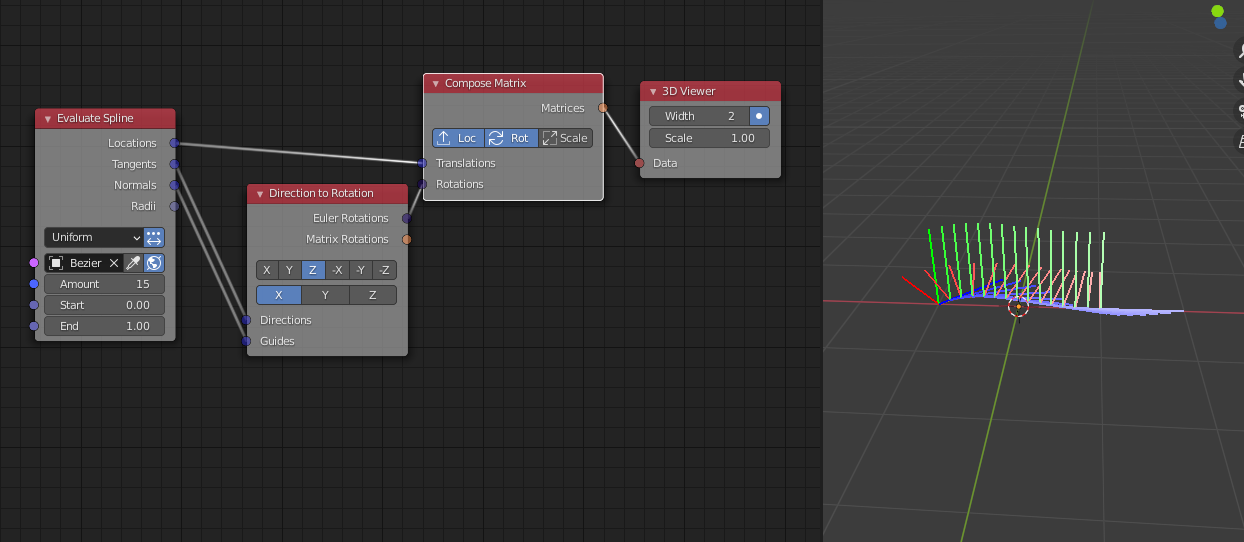
 Gerstmann-Bradley
on 1 Dec 2020
Gerstmann-Bradley
on 1 Dec 2020
Hi @Gerstmann-Bradley
Thanks for your quick reply.
I know about this evaluate spline approach and also implemented this together with the alignment into my node group (please have a look at the blend file). However this still solves only 2 of the approx. 15 different features the spline cloner in Cinema4D has to offer. Especially when you want to offset instances along the spline, loop them etc. it gets really messy quickly as you can see in my node group. Not to mention that also different distribution methods (count, per step, on vertices etc.) are really needed from a design perspective.
I therefor think that it would be really helpful to implement these features within the distribution node itself. Also from an UI consistency perspective I think it's much better to have the different distribution methods in one node rather than having almost all of them (grid, linear, mesh etc.) in one node and only have the spline distribution in an extra node. This way you could as well get rid of the spiral distribution option as for this you could just use a helix spline instead as well as any other spline type of course.
What do you think?
dapa5900
on 1 Dec 2020
@dapa5900 I think some of those options are reasonable to have and can be implemented. However, other options like randomness and animations are probably out of the scope of this node, and so I think they should either be left to the user or be implemented in another node in one form or another.
It is midterm week for me here, so I probably won't work on this immediately.
 OmarEmaraDev
on 1 Dec 2020
OmarEmaraDev
on 1 Dec 2020
@OmarEmaraDev
Yeah, great! Take your time and if you need me for testing, just let me know.
Yes, it's a good idea to include the distribution along a spline (including the different distribution modes and maybe trim options) as another mode for the Distribute Matrices Node and maybe create an extra node for the other things like offsetting/animating the instances along the spline (basically everything that might need a time info node input) in case you need this per use case (which is quite often the case for MoGraph stuff).
BTW. Where can I actually see or test the stuff, once it's implemented? Will this be part of the AN + EN Build which I use and get from here https://blender.community/c/graphicall/0hbbbc/
Thanks again!
dapa5900
on 2 Dec 2020
in one node and only have the spline distribution in an extra node.
This isn't true. For mesh, there is also an additional node called "Mesh Points Scatter" for random distribution of points on a mesh surface, etc. Are you suggesting this node should also be merged to "distribution matrices" node while deleting the original one?
AN has lots of function already, but most of them are scattered around, or functions have been divided into small pieces each handled by different nodes. As shown above, AN needs 3 nodes to achieve such a distribution. However, AN is also not C4D's mograph tools. It's a node system and enables your freedom. At some point I don't see anything wrong with this so far.
Especially when you want to offset instances along the spline, loop them etc
This is a good proposal, but I still think it should be added on the top of "evaluate spline" node instead of distribute matrices node. In fact, shouldn't these functions added to evaluate spline node?
- There is nothing wrong with the name of "evaluate spline".
- If as you proposed, nearly the same functions have been added to distribute matrices node. Are you going to delete the "evaluate spline" node? If yes, who will take over the rest functions of evaluate spline giving information about radius, tilt, curvatures? If not, don't you think it maybe redundant for these two nodes to have nearly identical function?
Regardless, these functions should be implemented in evaluate spline as well, whether there is a spline mode for distribute matrices or not.
This way you could as well get rid of the spiral distribution option as for this you could just use a helix spline instead as well as any other spline type of course.
I think this is a very bad and even toxic statement. AN generates procedural helical spline. Blender's way adding curve object so far is not procedural.
it gets really messy quickly as you can see in my node group.
I am not sure whether you mean what's inside, or the UI of your node group.
If you have already made that into a node group. I don't think it bothers a lot how it looks inside. Also, it depends on your own thinking process to approach the problem. Personally I disagree with various aspects of your building and the function you added. I think it should be up to users to decide, and thus not appropriate for a proposal that will apply to all users.
As for UI, the most prominent problem I see is "instance translation, rotation, scale". These seems completely not necessary, especially when you already know to plug a "offset matrix" behind. Why will you ruin your UI with these function?
By deleting these functions you can spare lots of nodes within your group node as well.
and maybe trim options.
This doesn't seem necessary. this option will only be used in specific circumstances. If needed, why not just add a "trim spline" node upstream?
BTW. Where can I actually see or test the stuff, once it's implemented? Will this be part of the AN + EN Build which I use and get from here https://blender.community/c/graphicall/0hbbbc/
Yes, you can.
At the end, speaking from a user, I think blender/AN is not C4D and unlikely will be C4D replicate.
Functional-wise I think AN needs more development. But design-wise it doesn't seem a good idea to mix up these two software.
Gerstmann-Bradley
on 2 Dec 2020
@dapa5900 The builds on https://animation-nodes.com/#download are updated instantly after we commit something, so you can test the Overlay mode already. AN + EN also has instant build, but the fork has to be updated manually by @3DSinghVFX, which he seems to have done already. We added support for Extensions recently, so an extension for EN will probably be published to work around this issue.
@Gerstmann-Bradley I do agree with you that we shouldn't replicate C4D designs or any other software's. This wasn't @dapa5900 intention, the motivation behind the proposal is to have similar functionality in a more designer-friendly way, regardless of the agreed upon design. I think it is acceptable and desirable to have certain high-level nodes that have clearer semantics in the node tree, while at the same time being bloat free. Moreover, there are performance implications to some design choices. For instance, the Trim Spline node is a bit more expensive than having an explicit start and end parameters, that's why I wouldn't consider them superfluous.
I will work on an implementation, then we can discuss the design further if it wasn't satisfactory for any party.
OmarEmaraDev
on 2 Dec 2020
Hi @Gerstmann-Bradley . Thanks for your reply. I'm gonna answer in quotes below.
in one node and only have the spline distribution in an extra node.
This isn't true. For mesh, there is also an additional node called "Mesh Points Scatter" for random distribution of points on a mesh surface, etc. Are you suggesting this node should also be merged to "distribution matrices" node while deleting the original one?
Yes, sorry forgot about that one. I'm also still very much in the learning process of AN so I don't recall every node by heart. But yes I think it would indeed be better and more accessible to have all distribution methods in one node rather than distributed across a couple of nodes especially when they all have different naming conventions (Distribute vs Scatter vs Evaluate, which makes it as well difficult to search for them on a use case basis [namely “distributing” instances]). Think about it from a users perspective, especially first time users. You might know that there's a node to distribute instances but why's there no way to instance on a spline here or why do I need an extra node for random mesh scatter even though I also have a Mesh option in the distribute matrices node (random mesh scatter might as well be integrated here therefore as another option next to Vertices and Polygons). This is pretty confusing imo and especially as a first time user you get unsecure which node when to use.
AN has lots of function already, but most of them are scattered around, or functions have been divided into small pieces each handled by different nodes. As shown above, AN needs 3 nodes to achieve such a distribution. However, AN is also not C4D's mograph tools. It's a node system and enables your freedom. At some point I don't see anything wrong with this so far.
Especially when you want to offset instances along the spline, loop them etc
This is a good proposal, but I still think it should be added on the top of "evaluate spline" node instead of distribute matrices node. In fact, shouldn't these functions added to evaluate spline node?
- There is nothing wrong with the name of "evaluate spline".
- If as you proposed, nearly the same functions have been added to distribute matrices node. Are you going to delete the "evaluate spline" node? If yes, who will take over the rest functions of evaluate spline giving information about radius, tilt, curvatures? If not, don't you think it maybe redundant for these two nodes to have nearly identical function?
Regardless, these functions should be implemented in evaluate spline as well, whether there is a spline mode for distribute matrices or not.
Totally agree and I can definitely see the advantages from a freedom and performance perspective here. But as @OmarEmaraDev already mentioned below it’s just a proposal from my side to have a couple of high-level nodes that might be more user friendly by combining a couple of frequently used features already (meaning, features that are often used in real world projects). As I admitted in my last post already, after having a second thought about it I think it makes perfectly sense to leave the distribution methods to the distribute matrices nodes while adding a couple of more spline relevant extra functionality to the evaluate spline node (like trimming, offset and everything that might be animated etc.). The radius, tilt, curvatures, etc. information should stay as well then of course.
This way you could as well get rid of the spiral distribution option as for this you could just use a helix spline instead as well as any other spline type of course.
I think this is a very bad and even toxic statement. AN generates procedural helical spline. Blender's way adding curve object so far is not procedural.
Sorry, didn’t meant to be toxic here ;-) I love that you have a procedural helix spline here and if at all I would definitely vote for more procedural / parametric objects in Blender as I’m thinking that this is definitely also very much missing in Blender in general (I’m using WMesh for that and also BS Max offers procedural curves like a Helix Spline for example. I also tried Sorcar where you can create parametric primitives as well so this might be something for future proposals for AN as well..:)).
My point here was only that this is “just one” of many different possible curve types which could be replaced with a general spline input that could best case of course also take procedurally generated splines.
it gets really messy quickly as you can see in my node group.
I am not sure whether you mean what's inside, or the UI of your node group.
If you have already made that into a node group. I don't think it bothers a lot how it looks inside. Also, it depends on your own thinking process to approach the problem. Personally I disagree with various aspects of your building and the function you added. I think it should be up to users to decide, and thus not appropriate for a proposal that will apply to all users.
As for UI, the most prominent problem I see is "instance translation, rotation, scale". These seems completely not necessary, especially when you already know to plug a "offset matrix" behind. Why will you ruin your UI with these function?
By deleting these functions you can spare lots of nodes within your group node as well.
Sure, this is just my Uber-NodeGroup that I created for my own needs. How it looks inside I also don’t care as long as I find my way around but I’m more concerned about performance issues due to potential bad node-wiring or redundancies (as I’m not a developer and thus can not optimize it as much as possible). The translation, rotation, scale options I just added as I almost every time need them in these setups and wanted to spare me some extra nodes when setting up the spline instances. Also (at least from what I understood), since I can cache the node-group, this way I maybe get a bit of extra performance compared to having these transformations outside of the group (but I’m not sure if this really works that way).
and maybe trim options.
This doesn't seem necessary. this option will only be used in specific circumstances. If needed, why not just add a "trim spline" node upstream?
BTW. Where can I actually see or test the stuff, once it's implemented? Will this be part of the AN + EN Build which I use and get from here https://blender.community/c/graphicall/0hbbbc/
Yes, you can.
At the end, speaking from a user, I think blender/AN is not C4D and unlikely will be C4D replicate.
Functional-wise I think AN needs more development. But design-wise it doesn't seem a good idea to mix up these two software.
>
Again, agree and I totally respect that AN has a different approach and philosophy than C4D MoGraph. However as a Designer coming from C4D I think it makes sense to take some inspiration from there as a lot of the stuff is widely considered best class when it comes to user friendliness. I myself tried 3 years in a row to get my head around AN nodes. I watched tutorials, read the documentation and tried out things but gave up after a while again since it just seemed too hard to do really simple things (like instancing on a spline and animating the instances offset ;)). Now in the 3rd run I finally wrapped my head around a lot of the concepts and really see the benefits of using nodes for certain things as you can be much more flexible when you want to do more complex stuff. That said I still think that easy things should be easy to achieve because otherwise a lot of people won’t take the hurdle to dive deeper into AN when they already struggle hard to do simple stuff. I really hope I can help a bit here with my proposals as I would like to see more designers trying out AN and contributing to the user community as well.
dapa5900
on 2 Dec 2020
@OmarEmaraDev
Great stuff. Tried the overlay mode and works like a charm 😊
I would have one suggestion how to maybe improve the behaviour a bit more. Should I open a new ticket for this or can I somehow reply to the former overlay mode proposal ticket?
Thanks!
dapa5900
on 2 Dec 2020
@dapa5900 You can use the original ticket.
OmarEmaraDev
on 2 Dec 2020
Implemented in 9746546.
OmarEmaraDev
on 9 Dec 2020
Hi @OmarEmaraDev ,
thanks for your great work on the spline distribution. I just tested it and it works really good already.
However there's a thing that needs to be improved a bit when it comes to the distribution methods. Both in the "uniform" and "step" mode, the distribution seems to be not really even.
This is the current behavior in Blender:
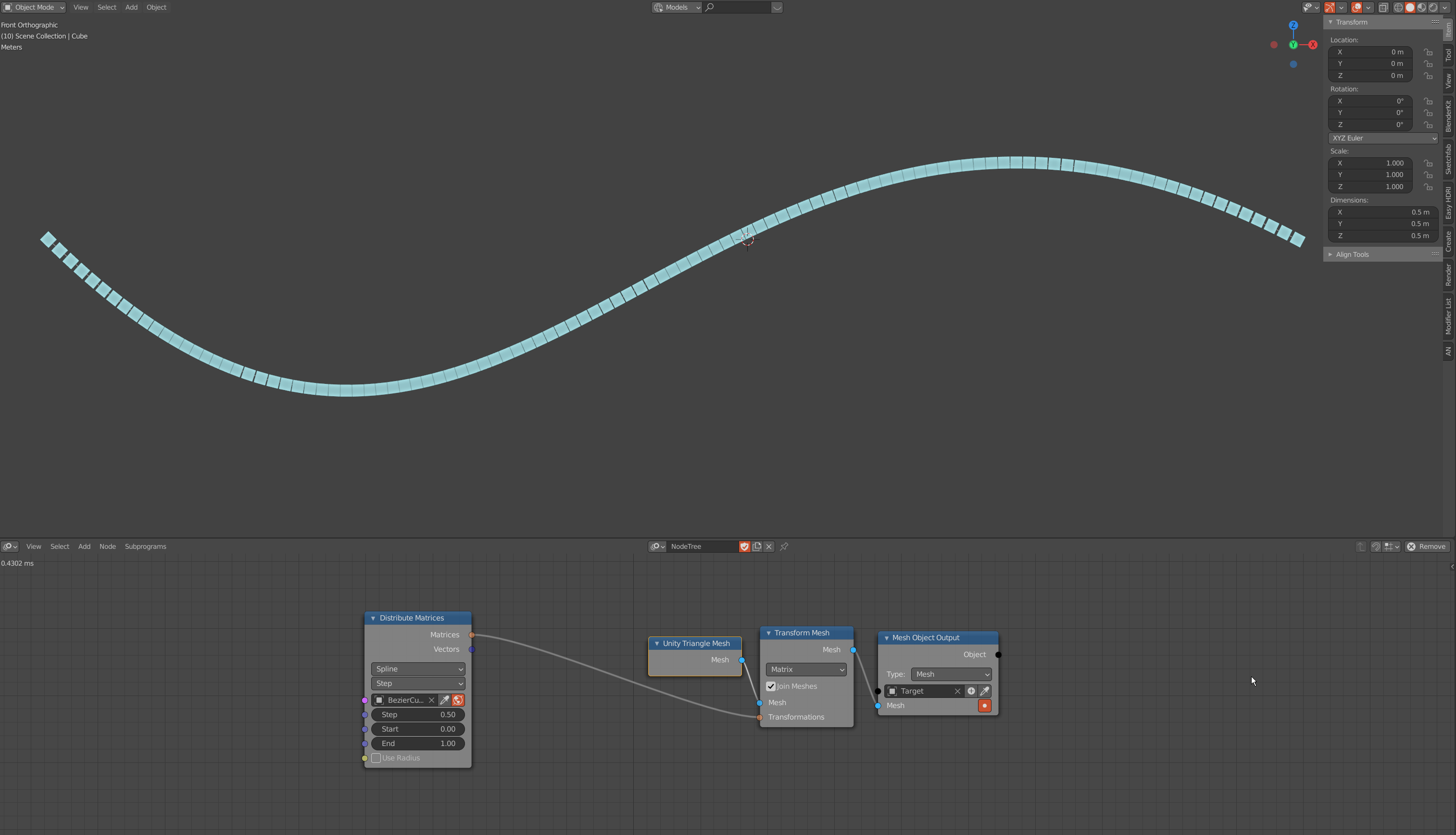
As you can see, currently in AN the (maybe only "visual"?) gap size is different depending on how straight or curved the spline is at the current instance position.
And this is how it should work actually (reference taken from C4D step mode, as you can see:
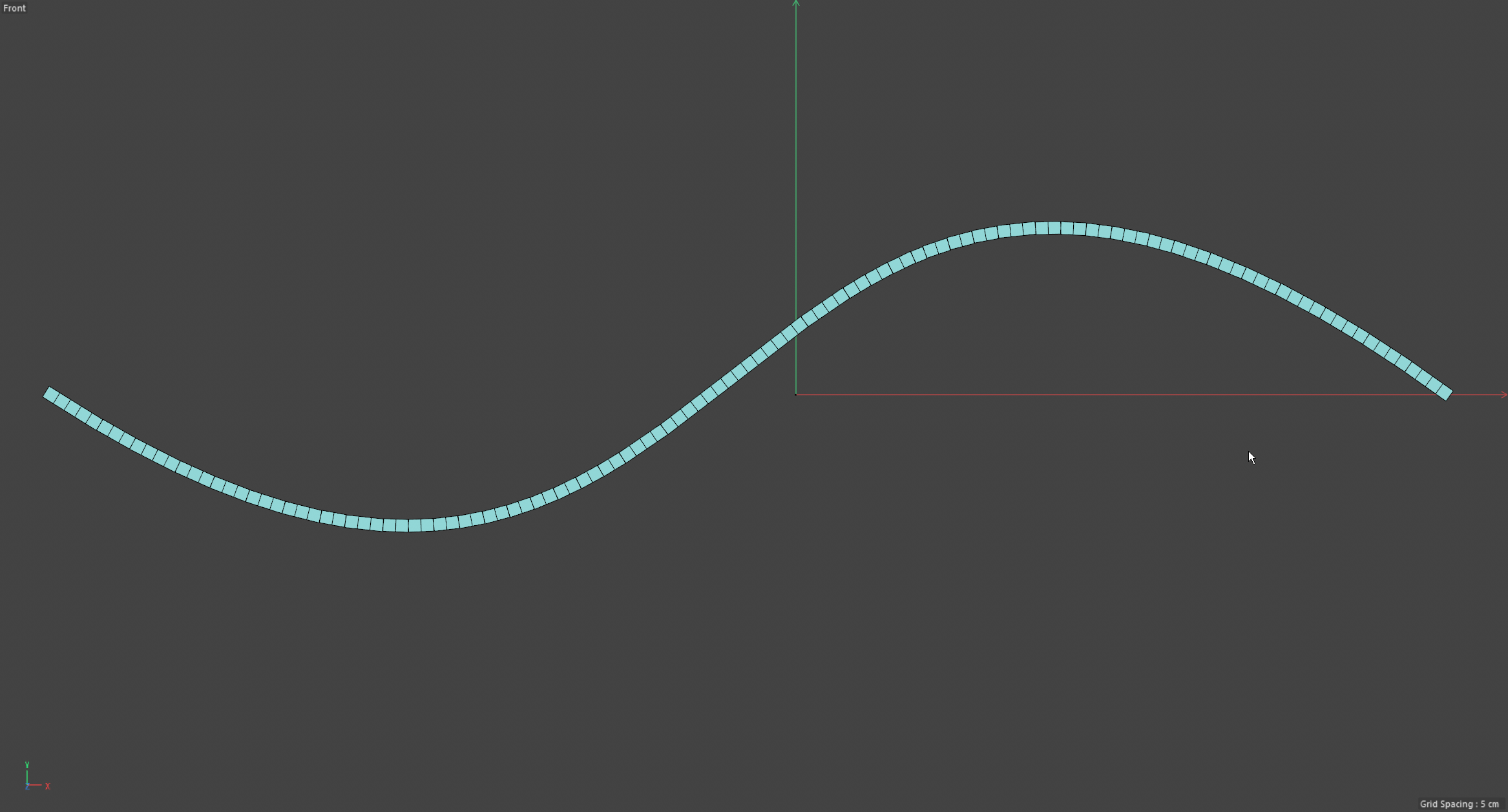
Here all the gaps seem to be visually the same size ... maybe not mathematically though...?
It seems like the angle of the curve tangents have to be factored in somehow into the calculation of the distribution to get the intended behavior that all the gaps are equally big visually. Is this something that you can implement as well please?
And can you please as well add the option to turn on and off the alignment of the instances along the spline?
Thanks again!
dapa5900
on 9 Dec 2020
@dapa5900 Looks like the spline resolution is too low. You can increase it in the Advanced Node Settings when uniform or step is selected.
Now that you pointed that out, perhaps we should increase the default value in this node and other spline nodes.
OmarEmaraDev
on 9 Dec 2020
Done in 15a9eb6.
OmarEmaraDev
on 9 Dec 2020
@OmarEmaraDev
I see. Increasing it helped. 50 seems to be a good default value maybe...
What do you think about the "align to spline"-toggle?
Thank you!
dapa5900
on 9 Dec 2020
@dapa5900 You mean a toggle to control whether the objects are oriented along the spline or not?
A matrix without an orientation or scale is a mere location vector. So why not use the vectors output in this case?
OmarEmaraDev
on 9 Dec 2020
@OmarEmaraDev
exactly. I think it would a bit more intuitive but actually the approach with using the vector output is also not a problem when you are familiar with AN and know about the differences of matrices, vectors and eulers in AN and when to use them and therefor I think you can leave it as it is.
Regarding this topic: would it actually be possible to get rid of the Distinction of Vectors and Eulers (Input, Math, etc.) and just use a generic XYZ-value instead that automatically converts the numbers to the appropriate format depending on where it get's plugged into (so to vectors when used in the scale and location input and to euler (which should result in degrees by default I think) in rotation inputs ...? I think this could make AN also more accessible to people who are not necessary too familiar with mathematical terminology ;) and would also reduce / de-clutter the node amount a bit. Or doesn't this make sense from a performance perspective?
Also, are you gonna implement the "offsetting instances along the spline" functionality as well; either as separate node or better as addition to the evaluate spline node as discussed above? Being able to animate objects along a path is a pretty common task in motion graphics and this feature would be very helpful to achieve this more easily.
Thanks again.
dapa5900
on 10 Dec 2020
@dapa5900
An Euler is not just a vector of three values, it holds an extra value (Typically hidden from the end user) called the order of the euler. Which can be XYZ, YZX, ZYX, and so on. So we can't really store an euler in a vector, we won't have sufficient information to fully represent an euler. So this is technically not feasible. The way I see it. Euler is typically an end or a start representation of rotations. In other words, you start with an euler, convert it to a a better representation like a vector, quaternion, or a matrix, then do some useful operations on them, then eventually convert them back to an euler. The reason is that euler is not a very good representation of rotation for processing. The means of conversion are there, the other representation are there, and the means of processing other representations are there, so the system works.
As for the offsetting feature. Can you open a separate issue for it? I plan to work on the evaluate node to accommodate that, but I probably have a different idea of how this should be done than you, so we will need to discuss it first.
OmarEmaraDev
on 10 Dec 2020
@OmarEmaraDev
Thanks for the explanation. Ok, then leave it as it is, it's already working super nicely. 👍
Ok, will open another ticket. Is it sufficient if I reference this ticket here or do I need to write down my ideas briefly again?
Thanks!
dapa5900
on 10 Dec 2020
@dapa5900 Write your idea briefly again if you don't mind.
OmarEmaraDev
on 10 Dec 2020
Related issues
 enzyme69
·
9Comments
enzyme69
·
9Comments
 dimitripaiva
·
6Comments
dimitripaiva
·
6Comments
 collinizhou
·
10Comments
collinizhou
·
10Comments
 juangea
·
10Comments
juangea
·
10Comments
 tofuhead
·
7Comments
tofuhead
·
7Comments
Most helpful comment
@dapa5900 The builds on https://animation-nodes.com/#download are updated instantly after we commit something, so you can test the Overlay mode already. AN + EN also has instant build, but the fork has to be updated manually by @3DSinghVFX, which he seems to have done already. We added support for Extensions recently, so an extension for EN will probably be published to work around this issue.
@Gerstmann-Bradley I do agree with you that we shouldn't replicate C4D designs or any other software's. This wasn't @dapa5900 intention, the motivation behind the proposal is to have similar functionality in a more designer-friendly way, regardless of the agreed upon design. I think it is acceptable and desirable to have certain high-level nodes that have clearer semantics in the node tree, while at the same time being bloat free. Moreover, there are performance implications to some design choices. For instance, the Trim Spline node is a bit more expensive than having an explicit start and end parameters, that's why I wouldn't consider them superfluous.
I will work on an implementation, then we can discuss the design further if it wasn't satisfactory for any party.