Animation_nodes: Crash within a few frames with all renderers while rendering animation with animation nodes
System Information
Operating system: Windows 10
Graphics card: Nvidia 980Ti
Blender Version
2.80, 90f6fd0a3651, blender2.8, 2019-02-1
5, 02:32 as found on the splash screen)
Short description of error
Guaranteed crash within rendering a few frames in Eevee or with cycles (render animation, render stills works ok), especially around frame 140
The file uses animation nodes, which work fine in the viewport so long as you scrub through first before you play the animation, but crashes when trying to render
Exact steps for others to reproduce the error
Open attached blend file, Set start frame to around 160 and hit render Animation, you will notice 2 things:
the plants controlled by animation nodes don't update, they render in whatever state they were last in the viewport as, (scrub through the viewport to see how they should behave)
blender will crash within a few frames.
BugreportBlenderCrashAnimationNodes.zip
 Willd10
All 7 comments
Thanks, will take a look at it on monday.
Maybe we can slowly start finding the root cause of all these rendering bugs with AN.
 JacquesLucke
on 15 Feb 2019
JacquesLucke
on 15 Feb 2019
@JacquesLucke It should be noted that other addons reported similar problems, like Tissue addon as reported here. Maybe this will help.
 OmarEmaraDev
on 16 Feb 2019
OmarEmaraDev
on 16 Feb 2019
Hi!
I solve the same problem (crash/not render) with rendering by script. It's fine for me, render works very well:
import bpy

for step in range(1, 100):

    bpy.context.scene.frame_set(step)
    bpy.data.scenes["Scene"].render.filepath = 'd:/3D RENDER/2019 01 13/image.jpg_%d.jpg' % step
    bpy.ops.render.render( write_still=True )
 VideoBombala
on 17 Feb 2019
VideoBombala
on 17 Feb 2019
I've managed to get a debug build of Blender, Python and AN all running together. The crash is happening in Blender code, in a function called mesh_calc_modifiers, where a loop body seems to have a null pointer where it's expecting a modifier.
I'm not particularly seasoned in C, and this is all happening in limited work time; not sure how much further I'll get with it. Here's a stack trace if that's any help; my guess is that it's a Blender problem that AN is just triggering – possibly a race condition, as the code looks to be checking for nulls correctly and is somehow getting some other corrupted value:
blender.exe!mesh_calc_modifiers(Depsgraph * depsgraph, Scene * scene, Object * ob, float[3] * inputVertexCos, int useDeform, const bool need_mapping, const CustomData_MeshMasks * dataMask, const int index, const bool useCache, const bool build_shapekey_layers, Mesh * * r_deform, Mesh * * r_final) Line 1290
    at d:\blender_source\blender\source\blender\blenkernel\intern\derivedmesh.c(1290)
blender.exe!mesh_build_data(Depsgraph * depsgraph, Scene * scene, Object * ob, const CustomData_MeshMasks * dataMask, const bool build_shapekey_layers, const bool need_mapping) Line 2100
    at d:\blender_source\blender\source\blender\blenkernel\intern\derivedmesh.c(2100)
blender.exe!makeDerivedMesh(Depsgraph * depsgraph, Scene * scene, Object * ob, BMEditMesh * em, const CustomData_MeshMasks * dataMask, const bool build_shapekey_layers) Line 2209
    at d:\blender_source\blender\source\blender\blenkernel\intern\derivedmesh.c(2209)
blender.exe!BKE_object_handle_data_update(Depsgraph * depsgraph, Scene * scene, Object * ob) Line 186
    at d:\blender_source\blender\source\blender\blenkernel\intern\object_update.c(186)
blender.exe!BKE_object_eval_uber_data(Depsgraph * depsgraph, Scene * scene, Object * ob) Line 352
    at d:\blender_source\blender\source\blender\blenkernel\intern\object_update.c(352)
[External Code]
blender.exe!DEG::deg_task_run_func(TaskPool * pool, void * taskdata, int thread_id) Line 91
    at d:\blender_source\blender\source\blender\depsgraph\intern\eval\deg_eval.cc(91)
blender.exe!handle_local_queue(TaskThreadLocalStorage * tls, const int thread_id) Line 418
    at d:\blender_source\blender\source\blender\blenlib\intern\task.c(418)
blender.exe!task_scheduler_thread_run(void * thread_p) Line 449
    at d:\blender_source\blender\source\blender\blenlib\intern\task.c(449)
[External Code]
blender.exe!invoke_thread_procedure(unsigned int(*)(void *) procedure, void * const context) Line 92
    at minkernel\crts\ucrt\src\appcrt\startup\thread.cpp(92)
blender.exe!thread_start<unsigned int (__cdecl*)(void * __ptr64)>(void * const parameter) Line 115
    at minkernel\crts\ucrt\src\appcrt\startup\thread.cpp(115)
[External Code]
 mattdw
on 14 Mar 2019
mattdw
on 14 Mar 2019
I'm getting different crashes in different parts of the blender code depending on which nodes I'm using – if I'm generating meshes, the crash is in applying modifiers, if I'm modifying transforms the crash seems to be in scene graph code.
With the theory that it could be a race condition, I added a script node which just does a time.sleep(x) before returning a value which I use as transforms output. As long as I sleep for more than 0.25 seconds, it renders reliably. As soon as I use a smaller sleep, things start to crash.
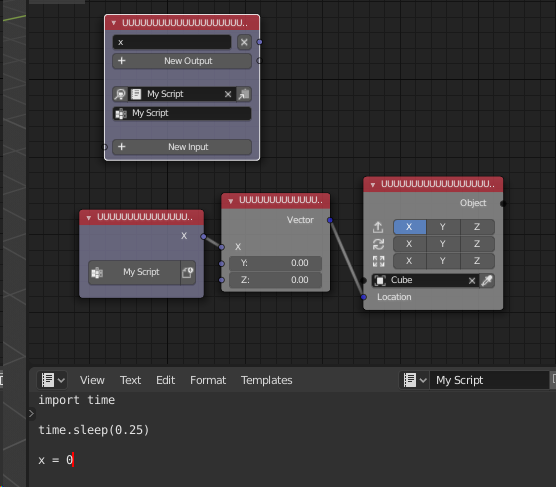
I don't think I've managed to trigger any of these crashes while rendering headlessly, either, no matter what the delay is set to, so I wonder if the race is actually in the viewport.
mattdw
on 14 Mar 2019
@mattdw
this is something that can prevent animationnodes-renders from crashing! however, anything that is driven by time in the animationnodes tree is broken in the resulting render ... see

notice the background going smooth with the camera-animation and animation-nodes calculating the expanding of the l-system a little weird (its driven by time and delays thereof)
i had to up the time.sleep from 0.25 to 3 to keep animation nodes from crashing
my times:
0.25 crash at 76 frames
0.5 crash at 88 frames
2 crash at 264 frames
3 rendering through to 250 frames
any thoughts? can the "wait" process be triggered by anything else?
 randomuser531
on 4 Aug 2019
randomuser531
on 4 Aug 2019
Lets continue this discussion in issue #1200.
OmarEmaraDev
on 5 Oct 2019
Related issues
 juangea
·
10Comments
juangea
·
10Comments
 ricardoroehe
·
4Comments
ricardoroehe
·
4Comments
 Montaire
·
3Comments
Montaire
·
3Comments
 shadowcreeper-hash
·
4Comments
shadowcreeper-hash
·
4Comments
 dimitripaiva
·
6Comments
dimitripaiva
·
6Comments
Most helpful comment
Hi!
I solve the same problem (crash/not render) with rendering by script. It's fine for me, render works very well: