Animation_nodes: Unable to install Animation Nodes on Blender 2.79
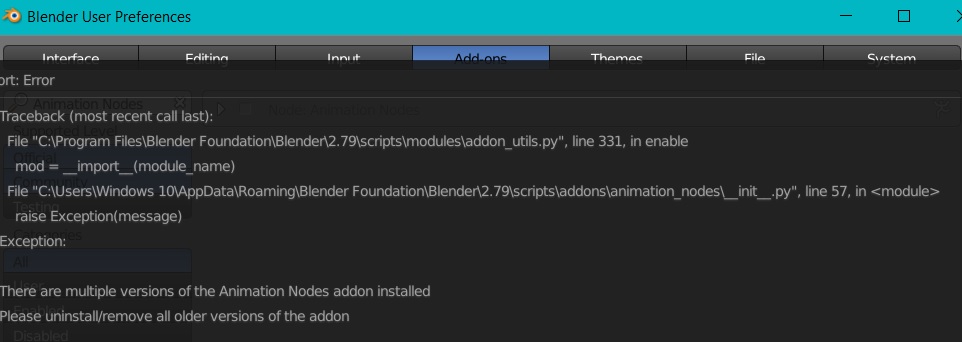
I'm getting an error message telling me I have multiple versions of Animation Nodes installed. But I can't find any versions installed on searching. Please help.
 FlashBlaze
All 30 comments
https://github.com/JacquesLucke/animation_nodes/issues/798
It might be a different path in your case depending on your operating system. You can see the path of the addon directory in the error message.
 JacquesLucke
on 8 Oct 2017
JacquesLucke
on 8 Oct 2017
Is it okay if I post a screenshot?
FlashBlaze
on 8 Oct 2017
sure
JacquesLucke
on 8 Oct 2017

FlashBlaze
on 8 Oct 2017
Find this path in the windows explorer: C:\Users\Neeraj\AppData\Roaming\Blender Foundation\Blender\2.79\scripts\addons\
There you'll see multiple Blender versions. Remove them and then install AN again.
JacquesLucke
on 8 Oct 2017
That solved it! Thanks a lot for replying early and solving my issue.
FlashBlaze
on 8 Oct 2017
I have a slightly different issue with Animation Nodes. After selecting 'Install addon from file' I selected the entire folder I downloaded and this opened up OK. However I have no idea which file to select. Is it one of the .py ones? I'm on a Mac Book Pro using Blender 2.79
 JimCoote
on 17 Jan 2018
JimCoote
on 17 Jan 2018
you have to select the .zip file you downloaded (don't unpack it manually).
JacquesLucke
on 17 Jan 2018
The problem is that I cannot select the folder without unpacking it. I have tried both the macOS.zip files and the source code, and have exactly the same trouble.
JimCoote
on 17 Jan 2018
hm I don't know why this happens. Maybe there is a filter activated in the file browser?
You need the macos release, the source code won't help you here.
If all of that does not work you can also install AN manually by copying the unpackt animation_nodes folder into blenders addons folder.
JacquesLucke
on 17 Jan 2018
Thanks Jacques, I did as you advised and dropped the entire folder into the Addons folder, and it seems to be working fine.
After downloading I was left with a folder called animation_nodes but no sign of anything with a .zip suffix, (I checked just about every subfolder). I tried adding .zip in case downloading caused some kind of misnaming, but no luck. Oddly when I looked in my trash bin, (where I dumped failed attempts), and there appeared to be some zip folders there. I suspect that the downloading of some types of zip files is going wrong on my Mac somewhere. Anyway, all OK now. Thanks again.
JimCoote
on 17 Jan 2018
Doh! Found the answer. Safari was set to automatically open any safe files. This meant that any zipped folders were always unwrapped after downloading. Simply right clicking and choosing compress gave me the zip folder back. I presume this is why previously I could see the zip folder in the trash but not elsewhere.
JimCoote
on 21 Jan 2018
ah that explains it! Haven't thought about that. Thanks for sharing the solution.
JacquesLucke
on 21 Jan 2018
i also have the same problem with him but i don't see the directory show in my laptop (c:usersWindows10AppData.......) there are no AppData in my C: ..how can i solve this problem ..? thanks in advance ..
 azwa1321
on 14 Mar 2018
azwa1321
on 14 Mar 2018
Hey, the AppData folder is hidden by default.
Maybe that helps: https://www.howtogeek.com/howto/windows-vista/show-hidden-files-and-folders-in-windows-vista/
JacquesLucke
on 14 Mar 2018
I'm also using 2.79, when I add the .zip to my addons it does create a folder in my "...AppDataRoamingBlender FoundationBlender2.79scriptsaddons" folder, but the add on is not visible in my preferences, thus I can't activate it. I've rebooted blender twice. nothing gets added to the _pycache_, not sure if this is relevant.
 videodromex
on 31 Mar 2018
videodromex
on 31 Mar 2018
please tell me exaxtly where you downloaded the compiled AN build.
If you did not download a release from https://github.com/JacquesLucke/animation_nodes/releases, you can try that.
JacquesLucke
on 31 Mar 2018
Thanks a lot! that allowed me to install the addon, now, when I tried to bake average on an mp3 I get the following error:

videodromex
on 31 Mar 2018
Hope that helps: https://github.com/JacquesLucke/animation_nodes/issues/885
JacquesLucke
on 1 Apr 2018
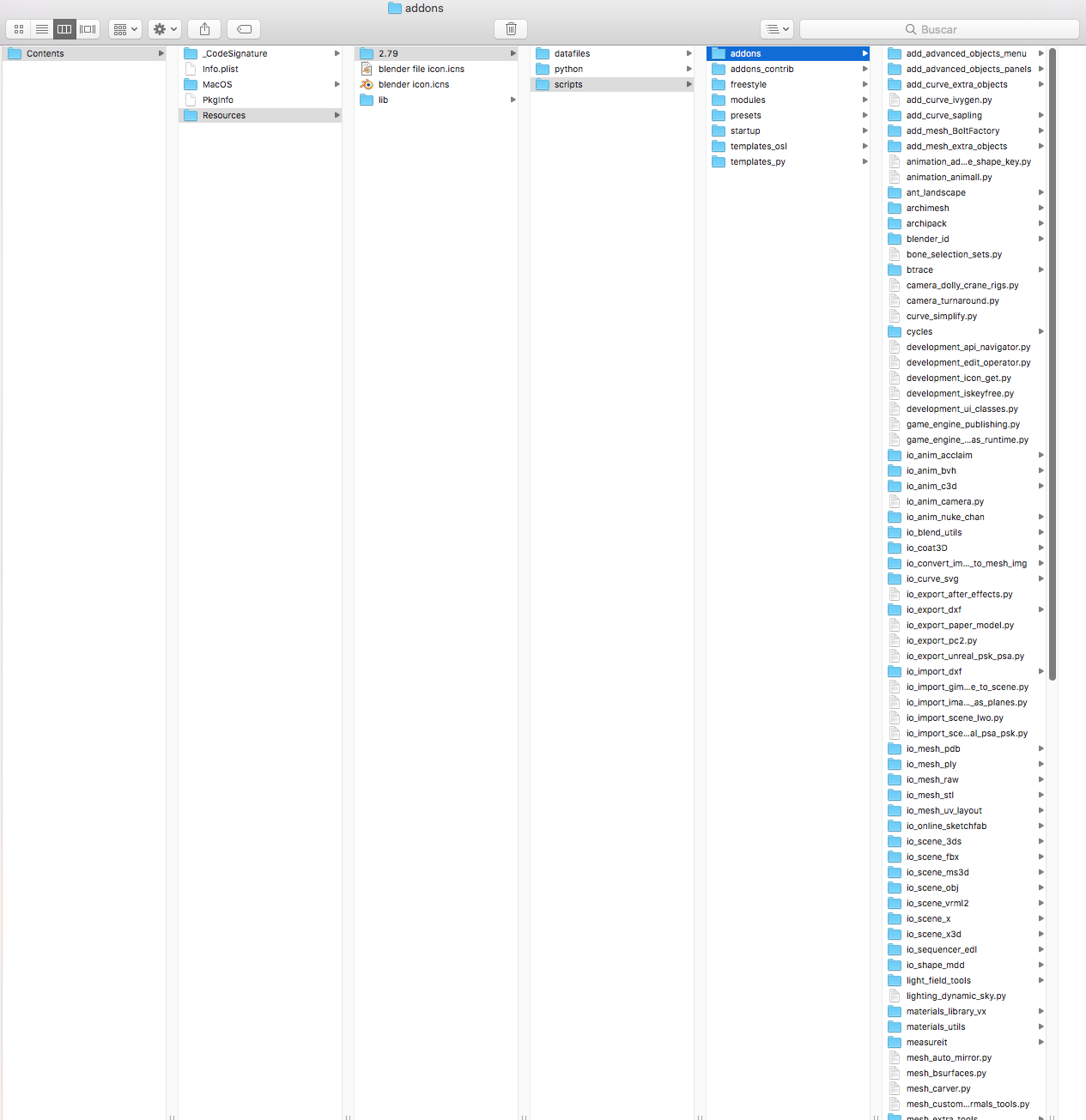
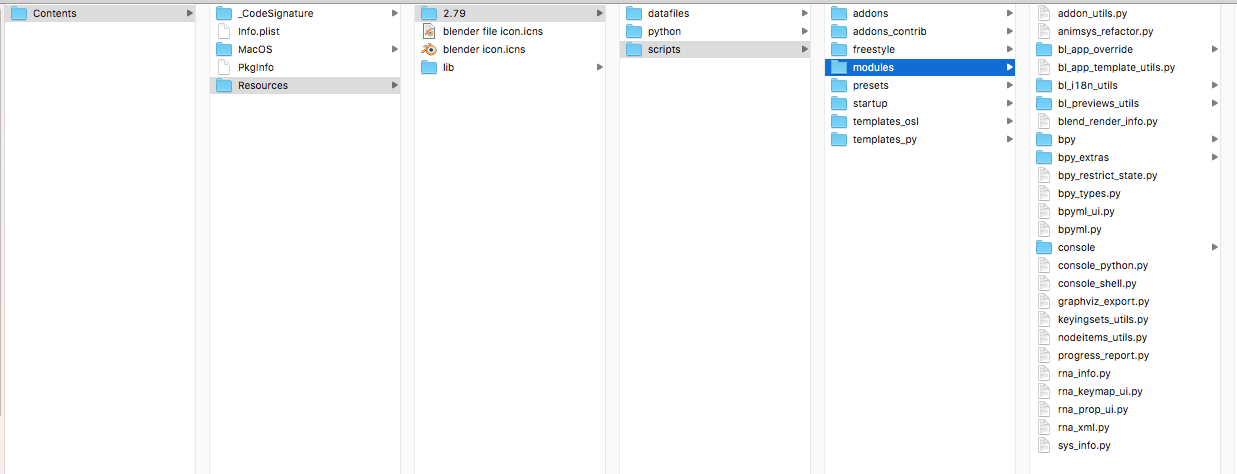
Hello, first I want to thank for the great work done with this addon, I am surprised with the magnificent things that it has. Unfortunately I got the error when I was installing it in the new version 2.79 ... I have Mac and I can't find the way to uninstall the previous versions. Could you help me?

 Eqysterika
on 27 Jun 2018
Eqysterika
on 27 Jun 2018
I got an error message:
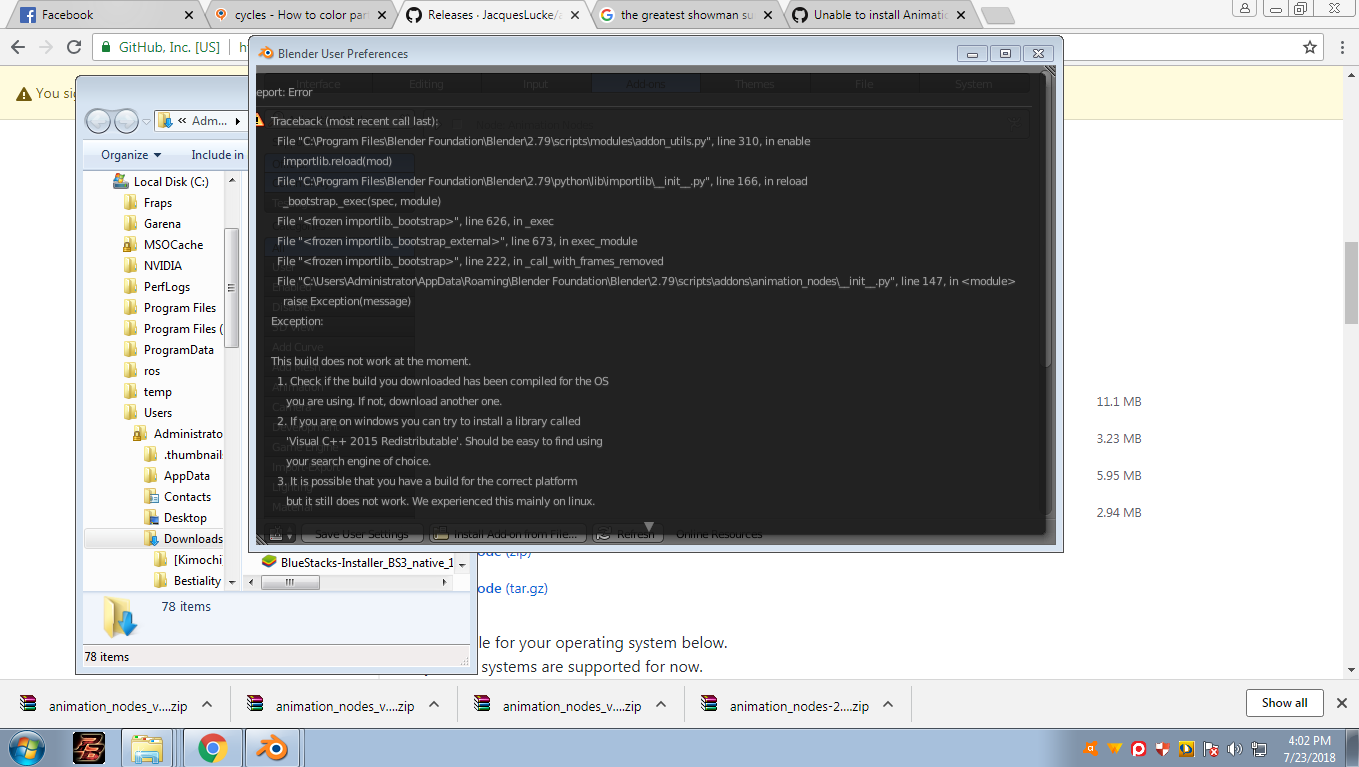
I don't know how to solve this. Please respond
 Omeleto
on 23 Jul 2018
Omeleto
on 23 Jul 2018
I'm having the same problem on MacOSX. "Uninstall the previous version" - but there doesn't seem to be a previous version anywhere
Hello, first I want to thank for the great work done with this addon, I am surprised with the magnificent things that it has. Unfortunately I got the error when I was installing it in the new version 2.79 ... I have Mac and I can't find the way to uninstall the previous versions. Could you help me?
 skoorbatase
on 22 Sep 2018
skoorbatase
on 22 Sep 2018
This is not the only path where blender addons are installed. Addons installed through the install operator will be installed in a user specific path, in your case, it is in /Users/minuto31/Library/Application Support/Blender/2.79/scripts/addons/.
 OmarEmaraDev
on 22 Sep 2018
OmarEmaraDev
on 22 Sep 2018
Thank you! by typing - bpy.utils.script_paths("addons") - into the console I was able to find an alternate path that'd I'd created when I was trying to get an older version to work last year. After deleting that... ALL SYSTEMS GO! Amazing Addon! Thank you Jaques!
skoorbatase
on 22 Sep 2018
Hi , I have downloaded the Zip file , follow the procedure , but AN not show up in the addon menu .
 Amir997
on 23 Sep 2018
Amir997
on 23 Sep 2018
@Amir997 Please check the troubleshooting guide..
OmarEmaraDev
on 23 Sep 2018
Hi there I installed the .zip using the Blender standards (from preferences) and the addon will appear in the list, but when clicked (activating) Ive got this message...

...Im using Blender 2.79a and for sure download the AnimationNodes version for Windows. As an additional info I could provide that v1.6 of AN was installed WITHOUT problems (only v2.0 and 2.1 are "broken")
Sincerely, Jan
 janmatys
on 4 Oct 2018
janmatys
on 4 Oct 2018
@janmatys Please check the troubleshooting guide..
OmarEmaraDev
on 4 Oct 2018
@OmarSquircleArt I already checked it for sure and I found nothing of help ... Could U explain what could I do to solve this? This is probably the same: https://github.com/JacquesLucke/animation_nodes/issues/931 ...so could Jacques make some points?
janmatys
on 4 Oct 2018
Anyone having the same issue try to install 14.14.26429 C++ Redist 2017 x64 cause I think that solves the problem (could be that one cause I have NO issue now ;) ).
janmatys
on 19 Oct 2018
Related issues
 juangea
·
10Comments
juangea
·
10Comments
 Montaire
·
3Comments
Montaire
·
3Comments
 LupoMarcio
·
4Comments
LupoMarcio
·
4Comments
 dimitripaiva
·
6Comments
dimitripaiva
·
6Comments
 benthillerkus
·
7Comments
benthillerkus
·
7Comments