Angular-gridster2: Is it possible to have a Game inside a GridsterItem?
Hello, first of all my apologies for my poor english
Well i want to know if it's actually possible to have a game inside a gridster element, i've tried to start a snake game but it only works for a few second when i do a click in some item or when i drag an item, otherwise it's seems to be freezed
That was my first time opening an issue, sorry if i did something wrong
 LeandrodeLimaC
All 14 comments
Hi @leandrolimacuminato ,
If you use the gridster-item-content you shouldn't have any issues.
https://github.com/tiberiuzuld/angular-gridster2#interact-with-content-without-dragging
 tiberiuzuld
on 28 Mar 2018
tiberiuzuld
on 28 Mar 2018
Hello again
unfortunately it doesn't fixed the problem, there's another way?
LeandrodeLimaC
on 28 Mar 2018
I don't know exactly what problem you have ...
Can you provide some GIF of it?
Maybe the game doesn't work any more if you loose focus..
tiberiuzuld
on 28 Mar 2018
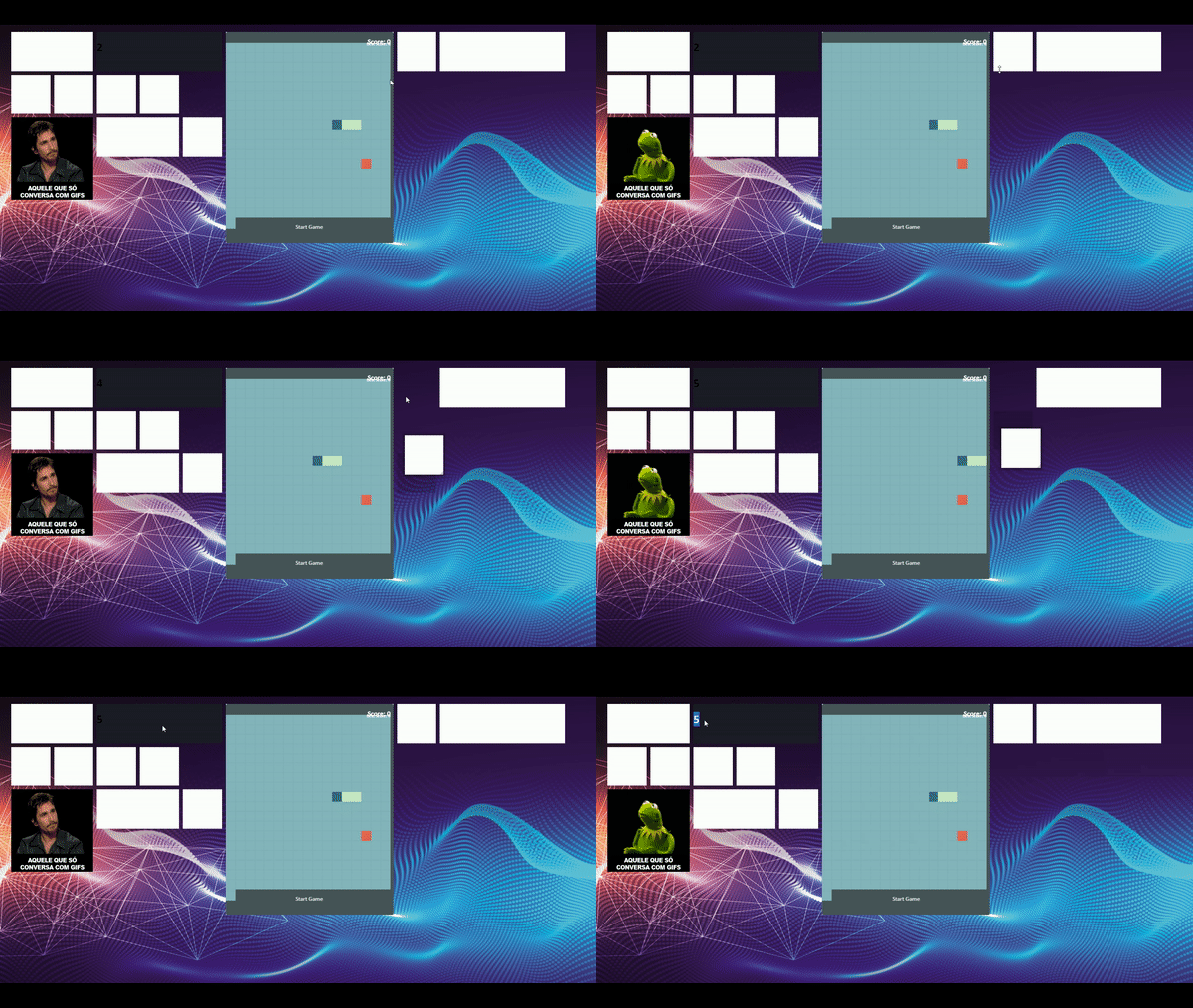
I created an widget that increases its own number every 10 seconds (the dark grey one), and as you can see the number is freezed before i start a drag event the same with the game, the snake only moves when I drag or click some GridElement
LeandrodeLimaC
on 28 Mar 2018
Hello! Making a little intrusion here. I believe this is due to Angular change detection algorithm. GridsterGridComponent uses OnPush strategy, which means that components are re-rendered only when their input changes or the code specifies this with something like cdRef.detechChanges().
That being said, when you're simply idling, the @Input properties never change. This results in your game "freezing". You could hack it a make a "game loop" which triggers change detection 30 or 60 times per second (or less considering the game doesn't have much graphics), but I don't think it's a good idea. You might want to look for a different way to host your game.
 NoMercy235
on 28 Mar 2018
NoMercy235
on 28 Mar 2018
@NoMercy235 may be right.
And in v5.0.0 the GridsterGridComponent will no longer exist and the drag/resize move event will run outside the angular.
tiberiuzuld
on 28 Mar 2018
@NoMercy235 yes, that's true, thanks
I think that game will have to be used in another place haha, no problem
But about the other GridsterItem, the grey one, what could i do? it is freezed too
I dont want to laggy my gridster app with so many triggers per second
LeandrodeLimaC
on 28 Mar 2018
@leandrolimacuminato I don't understand which GridElement are you referring to? Is it the second one from the first row (which has the values 2, then 4, then 5), the one which hosts the game, or the one with the gif(1st widget on the 3rd row)? Could you also provide some details about what is happening and what do you expected to happen?
NoMercy235
on 28 Mar 2018
That second one, the element that have values, as said before it increases its own value every 10 seconds ( number++) but as you can see in the gif, the value inside the GridElement only changes after I trigger on dragEvent
What i want to do is the value keep changing itselfs in DOM
LeandrodeLimaC
on 28 Mar 2018
I see. In that case, it's exactly the same issue as the game itself. Whenever you make an update to the grid element, you'll have to let the host component for the grid to either modify the inputs or force the change detection like this.
@Component({
    ...,
    template: `
        somewhere here the grid is hosted. e.g
        <gridster [options]="options">
            <gridster-item [item]="item" *ngFor="let item of items">
                <component-to-render-in-item (update)=gridUpdate()></component-to-render-in-item>
            </gridster-item>
        </gridster>
    `
})
export class ComponentWhichHostsGrid {
    constructor(protected cd: ChangeDetectorRef) {}
    gridUpdate(): void {
        this.cd.detectChanges();
    }
}
Here, the grid items always use an EventEmitter to let the host component know that it needs to update the view. Whenever one item know that it needs to be re-rendered, it emits something on the update event emitter and the host will respond by triggering a change detection.
This method is what I'm also using, but, in my case, the grid items are static components that don't change at short intervals (only on user edits). In your case, if you want the component to automatically update itself you have to either do this outside Angular with ngZone or perhaps jQuery or trigger the change detection once every second. This might sound resource intensive, but it's not, as long as you're simply displaying a number and not doing something like rendering charts.
NoMercy235
on 28 Mar 2018
Or, I think you could call options.api.optionsChanged() and the effect would be the same? To be honest, I didn't think about this until now. :laughing: @tiberiuzuld ?
NoMercy235
on 28 Mar 2018
Yes you can call optionsChanged but I think will check changes for all widgets not only the one you want to change.
So I think is better just to do this.cd.detectChanges(); only for your component in the widget.
tiberiuzuld
on 28 Mar 2018
Yes, that's better and you don't even need the event emitter anymore. Just make the call to detectChanges in your component whenever it needs to update and it will only affect itself, not all widgets.
NoMercy235
on 28 Mar 2018
Nice. it works very well
Thanks guys, you r amazing!
Unfortunately this solution only fixed the "Meu Avenida" gridElement problem so i need to figure out a way to fix the game freezes, but it was a step foward 👍
thks
ps: When I solve the game problem, I will share the solution here :)
LeandrodeLimaC
on 29 Mar 2018
Related issues
 klemenoslaj
·
4Comments
tiberiuzuld
·
3Comments
klemenoslaj
·
4Comments
tiberiuzuld
·
3Comments
 JohnxAss
·
5Comments
JohnxAss
·
5Comments
 Abdullah-96
·
5Comments
Abdullah-96
·
5Comments
 samarsiraj
·
3Comments
samarsiraj
·
3Comments
Most helpful comment
Yes you can call
optionsChangedbut I think will check changes for all widgets not only the one you want to change.So I think is better just to do
this.cd.detectChanges();only for your component in the widget.