Angular-gridster2: resize grip (handler-se) not positioned correctly when scrolling
Hi Tiberiu,
For using the grid on a rather small screen, we added auto-scrollbars to the gridster-items by setting the following css:
gridster-item { overflow: auto!important; }
When hovering, the handler-se is nicely placed in the right bottom corner with position:absolute :
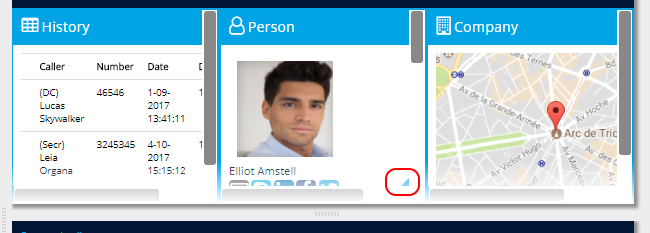
But when scrolling to the right, the handler-se moves to the left along with the content of the gridster-item:
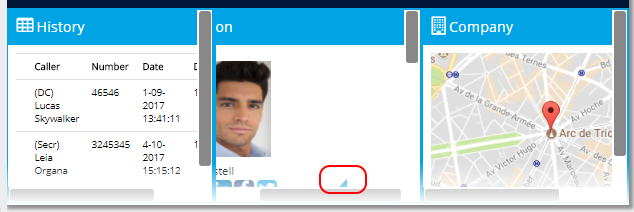
Can you fix this or help me with some external styling how to set this right?
Thanks in advance!
Melissa
 MelissaVanDijk
All 2 comments
Hi @MelissaVanDijk ,
Try adding the scrollbars to some div inside the gridster-item.
html
<gridster-item>
  <div class="gridster-item-content">
      Some content to select and click without dragging the widget
  </div>
</gridster-item>
On gridster-item-content for example.
 tiberiuzuld
on 23 Jan 2018
tiberiuzuld
on 23 Jan 2018
Thank you! That works. Solved :-)
MelissaVanDijk
on 23 Jan 2018
Related issues
 JohnxAss
·
5Comments
JohnxAss
·
5Comments
 CollinGraf314
·
3Comments
CollinGraf314
·
3Comments
 ermcgrat
·
3Comments
ermcgrat
·
3Comments
 marco-martins
·
4Comments
marco-martins
·
4Comments
 dhaniksahni
·
4Comments
dhaniksahni
·
4Comments
Most helpful comment
Hi @MelissaVanDijk ,
Try adding the scrollbars to some div inside the gridster-item.
html
<gridster-item>
  <div class="gridster-item-content">
      Some content to select and click without dragging the widget
  </div>
</gridster-item>
On gridster-item-content for example.