Angular-gridster2: girdType: scrollVertical without scrollbar
Is it possible to extend parent container height without showing any scrollbar? I am developing a dashboard where sidebar, footer and header are in fixed position. Browser has already a scrollbar. So, I would like avoid the additional scrollbar into it. The option girdType: "fit", only fit all widgets into the container which is not extend the height of the container. girdType: "scrollVertical" is a good option, if the scrollbar will not display and can scroll by the browser scrollbar.
 khaled-ansary
All 27 comments
Hi @khaled-ansary ,
If you set gridType: 'scrollVertical' and change the css of the gridster, you may be able to get the desired effect.
Try to change height to 'initial'.
Let me know if it works.
 tiberiuzuld
on 13 Jul 2017
tiberiuzuld
on 13 Jul 2017
Thank you very much for quick response. I have tried the following but it is not working as I expected
<div class="container-fluid">
    <gridster [options]="options" style=" height:initial; background-color:#eceeef">
         <gridster-item [item]="item" *ngFor="let item of dashboard">
            <--my contents -->
        </gridster-item>
     </gridster>
 </div>
it display a blank screen. Whenever I set style="min-height:800px; height:initial; background-color:#eceeef", it shows the content but with the scrollbar.
khaled-ansary
on 13 Jul 2017
Hi @khaled-ansary ,
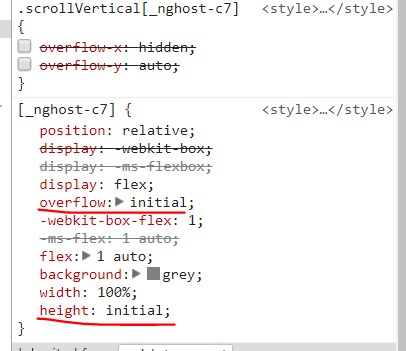
Made it work by modifying in the demo:
overflow: initial and height: initial
tiberiuzuld
on 14 Jul 2017
Hi @tiberiuzuld , thanks for the solution. Its working for me like this
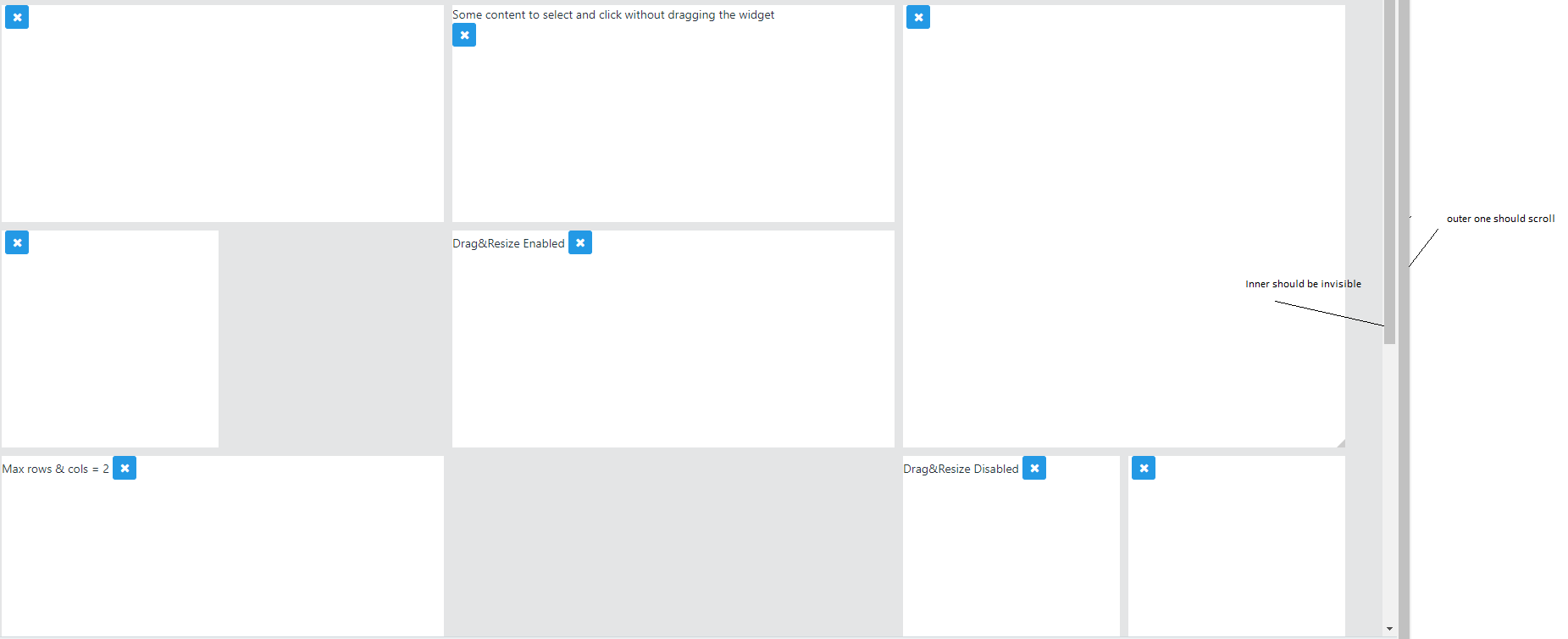
Where I expected the inner scrollbar should be invisible and the outer one should scroll. Is there any possibility to implement this? Thanks.
khaled-ansary
on 17 Jul 2017
Hi @khaled-ansary ,
You need to set the parent elements of gridster to overflow: initial and not to have a fixed height.
This issue is a css problem, not dependent on the library.
tiberiuzuld
on 17 Jul 2017
Hi @tiberiuzuld, I just hidden the scrollbar using the following code
::-webkit-scrollbar {
    display: none;
}
its also a good solution for me. Thank you very much for your support.
khaled-ansary
on 17 Jul 2017
Hi @tiberiuzuld,
Great work.
As I am trying to consume gridster. As I see gridster style height of 100% . Due to gridster height of 100% when widgets drag below the screen scroll comes in the application. We tried css approach which you mentioned in above thread and it didnt work for us. Kindly guide us in solving it.
 kesavanpos
on 1 Sep 2018
kesavanpos
on 1 Sep 2018
Hi @Kesavan2013,
As stated by tiberiuzuld, your issue is implementation specific and not related to this library, so without seeing your code there is no sure fire way I can tell you how to fix your problem. If you can recreate the problem on stackblitz and post a link, I could help you work through it with more definitive answers, but just from speculation here are a few things I would try.
First, make sure you are using a css rule with a higher specificity than the one in the library, otherwise your rule will not take precedence. Second, try setting the gridster's max-height to 100% so that the gridster element does not expand outside it's container. Third, try setting gridster's overflow to hidden, which will hide anything part of the gridster element that does expand outside of it's container (may be a double-edged sword, as it prevents scrolling and might cut off part of the display).
I hope this helps, if not, I will need to know more about your code.
 CollinGraf314
on 1 Sep 2018
CollinGraf314
on 1 Sep 2018
Hi @CollinGraf314 ,
Please find sample application using angular gridster. As we can see two scrollbar in the sample provided. We are trying to make one scroll that is available in the browser. Kindly guide us.
Sample Application : https://stackblitz.com/edit/angular-zuxcfh
kesavanpos
on 3 Sep 2018
If there are going to be elements in a grid that extend outside of the gridster elements viewport then the gridster element must have its own scroll. If any element on your web page extends outside of the page's viewport then the page must have its own scroll. What is going on in the stackblitz is that you set the parent container of the gridster element to be larger than the pages viewport, forcing the page to have a scroll, but you also limit the size of the gridster element to the size of that parent container, so as soon as you add enough gridsterItems then the gridster element necessarily creates its own scroll. To remedy this you have two options:
- Remove the page scroll by keeping all elements within the page's viewport. You can do this simply in your stackblitz by changing the parent div size from 600px to something like calc(100vh - [page padding]).
- Remove the scroll on the gridster element. To do this you must allow it's parent container's size to be dynamic, and you must allow the gridster element's height to grow as gridsterItems are added to it. Easiest way to do this would be to set a min-height on the gridster element, and then set setGridSize to true so that the gridster element resizes based on the size of it's contents.
CollinGraf314
on 3 Sep 2018
Thanks a lot solution 2 working like charm
kesavanpos
on 3 Sep 2018
Hi @CollinGraf314 ,
One more clarification required if possible. As we are setting fixedColWidth: 300, fixedRowHeight: 300,for gridster element. If screen resolution changes gridster width is not adjusting as per screen resolution. Please let us know any other option available in gridster.
Sample Application : https://stackblitz.com/edit/angular-zuxcfh
kesavanpos
on 4 Sep 2018
I don't see your problem. You are setting a fixedColWidth which means that the width of the columns will never change from 300px regardless of resolution. The grid properly expands and collapses to meet the number of columns needed by the GridsterItems inside it. If you want the grid to take up exactly the width of the screen but always display 3 columns then you can set maxCols to 3, minCols to 3, unset fixedColWidth, and then set the gridster elements width to be calc(100vw - [page padding]).
CollinGraf314
on 4 Sep 2018
Thanks for speedy response,
Will try this option and update you ASAP.
kesavanpos
on 4 Sep 2018
Hi @CollinGraf314 ,
We have couple of query after placing the widget in gridster.
1) On widget load any options to get x and y position of widget.
2) How to get differ Array
kesavanpos
on 4 Sep 2018
From the API:
initCallback | callback to call after grid has initialized | Function(gridsterComponent) | undefined
If you want the x and y for an item right after it was initialized, use the above. If your curious is an item can or cannot be placed, check out getNextPossiblePosition(item: GridsterItem): boolean.
I do not know what your component structure looks like, but I don't think you should need to make separate calls to each component to update positions. Simply iterate over whatever array you are using to store each of your widgets and change the GridsterItem positioning values in the component that houses your gridster element.
CollinGraf314
on 5 Sep 2018
Hi @CollinGraf314 ,
As we are currently facing a issue after implementing initCallback event. When we click on widgets dragStart and dragStop event is triggered. On only clicking widgets we want to restrict dragStart and dragStop events. After Successfull widget position movement placement only we need dragstop event needs to be triggered.
kesavanpos
on 5 Sep 2018
Set the GridsterItem's dragEnabled property to false. In practice you will probably want to implement some sort of 'edit mode' where a user can toggle on/off their ability to move the widgets by toggling the grid options draggable property (run this.yourGridOptions.api.optionsChanged(); to propagate any changes made to grid options after initialization).
CollinGraf314
on 5 Sep 2018
If you are set on not having some sort of edit mode, you can try nesting everything inside your gridsterItem in a div with a margin of say 10px on all sides, then use (click)="$event.stopPropagation()" on that div to prevent the click from being registered by gridster anywhere except for on that 10px margin of the widget. If that doesn't work then it might need to be on the (mousedown) event instead of (click). Although this would have the side effect of making it nearly impossible to drag items without resizing. Play around with it and see if you can't get the behavior you desire.
CollinGraf314
on 5 Sep 2018
Hi @CollinGraf314 ,
I tried with different options with no luck. Without changing position drag start event and drag stop event triggered. Due to this wrong position got updated. Kindly let me know other options available.
kesavanpos
on 5 Sep 2018
So this is pretty hacky, but probably the best work around I can think of. Start with nesting everything in your gridsterItem in a div that has css rules: padding: 10px; width: calc(100% - 10px); height: calc(100% - 10px); and has event binding on the (mousedown) event (mousedown)="initiateCheckForDrag(); $event.stopPropagation()" and has an event binding on the (mousemove) event (mousemove)="dragIfMouseIsDown()". This will create a 10px ridge around your widget that can be used for resizing, and prevent any click on the widget from initiating the dragStart event. Then in your component you just have to create the two functions. initiateCheckForDrag() will simply set a boolean flag to true: this.checkForDrag = true; and dragIfMouseIsDown() will check if this.checkForDrag is true, and if so, initiate the dragStart event by simulating a 'mousedown' event on the GridsterItem which would look something like what is being discussed here: https://stackoverflow.com/questions/24025165/simulating-a-mousedown-click-mouseup-sequence-in-tampermonkey
Sorry for not making a stackblitz to show you, I'm at work so I don't have enough time :(
CollinGraf314
on 5 Sep 2018
Hi @CollinGraf314 ,
Nope it is not working.After doing changes still it navigates to mousedown event.
kesavanpos
on 6 Sep 2018
Hi @CollinGraf314 ,
Any working sample would work.
kesavanpos
on 6 Sep 2018
okay, I'll see if I can't find the time to make a demo for you tonight.
CollinGraf314
on 6 Sep 2018
Hi @CollinGraf314 ,
If possible can you send working sample by tommorrow max.
kesavanpos
on 6 Sep 2018
Hi @CollinGraf314 ,
Any updates on the solution
kesavanpos
on 9 Sep 2018
Hi All,
How to capture and store the grid position whenever drag and move the grid position.
 sureshsha
on 24 Mar 2020
sureshsha
on 24 Mar 2020
Related issues
 samarsiraj
·
3Comments
CollinGraf314
·
3Comments
samarsiraj
·
3Comments
CollinGraf314
·
3Comments
 HighSoftWare96
·
4Comments
HighSoftWare96
·
4Comments
 MaiGhoneem
·
4Comments
MaiGhoneem
·
4Comments
 leandro-ali-elel
·
4Comments
leandro-ali-elel
·
4Comments
Most helpful comment
Hi @khaled-ansary ,
You need to set the parent elements of gridster to
overflow: initialand not to have a fixedheight.This issue is a css problem, not dependent on the library.