Angular-calendar: TypeError: Object(...) is not a function while using angular-calendar
Describe the bug
I am using angular-5.2.I want to use angular-calendar in my project.
I followed instructions as stated in "https://mattlewis92.github.io/angular-calendar/#/kitchen-sink".
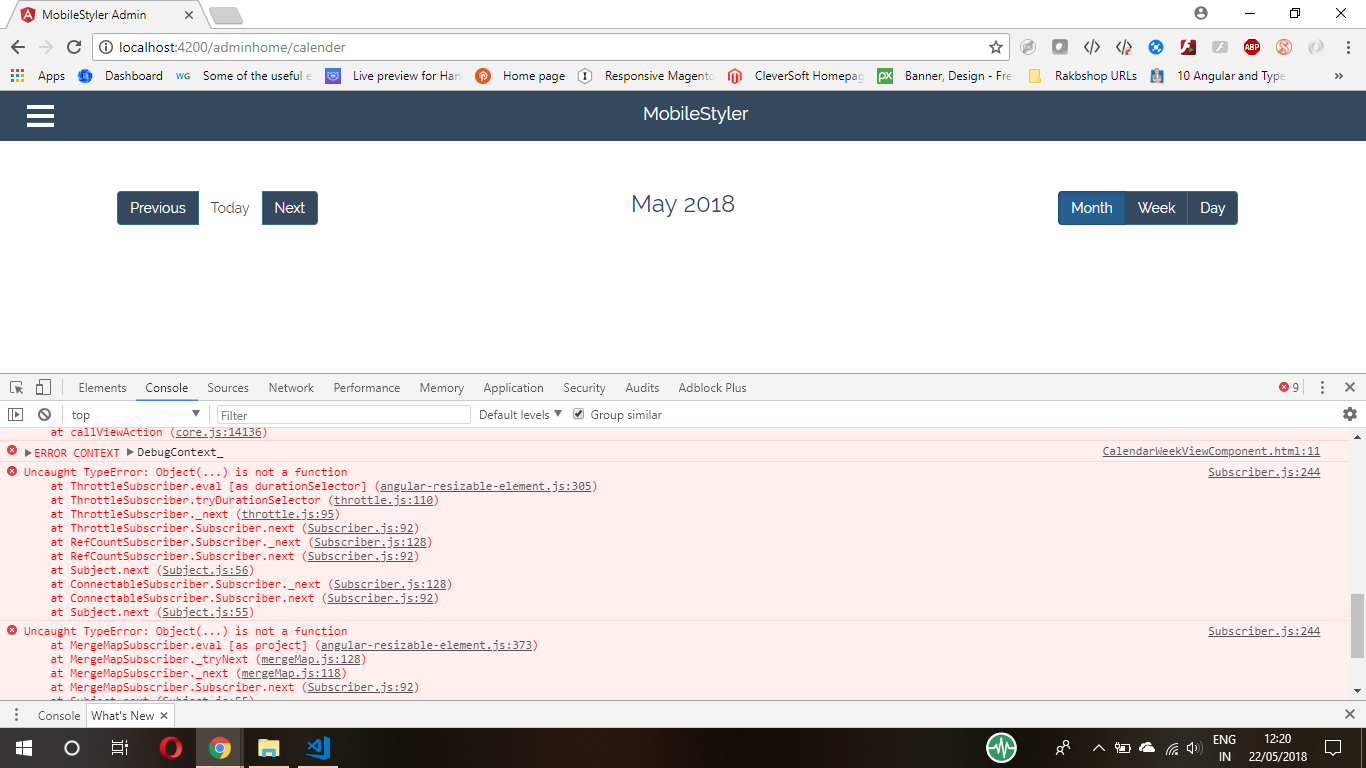
CSS is rendering fine ,but there is a error in console stating
"CalendarMonthCellComponent.html:18 ERROR TypeError: Object(...) is not a function"
And also my calendar is not working properly when i am adding any event to it.
The component file is as follows:-
import { Component, OnInit } from '@angular/core';
import { CustomDateFormatter } from './custom-date-formatter.provider';
import { ChangeDetectionStrategy,ViewChild,TemplateRef } from '@angular/core';
import { CalendarEvent,  CalendarEventAction,CalendarEventTimesChangedEvent,CalendarDateFormatter } from 'angular-calendar';

import {startOfDay,endOfDay,subDays,addDays,endOfMonth,isSameDay,isSameMonth,addHours} from 'date-fns';
import { Subject } from 'rxjs';
const colors: any = {
  red: {
    primary: '#ad2121',
    secondary: '#FAE3E3'
  },
  blue: {
    primary: '#1e90ff',
    secondary: '#D1E8FF'
  },
  yellow: {
    primary: '#e3bc08',
    secondary: '#FDF1BA'
  }
};
@Component({
  selector: 'app-graph2',
  templateUrl: './graph2.component.html',
  changeDetection: ChangeDetectionStrategy.OnPush,

  styleUrls: ['./graph2.component.css'],
  providers: [
    {
      provide: CalendarDateFormatter,
      useClass: CustomDateFormatter
    }
  ]
})
export class Graph2Component implements OnInit {
  view: string = 'month';

  viewDate: Date = new Date();

  events: CalendarEvent[] = [
    {
      title: 'Has custom class',
      color: colors.yellow,
      start: new Date(),

    }

  ];
  constructor() { }

  ngOnInit() {
  }

}
`
the html file is as follows:-
````
[(viewDate)]="viewDate">
````
Versions (please complete the following information):
@angular/core: 5.0.0angular-calendar:0.25.2- Browser name and version:google chrome
 devforum2020
All 2 comments
I think this is because you're using angular 5 which isn't compatible with the latest version of this package.
npm i [email protected]
should fix your problem 😄
 mattlewis92
on 22 May 2018
mattlewis92
on 22 May 2018
Thank you very much.It works for me.
devforum2020
on 23 May 2018
Related issues
 oldschoolbg
·
4Comments
oldschoolbg
·
4Comments
 sylvain-fr
·
3Comments
sylvain-fr
·
3Comments
 Novabllast
·
3Comments
Novabllast
·
3Comments
 PrasannaKolla
·
4Comments
mattlewis92
·
3Comments
PrasannaKolla
·
4Comments
mattlewis92
·
3Comments
Most helpful comment
I think this is because you're using angular 5 which isn't compatible with the latest version of this package.
should fix your problem 😄