Angular-calendar: Is there a way to make the events listed out by name on the actual date.
Sorry,
this may be in the documentation but I have yet to find it.
I would like to list out the events on the page per date and forgo the animation drop down of events nested behind the calendar.
Is there a straight forward way to do this?
 xtianus79
All 31 comments
I'm afraid there is no way of disabling the slidebox animation, AFAIK there is no way in angular to conditionally disable an animation. Once custom templates are implemented you'll be able to use your own template without the animation property set.
 mattlewis92
on 7 Dec 2016
mattlewis92
on 7 Dec 2016
ok we are ok with keeping the animation... but is there a way to list out the events on the actual date for the month?
xtianus79
on 7 Dec 2016
Sorry I don't quite follow what you mean?
mattlewis92
on 7 Dec 2016
sorry...
so on the month for each day... i.e. the 6th we want to list out the event on the particular day in the box for that day of the calendar. The sub section and animation is fine but we would like to also list out the events per the day on the calendar ui box for that day.
xtianus79
on 7 Dec 2016
Oh as in retrieve the events that are listed on that day?
mattlewis92
on 7 Dec 2016
yes... well to retrieve them and put them on the calendar for the month to list out the events to the end user
xtianus79
on 7 Dec 2016
So for this example you'd want to get the "A 3 day event" event?

mattlewis92
on 7 Dec 2016
yes so for the 7th i want to see "A 3 day event" list out as a line on the 7th box.
xtianus79
on 7 Dec 2016
Oh do you mean for the events to span multiple days?

mattlewis92
on 7 Dec 2016
not even multiple days... just the event for that day... but yes just like you show on the 8th
xtianus79
on 7 Dec 2016
Oh right, no there's not a way of doing this, you only have the colored dots. Once custom templates are implemented you'll be able to do something like this yourself
mattlewis92
on 7 Dec 2016
ok do you know when that will be implemented... and if not very soon would this be a hard "adjustment/hack" to achieve from your perspective?
xtianus79
on 7 Dec 2016
I have no idea when it’ll be implemented, I work on this project (along with several dozen more) in my free time. For now you could just fork the library and implement the change you need, and then once custom templates are implemented use this lib again.
Because of the limitations of angular there is no way to currently hack this in without forking the library.
Kind regards,
Matt Lewis
On 7 Dec 2016, at 17:14, xtianus79 notifications@github.com wrote:
ok do you know when that will be implemented... and if not very soon would this be a hard "adjustment/hack" to achieve from your perspective?
—
You are receiving this because you modified the open/close state.
Reply to this email directly, view it on GitHub https://github.com/mattlewis92/angular-calendar/issues/98#issuecomment-265509409, or mute the thread https://github.com/notifications/unsubscribe-auth/AGIMMX3nTZtBSrjxnJlA7zw0SOn3qlvHks5rFulzgaJpZM4LGxTd.
mattlewis92
on 7 Dec 2016
true... Thank you @mattlewis92
xtianus79
on 7 Dec 2016
Hi @mattlewis92 i made the changes on the same issue by forking it. is there a way for me to publish it to npm ?
 SamindaK
on 21 Feb 2017
SamindaK
on 21 Feb 2017
Change the package name in package.json and run npm run release
mattlewis92
on 21 Feb 2017
Thanks @mattlewis92 i did make the changes and used npm publish
Thanks for the brilliant code. current calendar of mine

SamindaK
on 21 Feb 2017
@mattlewis92 and @SamindaK so is this available now in the current build? What did you do to accomplish this? thanks
xtianus79
on 21 Mar 2017
@xtianus79 it's currently not possible without forking the repo, I'm going to try and get custom templates done this week though as I have a clean way of implementing it now 😃
mattlewis92
on 21 Mar 2017
Can you re-open this ticket. This calendar is much better than the fullcalendar version in my opinion, but it's much harder to provide a birds eye view of events when limited to only viewing titles of the selected day. Also due to this resizing functionality is non existent from the monthly view.
 kwilliams
on 24 Mar 2017
kwilliams
on 24 Mar 2017
@kwilliams This is actually possible now in 0.9.0 onwards. If you follow the custom templates demo but use the openDayEventsTemplate input instead of cellTemplate you can pass a template in to customise the events list like so:
    <ng-template #customTemplate let-events="events" let-eventClicked="eventClicked">
      <div
        *ngFor="let event of events"
        [ngClass]="event?.cssClass">
        <span
          class="cal-event"
          [style.backgroundColor]="event.color.primary">
        </span>
        <mwl-calendar-event-title
          [event]="event"
          view="month"
          (click)="eventClicked.emit({event: event})">
        </mwl-calendar-event-title>
        <mwl-calendar-event-actions [event]="event"></mwl-calendar-event-actions>
      </div>
    </ng-template>

<mwl-calendar-month-view [openDayEventsTemplate]=""></mwl-calendar-month-view>
Hope that helps!
mattlewis92
on 24 Mar 2017
Thanks for the response this was helpful!
On Fri, Mar 24, 2017 at 5:18 PM, Matt Lewis notifications@github.com
wrote:
@kwilliams https://github.com/kwilliams This is actually possible now
in 0.9.0 onwards. If you follow the custom templates
https://mattlewis92.github.io/angular-calendar/#/custom-templates demo
but use the openDayEventsTemplate input instead of cellTemplate you can
pass a template in to customise the events list like so:<ng-template #customTemplate let-events="events" let-eventClicked="eventClicked"> <div *ngFor="let event of events" [ngClass]="event?.cssClass"> <span class="cal-event" [style.backgroundColor]="event.color.primary"> </span> <mwl-calendar-event-title [event]="event" view="month" (click)="eventClicked.emit({event: event})"> </mwl-calendar-event-title> <mwl-calendar-event-actions [event]="event"></mwl-calendar-event-actions> </div> </ng-template>
Hope that helps!
—
You are receiving this because you were mentioned.
Reply to this email directly, view it on GitHub
https://github.com/mattlewis92/angular-calendar/issues/98#issuecomment-289156506,
or mute the thread
https://github.com/notifications/unsubscribe-auth/AAM4YI3c0OGqLaLRhZGUwM2Zs39g3UaDks5rpEFRgaJpZM4LGxTd
.
kwilliams
on 4 Apr 2017
Hi mattlewis92,
can you please let me know if span multiple days is available in Angular 5 version?
Thanks.
 kattakranthi
on 19 Mar 2018
kattakranthi
on 19 Mar 2018
@mattlewis92 Is this possible?
 bergmito
on 9 Apr 2018
bergmito
on 9 Apr 2018
Sorry there's no support for this UX (it's non trivial to implement).
mattlewis92
on 10 Apr 2018
@mattlewis92 Please i need help i want to implement this solution with month view is this possible to use custom template ?
 ImenTaieb
on 17 Jul 2018
ImenTaieb
on 17 Jul 2018
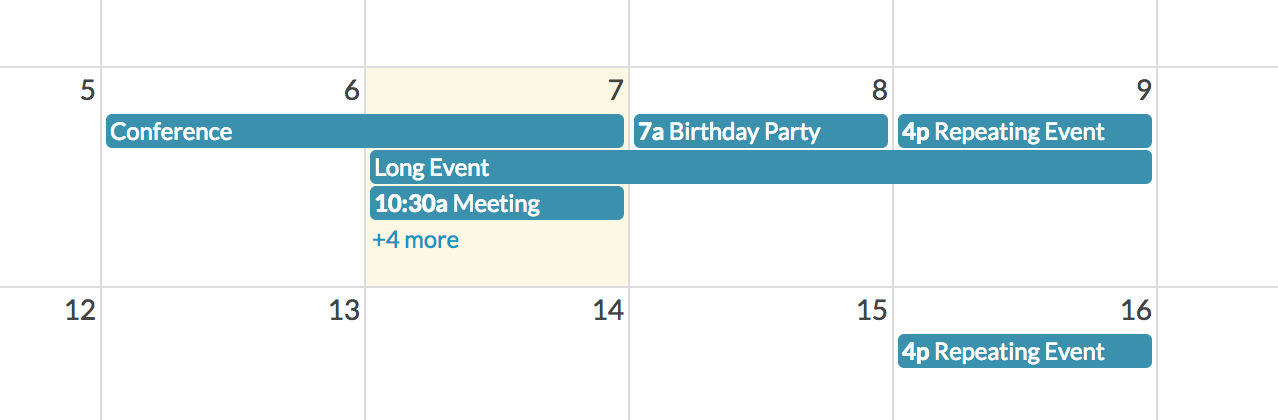
@mattlewis92 @ImenTaieb Were able to implement this or is it possible to do it using the custom template ? Thanks.
 AngularDe
on 6 Aug 2018
AngularDe
on 6 Aug 2018
Hi everybody, i would like to add new event in @freetime (week view) and i expect result is event's color continuity but i receive striped (e.g: green, red, green, red). green freetime. red busy. Thank so much.
 BiStokeCity
on 15 Aug 2018
BiStokeCity
on 15 Aug 2018
Event over event. Sr because my English not good.
BiStokeCity
on 15 Aug 2018
@SamindaK I want to create a calendar similar to yours "Pricing calendar". Initially my calendar will show Dr's availability and user will be able to book their appointment on the basis of Dr's availability. Could you please share the code what changes you have made in calendar for "Pricing Calendar".
 abhishek-patel
on 2 Jan 2019
abhishek-patel
on 2 Jan 2019
Im not able to show title instead of title being represented by dots in month view calendar. I want to show the title itself.How to achieve this. Anyone can help?
 najah1501
on 2 Jul 2019
najah1501
on 2 Jul 2019
Related issues
 daneshmandi
·
4Comments
mattlewis92
·
3Comments
daneshmandi
·
4Comments
mattlewis92
·
3Comments
 sylvain-fr
·
3Comments
sylvain-fr
·
3Comments
 fmoessle
·
5Comments
fmoessle
·
5Comments
 no-more
·
3Comments
no-more
·
3Comments