Android: Notifications doesn't wake phone up
As title says - notifications does not wake screen/phone, they show up after interaction with phone.
HTML5 push does that instantly or after a short while.
 andriej
All 27 comments
Did you make sure to turn off battery optimizations for the app? When we tested this earlier the notifications were definitely waking up the phone. Only time it didn't wake up the phone was when we restarted the phone and didn't open the app.
 dshokouhi
on 14 Dec 2019
dshokouhi
on 14 Dec 2019
I did it for a test now, will check. For HTML5 there's no way to turn off optimization.
If it's needed for notifications it would be nice to add 'startup procedure' suggesting doing so. :-)
andriej
on 15 Dec 2019
First observation, I have disabled battery optimalization , so this morning, when doorbell rang, the message came in, when my phone was in deep sleep… So that’s good…
But only 3 minutes later… So there is a delay though…
I am also using pushover for a notify system, those are always instant… There is a priority setting there… Is such thing also coming?
 pergolafabio
on 16 Dec 2019
pergolafabio
on 16 Dec 2019
Agreed that the battery optimization check might be useful in the onboarding activity. Having an issue with connection loss/stale state, and just tried disabling optimization as a possible fix. It's one of those things I know about, but I don't think about it unless actively reminded by, say, an onboarding step. :)
 ndarilek
on 16 Dec 2019
ndarilek
on 16 Dec 2019
@ndarilek I have an open issue with what I think is important to warn/prompt about here https://github.com/home-assistant/home-assistant-android/issues/119
 allanpersson
on 16 Dec 2019
allanpersson
on 16 Dec 2019
After a few days testing, my phone doesn't receive notification in deep sleep, while battery optimalization is disabled...
Pushover however is working...
I had same issues with html5
pergolafabio
on 17 Dec 2019
Is this still an issue? If so, can you set TTL to 0 and priority to high in your notifications and see if that changes anything? For example:
title: 'Title Text'
message: 'Body Text'
data:
  ttl: 0
  priority: 'high'
 robbiet480
on 12 Feb 2020
robbiet480
on 12 Feb 2020
So I have personally tried setting both ttl and priority but in all cases after not using my phone for 5-10 minutes the notification would not show up until the screen turns on. The moment the screen turns on all notifications that I sent from HA show up at once.
Edit: I started testing this again after my comment and after waiting about 10 minutes and sending a notification with both ttl and priority the notification showed up within 10 seconds. I will wait about 30 min and 1 hour and see if it continues to work :)
dshokouhi
on 12 Feb 2020
still not working for me either, tested below script, maybe its the image? but what i noticed, the message didnt come, i had to wake up phone, and even i had to open the "home assistant" app , the the push message arrived
aa_test:
  alias: Doorbell notification
  sequence:
  - service: !secret notify_ha_fabio
    data:
      title: "Alert"
      message: "Someone at the door"
      data:
        # actions:
          # - action: "close_garage" # The key you are sending for the event
            # title: "Close Garage Door" # The button title
        image: "https://i.pinimg.com/originals/0f/7b/fa/0f7bfa4e6775b5977694a6036fc85b48.png"
        priority: high
        ttl: 0
@pergolafabio how long did you wait after sending the notification to determine it was not showing up? I think when we send an image it takes an extra 10 seconds to show up.
dshokouhi
on 12 Feb 2020
about 3 minutes :-)
pergolafabio
on 12 Feb 2020
but gonna do some testing later
sometimes the messages comes, if the phone is waken up by some other system like email/sms/whatsapp
so i need todo the testing when its calmer :)
pergolafabio
on 12 Feb 2020
Yea that makes testing this more difficult because how do we know the phone was in doze or already woken. FCM does have some testing tips for developers so maybe this will help
https://developer.android.com/training/monitoring-device-state/doze-standby#testing_doze
dshokouhi
on 12 Feb 2020
Indeed...
But I am now using also pushover, that system didn't fail me one time... Is it working completely different?
pergolafabio
on 12 Feb 2020
Pushover also uses FCM and messages are sent with priority. Although instead of specifying high they do a number scheme.
https://pushover.net/api#priority
What happens if you try to send priority: 2? same results?
dshokouhi
on 12 Feb 2020
Ok will test that too, I indeed have 2 configured in those automations..
But is it maybe possible that the home assistant app is in a not connected state when in doze/sleep? Because when I open the app, I see for 1 sec, a reconnecting message
pergolafabio
on 12 Feb 2020
So when you disable battery optimizations the app becomes exempt from Doze and App Standby. To check this go to Settings > Developer Options > App Standby and you should see Home assistant showing as Exempt....just like Pushover I would imagine.
The reconnecting message you are referring to is actually the HA frontend.
dshokouhi
on 12 Feb 2020
Indeed, it's exempt...
Ok, nothing todo with frontend then...
Will test that '2' also later and provide feedback
pergolafabio
on 12 Feb 2020
ok doing some testing
priority: 2 doesnt do anything =-)
so back to prority: high
seems to be working better.... gonna let my phone sleep now
pergolafabio
on 12 Feb 2020
Using the Pixel 2XL on the latest release of Android.
I'm having similar issues with notifications, experienced the same using the HASS HTML5 app notifications too. This is without any images.
I've added ttl: 0, priority: high, seems to be delivering it quicker, but have still experienced up to 20 sec lag using this code - better than before thought. It does however restrict certain usecases like a smart doorbell if notifications aren't quicker.
 mutasim
on 12 Feb 2020
mutasim
on 12 Feb 2020
yeah, thats why i am testing it also, as a doorbell usecase
html5 always bugged me too, thats why i choose for pushover
pergolafabio
on 12 Feb 2020
My Oneplus 5t is not awake. In contrast, the phone of the wife of Xiaomi Redmi note 4 is beautifully woken up.
Is there a chance to improve this? ( i've addes ttl:0, priority: high)
 majdzik84
on 16 Feb 2020
majdzik84
on 16 Feb 2020
i think this can be solved by channels. And have channels configured on what to do in do not disturb:
https://developer.android.com/guide/topics/ui/notifiers/notifications#ManageChannels
 RikP
on 28 Feb 2020
RikP
on 28 Feb 2020
@RikP this will only work if the device is in DnD mode, the OP here was having this issue without that mode enabled so channels won't be much help. ttl and priority is whats supposed to help out but as we can see in this thread the results are mixed. There is also already a default channel provided by the app that users can set to override DnD too.
dshokouhi
on 28 Feb 2020
Any further develpoment here ? I am having same problem on. Motorola G7 Plus, Android 10.
 DavidWicks
on 26 May 2020
DavidWicks
on 26 May 2020
Are we sure that setting priority and ttl is actually working as expected?
I ask this as I've noticed something really odd...
(note: I added a shotcut to the "Notifications log" activity, so the next screenshots you see here are from there)
If I send a message via Home Assistant to a Hangouts chat, this is the information on the notification:
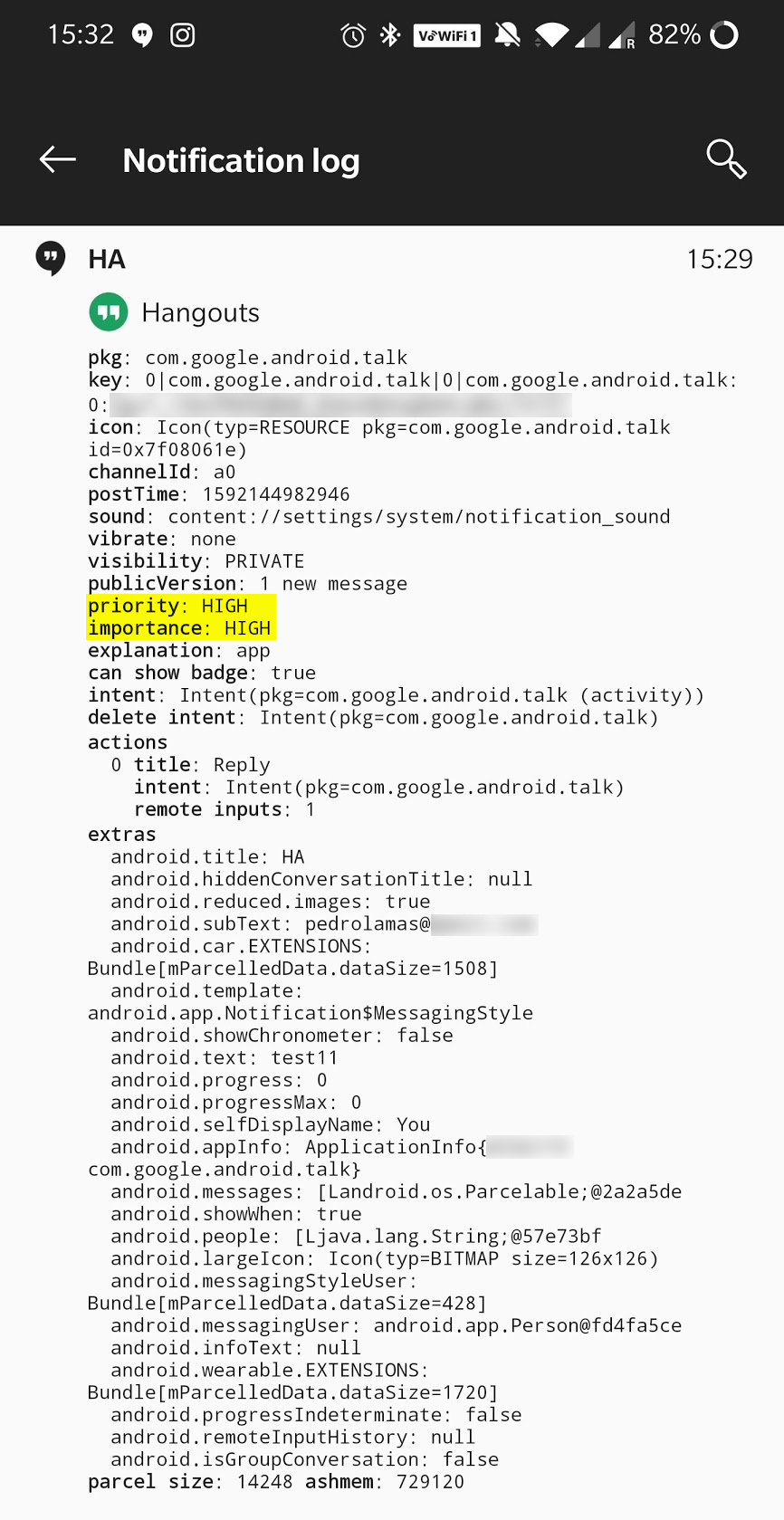
As you can see above, this gets both the priority and importance attributes set to "high"
Now let's say I go to the developer tools, and use the following:
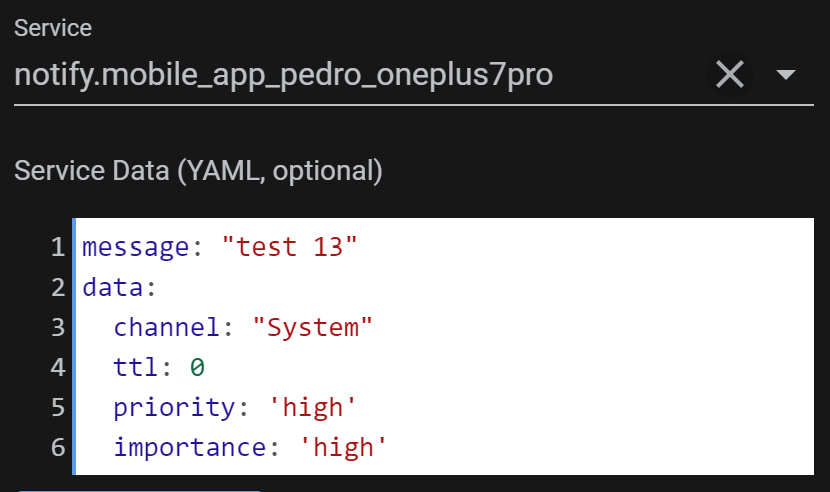
If I now look at the Notification Log, this is what I see:
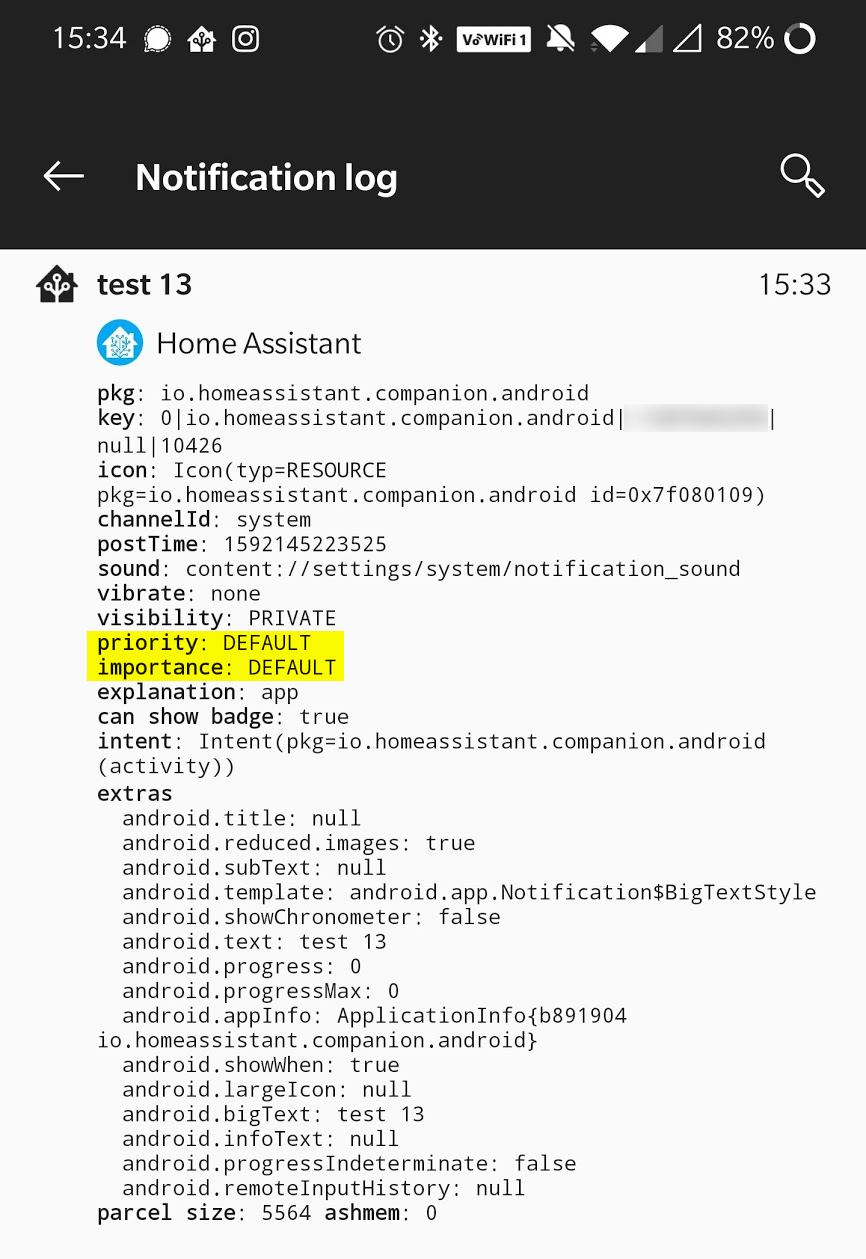
As you can see on the above screenshot, it looks like it completely ignored both the priority and the importance values.
 pedrolamas
on 14 Jun 2020
pedrolamas
on 14 Jun 2020
There hasn't been any activity on this issue recently. Due to the high number of incoming GitHub notifications, we have to clean some of the old issues, as many of them have already been resolved with the latest updates.
Please make sure to update to the latest Home Assistant version and check if that solves the issue. Let us know if that works for you by adding a comment 👍
This issue now has been marked as stale and will be closed if no further activity occurs. Thank you for your contributions.
![stale[bot] picture](https://avatars3.githubusercontent.com/in/1724?v=4&s=40) stale[bot]
on 12 Oct 2020
stale[bot]
on 12 Oct 2020
Related issues
andriej
·
4Comments
 acme-szala
·
3Comments
andriej
·
4Comments
acme-szala
·
3Comments
andriej
·
4Comments
 aleksandrov1995
·
4Comments
aleksandrov1995
·
4Comments
 rradar
·
4Comments
rradar
·
4Comments
Most helpful comment
After a few days testing, my phone doesn't receive notification in deep sleep, while battery optimalization is disabled...
Pushover however is working...
I had same issues with html5