Android: Zone based tracking reports zone latitude/longitude instead of device location
It seems to me that zone based tracking doesn't report that I am outside all defined zones. It would be a lot more useful to get an away status update at least once when leaving a zone. Preferably an away status update without coordinates.
 stigvi
All 28 comments
Do you mean your device tracker does not flip from home and not_home when you are out of a HA zone? Mine definitely does that when I go outside the home zone. Make sure you turn on zone based tracking as well as background tracking. Maybe you need to adjust the zone radius in HA if you find its too large?
 dshokouhi
on 13 Dec 2019
dshokouhi
on 13 Dec 2019
I am finding I need to fully quit the app (open app switcher and swipe it away) then relaunch the app for it to update my location. I have both those toggles on and battery optimization off. Was hoping to use this to replace owntracks but accurate location detection is a must and this just isn't quite there yet.
 damusmf
on 14 Dec 2019
damusmf
on 14 Dec 2019
@damusmf provide more details of the device, it's for sure not usual.
on my device it works.
 andriej
on 15 Dec 2019
andriej
on 15 Dec 2019
I am facing the same issue. It seems it doesn't keep the location updated that often and when I leave a zone it doesn't send anything to HA.
If I open the app it doesn't fix I need to go on the settings and disable/enable both options.
I do have battery optimization disabled for the app but it doesn't help.
I also noticed that I cannot enable push notification in the app.
My phone is a OnePlus 5 with Android 9.
Everything up2date and let's encrypt SSL certificate on HA (related to the push notification, which works on crhome)
 SeLLeRoNe
on 15 Dec 2019
SeLLeRoNe
on 15 Dec 2019
Just taken a look at the code for this. It looks like both entering and exiting a geofence zone are correctly registered, but then both events are treated identically. So when you leave a zone, you get marked as in the zone... You can move between zones fine as they are triggered from entering but you'll never be able to get to the not_home state.
 CultusMechanicus
on 15 Dec 2019
CultusMechanicus
on 15 Dec 2019
It really depends on the accuracy of the location we receive. If it's not very accurate then HA will mark you as inside the zone still on exit. The best way to avoid this issue is to use the location updates as well. Currently we are doing everything we can to be respectful of peoples batteries as far as requesting updates.
 JBassett
on 15 Dec 2019
JBassett
on 15 Dec 2019
@JBassett It looks a lot like the code will always treat any incoming zone changes as if they were entry events though, which seems wrong. Both GEOFENCE_TRANSITION_ENTER and GEOFENCE_TRANSITION_EXIT get fed into sendLocationUpdate, which means it sets the location to the zone you just left 100% of the time.
CultusMechanicus
on 16 Dec 2019
@CultusMechanicus if you notice though we take your location not just the zone you are leaving. If you break out of the zone by definition your location is not inside the zone... The problem comes in when your accuracy is not great. That causes your "location" in Home Assistants eyes, to grow. That causes Home Assistant to think you haven't left.
JBassett
on 16 Dec 2019
Or if the LocationUpdate is processed before GEOFENCE_TRANSITION_EXIT, you get teleported back to the center of the zone. I'll try and get a screen grab of it happening tomorrow but I've been several miles outside of a zone and this device tracker has me as inside the zone. Both toggles were active and my main tracker (gmaps sharing on the same phone) was as accurate as it usually is. Something odd is definitely going on around geofencing, as gmaps does send out fused location intents (iirc) so the two trackers should be in sync. Additionally, why register for exit events if they are going to be treated as the exact opposite?
CultusMechanicus
on 16 Dec 2019
Or if the LocationUpdate is processed before GEOFENCE_TRANSITION_EXIT, you get teleported back to the center of the zone.
Yes, I have noticed this on my phone. After a few days more of usage, I see that I indeed get a "not_home" status now and then. But when this happens, I also get a "home" status a little later, even when I am further away from home than when I got the "not_home" status update.
stigvi
on 16 Dec 2019

Here is an example of me and my wife driving away from home in the same car.
My phone sent the first "not_home" 15:52. A "home" status 16:07. A "not_home" status 16:25 and finally a "home" status 17:20. Only the first at 15:52 and the last at 17:20 was correct.
My wife's phone sent a "not_home" status at 16:06, 14 minutes later than the first from my phone. And a "home" status at 17:23
Both phones with zone based tracking and background updates turned on.
stigvi
on 16 Dec 2019
We are correct in sending the location updates, as that's how we interface with Home Assistant.
The reason you get set to be in the zone by Home Assistant (not the Android app) is because your current location + GPS accuracy puts you in that zone.
 balloob
on 16 Dec 2019
balloob
on 16 Dec 2019
When I was sent back to the home zone, I was in fact 10km away from home. Why are gps positions that inaccurate sent to Home Assistant?
stigvi
on 16 Dec 2019
You should ask your phone manufacturer 😉
You can see the accuracy that was reported by looking at the state in the state machine. Accuracy is reported as the gps_accuracy.
balloob
on 16 Dec 2019
You can see the accuracy that was reported by looking at the state in the state machine. Accuracy is reported as the
gps_accuracy.
How do I do that for something 2 days old?
stigvi
on 16 Dec 2019
It's recorded by the recorder, so you should be able to find it using a SQLite browser in home_assistant_v2.db. Or wait until the next time you leave home.
balloob
on 16 Dec 2019
The reason you get set to be in the zone by Home Assistant (not the Android app) is because your current location + GPS accuracy puts you in that zone.
@balloob Sorry, but that isn't what has happened. The bottom track in the history from stigv shows exactly what I have been saying. He left the zone, a standard GPS location update happened which moved him to "away", then the geofence exit update happened, which (incorrectly) put him back at "home". A subsequent location update then corrected his position.
Look in LocationBroadcastReceiver. Line 204 registers for entry and exit events. When either of these events happen, the coords of the center of the zone (not the device) triggering them are passed to HA in
handleGeoUpdate at line 144.
This isn't an accuracy issue, it's a combination of incorrect event handling and a race condition.
CultusMechanicus
on 16 Dec 2019
Ah, you're right. We should not send the zone GPS but instead try to get a GPS fix and send that location.
balloob
on 16 Dec 2019
Ah, you're right. We should not send the zone GPS but instead try to get a GPS fix and send that location.
Even if not able to get a gps fix, a "not_home" status message should perhaps be sent to HA.
stigvi
on 16 Dec 2019
Can confirm the problem on teleportation home for a few minutes and then back to the correct location even when im 20-25 km away from home.
Only seen it happen a few times. Did never see that using owntracks.
 MuppetOwl
on 16 Dec 2019
MuppetOwl
on 16 Dec 2019
@CultusMechanicus
Look in LocationBroadcastReceiver. Line 204 registers for entry and exit events. When either of these events happen, the coords of the center of the zone (not the device) triggering them are passed to HA in
handleGeoUpdate at line 144.
It seems you misunderstood.
triggeringLocation is the location at which your device noticed it either entered or left a zone, so it's basically your fix at that moment. It is not the zone's location.
I'm using that technique in my own app for over a year and it's working well for me.
 quthla
on 16 Dec 2019
quthla
on 16 Dec 2019
If you've been using it that long, do you have a suggestion as to why
people are seeing these jumping around issues?
On Mon, Dec 16, 2019, 8:25 AM quthla notifications@github.com wrote:
@CultusMechanicus https://github.com/CultusMechanicus
Look in LocationBroadcastReceiver. Line 204 registers for entry and exit
events. When either of these events happen, the coords of the center of the
zone (not the device) triggering them are passed to HA in
handleGeoUpdate at line 144.It seems you misunderstood.
triggeringLocation is the location at which your device noticed it either
entered or left a zone, so it's basically your fix at that moment. It is
not the zone's location.I'm using that technique in my own app for over a year and it's working
well for me.—
You are receiving this because you are subscribed to this thread.
Reply to this email directly, view it on GitHub
https://github.com/home-assistant/home-assistant-android/issues/145?email_source=notifications&email_token=AAICE7FPV2EESH4HNY2RTFDQY56V7A5CNFSM4J2JAH5KYY3PNVWWK3TUL52HS4DFVREXG43VMVBW63LNMVXHJKTDN5WW2ZLOORPWSZGOEG6WFPQ#issuecomment-566059710,
or unsubscribe
https://github.com/notifications/unsubscribe-auth/AAICE7EHSOGKMLCQPBSZELLQY56V7ANCNFSM4J2JAH5A
.
 Knoxie
on 16 Dec 2019
Knoxie
on 16 Dec 2019
It seems you misunderstood.
https://developers.google.com/android/reference/com/google/android/gms/location/GeofencingEvent.html#getTriggeringLocation()
triggeringLocation is the location at which your device noticed it either entered or left a zone, so it's basically your fix at that moment. It is not the zone's location.
If that's true, that's extremely unhelpful method naming and documentation on Google's part, given that https://developers.google.com/android/reference/com/google/android/gms/location/GeofencingEvent.html#getTriggeringGeofences() exists on the same object.
Either way, I've done a little more testing and, for my use cases, simply turning off the geofencing toggle in the app fixes my issues. It matches the Google Maps location sharing tracker almost exactly. With geofencing on I'm apparently pogoing all around the place...
Now I just have to stop my girlfriend's Samsung from killing off the HA background service and I can migrate away from Maps as a tracker.
CultusMechanicus
on 16 Dec 2019
It would require some logging to understand the issue better and maybe even fix it. Especially
https://developer.android.com/reference/android/location/Location.html#getTime()
https://developer.android.com/reference/android/location/Location.html#getProvider()
https://developer.android.com/reference/android/location/Location.html#getAccuracy()
quthla
on 16 Dec 2019
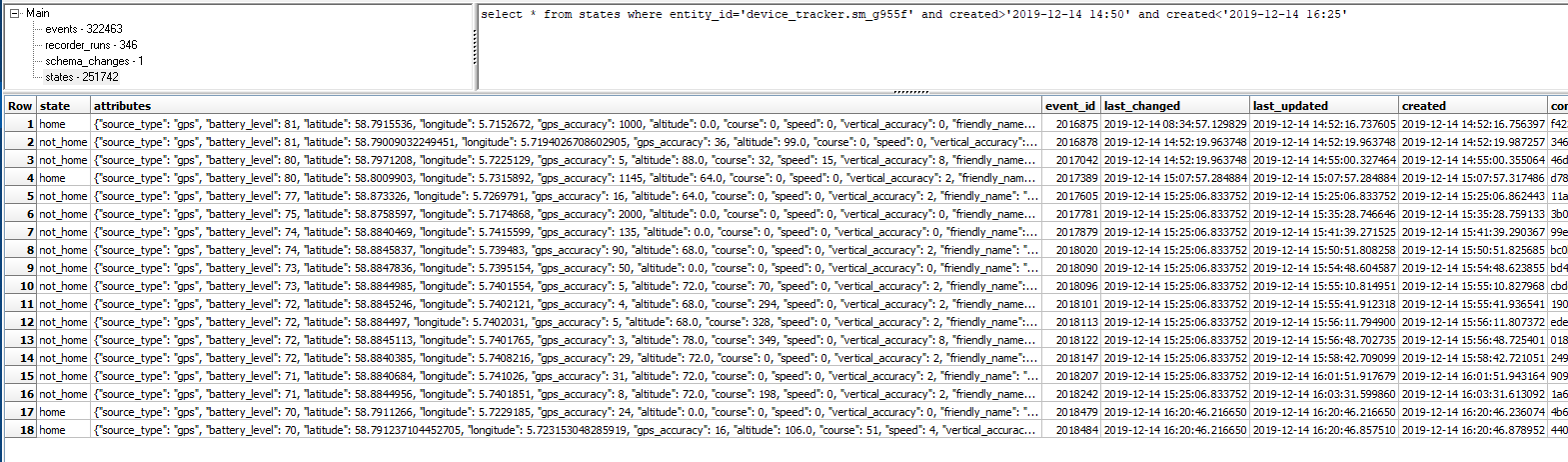
This data is for the sequence I posted earlier today
stigvi
on 16 Dec 2019
We can add a threshold for the accuracy to report back to HA that can be set by users. Should help the "teleportation" people are seeing.
JBassett
on 17 Dec 2019
The app could try to get a better fix when it receives a geofence intent with an inaccurate fix
quthla
on 17 Dec 2019
In the image I posted above, row 4 shows that I was home. But I wasn't and the coordinates in row 4 is outside my home zone with at least 1000m. But the inaccuracy of that position could place me in the home zone - my current position + 1145m overlap my home zone slightly
stigvi
on 17 Dec 2019
Related issues
andriej
·
4Comments
 Hypfer
·
3Comments
Hypfer
·
3Comments
 N-Schaef
·
5Comments
N-Schaef
·
5Comments
 Nik71git
·
4Comments
Nik71git
·
4Comments
 ofalvai
·
5Comments
ofalvai
·
5Comments
Most helpful comment
We can add a threshold for the accuracy to report back to HA that can be set by users. Should help the "teleportation" people are seeing.