I noticed that the Battery it is not updated unless the App is opened (it is not updated even if it's in background as far as I can tell), but it is when I "open" the app (even if the GPS location hasn't changed).
I did some test leaving the phone discharge and in HA (using only the Mobile App reported value) the battery level has never been updated (tested with 3 hours span), same goes when I charged it.
(OnePlus 5 with Android 9 Oxygen OS 9.0.9)
In my opinion it would be great to have the battery updated everytime the value changes (this should already prevent too many/frequent updates unless the phone is under "load").
Thanks
Andrea
 SeLLeRoNe
All 28 comments
I have Sony Xperia Xz1 and I have noticed the same problem. The app doesn't update battery unless you open the app after reboot.
 klejejs
on 9 Dec 2019
klejejs
on 9 Dec 2019
@SeLLeRoNe @klejejs I works for me on Samsung galaxy s9+. Have you made sure the app is excluded from battery optimization and "sleeping app" mode?
 allanpersson
on 9 Dec 2019
allanpersson
on 9 Dec 2019
Yes, I have the battery optimization fully disabled for HA app.
klejejs
on 9 Dec 2019
@klejejs I see you got an answer about how 5he battery update works in the other thread. I don't know your model but on my galaxy there is 2 options that can prevent updates when the app is not active.
- Battery optimization
- Sleeping apps (Disallows specific apps background updating)
I'll try to Google your model to see if similar exists.
- I see it has some battery modes that can impact https://support.sonymobile.com/us/xperiaxz1compact/userguide/battery-and-power-management/
- Take a look at post 10 here https://talk.sonymobile.com/t5/Xperia-XZ1/XZ1-Battery-life/td-p/1281562 make sure background actityty is allow and power saving feature is not applied.
- Try add the battery level sensor to HA and try trigger location update by moving around to trigger GPS changes and see how the battery level reacts.
It's a little complicated on Android because most manufacturers how different changes to the stock android that can be causing unwanted behavior. I'll try to write some documentation to cover most seen problems.
The battery optimization prompt is raised as an issue https://github.com/home-assistant/home-assistant-android/issues/119 maybe more prompts are needed to cover all manufacturers/models!?
allanpersson
on 9 Dec 2019
@allanpersson I've been told yesterday that the App update the Battery Level only when there is a GPS coordinates change, not on pre-defined period/event (such as, battery value changes).
I did disable Battery optimization yesterday when I was trying to debug it and it didn't help.
This is more a Feature Request then a Bug at this moment since the App has no logic to update only the battery.
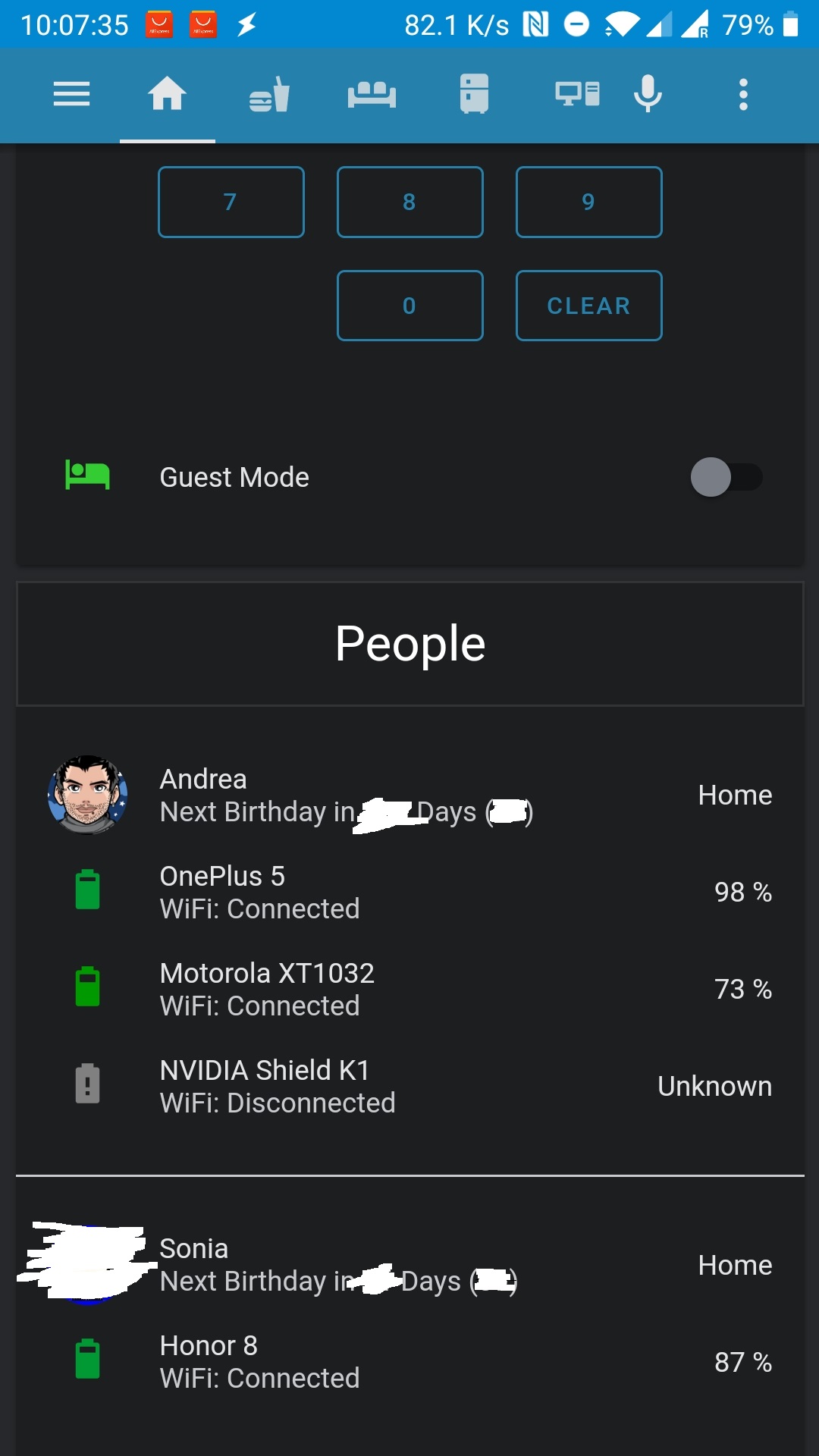
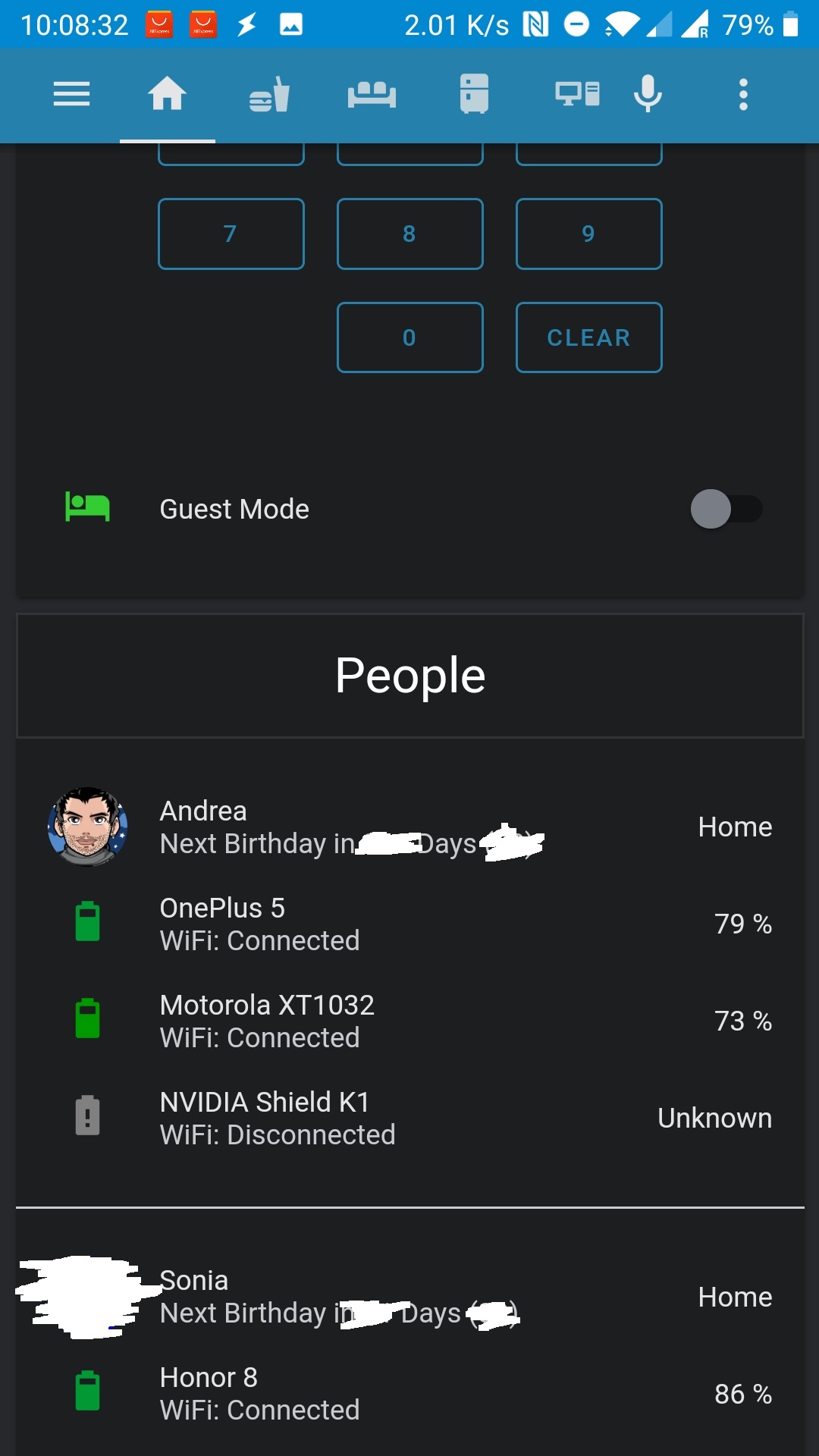
Also to note, this morning I did a test, opened the app without having moved for hours (yes basically I was in bed :D ) and the App updated the battery after 1 minute since I opened it.
SeLLeRoNe
on 9 Dec 2019
@SeLLeRoNe as I understand you, it works for you? (Exept for the feature request of updating on every battery change and not like now gps change)
allanpersson
on 9 Dec 2019
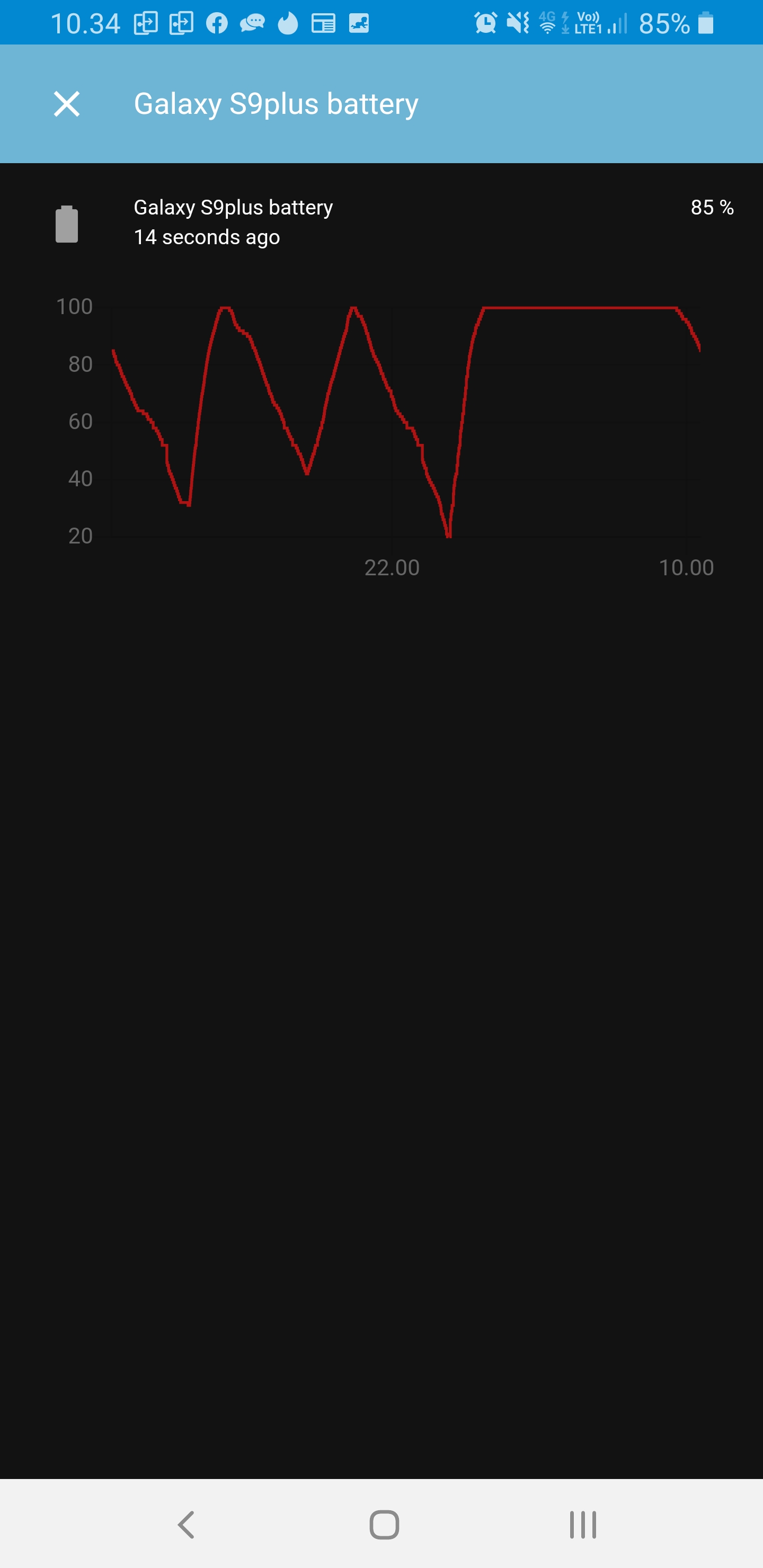
@SeLLeRoNe mine have been updating while charging, app not running and me sleeping 😴
allanpersson
on 9 Dec 2019
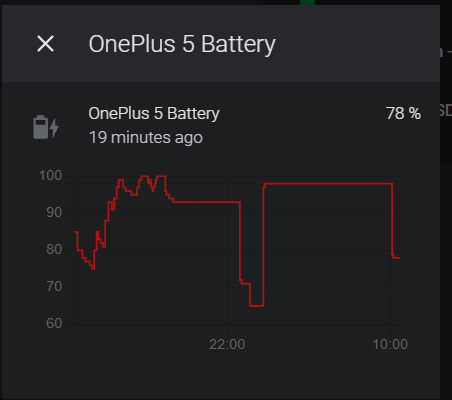
No it doens't work for me either, as you can see from my two screenshots, this morning I did open the App having 79% of battery while in HA it was reported 98% (value I had before going to sleep), after 1 minute that the App was opened finally HA was updated to the correct battery value.
Maybe this is clearer, and it looks like yours :D
SeLLeRoNe
on 9 Dec 2019
Also as you can see it says my phone is currently at 78% which is not true, it's currently at 94%
SeLLeRoNe
on 9 Dec 2019
@SeLLeRoNe it's expected not to update (at the moment due to the way it updates, only when gps changes). If you trigger the GPS by moving location with the phone inactive, is the value then reported correctly and updating?
If not, it's most likely something in your settings for battery and/or locations
allanpersson
on 9 Dec 2019
I know it's expected to update only on GPS change at the moment, I haven't yet tested it but I was just pointing out that it updates when the App is opened, even if the GPS hasn't changed.
This was more meant to be a FR to have the battery actually being updated regardless of the GPS which is very useful to have to get rid of external services such as Life360 (not that it is not useful, just more privacy-focused if it's only the HA App and it only communicate with your own HA instance).
SeLLeRoNe
on 9 Dec 2019
@SeLLeRoNe personally I have already got rid of owntracks and using the app only for reporting away from home gps.
Can you test if it works for you if you move around, to be able to know if the actually functionality is working. And to learn if some setting in your phone is preventing it from working. That can be useful information ℹ
allanpersson
on 9 Dec 2019
Yes I got rid of life360 because now the App reports GPS, but I need it also to crrectly report Battery.
I am currently working from home so the GPS changes are close to none.
But I will definetely leave the house after work and I will be able to see if it does behave :)
SeLLeRoNe
on 9 Dec 2019
Ok, I went to buy bread and that gave me the opportunity to see if the App was working and unfortunately it is not updating, technically I would have resulted to be Away because the place it's out of my "Home Zone".
I did check the battery optimization and it is set to don't optimize:

The only thing I am not 100% sure about is if that's the right App because I got 3 that seems related:
Assistant
Home Assistant - Blue icon (which might be my father HA installation over Chrome)
Home Assistant - Black icon (which is my own HA installation over Chrome)
Maybe the App I need to "Don't optimise" is the "Assistant" one?
SeLLeRoNe
on 9 Dec 2019
@SeLLeRoNe it's hard for me to know which one. One other thought, is the app setup with a external url (nabu casa url fx) ?
allanpersson
on 9 Dec 2019
Yes it is set with an external URL.
I do understand it might be hard to identify which one it is, for now I changed the "Don't optimise" to the one called "Assistant" because the one that was already set didn't work and the one with the black icon I am sure is the Chrome one.
One interesting not is that the first time I opened the App I didn't receive any request for battery optimization, that might aswell be something nice to have :)
SeLLeRoNe
on 9 Dec 2019
@SeLLeRoNe the battery optimization prompt is raised as an enhancement issue.
It works fine on my galaxy s9+, so try to figure out what's blocking it on your mobile 🙏
allanpersson
on 9 Dec 2019
I will test again later today with the "Assistant" set to "Don't Optimise"
But the App name should be the same cross-phones in my opinion, with what name does it show up in your Battery Optimization App list?
SeLLeRoNe
on 9 Dec 2019
@SeLLeRoNe make sure to check location settings as well, sometimes the location settings only allow update location when app in use.
allanpersson
on 9 Dec 2019
I don't see to have such configuration, it does look location usage is enabled.
SeLLeRoNe
on 9 Dec 2019
@SeLLeRoNe can you try make a template sensor for longitude and latitude, and see if the coordinates update when ilde and away from home. That should give a indication if it updates at all when away.
allanpersson
on 9 Dec 2019
@SeLLeRoNe I have been out running for the last 45 minutes and as you can see alot of gps updates...
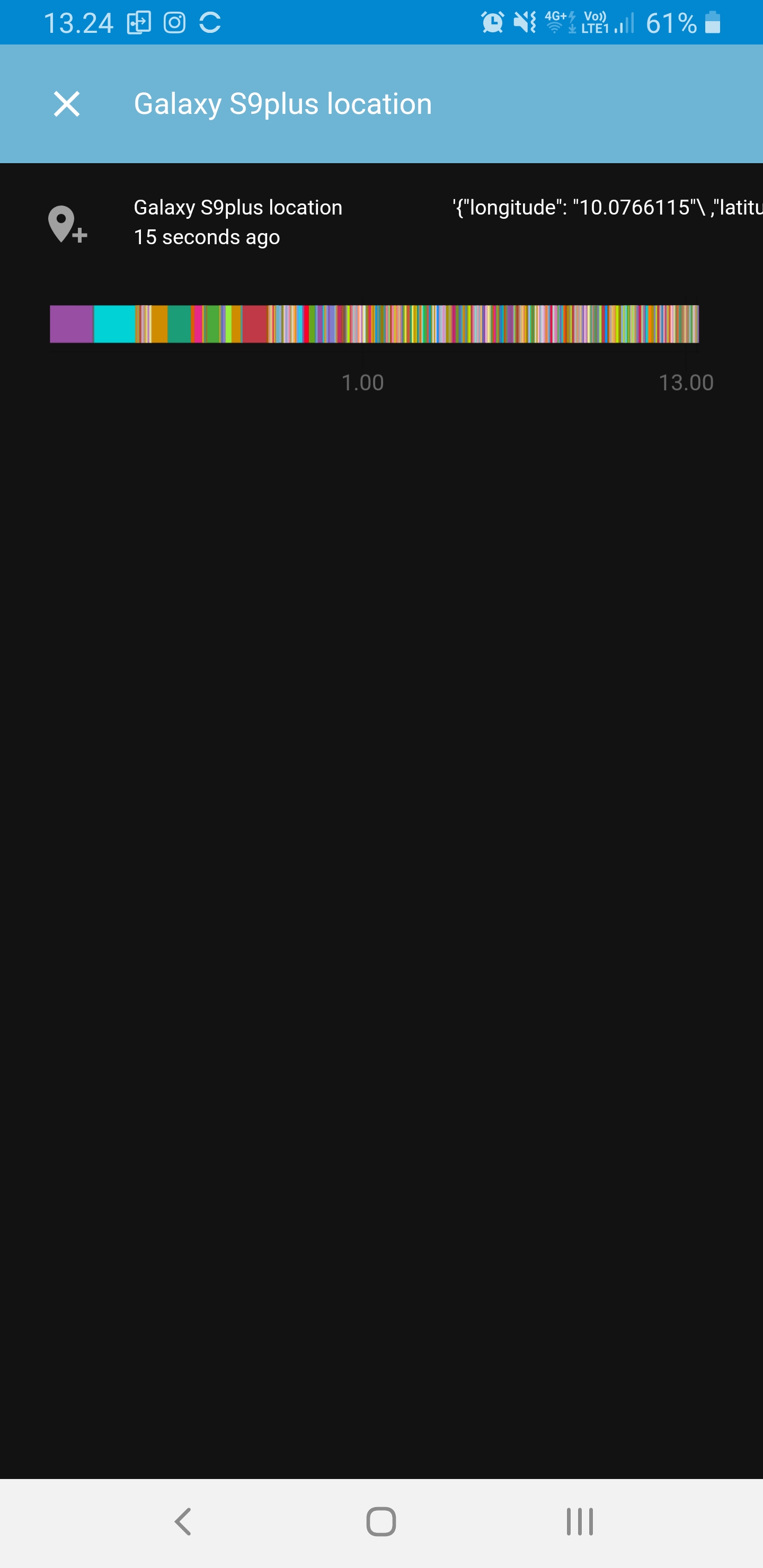
allanpersson
on 9 Dec 2019
And battery also.
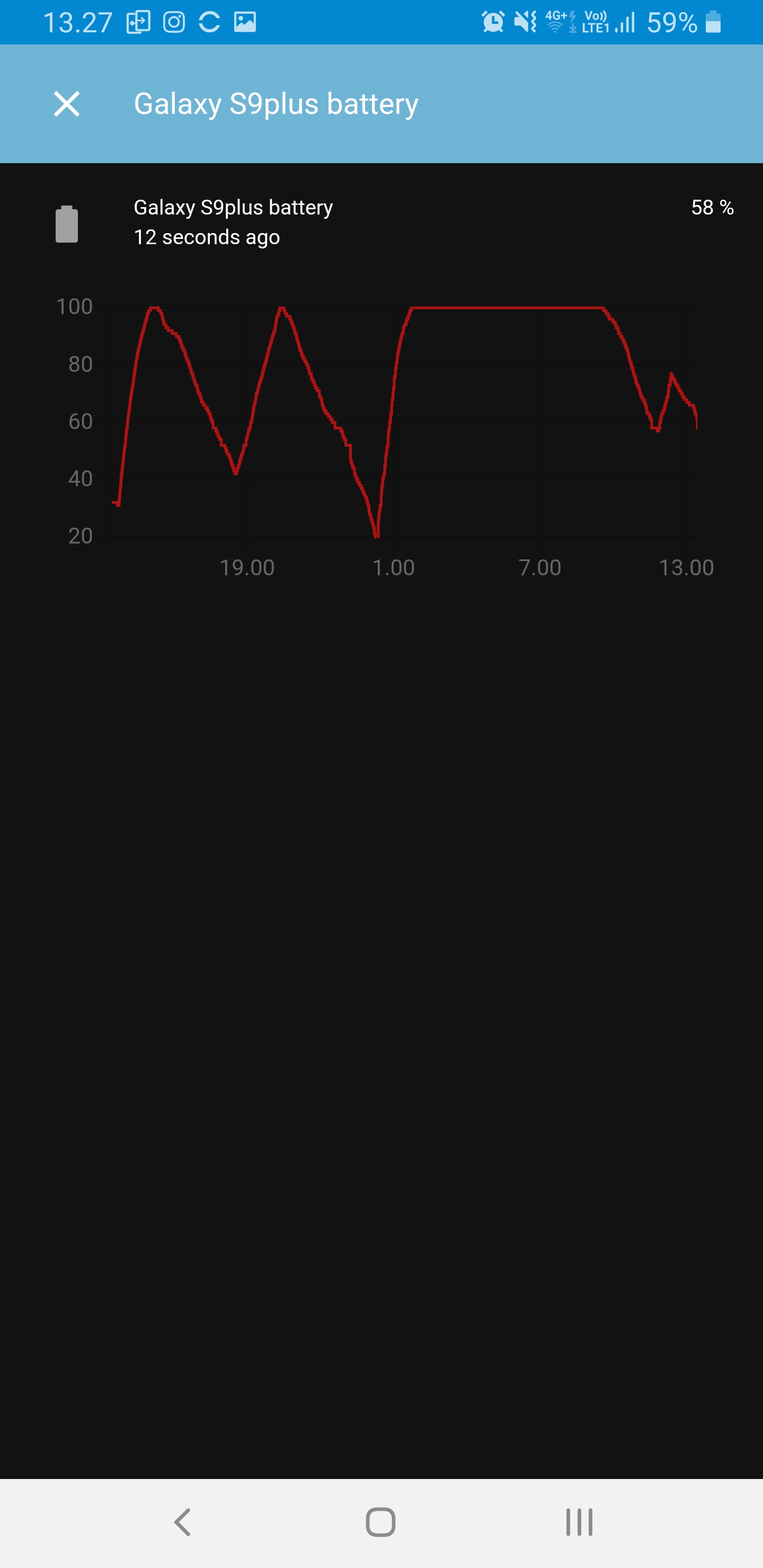
allanpersson
on 9 Dec 2019
It did work when I left the house, now that I am back I did look and it seems it has been stuck in the last position for about 1h now, it didn't "recognize" I arrived home.
Maybe it might be an idea if the home parameters are stored in the app itself, so that everytime you enter/leave the home zone it sends an update, this might improve a bit the usage for automation on arrival and leave (ex. turn on alarm).
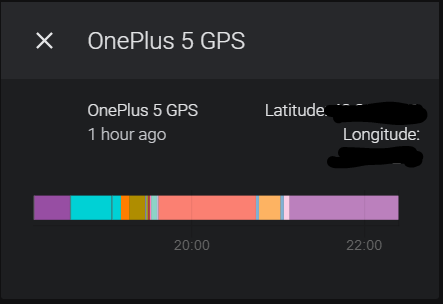
PS: On last update I was about 10 mins away from home, so I did quite enough distance for it to trigger again in my opinion :)
Also worth a note is that it did record minor movements, but not this last one to let me enter the "home" zone
SeLLeRoNe
on 9 Dec 2019
I have just opened the App and it did update:
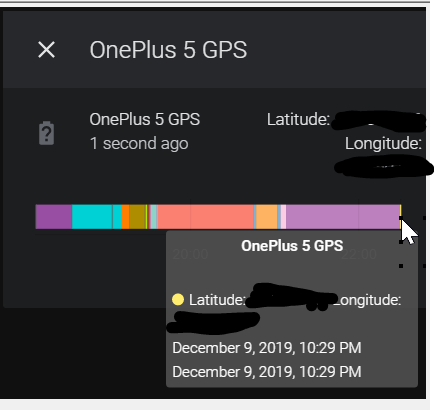
SeLLeRoNe
on 9 Dec 2019
This PR has the zone based events: https://github.com/home-assistant/home-assistant-android/pull/95
 JBassett
on 9 Dec 2019
JBassett
on 9 Dec 2019
That's very good @JBassett thanks for letting me know :)
SeLLeRoNe
on 9 Dec 2019
I really don't want to open an "issue" for this question, so:
https://github.com/home-assistant/home-assistant-android/issues/53
_Why is the "Battery Level" so dependent by the GPS location?_
Again, _some tablets do not have the GPS_, the battery indicator won't work.
 Nihvel
on 16 Dec 2019
Nihvel
on 16 Dec 2019
Related issues
 andriej
·
4Comments
andriej
·
4Comments
 Nik71git
·
4Comments
Nik71git
·
4Comments
 rradar
·
4Comments
rradar
·
4Comments
 CedrickFlocon
·
4Comments
CedrickFlocon
·
4Comments
 simbesh
·
3Comments
simbesh
·
3Comments