Android: Problem when accessing local WebDav on android
Basic Info
Cryptomator v1.3.9 (1733)
Android 9 / API28
Device Xiaomi Mi A2
Description
When you try to open a safe from a local WebDAV server, you can select the masterkey file, but when trying to access, the vault not found screen appears ...
Attached zip with logs and video with capture of the whole process.
logs.zip
20190524-113526.zip
 calvituh
All 8 comments
Looks like your masterkey.cryptomator file and the d folder is directly located in the root of the WebDAV drive. Normally they are in a folder and our Android application expects this. If they are directly in the root, this leads to an error.
Could you try to create a new vault (and don't move out the masterkey.cryptomator file and the d folder) or create a new folder e.g. foo and move the masterkey.cryptomator file and the d folder inside the created foo folder. Then try to open this vault by using the masterkey.cryptomator file inside the foo folder.
Edit: foo must match the name he had before and was the name of the vault.
 SailReal
on 24 May 2019
SailReal
on 24 May 2019
@SailReal First of all, thank you very much for your response, but I have tried what you tell me and the result is the same.
calvituh
on 24 May 2019
The folder structure looks now something like this?:
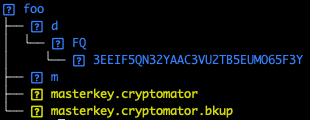
Could you try to create a new vault directly with Cryptomator Android, what happens then? Maybe you can provide again a log file after this step? Thanks!
SailReal
on 24 May 2019
Thanks again @SailReal , the directory structure is the same as you raise, and creating a new vault from android cryptomator, the result is the same.
Attachment log.
logs.zip
Edit: The WebDav server is a IIS 8.5
calvituh
on 24 May 2019
Now the log looks much better!
Creating the masterkey.cryptomator works, directly after the create an exist check works but the GET fails with a 404 not found. That sounds really strange :thinking:
PUT https://192.168.30.100/prueba/masterkey.cryptomator
201 Created https://192.168.30.100/prueba/masterkey.cryptomator
PROPFIND https://192.168.30.100/prueba/masterkey.cryptomator
207 Multi Status https://192.168.30.100/prueba/masterkey.cryptomator
GET https://192.168.30.100/prueba/masterkey.cryptomator
404 Not Found https://192.168.30.100/prueba/masterkey.cryptomator
I think that the server is configured incorrectly. Can you please check the server logs for any hint or recheck that you can open the masterkey.cryptomator file using another WebDAV client ?
SailReal
on 24 May 2019
With the windows client works correctly, even through a VPN ... so I do not know what I can check in the WebDav server configuration, I will locate the logs and pass them to you.
Thank you so much for everything.
Edit: Attached log file WebDav Server
u_ex190524_x.log
calvituh
on 24 May 2019
It looks the same in server log, until the GET everything is fine but then the status code to the GET request is 404 that makes completely no sense.
2019-05-24 16:21:29 192.168.30.100 PUT /prueba/masterkey.cryptomator - 443 jcaballero 192.168.30.196 okhttp/3.14.1 - 201 0 0 15
2019-05-24 16:21:29 192.168.30.100 PROPFIND /prueba/masterkey.cryptomator - 443 jcaballero 192.168.30.196 okhttp/3.14.1 - 207 0 0 15
2019-05-24 16:21:32 192.168.30.100 GET /prueba/masterkey.cryptomator - 443 jcaballero 192.168.30.196 okhttp/3.14.1 - 404 3 50 15
With localhost it seems that you can make GET requests but not from external machines, to verify that, please install an WebDAV client on your smartphone like webdav nav lite (requests a lot permissions), create a new connection with the url192.168.30.100, open the folder prueba and try to download the masterkey.cryptomator file. If this doesn't work (what I expect) the problem is on the server config side.
SailReal
on 24 May 2019
Hi again, there has been no way to get it to work with IIS, so I have fixed it by installing apache, activating the DAV module and now it works correctly cryptomator !!.
Thank you very much for your help @SailReal .
A greeting.
calvituh
on 28 May 2019
Related issues
 ixmnz
·
6Comments
ixmnz
·
6Comments
 tobihagemann
·
5Comments
tobihagemann
·
5Comments
 amigagamer
·
3Comments
amigagamer
·
3Comments
 jordanbtucker
·
5Comments
jordanbtucker
·
5Comments
 BearTi
·
6Comments
BearTi
·
6Comments
Most helpful comment
Hi again, there has been no way to get it to work with IIS, so I have fixed it by installing apache, activating the DAV module and now it works correctly cryptomator !!.
Thank you very much for your help @SailReal .
A greeting.