Android: Error while trying to run the app on my device using android studio
Actual behaviour
Unable to run the app on my device using android studio.
Expected behaviour
The app should run on my device
Steps to reproduce
- Open Android Studio
- Click the run button
- Select their device from the list of available devices
Environment data
Android version: 7.1.1
Device model: OnePlus 3T

 sd1998
All 29 comments
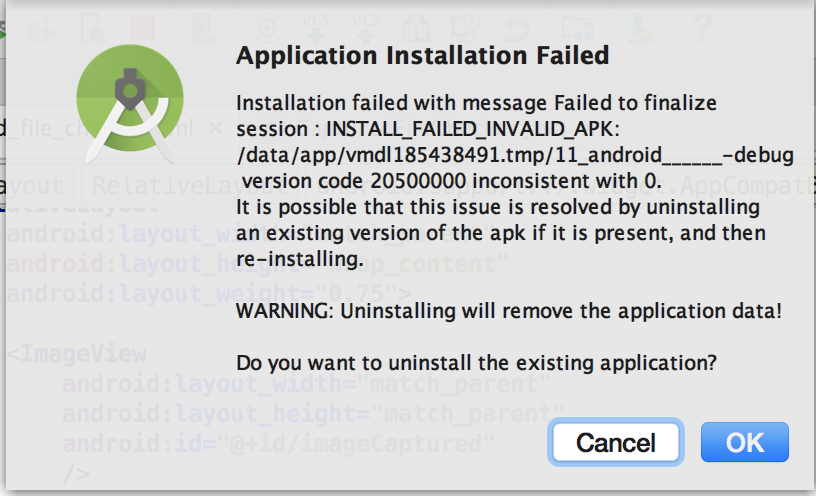
Hi @sd1998 , this error may appear because you have the ownCloud release app installed and when you try to install the apk generated during development, which is different to the release one and not signed, a conflict is triggered when Android tries to update the release app with the debug app.
So, as the dialog you attach suggests you, uninstalling the ownCloud app from your device, should be enough to fix the problem.
 davigonz
on 30 Oct 2017
davigonz
on 30 Oct 2017
@davigonz I tried that but still I am getting the same error.
sd1998
on 30 Oct 2017
Hi again @sd1998 , try the next steps in Android Studio:
- Open "Build" menu in the top bar and click "Clean project" option.
- Open "Build" menu again and click "Rebuild project" option.
- Click the run button and select the device/emulator.
davigonz
on 31 Oct 2017
@davigonz I tried that also but I am still getting the same error.
sd1998
on 1 Nov 2017
Hi @sd1998 , are you using the code just downloaded from the github repo or have you included any change? With which branch are you working? Are you having the same problem with an emulator?
davigonz
on 2 Nov 2017
@davigonz I add the camera upload feature and I am working on the master branch should I work on the beta?
sd1998
on 2 Nov 2017
@sd1998 I meant if you were having the same error before applying your changes. It doesn't matter the branch you are using in your repo, as long as it has been created from master branch.
davigonz
on 2 Nov 2017
@davigonz Yes I was getting the same error before making the changes.
sd1998
on 2 Nov 2017
@sd1998 hmm, could you attach here the details when clicking Binder-java:580? Thanks

davigonz
on 3 Nov 2017
@davigonz On clicking android studio opens the Binder.java class
and the following is shown:-

And here is the Binder.java file:-
I downloaded the Android API 24 Platform but still it is showing the same message.
Can there be a problem if I have JAVA9?
sd1998
on 3 Nov 2017
@sd1998 Try to generate the apk file and install it manually in the device. It's possible that once the app is installed, the next time you press the run button in Android Studio, it will work.
Follow the next steps:
- Press Build menu.
- Option Build Apk.
- A dialog will appear pointing you to the folder in which the apk has been saved.
- Copy the apk to your device and install it.
davigonz
on 3 Nov 2017
@davigonz I tried it and it did not work I am receiving the same error.
sd1998
on 5 Nov 2017
Can there be a problem if I have JAVA9?
@sd1998 did you check with java8?
 jesmrec
on 6 Nov 2017
jesmrec
on 6 Nov 2017
@jesmrec Yes I tried but it does not work.
sd1998
on 7 Nov 2017
@sd1998 very weird behaviour... you does not have any previous installation in the device so it should work. Could you check over a new created emulator? Other option is clearing Android Studio cache, not only the project's one (File > Invalidate Caches/Restart) and build again.
Do you have Instant Run enabled?
jesmrec
on 7 Nov 2017
@sd1998 did you upgrade Android Studio to 3.x?
jesmrec
on 8 Nov 2017
@jesmrec Yes I have the upgraded version.
sd1998
on 8 Nov 2017
@sd1998 did you check https://github.com/owncloud/android/issues/2060#issuecomment-342481296
jesmrec
on 8 Nov 2017
@jesmrec Sorry I missed it
I will try out what you suggested.
sd1998
on 8 Nov 2017
@sd1998 did you have time to check? if you need help, don't hesitate...
jesmrec
on 15 Nov 2017
Hi @sd1998 , I've just noticed the same problem while using a different computer and I have fixed by disabling the Instant Run feature. To do that, go into File > Settings > Build, Execution, Deployment > Instant Run and disable it.
davigonz
on 29 Nov 2017
@davigonz Thanks I will try it now
sd1998
on 29 Nov 2017
@davigonz It is working now thanks for the help Now I will work on #2060
sd1998
on 29 Nov 2017
It is working now thanks for the help Now I will work on #2060
@sd1998 Awesome! I will close this, since it's already fixed.
davigonz
on 29 Nov 2017
Hi, I'm having the same issue and I have already tried each and every things. I have no clue what else to do. can someone help
 prabhashibuddhima
on 22 Jan 2020
prabhashibuddhima
on 22 Jan 2020
did you check https://github.com/owncloud/android/blob/master/SETUP.md#2-working-with-android-studio @prabhashibuddhima ?
jesmrec
on 22 Jan 2020
I have the issue when I install tha app on my android phone. It install but it closed imdedgtely, without showing any error. Can anyone help me.
Thanks
 nidasajjad
on 13 Feb 2020
nidasajjad
on 13 Feb 2020
@nidasajjad which server version and app version? how do you install the app?
jesmrec
on 14 Feb 2020
@jesmrec the server version and app version is same and that is 29. And I install app by both method. Build apk and directly install to android mobile but it shows same error
nidasajjad
on 14 Feb 2020
Related issues
davigonz
·
7Comments
jesmrec
·
4Comments
 ldmpub
·
4Comments
sd1998
·
6Comments
davigonz
·
5Comments
ldmpub
·
4Comments
sd1998
·
6Comments
davigonz
·
5Comments
Most helpful comment
Hi @sd1998 , I've just noticed the same problem while using a different computer and I have fixed by disabling the Instant Run feature. To do that, go into File > Settings > Build, Execution, Deployment > Instant Run and disable it.