Android: App crashes in second Android account
Actual behaviour
-Tell us what happens
When trying to open the ownCloud app with my wifes user account on my Pixel C, the app crashes straight away.
Expected behaviour
-Tell us what should happen
App opens normally
Steps to reproduce
- Create a second user account on Android
- Switch to second user account
- Try to open the app
Can this problem be reproduced with the official owncloud server?
(url: https://demo.owncloud.org, user: test, password: test)
- Unable to test as I can not configure it (The server took too long to respond)
Environment data
Android version:
8.0.0
Device model:
Pixle C
Stock or customized system:
Stock
ownCloud app version:
2.4.0
ownCloud server version:
9.1.6
Logs
Web server error log
Notihing showing when I open up the app on the tablet.
ownCloud log (data/owncloud.log)
Nothing showing when I open up the app on the tablet.
What I already tried
- Logging in with her account works fine on the website
- Linux desktop app works fine with her account
- My ownCloud account works find in my user account but also crashes the app in my wifes user account
- Clearing cache, clearing cache & data, removing the account and trying to add it again -> once the account is added, the app crashes
- Rebooting the tablet and re-set up the account in her user account still lets the app crash
Overall it looks like the app crashes before it even tries to connect to the server.
 daincredibleholg
All 36 comments
@daincredibleholg Thank you very much for reporting this issue!
Could you verify with the 2.5.0-beta2 from F-Droid or Play Store?
 michaelstingl
on 17 Sep 2017
michaelstingl
on 17 Sep 2017
Hi @michaelstingl.
Just checked with the 2.5.0-beta2 and it shows the same behaviour. It lets me set up the account and when it tries to start, it simply crashes.
Interestingly enough, I can not log in with my user either - but this seems to be another issue. It changes my user name to my LDAP OID and then refuses my password. Will play around with that and open another issue if needed.
daincredibleholg
on 17 Sep 2017
Does that account crash if is the only one in device? (not a second one). Will check anyway... maybe an Android O issue.
 jesmrec
on 17 Sep 2017
jesmrec
on 17 Sep 2017
@jesmrec I am pretty sure it has something to do with Android O as it worked before the update.
And yes, it is the only ownCloud account in that Android User Account (if this makes sense). Give me a shout if you need more test / more explanations. Happy to help.
daincredibleholg
on 18 Sep 2017
Just checked with the 2.5.0-beta2 and it shows the same behaviour. It lets me set up the account and when it tries to start, it simply crashes.
Please, if you are able to set up the account that triggers the crash, could you include here the logs just after crashing? To see them, you can go to the side menu => Settings => Logs
Interestingly enough, I can not log in with my user either - but this seems to be another issue. It changes my user name to my LDAP OID and then refuses my password. Will play around with that and open another issue if needed.
Yeah, I've noticed this problem also, I will check it.
 davigonz
on 19 Sep 2017
davigonz
on 19 Sep 2017
@davigonz @daincredibleholg seems to be the regression bug already reported in https://github.com/owncloud/android/issues/2008#issuecomment-327798395. If it is, it will be fixed with the 2.5.0 version.
jesmrec
on 19 Sep 2017
@davigonz I'll try once I am back home at the device.
@jesmrec That would be great. Are there more betas planned?
daincredibleholg
on 20 Sep 2017
not before the 2.5.0 official release in Google Play.
jesmrec
on 20 Sep 2017
Hi @daincredibleholg , have you tried the new 2.5.0 app?
davigonz
on 19 Oct 2017
Good morning.
@davigonz Sorry, complete forgot to test it after the last release.
Gave it a run just now and it sadly still crashes.
I tried straight away (with set up account) first - crash. Then, removed account & uninstalled beta & force stopped owncloud app & cleared cached & cleared data -> same behaviour as before, I can set up the user and then it crashes. :thinking:
daincredibleholg
on 20 Oct 2017
mmmm, we should try to get more accurate steps. For example:
1.- Install the app
2.- Create first account -> go to Manage accounts view
3.- Tap on "Add Account" in Manage accounts view -> Login view appears
4.- Create a second account by inputing credentials in login view -> go to Manage accounts view where two attached accounts are displayed
5.- Tap on the second one -> files view appears (?)
...
n.- Open drawer -> Manage accounts -> Select first account -> Crash (?)
...
@daincredibleholg if you can provide us something similar it can be helpful to try to reproduce, so small details can point to different scenarios. Other details are also important to reproduce:
- server reached under protocol http/https/https with custom certificate ?
- are you using AD/LDAP? or other apps in server that can be involved in authentication process.
- both accounts in same or different servers?
Thanks a lot !
jesmrec
on 20 Oct 2017
@daincredibleholg Could you check with 2.5.1-beta1 if the problem persists?
jesmrec
on 29 Nov 2017
@jesmrec Of course. Will do hopefully tonight, once I am back home.
daincredibleholg
on 29 Nov 2017
thanks, in case it keeps failing you can send us logs (settings view)
jesmrec
on 29 Nov 2017
The behaviour is still the same :(
Where can I get the logs from? If you refer to the app's settings view, no chance, as I can not reach it (it crashes straight away once an OC account is configured)
daincredibleholg
on 29 Nov 2017
You can get logs in beta version from settings view.
jesmrec
on 30 Nov 2017
@jesmrec I explored the Android settings and couldn't find a log section. So, I assume you mean the settings view from the app. As it crashes straight after opening it, there is no way for me to check that view :-/
Any other ways of getting better information?
daincredibleholg
on 2 Dec 2017
Same issue here on OnePlus phone with Android 8.0.0. It was working fine in earlier Android versions. So I can confirm everything that @daincredibleholg wrote. Can you please fix that soon? Its very annoying that a paid app (Google Play Store) isn't able to fix that issue within a quarter of a year...
And no: there is no chance to provide a crashlog, cause the app is instantly crashing after you open it. Just use a Android 8 device, create a second Android user and install your app. You will instantly discover this failure. Also with your demo server...
 dm82m
on 14 Dec 2017
dm82m
on 14 Dec 2017
@daincredibleholg , @dm82m thank you for your feedback, since it's not possible to have app logs in this case, could you please answer the questions @jesmrec asked above?
- server reached under protocol http/https/https with custom certificate ?
- are you using AD/LDAP? or other apps in server that can be involved in authentication process.
- both accounts in same or different servers?
If we configure our test servers in a similar way than yours, we might reproduce the problem.
The last option would be providing us a test account of your servers.
davigonz
on 15 Dec 2017
To get logs it is needed the beta version (in the official logs are not available).
jesmrec
on 15 Dec 2017
are the steps the following? (Pyxel C Android 8, the environment reported in first message):
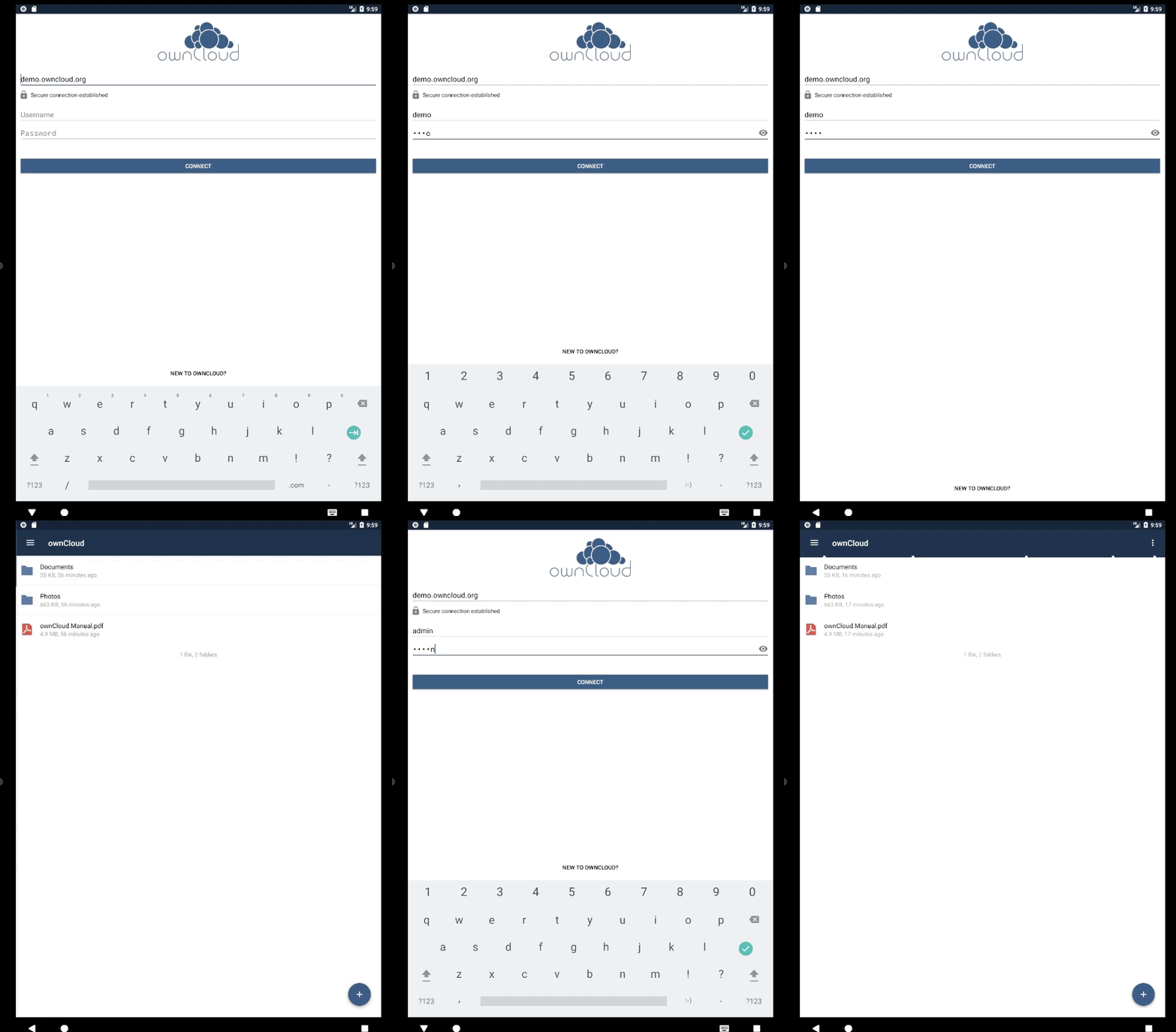
we are not reproducing the problem, so we are missing something, and all our help will be useful.
Other question to add @davigonz's above:
- Did the problem start to happen after any upgrading (app or android), or is the app installed from scratch?
Please, don't miss anything. Any detail could have the key to fix.
@dm82m @daincredibleholg
jesmrec
on 15 Dec 2017
Good morning.
Right, let's see:
- I use https with a valid SSL cert from letsencrypt.org
- My backend is an OpenLDAP, running on Ubuntu Server 16.04
- Both accounts in question run on the same server - and it doesn't matter which account I try in the non-primary Android account, the error happens either way.
- The problem started after upgrading the app, but uninstalling it (both, Beta and Stable) and then reinstalling it (including the cleaning of cache and files before uninstall). It is still reproducible.
- The Pixel C always gets the latest OS updates / upgrades. Sadly, I can not remember when it started, but I think the first time I experienced the issue was after the initial Android 8 release.
Hope that helps. Let me know if I can give you more information.
I can also create you a test user on my server if needed / helpful.
daincredibleholg
on 15 Dec 2017
@daincredibleholg you can ship the credentials to [email protected]
jesmrec
on 15 Dec 2017
- yes the problem started with Android 8
- it is ONLY happening if you are using a second/third/... user on Android. If you use your first user, everything works like a charm. Have you tried that on your side with Android 8 and a second user on the device? Looks like you are testing with Android 8 and your primary user...
- clearing the system cache, application cache, application data, reinstalling app (beta or non-beta) is not changing anything
- where is the beta app putting its crash log files? Maybe I can provide logs then...
dm82m
on 15 Dec 2017
In the gif above i attached two accounts (demo and admin), and i couldn't reproduce it, unfortunately. Beta app sets the logs in settings view.
jesmrec
on 15 Dec 2017
@dm82m I have limited understanding about Android, but do you mean you not only have multiple accounts in your ownCloud Android app, but you also have multiple accounts in your Android 8 system itself? (https://support.google.com/pixelphone/answer/2865483?hl=en-GB)
michaelstingl
on 15 Dec 2017
guys for sure, we are NOT talking about different OwnCloud users. we are talking about ANDROID users. If you create a second/third/... user on ANDROID the OwnCloud app fails on that second/third/... user on ANDROID. Completely independent from the OwnCloud user(s).
Hope it is more clear now!
dm82m
on 15 Dec 2017
@jesmrec Sure. Will send it over in a minute. Let me know if you need anything else. And thanks for looking into this!
daincredibleholg
on 16 Dec 2017
That was our missing detail. Sorry for the misunterstanding with the Android account/ownCloud account.
The problem seems to come from a lack of INTERACT_ACROSS_USERS permission.
We will check for a fix.
@davigonz this is the stacktrace of the problem:
12-18 14:35:04.603 9046-9126/? E/AndroidRuntime: FATAL EXCEPTION: Thread-2
Process: com.owncloud.android.beta, PID: 9046
java.lang.SecurityException: get package info: Neither user xxxxxx nor current process has android.permission.INTERACT_ACROSS_USERS.
at android.os.Parcel.readException(Parcel.java:1942)
at android.os.Parcel.readException(Parcel.java:1888)
at android.accounts.IAccountManager$Stub$Proxy.getAuthToken(IAccountManager.java:1488)
at android.accounts.AccountManager$11.doWork(AccountManager.java:1749)
at android.accounts.AccountManager$AmsTask.start(AccountManager.java:2240)
at android.accounts.AccountManager.getAuthToken(AccountManager.java:1746)
at android.accounts.AccountManager.getAuthToken(AccountManager.java:1658)
at android.accounts.AccountManager.blockingGetAuthToken(AccountManager.java:1495)
at com.owncloud.android.lib.common.accounts.AccountUtils.getCredentialsForAccount(AccountUtils.java:166)
at com.owncloud.android.lib.common.OwnCloudAccount.loadCredentials(OwnCloudAccount.java:128)
at com.owncloud.android.lib.common.SingleSessionManager.getClientFor(SingleSessionManager.java:126)
at com.owncloud.android.lib.common.DynamicSessionManager.getClientFor(DynamicSessionManager.java:40)
at com.owncloud.android.lib.common.operations.RemoteOperation.grantOwnCloudClient(RemoteOperation.java:283)
at com.owncloud.android.lib.common.operations.RemoteOperation.runOperation(RemoteOperation.java:265)
at com.owncloud.android.lib.common.operations.RemoteOperation.run(RemoteOperation.java:232)
at java.lang.Thread.run(Thread.java:764)
jesmrec
on 18 Dec 2017
Thanks for the logs @jesmrec , I will check them
davigonz
on 28 Dec 2017
@daincredibleholg @dm82m
After researching a bit about the problem, I'm not able to find a quick solution to fix this crash since is triggered because of the lack of INTERACT_ACROSS_USERS permission, which is not like other Android permissions that are available to third party applications like ownCloud, I mean, it's not possible to grant this permission from the code directly or ask the user for accepting it, as we currently do with the permission to write in the storage for instance.
Since the app is working properly in additional Android accounts for versions lower than Android 8, it seems that Google has changed something related to INTERACT_ACROSS_USERS permission or maybe is an Android 8 bug.
I will request other opinions in specialized forums and paste here the conclusions.
davigonz
on 4 Jan 2018
We have not found a quick solution for this problem to be included in the next release 2.6.0, so we will face it in coming releases.
davigonz
on 15 Jan 2018
Hi @daincredibleholg , is this already working for you?
davigonz
on 7 Feb 2019
I need to double check. But last time I did, it was still broken.
daincredibleholg
on 11 Feb 2019
So, sorry for the delay.
I finally managed to check again and was able to switch to my wife's account on the tablet and open the ownCloud app. So it seems to be fixed.
Thanks for fixing this!
daincredibleholg
on 1 Mar 2019
Closing it... thanks for reporting and checking!
jesmrec
on 4 Mar 2019
Related issues
 Emil-G
·
7Comments
Emil-G
·
7Comments
 Fukurokudzu
·
5Comments
davigonz
·
7Comments
jesmrec
·
4Comments
jesmrec
·
7Comments
Fukurokudzu
·
5Comments
davigonz
·
7Comments
jesmrec
·
4Comments
jesmrec
·
7Comments
Most helpful comment
guys for sure, we are NOT talking about different OwnCloud users. we are talking about ANDROID users. If you create a second/third/... user on ANDROID the OwnCloud app fails on that second/third/... user on ANDROID. Completely independent from the OwnCloud user(s).
Hope it is more clear now!