Android: Disable preview on tablet in wide-screen.
Actual behaviour
- ownCloud APP on tablet shows a preview-area if you hold the tablet vertically
Expected behaviour
- I would like to have the possibility to disable this to see longer file-names.
Steps to reproduce
- Open ownCloud App
- Browse any Folder
- Turn the tablet
Environment data
Android version:
Every tested (5.0 and upwards)
Device model:
Acer Iconia A3-40
Stock or customized system:
Stock
ownCloud app version:
2.2.0
ownCloud server version:
9.1.2 (stable)
 mbrinkmann
All 7 comments
if you hold the tablet vertically
I guess that's a typo and you meant 'horizontally' :)
I know what you mean. We need a better, more flexible layout for tablets.
 davivel
on 1 Feb 2017
davivel
on 1 Feb 2017
of course you are right, sorry ;p
Thanks for your understanding.
mbrinkmann
on 4 Feb 2017
+1
Also when using raster view to review your images, the preview panel is useless.
 fokkejacobi
on 9 Feb 2017
fokkejacobi
on 9 Feb 2017
Also when using raster view to review your images, the preview panel is useless.
Absoloutly, and its also completely out of trend. No other files app does two panels anymore. So I remove it.
 theScrabi
on 5 Apr 2018
theScrabi
on 5 Apr 2018
@michaelstingl Your opinion pls:
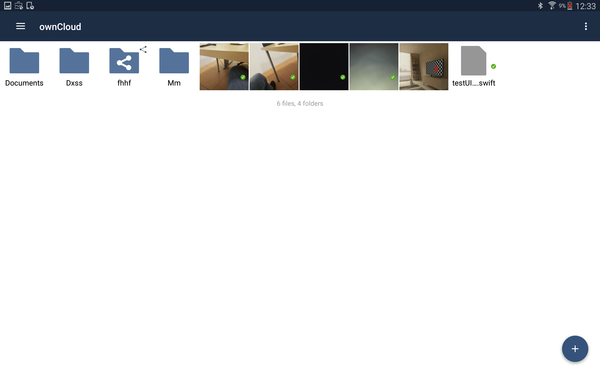
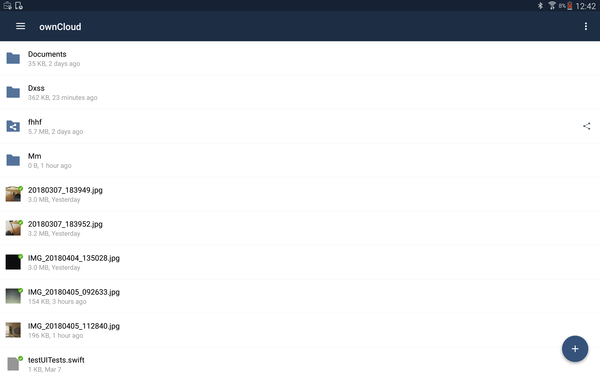
theScrabi
on 5 Apr 2018
Sounds like a good approach. Go for it! 👍
 michaelstingl
on 6 Apr 2018
michaelstingl
on 6 Apr 2018
It will be included in 2.8.0
 davigonz
on 8 May 2018
davigonz
on 8 May 2018
Related issues
 lefherz
·
6Comments
davivel
·
4Comments
lefherz
·
6Comments
davivel
·
4Comments
 jesmrec
·
4Comments
davigonz
·
7Comments
jesmrec
·
4Comments
davigonz
·
7Comments
 sd1998
·
6Comments
sd1998
·
6Comments