Android: FR: Retry failed camera uploads
A user review on GooglePlayStore requested a feature:
"Image upload still does not work reliably, not in 2.6 and is actually my most important feature. As far as I was happy, everything worked as it should. I was actually satisfied so far, everything worked as it should. Now I've had the problem for a long time that the photo upload to the InstantUpload directory always fails, especially because then simply ceases to upload the images, which is very unreliable. As if the trigger is lost in the system (Samsung S6 Edge and now Samsung S8). It would be OK if a second attempt would be made later to upload the picture again, but here this breaks completely away, so that not all my photos arrive in the InstantUpload."
Could this be implemented into the app?
 lefherz
All 6 comments
Implement a new feature to work around something else that isn't working? Why not fix the root cause?
@lefherz Please ask the user to send more information to [email protected] .
 michaelstingl
on 14 Mar 2018
michaelstingl
on 14 Mar 2018
Done :)
lefherz
on 14 Mar 2018
Ok, let me try to explain the major issue I have and where I would be surprised, if others would not have. I'm using newest version on Android (and iOS), I have set up an instant picture and video upload into a dedicated target folder on my owncloud. I also only want pictures/videos to be uploaded, when I'm connected to a WiFi.
_Please see the following real life example:_
Some days ago (10.03.2018), I was outside with my girls and took some pictures, there I was not connected to a WiFi, so no pictures where uploaded (which is what I wanted due to only a small data package on my phone).
Then, some days later (13.03.2018), I took at home some pictures of electronic parts on a table, which I did at home, where I was connected to my usual WiFi.
_Situation and expectation:_
In none of the cases I ever opened the ownCloud app until today. So I simply expect all my pictures to be uploaded in the background to my server, whenever I'm connected to a WiFi with access to my server. I've recognized today, that pictures of my girls are missing, but the electronic parts were visible in my photo folder. So why are the girls missing?
_Situation in the app:_
I opened the app and entered the upload section:
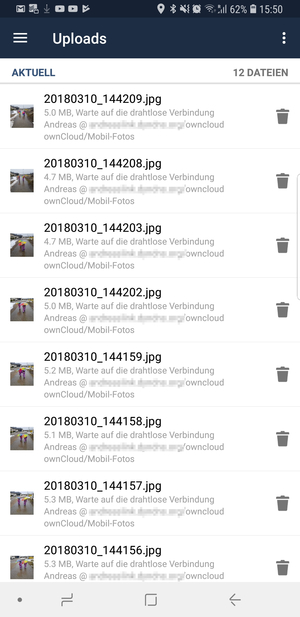
Here I can see, all pictures seem to wait on a WiFi connection, even though I'm currently connected to a WiFi (can also be seen at the top). So that's the issue, why aren't these uploaded?
If I scroll down a bit, I see the pictures taken at home to be successfully uploaded without any interaction from me, even though they are older:
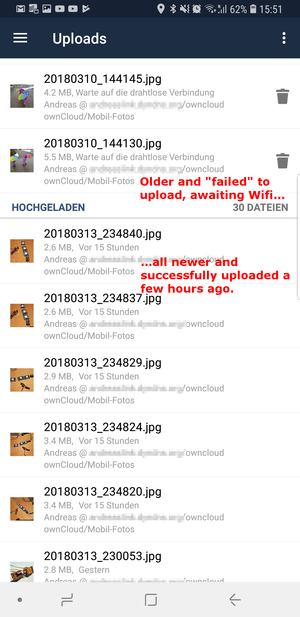
This of course makes sense, as I was able to see them in my folder on the server.
If I now manually hit the button to retry all failed uploads, the upload successfully starts again and is working like a charm:
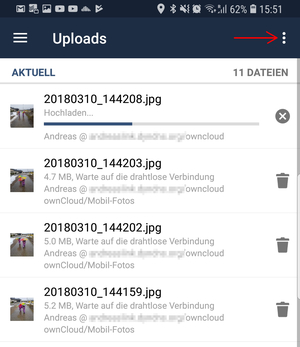
And THIS is exactly the point, where I'm wondering why the heck these are not retried a second time.
_Discussion:_
So the former scenario is exactly showing my issue with picture uploads, why you can't trust them and why this is an issue. What if I have decided to delete them today, assuming, they were already all backed-up in my ownCloud?
The core issue is probably as @michaelstingl said, to get things right, why is the available WiFi ignored and why are these not retriggered? So the initial feature request from @lefherz makes sense, just to have a retry on these ones. This is not just a WiFi related issue, but I had a lot more with things like "authentication failed" even though, there was no issue and I simply had to click "retry all failed" and they were all uploaded without any further noise. So why aren't all these failed ones not retried within some new timeslots? A re-trigger event could be, if at least one other photo/video was successfully uploaded as this prooves there is a working WiFi and a valid authentication existing. The only error I can understand is, if a source file is deleted, but please, then also remove the task to upload the picture. It does not make sense to have orders for not existing pictures.
What I'm aiming for is a 100% reliable picture and video upload functionality as I do not never ever want to enter the upload menu to manually re-trigger an upload process. Whether this is either solved by fixing the correct trigger point evaluation or by creating a new feature/scheduler to retry missing pictures. Or probably a mixtures of both?
_Personal blabla:_
I bring in a lot emotion in here as I've based my wife's and mine children-photo-and-video-life to this app, so I just need to rely on the app that all our mobile photos are stored secure and persistent in our ownCloud so we do not loose important moments with our children. Other cloud apps are also able to handle this silently in the background, so this is why I'm wondering that this is still not stable in this fairly mature app being quite some time on the market.
I hope, I could help :-).
 andreaslink-de
on 14 Mar 2018
andreaslink-de
on 14 Mar 2018
@andreaslink-de thank you very much for your feedback. To work on such an issue, ownCloud experts need some more information. Normally if you open a new issue here, you need to provide this information. (you can use it as an template). Please help and provide the information in the structured format. It would be awesome if you could help the ownCloud team to reproduce the issue.
michaelstingl
on 15 Mar 2018
Hej there,
some time past and I really would like to get this error fixed as it's still existing exactly the same way, even though I go with every stable version, which is provided. So following your template...
Actual behaviour
Pictures are not uploaded when being taken outside a valid wifi network and then entering back into a wifi network (like e.g. at home). I always need to press the button manually to retrigger an upload of the failed ones. Please find way more exact details in my posting above.
Expected behaviour
I do not want to make any interaction in the app, whenever there is a valid wifi connection, I want all outstanding pictures and videos automtically to be uploaded without any additional user interaction (compare e.g. with Dropbox app).
Steps to reproduce
- Read my very detailed posting above...
- Setup owncloud to only upload pics and videos when being WLAN connected
- Leave a valid wifi and take several pictures/videos
- Enter valid Wifi network take some further pictures if wanted
- See new pictures being uploaded but old ones taken outside wifi to be awaiting to be uploaded
Can this problem be reproduced with the official owncloud server?
(url: https://demo.owncloud.org, user: test, password: test)
I was not able to do it, as I did not connect my personal app (production phone) to the demo server. This needs to be tested by someone with a testphone.
Environment data
Android version: last tested with 8.0.0 (but failed same way with older versions)
Device model: Samsung S6 Edge, Samsung S8
Stock or customized system: Stock
ownCloud app version: v2.8.0
ownCloud server version: 10.0.8.5
Logs
_There are no logs, which might make sense as this is app triggered I guess, except you tell me something else._
andreaslink-de
on 15 Jul 2018
I'd like to throw my support behind this fix. My uploads fail frequently and they don't retry unless I do it manually.
 88fingerslukee
on 17 Jan 2020
88fingerslukee
on 17 Jan 2020
Related issues
 jesmrec
·
7Comments
jesmrec
·
7Comments
 gerroon
·
5Comments
gerroon
·
5Comments
 hodyroff
·
6Comments
hodyroff
·
6Comments
 sd1998
·
6Comments
sd1998
·
6Comments
 davivel
·
4Comments
davivel
·
4Comments