Android-components: Fennec migration: The Custom Import field from the uBlock Dashboard is not entirely visible
Preconditions:
Have uBlock Origin added to Fennec and pages added to the Custom Import field.
Steps to reproduce
- Replace Fennec with Fenix;
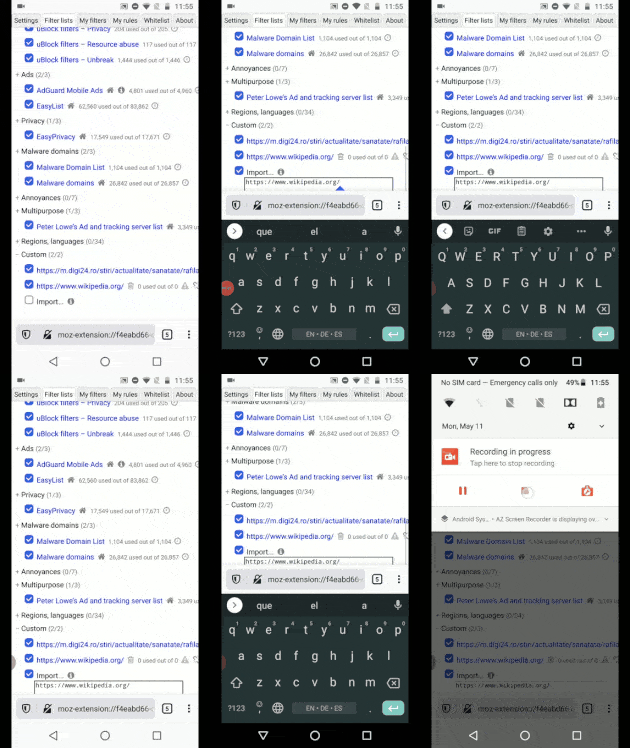
- Go to uBlock Origin Options -> Filter lists -> Custom;
- Tap the "Import" checkbox;
- Observe the editable field;
Expected behavior
The Custom Import field is visible.
Actual behavior
The Custom Import field is not entirely visible.
Notes:
This is also reproducible when there are no other pages added to the Custom list.
Device information
- Android device: Motorola Moto G6 (Android 8);
- Fenix version: Nightly migration build 200511.
 ebalazs-sv
All 15 comments
CC @csadilek @Amejia481
 pocmo
on 13 May 2020
pocmo
on 13 May 2020
For some reason, when we are in an extension setting page the toolbar is not auto hiding when scrolling this is not the case if the toolbar is on the top see this video
 Amejia481
on 2 Jun 2020
Amejia481
on 2 Jun 2020
I think we are having some issues with the bottom toolbar animation. I'm not sure if it's because the navigation on UBlock origin is based on iframes and causing GV to not giving us the right flags. I chatted with @Mugurell about it. As he mentioned our actual implementation indicates that we only animate if we get INPUT_RESULT_HANDLED
from GV but right now GV is sending us INPUT_RESULT_HANDLED_CONTENT or
INPUT_RESULT_UNHANDLED causing that we do not animate and the bottom part of the page is not getting shown
Amejia481
on 3 Jun 2020
There is a similar Bugzilla bug opened https://bugzilla.mozilla.org/show_bug.cgi?id=1633322, I commented to mention that same issue is happening for Ublock internal setting pages
Amejia481
on 3 Jun 2020
BZ-1633322 has been fixed.
 hwinnemoe
on 25 Aug 2020
hwinnemoe
on 25 Aug 2020
And with ^^ being merged in AC we can check if the problem is fixed in tomorrow's Fenix Nightly.
 Mugurell
on 27 Aug 2020
Mugurell
on 27 Aug 2020
Passing to @ebalazs-sv for testing if the initial issue is now fixed.
Mugurell
on 28 Aug 2020
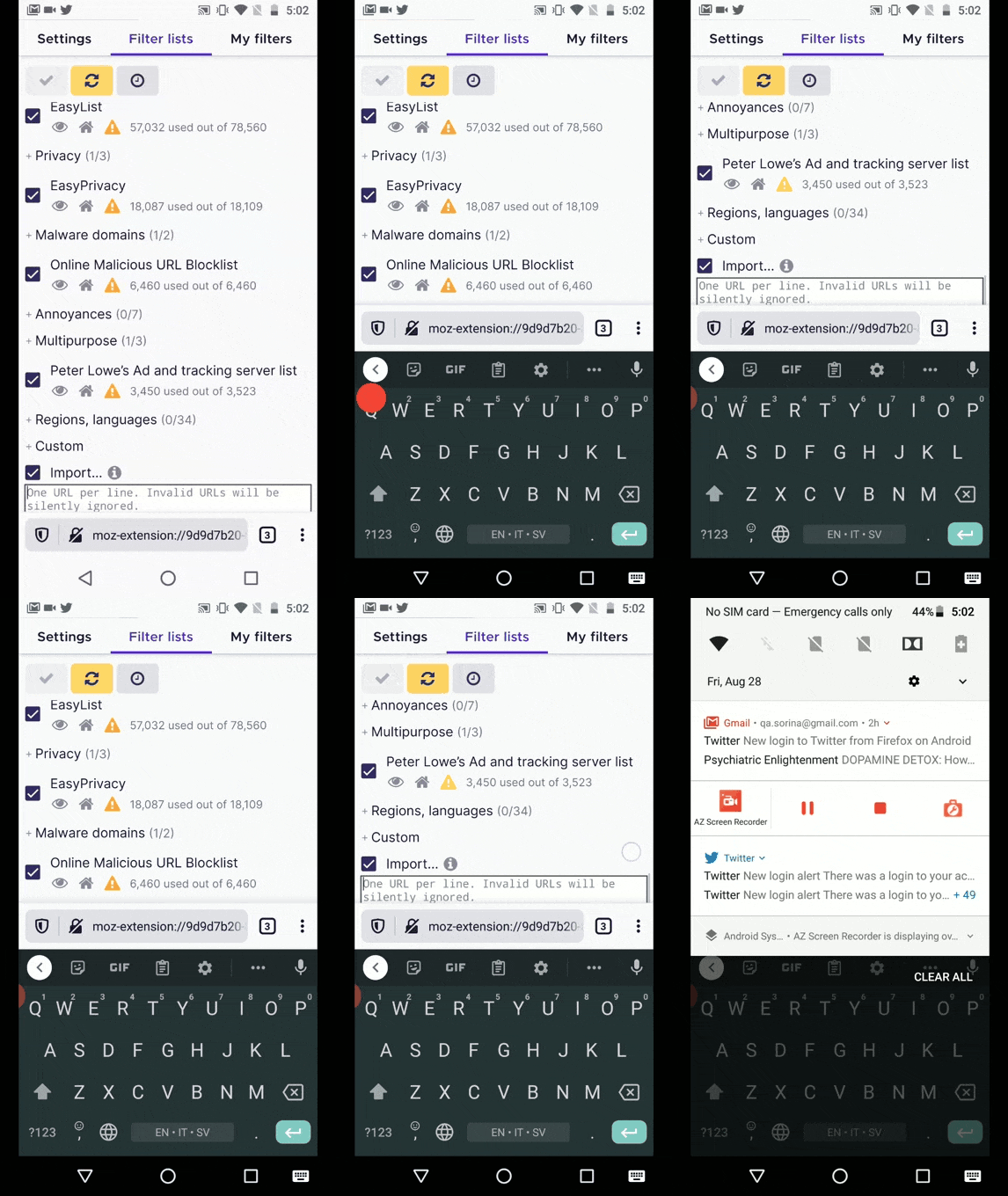
This issue is still reproducible on Nightly 200828 GV 81.0a1 from 8/28 with Pixel 2 (Android 9) and Motorola Moto G6 (Android 8).
ebalazs-sv
on 28 Aug 2020
A most frustrating obstacle, affecting many government websites where Submit or Continue or Next buttons are always on the very bottom.
 smhmore
on 31 Aug 2020
smhmore
on 31 Aug 2020
A most frustrating obstacle, affecting many government websites where Submit or Continue or Next buttons are always on the very bottom.
This seems similar to https://github.com/mozilla-mobile/fenix/issues/13797.
If the issues you are seeing is different please open a new issue here - https://github.com/mozilla-mobile/fenix (the issues is probably encountered on Fenix and there it would get more visibility) with examples of where this is happening.
Mugurell
on 1 Sep 2020
I'm seeing in RB a different behavior in regards to whether the toolbar is shown or not depending on from where uBlock's settings are accessed:

video
So I'm wondering, should we show the toolbar when users access the addons configurations pages?
I don't think it presents any useful information to the user in that context and even more, some of the menu options, like "share" would not bring the expected result (the shared tab is not for an internet resource that can be accessed by everyone that's shared but a local webpage).
Mugurell
on 1 Sep 2020
I'm seeing in RB a different behavior in regards to whether the toolbar is shown or not depending on from where uBlock's settings are accessed:
@Mugurell This is because R-B doesn't implement this correctly / doesn't have a fix we landed in Fenix. Whether or not the settings (option) page is opened in a tab or a popup is controlled by the add-on itself via the open_in_tab property in the manifest. uBlock specifies open_in_tab=true and some functionality doesn't work if opened in a popup instead. So, I don't think we should change that as we need to follow what the add-on specified, and open in a regular tab.
 csadilek
on 1 Sep 2020
csadilek
on 1 Sep 2020
Thank you!
Makes sense, I'm new to this part and saw differences between how different addons' details/settings screens are opened.
Mugurell
on 2 Sep 2020
Seems like the toolbar should've been animated away so that the entire page is available but this is not happening because GV returns INPUT_RESULT_HANDLED_CONTENT signaling that the scroll is handled by the page and not GV.
Not sure if this is a webcompat issue that should be resolved by the developers of uBlock or an issue in GV so I opened https://bugzilla.mozilla.org/show_bug.cgi?id=1662823
Mugurell
on 2 Sep 2020
Seems like the toolbar should've been animated away so that the entire page is available but this is not happening because GV returns
INPUT_RESULT_HANDLED_CONTENTsignaling that the scroll is handled by the page and not GV.Not sure if this is a webcompat issue that should be resolved by the developers of uBlock or an issue in GV so I opened https://bugzilla.mozilla.org/show_bug.cgi?id=1662823
@Mugurell that bug you linked was fixed but the toolbar still doesn't auto hide in fenix :/ uBO worked around fenix's bug btw
Edit: Now see:
https://bugzilla.mozilla.org/show_bug.cgi?id=1663634
 Poopooracoocoo
on 9 Nov 2020
Poopooracoocoo
on 9 Nov 2020
Related issues
 psymoon
·
6Comments
Amejia481
·
5Comments
psymoon
·
6Comments
Amejia481
·
5Comments
 jonalmeida
·
4Comments
Amejia481
·
5Comments
jonalmeida
·
4Comments
Amejia481
·
5Comments
 AndiAJ
·
3Comments
AndiAJ
·
3Comments