Anatole: raw HTML <img> in markdown does not work
Hello there,
I was trying to customize the size of images by using the css <img> in the markdown, somehow the image cannot show up in my local server. Could you please help me with it?  works but not <img>
<img src="/images/profile.jpg"> # not working
Desktop (please complete the following information):
- OS: macOS Catalina
- Browser: safari
- Version of Hugo: v0.81.0+extended
 xiangli2pro
All 5 comments
img tag is opened but never closed <img src="/images/profile.jpg">
_You Can Use:_
- self closing tag:
<img src="/images/profile.jpg"/> - separate closing tag:
<img src="/images/profile.jpg"></img>
 Ayan-Ali
on 2 Apr 2021
Ayan-Ali
on 2 Apr 2021
@xiangli2pro Hi there,
yes, there is a reason for that. It's because by default Hugo Markdown has unsafe mode turned off. You can see that's the case if you inspect the page source:
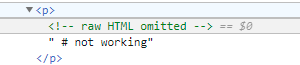
You can turn unsafe mode on for goldmark like this:
[markup]
  [markup.goldmark]
    [markup.goldmark.renderer]
      unsafe = true
It will work.
 lxndrblz
on 2 Apr 2021
lxndrblz
on 2 Apr 2021
Instead of using raw HTML, you should extend the figure shortcode for further options and customise those via CSS. Similarly to how I made a shortcode for left and right floating images could you include a parameter called size (s,m,l,xl).
lxndrblz
on 2 Apr 2021
Thank you for the reply. It works for me.
Now I am able to customize the image sizes using <center><img src="/images/profile.jpg" width="800" height="100"></center> in the markdown file.
It also works using figure shortcode {{< figure src="/images/profile.jpg" class="alignright" width="800" height="100" >}} in markdown file.
One more question, could you please direct me to the files where you made the shortcode for the floating images? I am not familiar with the shortcode, but I would like to learn how you did it in case I need to set up new features in the future. Thank you.
xiangli2pro
on 2 Apr 2021
Yes, I forgot to mention, that figure comes with height and width built-in. It's an easy option if you just want an image to appear a bit smaller.
If you want to find out how the left and right setup was created, check out this commit. You could basically write:
{{< figure src="https://via.placeholder.com/1600x800" alt="image" caption="figure-big" class="small" >}}
And create an entry in the custom CSS for the class small like this:
.post figure.small{
    width:800px;
    height:100px;
}
Related issues
 Xen-Echo
·
4Comments
Xen-Echo
·
4Comments
 jwalsh2me
·
6Comments
xiangli2pro
·
3Comments
jwalsh2me
·
6Comments
xiangli2pro
·
3Comments
 isa-chavarria
·
5Comments
isa-chavarria
·
5Comments
 PiotrWachulec
·
4Comments
PiotrWachulec
·
4Comments