Anatole: I can't change my profile picture.
I have put my picture in [images] dictionary, I changed the path of profile picture in [config.toml].
but when I open the web http://localhost:1313/, I can't see the picture.why?
 tangxuemei1995
All 4 comments
@tangxuemei1995 I'm sorry you are having trouble getting the image to show up.
In understood that you put the image into the 'static/images' folder.
To help you narrow down the problem, I need a little bit more information:
- Could you please provide me a snippet of your 'config.toml' that shows the relevant section?
- Dou you get any errors in your browser/hugo console?
- May I also know, which file format you tried to use?
 lxndrblz
on 30 Jul 2020
lxndrblz
on 30 Jul 2020
thanks for your reply.
when I use the original picture, it can't display normally, is this the problem of my browser.i use chrome.
I put my picture in 'static/images'. it's 'jpeg'.
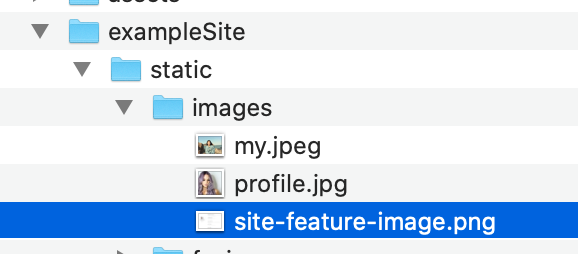
and I change the path:
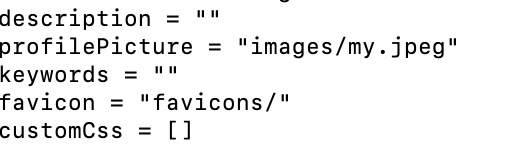
when I open http://localhost:1313/, it like this:

I don't know what the problem is.
tangxuemei1995
on 31 Jul 2020
@tangxuemei1995 Thanks for the screenshots. I think I've found your problem. :)
You have to put the the my.jpeg inside the static/images of your "main" hugo folder. The exampleSite is only include as a quickstart to copy some default data. Also make sure you make the configuration changes to your config.toml in the main folder and not the exampleSite.
Your whole project structure should look like this:
C:. tangxuemei1995
├───config.toml (Your config.toml goes into here)
├───archetypes
├───assets
│   └───js
├───content
│   └───post
├───data
├───layouts
├───static
│   ├───css
│   └───images (Your image goes into here)
└───themes
    └───anatole
        ├───.github
        ├───archetypes
        ├───assets
        │   ├───css
        │   └───js
        ├───exampleSite
        │   ├───content
        │   │   └───post
        │   └───static
        │       ├───favicons
        │       └───images
        ├───images
        ├───layouts
        │   ├───custom
        │   ├───partials
        │   │   └───taxonomy
        │   └───_default
        └───static
            ├───css
            └───images
Let me know if this resolved your problem.
lxndrblz
on 31 Jul 2020
thanks, with your advice, I solved my problem. :)
tangxuemei1995
on 1 Aug 2020
Related issues
 abraithwaite
·
4Comments
abraithwaite
·
4Comments
 shariq1989
·
3Comments
shariq1989
·
3Comments
 ivnvitx
·
3Comments
ivnvitx
·
3Comments
 Corfucinas
·
5Comments
Corfucinas
·
5Comments
 PiotrWachulec
·
4Comments
PiotrWachulec
·
4Comments