Amplify-ios: Auth+API+DataStore: 100 subscriptions reached on initial login
Describe the bug
Fresh installed app (either first install or delete and re-install) with user not logged in. When they succeed in logging in the sync does not run and they see none of the expected data from the cloud. Quitting the app and restarting it results in the sync running and the expected data being displayed.
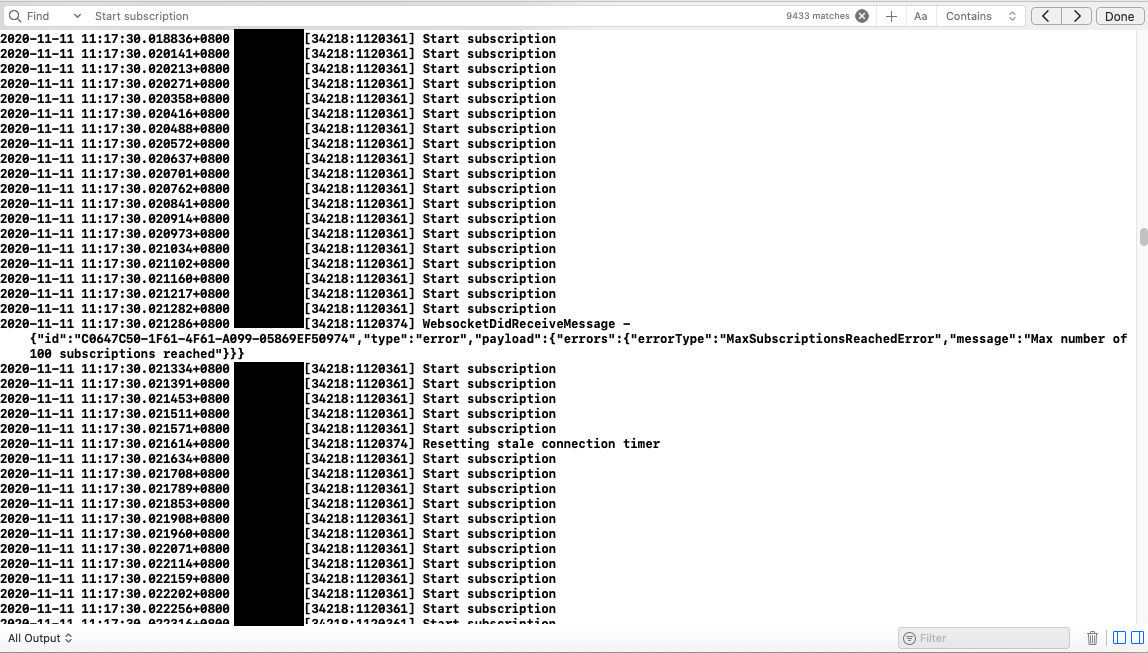
During the post-login sync failure two things are observed in the app's console logs:
- WebsocketDidReceiveMessage - {"id":"98357524-4A4B-48A3-BDF0-88BE6EBC7039","type":"error","payload":{"errors":{"errorType":"MaxSubscriptionsReachedError","message":"Max number of 100 subscriptions reached"}}}
- Hundreds and hundreds of lines of console log with: "Start subscription"
This problem (failure to sync after first login) was an issue for us in Amplify 1.3 but the two logs mentioned above are new in 1.4. Prior to the user logging in there are numerous cycles in the logs of the sync engine attempting to subscribe to the Webhooks, failing due to connection error (because they're not authorised) and then unsubscribing.
To Reproduce
Steps to reproduce the behavior:
- Configure Amplify auth, api and datastore
- Configure all api entities with @auth
- Install and launch app
- Monitor logging to see subscribe-connection error-unsubscribe loop
- Login to app
- Monitor logging to see Start subscription fire hundreds of times and 100 subscriptions reached errors
- Note that the sync does not appear to start (new datastore hub messages don't fire at all in this scenario)
Expected behavior
- SyncEngine does not attempt to subscribe to @auth entities while auth module is reporting as 'not authenticated'.
- When user logs in successfully sync starts and runs to completion, firing datastore hub messages at appropriate times.
Screenshots
If applicable, add screenshots to help explain your problem.
Environment(please complete the following information):
- Amplify Framework Version: 1.4.0
- Dependency Manager: Cocoapods
- Swift Version : 5.0
Device Information (please complete the following information):
- Device: Simulator + iPad
- iOS Version: iOS 13 + 14
- Specific to simulators: No
 petermauger
All 3 comments
For context, how many @Model types are in your application? DataStore establishes 3 subscriptions for each model (one each for create, update, and delete mutations), so if things are working as expected, I wouldn't expect to see this error until you hit 34 models.
 palpatim
on 12 Nov 2020
palpatim
on 12 Nov 2020
Hi @petermauger
Sorry that you are experiencing these issues. I have attempted to summarize your issues, but please let me know if I missed anything.
Issue 1: Sync engine does not properly behave after a user logs in
Unfortunately, we currently do not expose explicit controls of start and stop of the Sync Engine. This is something that we are planning to add in the future.
As a workaround, and if it works for your use case, you can do the following:
- After a user logs in, call
Amplify.DataStore.clear(). - Wait for
clear()to finish. - Call
Amplify.Datastore.query(..).
Note that calling Amplify.DataStore.clear() will delete the locally saved database, and put the sync engine into a reset (or inactive) state which is not actively attempting to connect to the AppSync backend. Calling Amplify.Datastore.query(..) will reinitialize the sync engine and should reconnect the subscription connections.
Issue 2: Max number of 100 subscriptions reached
We've looked into this issue, and it seems that there was a regression that is part of the 1.4.0 release, which makes the remote sync engine unstable if subscriptions fail to connect when starting the app. In this case, subscriptions calls are failing because the user is unauthenticated, and then the sync engine gets into an unstable state.
This PR should resolve the case where we are issuing too many "Start subscription" messages.
https://github.com/aws-amplify/amplify-ios/pull/889
Issue 3: Expectation is that the sync engine does not attempt to subscribe for @auth entities while auth module is not authenticated
Unfortunately, this is not the current expected behavior. We have taken an approach to make an attempt to authorize with the backend, and handle errors authorization errors appropriately rather than pre-emptively decide to make a request or not. This is currently the behavior across all of our platforms, but I will take this back to our internal working group to discuss this behavior and brainstorm around how to alter the design that is in alignment with future plans for the product.
 wooj2
on 13 Nov 2020
wooj2
on 13 Nov 2020
Our issue has been resolved by 1.4.3 release
petermauger
on 13 Nov 2020
Related issues
 ovidiuadorian-yonder
·
5Comments
ovidiuadorian-yonder
·
5Comments
 AboulEinein
·
4Comments
AboulEinein
·
4Comments
 Jun711
·
5Comments
Jun711
·
5Comments
 Tom-RulesCube
·
7Comments
AboulEinein
·
8Comments
Tom-RulesCube
·
7Comments
AboulEinein
·
8Comments
Most helpful comment
Our issue has been resolved by 1.4.3 release