Amplify-ios: AWSAppSync is incompatible with new Amplify frameworks
Describe the bug
Since I was recommended to update my Amplify pods, I updated it and now I cant get my app working again. There are dependencies I can't solve. After trying to update, also my app doesn't work anymore. It is totally crashed and cant find any other pods from AWS even if they're in the repository they have supposed to be. Can't start it anymore, no matter what I do.
Amplify is installed, and I get an compiler Error, that there is no module 'Amplify'
Have deleted all pods and reinstalled it, still total crash. Please help, I cant work anymore on this project since my 'update'
To Reproduce
Steps to reproduce the behavior:
- Install amplify pods without AppSync
- Install AppSync pod and see error message
Expected behavior
Compatible frameworks.
Screenshots


Environment(please complete the following information):
- Amplify Framework Version: [e.g. 1.3.1]
- Dependency Manager: [Cocoapods]
- Swift Version : [e.g. 5.3]
Device Information (please complete the following information):
- Device: [Simulator]
- iOS Version: [e.g. iOS 14]
Additional context
Add any other context about the problem here.
Also I would like to know, if there is anywhere some kind of documentation, so anybody can know what is with what compatible.
 chris-mds
All 9 comments
Hi @chris-mds, what does your pod file look like? For new apps, you can use AWSAPIPlugin with Amplify to make calls to your AppSync API. We're in the process of bumping AppSync SDK's dependency on the SDK to use 2.17.0 (https://github.com/awslabs/aws-mobile-appsync-sdk-ios/pull/419) and should unblock you, however AppSync SDk will only continue be maintained with bug fixes and security updates.
 lawmicha
on 13 Oct 2020
lawmicha
on 13 Oct 2020
Hi @lawmicha,
this is my podfile.

It throws me the following errors.
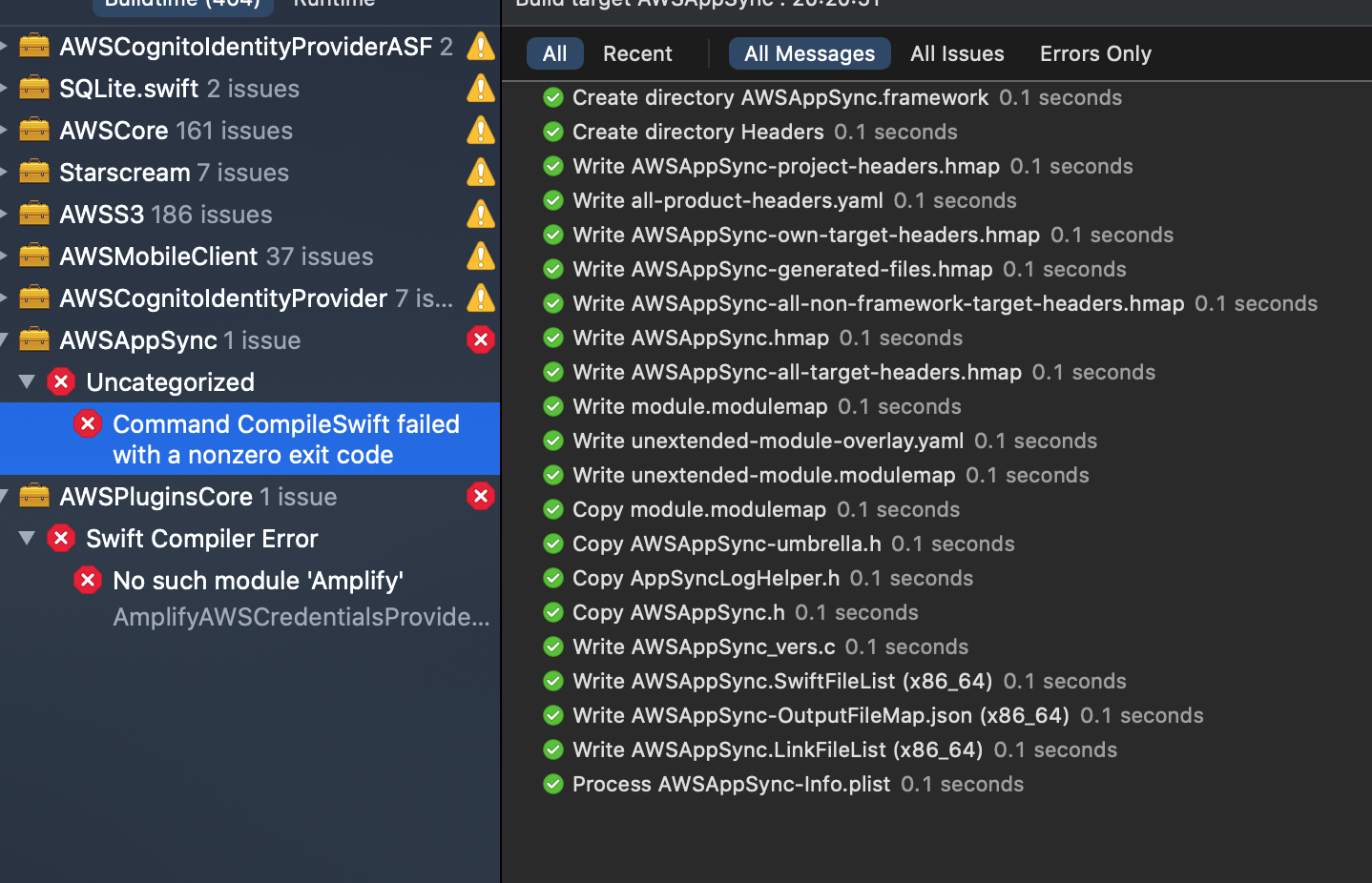
this is a weird error, because I don't see any error?!

If I would remove the AppSync Pod it would throw me an error at the codegen generated API.swift file, because this imports AppSync.
I additionally tried the following things:
- Remove all pods and reinstall it
- update cocoa pods
- uninstall and reinstall cocoa pods
- Create a new project and try the same steps
- Remove all pods, clear cache, delete the xcworkspace file to recreate it from cocoa pods
None of these steps give me success
chris-mds
on 13 Oct 2020
Hi @chris-mds sorry for the confusion. To make calls to your AppSync backend, you shouldn't need to use AppSync SDK and API.swift if you use the generated models from amplify codegen models (https://docs.amplify.aws/lib/graphqlapi/getting-started/q/platform/ios#generate-todo-model-class)
Some context, API.swift that your referring to is generated for use with the older AppSync SDK.
you can remove AppSync from your pod file, API.swift from the Xcode project, and continue to use the models to make calls to your backend, ie. Amplify.API.mutate(.create(post))
lawmicha
on 13 Oct 2020
It looks like you are using DataStore and Amplify Tools as well. DataStore interfaces with a local database and will automatically synchronize your data to your backend stack (AppSync/dynamoDB) and you don't have to make calls to your API directly anymore. You can replace the Amplify.API calls with Amplify.DataStore.save(post) and Amplify.DataStore.query(Post.self, byId: post.id) https://docs.amplify.aws/lib/datastore/getting-started/q/platform/ios
lawmicha
on 13 Oct 2020
Hi @lawmicha ,
thank you for your fast reply.
So taking it together: I can delete the pods 'AppSync' and 'AmplifyPlugins/AWSAPIPlugin' because both of if will be handled through the dataStore pod?
And when I run amplify codegen models it will automatic create my models with all functions and connections?
Additional question to DataStore: When I save a model to dataStore and I have a valid internet connection it pushes it to the backend without delay? This wasn't clear for me.
I removed the pods but the error No such module 'Amplify' in AmplifyAWSCredentialsProvider is still present
chris-mds
on 13 Oct 2020
Thanks for your patience and will try to clear up some confusion and improve the docs.
- If you are using AmplifyTools, DataStore, and AWSAPIPlugin.
Amplify Tools provides an build step to help you generate models to be used with Amplify, sets up the AppSync API with conflict resolution feature to be used by DataStore's sync engine. If you configure all three, you should interface with Amplify.DataStore.save and Amplify.DataStore.query.
- If you are using DataStore and AWSAPlPlugin.
This is the same as 1. but you will no longer auto generate the models in Xcode from the AmplifyTools build script. You'll have to go over Amplify CLI and run the commands
if creating a new project -> amplify init
create API -> amplify add api, then amplify update api and enable for DataStore
provision the AppSync backend -> amplify push, you can select 'No' to generate API.swift (this is used for AppSync)
generate models -> amplify codegen models
set up the configuration in your project by dragging over amplifyconfiguration.json and the model files, and make sure they are marked as Copy If Needed
- If you are looking for data persistance without offline capabilities and other features provided by DataStore, use AWSAPIPlugin without AmplifyTools and DataStore.
when creating the API, do not enable for DataStore. and you can continue to use the models and call Amplify.API.query, Amplify.API.mutate.
So taking it together: I can delete the pods 'AppSync' and 'AmplifyPlugins/AWSAPIPlugin' because both of if will be handled through the dataStore pod?
No, you will need APIPlugin if you want DataStore to automatically perisist the data to your AppSync backend. However, you can start off with DataStore local persistance without APIPlugin and add it in later (see https://docs.amplify.aws/lib/datastore/sync/q/platform/ios)
And when I run amplify codegen models it will automatic create my models with all functions and connections?
This will generate your models such as Post.swift, Comment.Swift to be used with the functions
Additional question to DataStore: When I save a model to dataStore and I have a valid internet connection it pushes it to the backend without delay? This wasn't clear for me.
Yes, when there is a valid internet connection, data persisted in the local store will be synchronized to the backend, and data from the backend created by other app clients will be synchronized to the local store.
I removed the pods but the error No such module 'Amplify' in AmplifyAWSCredentialsProvider is still present
Did the pod installation complete successfully, you can try pod cache clean --all && pod install --repo-update? In Xcode, have you tried clean CMD+K and then build?
lawmicha
on 13 Oct 2020
Hi @lawmicha,
thank you very much for the detailed information. This helps a lot.
I cleared cache and reinstalled the pods, but still facing this error.
I also noticed that my Framework-files are not correct. I have the feeling, that something with my Cocoapods could be wrong?
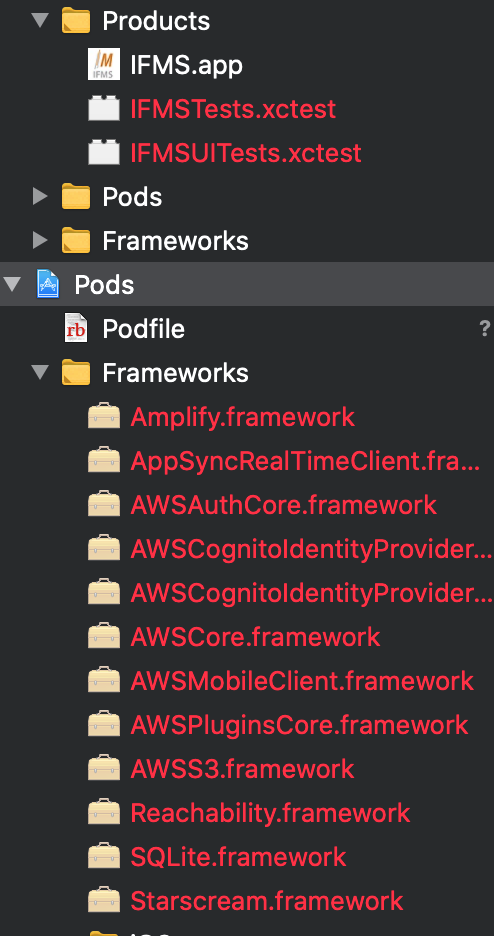
After updating it gives me additional warnings and a huge list of duplicated UUID's
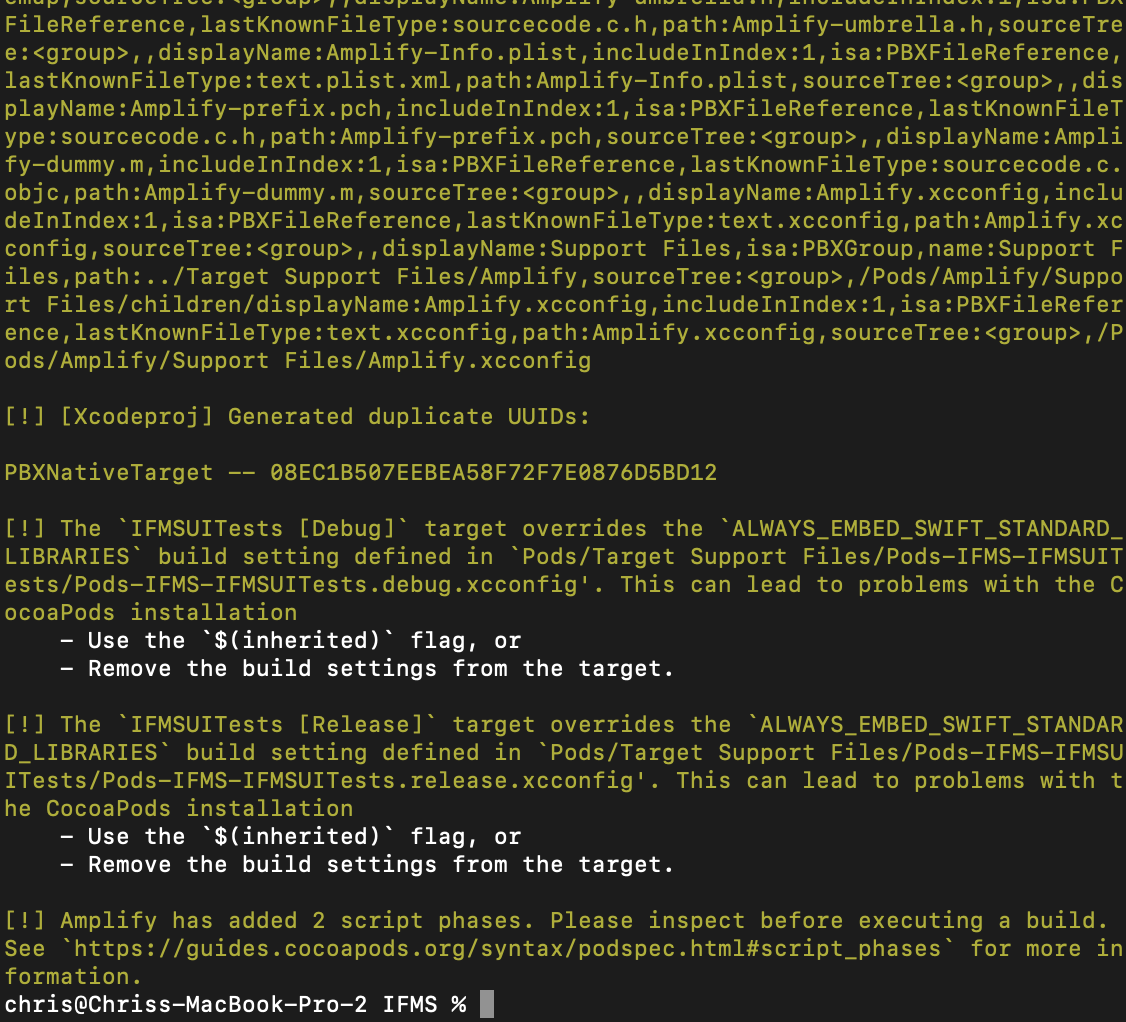
Something is really messed up with my pods.
chris-mds
on 13 Oct 2020
can you try removing Podfile.lock (or move it, Podfile.lock.old) and /Pods and do a clean installation of the pods? pod cache clean --all && pod install --repo-update
lawmicha
on 13 Oct 2020
Oh boy you saved my life. This finally works. Will try the DataStore-Framework tomorrow.
Thank you very much!
chris-mds
on 13 Oct 2020
Related issues
 Tom-RulesCube
·
7Comments
Tom-RulesCube
·
7Comments
 dsaliberti
·
6Comments
dsaliberti
·
6Comments
 ovidiuadorian-yonder
·
5Comments
ovidiuadorian-yonder
·
5Comments
 Jun711
·
5Comments
Jun711
·
5Comments
 LordZardeck
·
3Comments
LordZardeck
·
3Comments
Most helpful comment
can you try removing
Podfile.lock(or move it,Podfile.lock.old) and/Podsand do a clean installation of the pods?pod cache clean --all && pod install --repo-update