Amplify-console: Amplify Console is blank all of a sudden
I have a few projects all running fine on Amplify, but for one of them, about a week ago, the main console view started showing a blank page.
All of the other projects work completely fine.
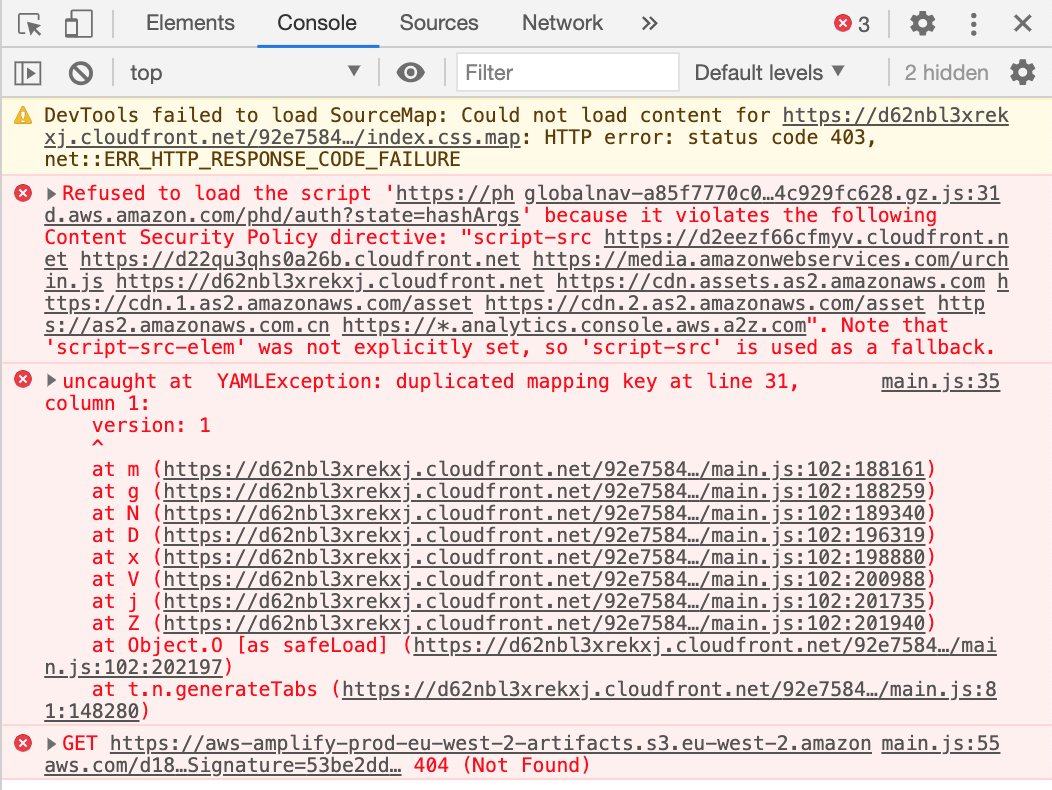
All of the sub-pages on the problem project also work fine (General, Domain Management, Previews etc) if I navigate to them directly, but they do also break depending on what sequence of pages I go through. There are also console errors showing (displayed below). Sometimes it even crashes to the point that I have to restart the page.


 dragosiordachioaia
All 6 comments
After further investigation, it turns out that the problem was caused by the YAML file uploaded to the "build settings" section, which had a duplicated section. This happened because when doing CMD+A in the editor, and then "paste", "delete" or really anything else, it doesn't actually delete the selected content, it just ignores it.
This highlights 3 things:
1) Having an error with the YAML file should actually be highlighted in the UI, not just in the console.
2) The Amplify Console itself should not just crash, without feedback to the user.
3) The editor for the "build settings" file should be more robust when dealing with keyboard shortcuts.
dragosiordachioaia
on 9 Sep 2020
@dragosiordachioaia we're working on fixing this.
 nimacks
on 10 Sep 2020
nimacks
on 10 Sep 2020
I saw this error today as well. deleted the yaml from the build settings. project has a amplify.yaml in the code. This resolved the blank console error
🙏🏼
 fsids
on 14 Sep 2020
fsids
on 14 Sep 2020
Deleting the file is not the solution, catching the validation error and handling it appropriately is.
dragosiordachioaia
on 14 Sep 2020
agree... just sharing that this thread was helpful in providing a workaround for my issue
fsids
on 15 Sep 2020
Hello all, thank you for your patience. We have deployed a fix for this, so it should no longer be an issue. Feel free to re-open this ticket if you continue to face this or related issues. Thank you!
 Athena96
on 18 Sep 2020
Athena96
on 18 Sep 2020
Related issues
 patleeman
·
5Comments
patleeman
·
5Comments
 zackthoutt
·
3Comments
zackthoutt
·
3Comments
 nomiddlename
·
4Comments
nomiddlename
·
4Comments
 OzzieOrca
·
3Comments
OzzieOrca
·
3Comments
 ckamps
·
3Comments
ckamps
·
3Comments
Most helpful comment
@dragosiordachioaia we're working on fixing this.