Amplify-console: Amplify pipeline fails at "Cloning repository" stage (since cli 4.26.0 version)
Issue Description: build fails since 4.26.0 cli introduced to the pipeline
Detailed Steps To Reproduce: "run pipeline with new commit, or use 'redeploy' in console"
Copy and Paste Logs + Error Messages (remove sensitive data)
My last successful build log (after cloning repository process, proceeded to normal backend and frontend build phases) is with amplify-cli 4.24.3 ~ 2 weeks ago:
2020-07-23T19:44:30.533Z [INFO]: # Ensuring NPM package '@aws-amplify/cli' is version: 'latest'
2020-07-23T19:44:37.238Z [INFO]: # Patching NPM package '@aws-amplify/cli' from 1.12.0 to 4.24.3...
2020-07-23T19:45:22.403Z [INFO]: # Done patching NPM package '@aws-amplify/cli'
Now, 2 weeks later, at the pipeline step "Cloning repository", process stops with these log messages without building backend nor frontend and then fails later on during deploy stage as no artifacts have been created during the build:
2020-08-06T10:43:03.458Z [INFO]: # Ensuring NPM package '@aws-amplify/cli' is version: 'latest'
2020-08-06T10:43:10.437Z [INFO]: # Patching NPM package '@aws-amplify/cli' from 1.12.0 to 4.26.0...
Attempt to fix it by downgrading cli version to previous working version results into same failure:
2020-08-06T11:16:11.832Z [INFO]: # Ensuring NPM package '@aws-amplify/cli' is version: '4.24.3'
2020-08-06T11:16:18.755Z [INFO]: # Patching NPM package '@aws-amplify/cli' from 1.12.0 to 4.24.3...
Expected behavior: Build stage builds backend and frontend like it used to.
Application Details
a. d1pdwexpb6iwmj
If the issue is related to a build, please also share:
b. dev (and master) branches, any build number since 23rd of July e.g. Build 178...182
Any idea what have changed and causes the pipeline to fail at this stage without any information in logs? How to fix this for good?
I tried workaround with amplify-cli version override on the build image (4.24.3 as this was success 2 weeks ago), but this also fails...
 pepso
pepso
All 7 comments
Same thing here. I think it is related to NPM's major outage today: https://status.npmjs.org/
They are still working on the fix. It would be nice to have some message on Amplify console though.
It took me hours to start to understand what was possibly happening.
 nathanqueija
on 6 Aug 2020
nathanqueija
on 6 Aug 2020
NPM seems to be back now and the deployment on Amplify too.
nathanqueija
on 6 Aug 2020
@pepso @nathanqueija thanks for the report and feedback. We'll work on doing a better job letting our customers know about these sorts of issues that impact our own service, will be discussing this with the team.
Let us know if you're seeing any further impact from this issue.
 kahdojay
on 6 Aug 2020
kahdojay
on 6 Aug 2020
Seems to be good now, I guess as an enhancement for people experiencing this for the first time, you can add more helpful errors instead of this:
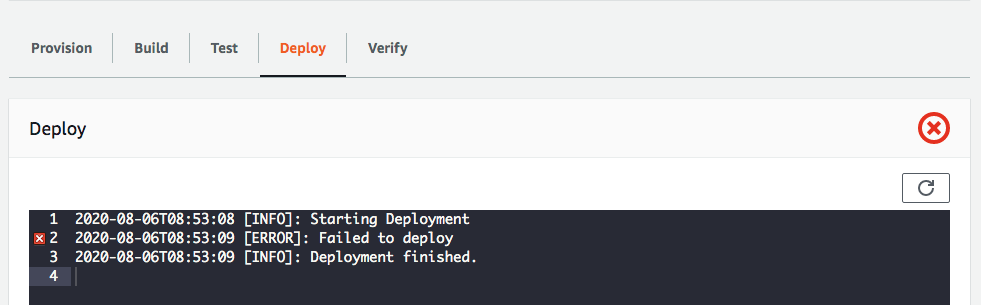
Also, it said "BUILD SUCCEEDED", but did the build actually succeeded? I don't think it did as it would have timed out as it did when I tried to run the build locally, right?
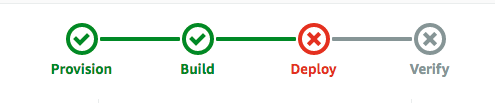
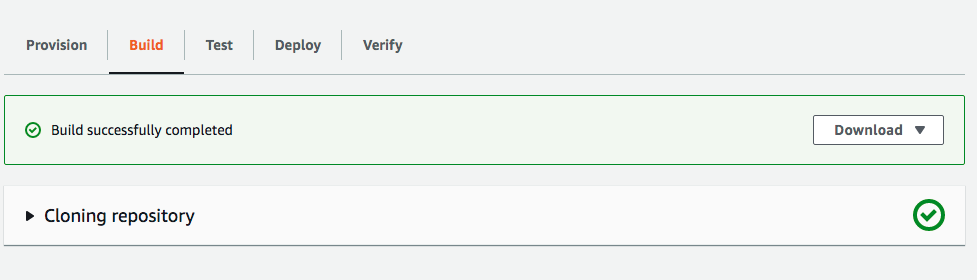
Being accurate would really be helpful in pointing us to what actually happened...
 aprilmintacpineda
on 7 Aug 2020
aprilmintacpineda
on 7 Aug 2020
Hi,
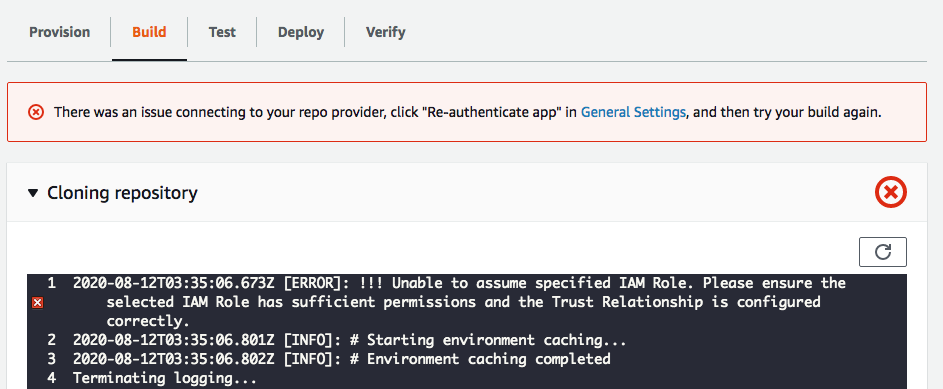
I sort of have a similar problem when cloning repository from the codecommit of the same AWS account. I don't encounter building the app on my other AWS account. I'm can't figure what I did different this time. I'm using version 4.25.0
 linfiesto
on 13 Aug 2020
linfiesto
on 13 Aug 2020
We have also had the same issue where deploys fail without a useful error message. The build step hasn't gotten past cloning repository, but the build step is still marked as successfully completed. The last line in clone repository step was: "2020-08-18T01:33:51.986Z [INFO]: # Checking for Git submodules at: /codebuild/output/src..."
This occurred at 2020/08/18 01:31:47 (UTC) AppID d3u1atjgwp5fyy build id: 226
 Kethatril
on 18 Aug 2020
Kethatril
on 18 Aug 2020
Closing as this was due to an npm outage. Please reopen if you have the same issue.
 swaminator
on 15 Sep 2020
swaminator
on 15 Sep 2020
Related issues
 helloPiers
·
3Comments
helloPiers
·
3Comments
 AustinZhu
·
4Comments
AustinZhu
·
4Comments
 asyschikov
·
5Comments
asyschikov
·
5Comments
 JIoJIaJIu
·
5Comments
JIoJIaJIu
·
5Comments
 nballenger
·
5Comments
nballenger
·
5Comments
Most helpful comment
Same thing here. I think it is related to NPM's major outage today: https://status.npmjs.org/
They are still working on the fix. It would be nice to have some message on Amplify console though.
It took me hours to start to understand what was possibly happening.