Amplify-console: Feature Branch Deploy stuck in "Verify"
* Please describe which feature you have a question about? *
My builds are getting stuck in verify. Maybe not a big deal, but I have to cancel the build eventually (I've seen it stay stuck for a couple of hours). Additionally, I hope I'm not being charged for "build time" as it is stuck
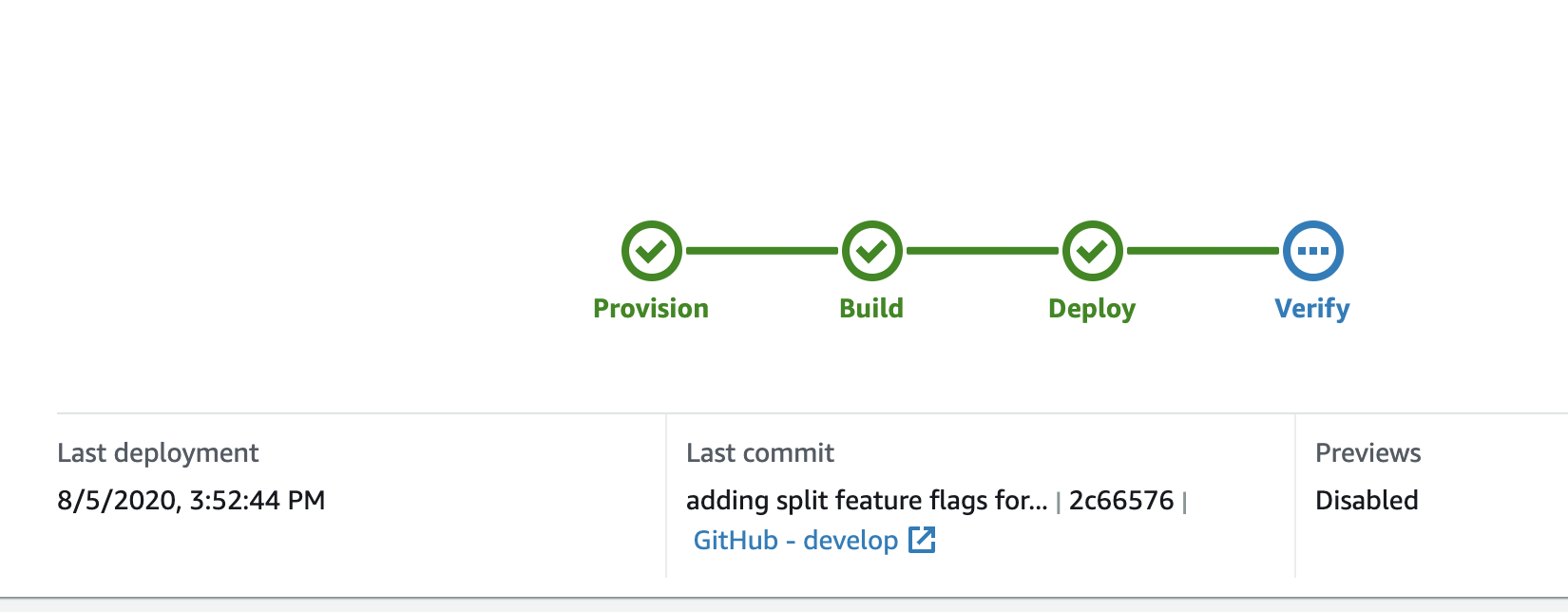
* Provide additional details*
App Id: d1ge9bft3fez35
Region: us-east-1
 tjspross
All 12 comments
Hey @tjspross I can verify you were not billed for any of the time spent stuck in Verify, if you see unexpected values in your monthly bill you can always open a support case so we can take a closer look.
In the meantime we will need to investigate why your jobs are getting stuck in that step.
Couple questions:
- Do you see a consistent pattern when this happens with your jobs?
- For jobs that get stuck at verify, do you actually see the screenshot previews for the branch that was built/deployed?
 kahdojay
on 6 Aug 2020
kahdojay
on 6 Aug 2020
Hi @kahdojay .
I just checked today. It looks like my builds ended up in "Failed".
- I've been seeing it consistently as of two or three builds ago. I see it on both my develop and master branch builds. Prior to that, I was seeing previews.
- I do not see screenshot previews. When I go to the verify tab, it is totally blank.
tjspross
on 7 Aug 2020
Hi @kahdojay any updates on this bug. We are facing the same issue. Project is build & deployed but its under verify for more than 3 hours. Only an observation to share, while building on console under source repository, the github url keeps toggling between the actual github url & an undefined url path.
Any help as our customers are unable to use the web app.
 rubensavio
on 7 Aug 2020
rubensavio
on 7 Aug 2020
Hi @kahdojay we are facing the same issue as well, and after @rubensavio mentioned it, I noticed the same behavior with Github url.
 aashishs101
on 7 Aug 2020
aashishs101
on 7 Aug 2020
Hi @kahdojay - we are facing the exact same issue as well. Is there a way we are able to disable the verify step until is fixed?
 nucat176
on 7 Aug 2020
nucat176
on 7 Aug 2020
Same problem, appId dqjgvhvek1hpl us-east-1. After about 9 hours I eventually got a "Your build status is FAILED" notification email.
Don't know if it's relevant, because the previous build was back in July, but all previous successful builds in this project have a blue "Screenshots are temporarily disabled" message on the Verify step:
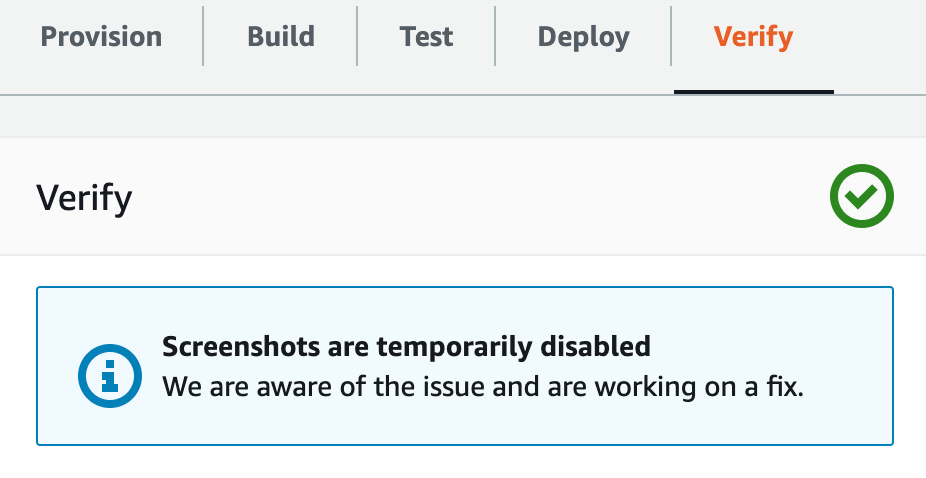
I have another project (appId d2zny4tezbjwg4 us-east-1) which is not getting stuck on verify, and it has always had successful screenshots in previous builds (back in July and today).
On the current builds, I too am seeing the "source repository" flash between the correct one and undefined:
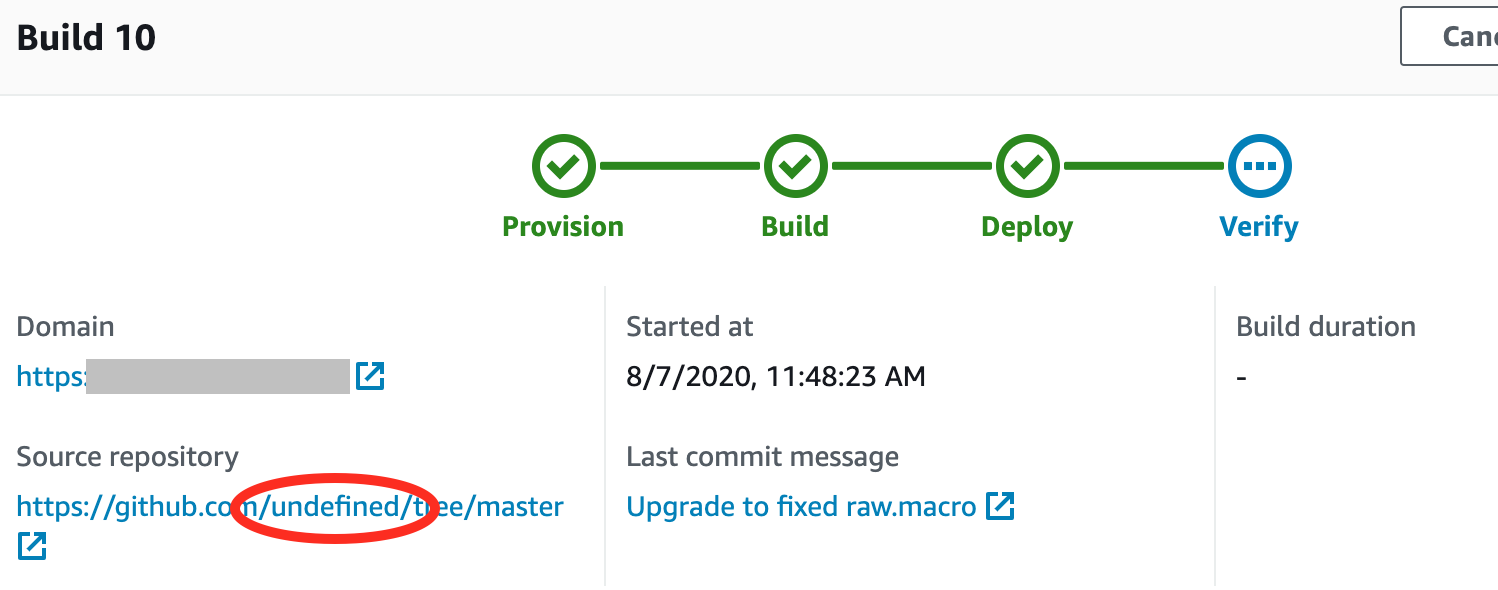
... but I suspect this may be an unrelated cosmetic problem in the console, because my other project which isn't getting stuck also flashes its source repository to undefined while the build is running.
 medmunds
on 7 Aug 2020
medmunds
on 7 Aug 2020
We are also having this issue, so far only on a specific branch. (AppID: d3u1atjgwp5fyy)
Not seeing any screenshots in the verify tab for the builds that get stuck.
Previously I was getting: "Screenshots are temporarily disabled" on the verify tab for that branch.
That branch contains webgl work, could that be the reason why verify is failing? If it is trying to take screenshots and the webgl is causing memory issues or other errors in the service that is taking the screenshots.
 Kethatril
on 9 Aug 2020
Kethatril
on 9 Aug 2020
We seem to be having the same issue consistently on one of our branches. The previous steps execute swiftly without problems, but "Verify" stalls for a long time (many minutes, possibly hours) before failing. The deployed app seems to be working just fine, so I am not sure what the "Verify" step is unhappy with.
App Id:dm197t2mo7xbv
Region: eu-west-1
Branch: feature/check_build_fix
Build: Both 1 and 2.
 nhc-motosumo
on 10 Aug 2020
nhc-motosumo
on 10 Aug 2020
We've identified an issue with screenshots timing out preventing the verify step from succeeding. After putting in a fix it appears that at least 1 customer was able to successfully build on https://github.com/aws-amplify/amplify-console/issues/948 Can you try another build and let us know if it still gets stuck?
 behrooziAWS
on 11 Aug 2020
behrooziAWS
on 11 Aug 2020
@behrooziAWS that seemed to solve the "stuck in verify" problem for my project. Now the verify step runs for a few minutes, and then shows the "Screenshots are temporarily disabled message" and marks the build "SUCCEED".
(And I guess I've learned that "Screenshots are temporarily disabled" maybe actually means "screenshots timed out".)
medmunds
on 11 Aug 2020
Great that it worked @medmunds! We have have a known issue taking screenshots on sites where the network doesn't go idle or are media heavy. It will no longer will block the verify, but you will see a message like the above while it is still an issue.
behrooziAWS
on 12 Aug 2020
Our build on the app mentioned above seem to work now. Thanks for looking into this!
nhc-motosumo
on 12 Aug 2020
Related issues
 thedgbrt
·
5Comments
thedgbrt
·
5Comments
 dongjason1
·
3Comments
dongjason1
·
3Comments
 nomiddlename
·
4Comments
nomiddlename
·
4Comments
 JIoJIaJIu
·
5Comments
JIoJIaJIu
·
5Comments
 kontrol-debug
·
4Comments
kontrol-debug
·
4Comments
Most helpful comment
Hi @kahdojay we are facing the same issue as well, and after @rubensavio mentioned it, I noticed the same behavior with Github url.