Amplify-console: Turning off TLS 1.1 for improving security
* Please describe which feature you have a question about? *
Security / TLS
* Provide additional details*
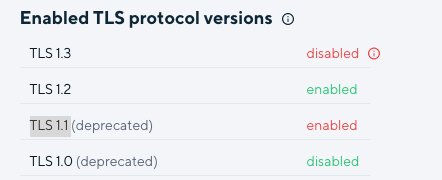
We have been using amplify with a SSL certificate provided by aws. We just got our Pen test results. Turns out that on amplify TLS 1.1 is turned on for some reason. Could someone please help out how to turn it off?
 gabrielmicko
All 40 comments
https://github.com/aws-amplify/amplify-console/issues/56 - Might be related?
gabrielmicko
on 7 Jul 2020
Hi @gabrielmicko yes we do not support custom SSL certificate currently.
 Athena96
on 10 Jul 2020
Athena96
on 10 Jul 2020
Is there any way to disable TLS 1.1 as it is a security concern?
gabrielmicko
on 14 Jul 2020
+1
 pabloroz
on 21 Jul 2020
pabloroz
on 21 Jul 2020
@Athena96 - any update on this? we will have to eject from Amplify because we can't pass security requirements without being able to make adjustments to the TLS/SSL versions/cipher suites utilized
 bryantbiggs
on 11 Sep 2020
bryantbiggs
on 11 Sep 2020
We also have to leave Amplify for projects with this security requirement. Would love to be able to disable TLS 1.1 or bring our own SSL certificate ref: #56
 Erlpil
on 7 Oct 2020
Erlpil
on 7 Oct 2020
Same Issue, our Amplify domain is scoring B on ssl test (https://www.ssllabs.com/ssltest/)
This is a major problem for our clients.
 nimrodp
on 12 Oct 2020
nimrodp
on 12 Oct 2020
@gabrielmicko @nimrodp @Erlpil can you please share your appid?
 swaminator
on 21 Oct 2020
swaminator
on 21 Oct 2020
Sure, but can you tell me where to find it pls, is it App ARN? Is it safe to share it here publicly?
gabrielmicko
on 21 Oct 2020
@swaminator d2bifi4djm8gdl
us-east-1
pabloroz
on 21 Oct 2020
@swaminator doutfkma2xq6
us-east-1
nimrodp
on 21 Oct 2020
@swaminator d3di9id37v0dc7, dtkq5tm6uhbkn
gabrielmicko
on 21 Oct 2020
@swaminator d2rbpazo33lhs8
eu-north-1
Erlpil
on 21 Oct 2020
@Erlpil @gabrielmicko @nimrodp @pabloroz apologies but i also need the region of your app. Please edit your comment and append the region to avoid confusion.
swaminator
on 23 Oct 2020
We were able to locate all of these with just app id, no region is needed. All apps mentioned in this thread have been updated to CloudFront's TLSv1.2_2019
 behrooziAWS
on 24 Oct 2020
behrooziAWS
on 24 Oct 2020
@behrooziAWS -- glad to see you on the thread! Would you also be able to set this for d1hpxxb2zvm1vh ?
Is the plan to have this be self-service in the future?
 benmj
on 24 Oct 2020
benmj
on 24 Oct 2020
@benmj yep, updated the last one you mentioned. We will discuss internally on exposing it. Likely we start by making new apps use the latest recommended first. If we do expose it, do you have any feedback on exposing it something like this at the app level?
- Track latest recommended (default)
- TLS 2019 1.2
- TLS 2018
- ...
behrooziAWS
on 24 Oct 2020
Thanks @behrooziAWS for addressing this!
I see that for my Amplify original domain this is now fixed - master.doutfkma2xq6.amplifyapp.com
But when registering a custom domain, Amplify gives me this domain to set a DNS CNAME: d1n8d4w5jygk7q.cloudfront.net
And this domain still supports TLS 1.1.
Can the cloudfront domain be fixed as well?
nimrodp
on 24 Oct 2020
same as what @nimrodp stated - great to see it on the *.amplifyapp.com domain but its not on the custom domains which is where its really needed at
bryantbiggs
on 24 Oct 2020
@behrooziAWS / @swaminator any thoughts on this ☝🏼 - I think most users are using custom domains which is where the TLS changes are desired
bryantbiggs
on 27 Oct 2020
I’m using amplify to host a React app. I would like to turn off TLS/SSL altogether for testing purposes. Is that possible? I am using the default .amplifyapp.com domain.
 JoshVandeWalle
on 27 Oct 2020
JoshVandeWalle
on 27 Oct 2020
@bryantbiggs Good point, I'll work on getting the distributions associated with custom domains and get those updated as well.
behrooziAWS
on 28 Oct 2020
@behrooziAWS , we are facing the same issue. Is it possible for you to manually disable TLS 1.1 on our apps for now as well? Thanks.
 leizhao-lesmills
on 29 Oct 2020
leizhao-lesmills
on 29 Oct 2020
@nimrodp @bryantbiggs I've set it to 1.2 for the custom domains on the apps you provided. @leizhao-lesmills I don't have an app id for you, either post it here or send it to [email protected] and reference this github issue.
For all others, we are starting to update all cloudfront distributions to use TLS 2019. Stay tuned, the current estimated completion is < 3 weeks.
behrooziAWS
on 30 Oct 2020
@JoshVandeWalle
I’m using amplify to host a React app. I would like to turn off TLS/SSL altogether for testing purposes. Is that possible? I am using the default .amplifyapp.com domain.
We don't support turning off TLS/SSL.
behrooziAWS
on 30 Oct 2020
@behrooziAWS I hope you are well. I have sent an email to [email protected] with two app IDs two days ago but unfortunately there is no response yet.
Could you please let me know if you have received it and if it will be actioned?
Thank you for your help, it is much appreciated.
 Szasza
on 13 Nov 2020
Szasza
on 13 Nov 2020
@behrooziAWS can you please help disable it for my app with custom domain? App ID: d2esoszu03i9k9
 kirankc
on 15 Nov 2020
kirankc
on 15 Nov 2020
@kirankc @Szasza your apps have been updated, responded to your emails
 kahdojay
on 16 Nov 2020
kahdojay
on 16 Nov 2020
@kirankc @Szasza your apps have been updated, responded to your emails
Thank you @kahdojay , it is working perfectly.
Szasza
on 16 Nov 2020
Hi There,
We have been using amplify app provided by aws. We have done the PT and came to know that TLS1.1 is offered. We would need to disable this ASAP Could someone please help out how to turn it off?
The recomendations are as below:
It is recommended to reconfigure the SSL certificates configuration in the affected applications. While configuring the
following may be considered:
• Support only strong ciphers
• Enable and prioritize Perfect Forward Secrecy (PFS) ciphers
(those using the DHE/ECDHE algorithm) to support
Forward Secrecy.
• Switch to using AEAD ciphersuites, such as AES-GCM
See the app id below
App ID: d31fnlrtqby2rx
Region: ap-south-1
Thanks
 martcklm
on 20 Nov 2020
martcklm
on 20 Nov 2020
@kahdojay @behrooziAWS
We've sent an email to [email protected] requesting to disable TLS 1.1 but got no response.
We have custom domain enabled on our app.
App ID : d2yup0ag2jfw76
 nickchauhan
on 23 Nov 2020
nickchauhan
on 23 Nov 2020
@kahdojay @behrooziAWS
Hi, we also sent an email last Thursday to [email protected] requesting to disable TLS 1.1 with no response so far.
App ID: d2yup0ag2jfw76
Thanks for updating this
 jpschibul
on 23 Nov 2020
jpschibul
on 23 Nov 2020
@behrooziAWS
Could you also please disable TLS 1.1 for
App ID: dxpkt19g6tfmo
 michaelbrewer
on 23 Nov 2020
michaelbrewer
on 23 Nov 2020
@behrooziAWS
Could you do the same for the following and turn off TLS1.1
App ID: d15x25lnddr88x
michaelbrewer
on 23 Nov 2020
@jpschibul @michaelbrewer you should see the changes this afternoon, let us know if you don't see them by the end of today
kahdojay
on 23 Nov 2020
Hi There,
We have been using amplify app provided by aws. We have done the PT and came to know that TLS1.1 is offered. We would need to disable this ASAP Could someone please help out how to turn it off?
The recomendations are as below:
It is recommended to reconfigure the SSL certificates configuration in the affected applications. While configuring the
following may be considered:
• Support only strong ciphers
• Enable and prioritize Perfect Forward Secrecy (PFS) ciphers
(those using the DHE/ECDHE algorithm) to support
Forward Secrecy.
• Switch to using AEAD ciphersuites, such as AES-GCMSee the app id below
App ID: d31fnlrtqby2rx
Region: ap-south-1
Thanks
@Szasza @kahdojay
Did you get a chance to look into this ? Much appreciated your help.
Thanks
martcklm
on 23 Nov 2020
Hi @martcklm ,
I definitely did not look into it from Amplify perspective given that I am not a member either of the Amplify team or the broader AWS team.
That being said according to my knowledge CloudFront currently doesn't support individual cipher configuration, one can only choose from predefined set of security policies: https://docs.aws.amazon.com/AmazonCloudFront/latest/DeveloperGuide/secure-connections-supported-viewer-protocols-ciphers.html
As for modifying your Amplify app's CloudFront configuration to use the TLSv1.2_2019 security policy, @kahdojay and @behrooziAWS can help with that.
Szasza
on 23 Nov 2020
@kahdojay @behrooziAWS - is there an option like this for AppSync and Cognito?
michaelbrewer
on 23 Nov 2020
Hi There,
We have been using amplify app provided by aws. We have done the PT and came to know that TLS1.1 is offered. We would need to disable this ASAP Could someone please help out how to turn it off?
The recomendations are as below:
It is recommended to reconfigure the SSL certificates configuration in the affected applications. While configuring the
following may be considered:
• Support only strong ciphers
• Enable and prioritize Perfect Forward Secrecy (PFS) ciphers
(those using the DHE/ECDHE algorithm) to support
Forward Secrecy.
• Switch to using AEAD ciphersuites, such as AES-GCMSee the app id below
App ID: d31fnlrtqby2rx
Region: ap-south-1
Thanks
@kahdojay @behrooziAWS
Could you help me to disable the TLS 1.1 as I mentioned in the comment please.
martcklm
on 23 Nov 2020
@behrooziAWS @kahdojay I have dropped a mail, please disable TLS 1.1 for my application too.
App id: d19jl7ud99yyui
 sanganagouda-k
on 30 Nov 2020
sanganagouda-k
on 30 Nov 2020
Related issues
 adamaltman
·
3Comments
adamaltman
·
3Comments
 helloPiers
·
3Comments
helloPiers
·
3Comments
 BardiaN
·
4Comments
BardiaN
·
4Comments
 nomiddlename
·
4Comments
nomiddlename
·
4Comments
 thedgbrt
·
5Comments
thedgbrt
·
5Comments
Most helpful comment
@nimrodp @bryantbiggs I've set it to 1.2 for the custom domains on the apps you provided. @leizhao-lesmills I don't have an app id for you, either post it here or send it to [email protected] and reference this github issue.
For all others, we are starting to update all cloudfront distributions to use TLS 2019. Stay tuned, the current estimated completion is < 3 weeks.