Amplify-console: My production backend envirnoment is gone.
Describe the bug
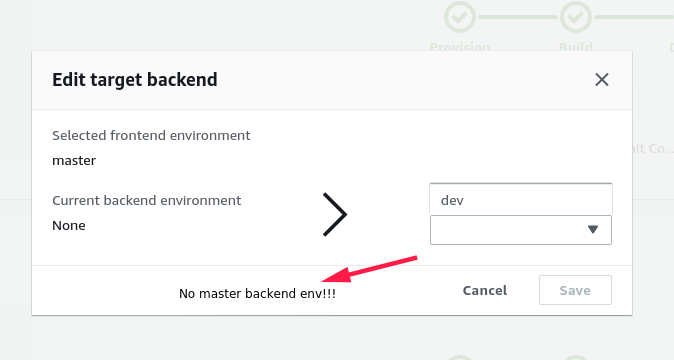
I've an Amplify app with 2 backend environments, dev and prod. Dev is tied to a git branch of the same name and production is tied to master (I've another backend env called fuse but I've never done anything with it actually). Everything has worked more or less fine for over a year and suddenly I'm trying to push to production and notice that the web app doesn't update (note that the amplify push was successful on the CLI) and when I dig into the Amplify console I notice that my git push didn't trigger a build as it has done always and digging deeper (not that deep actually) I realize that there's no prod backend environment ... what's going on here?
See attached images.
PD: I haven't updated my amplify library or CLI recently.
I'd very much appreciate your help here, this is a production website and the problem is actually with the production branch/env.

To Reproduce
Steps to reproduce the behavior:
- Go to Amplify Console
- Click on portal App
- Click on 'backend environments' tab
- See that there's no prod backend env.
 damianrr
All 19 comments
@damianrr This seems to be related to Amplify Console. I have moved it to their repository and let their oncall know
 sammartinez
on 2 Apr 2020
sammartinez
on 2 Apr 2020
Thanks @sammartinez
damianrr
on 2 Apr 2020
@damianrr we are looking into it and will get back to you soon.
 swaminator
on 2 Apr 2020
swaminator
on 2 Apr 2020
Thanks @swaminator, let me know if you need anything on my end.
damianrr
on 2 Apr 2020
@damianrr what's your Appid ( found in app setttings > general)
swaminator
on 2 Apr 2020
App ARN
arn:aws:amplify:us-east-1:155161765563:apps/d2poyx4r6wisl6
damianrr
on 2 Apr 2020
@damianrr can you run amplify env list from your CLI?
swaminator
on 2 Apr 2020
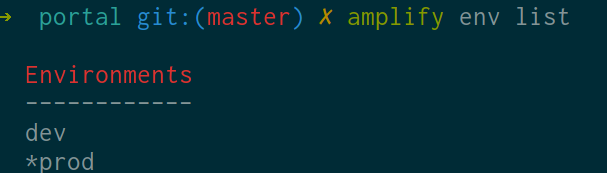
I get dev and prod. Please note the first image I attached to the original description of the problem here: https://user-images.githubusercontent.com/638567/78265702-d09b1500-74d2-11ea-88d5-b064d877ee0d.png
damianrr
on 2 Apr 2020
Can you go to CloudFormation console and see what amplify stacks you have?
swaminator
on 2 Apr 2020
I've quite a number of them, do you want me to send something like name, link ... anything?
damianrr
on 2 Apr 2020
@damianrr can you actually flip the Show nested stacks to OFF and filter for stacks that contain prod (or whatever your production env is)
Is your production env still working?
swaminator
on 2 Apr 2020
@damianrr what version of the CLI are you using? Is it 4.x+?
swaminator
on 2 Apr 2020
Flipping off the switch I have:
- portal-20190528145021
- portal-20190328173653
One should be my dev and the other my prod envs (I'm guessing here)
My prod env is currently working but I'm unable to modify it. I noticed the issue by commiting and pushing some changes which up until now triggered a build/deploy action through the Amplify Console, that's broken now and I can't push changes to the backend. (Dev env/branch continues to work).
My amplify version is: 4.13.4
damianrr
on 2 Apr 2020
BTW, there's a third env a co-worker created with it's stack but he didn't do anything else beyond creating and pushing the environment.
damianrr
on 2 Apr 2020
@damianrr Can you please try again, you should be able to see your prod backend environment now.
 ganipcanot
on 2 Apr 2020
ganipcanot
on 2 Apr 2020
I can see it now!
Thanks so much for the help guys!
PS: What was going on?!
damianrr
on 2 Apr 2020
@damianrr Glad it is now working for you and you are unblocked. We are currently investing into how this backend environment went missing.
ganipcanot
on 2 Apr 2020
Fair enough. Thank you all!
damianrr
on 2 Apr 2020
@damianrr glad to see you're unblocked. Did your prod backend ever show up on the 'Backend environment' tab?
swaminator
on 2 Apr 2020
Related issues
 patleeman
·
5Comments
patleeman
·
5Comments
 nballenger
·
5Comments
nballenger
·
5Comments
 hassankhan
·
4Comments
hassankhan
·
4Comments
 gherrera-gesintel
·
4Comments
gherrera-gesintel
·
4Comments
 zackthoutt
·
3Comments
zackthoutt
·
3Comments
Most helpful comment
I can see it now!
Thanks so much for the help guys!
PS: What was going on?!