Amplify-console: Manual Deploy gets stuck in Build
We recently started working on Amplify. When we try to deploy front end using Zip(which is actually S3 content), is taking forever to deploy.
 rama3319
All 48 comments
@prasaddattu478 Sorry that you are facing this issue, would you mind provide your appID and region? Don't put you accountID here.(console->App setting-> App ARN (arn:aws:amplify:${region}:${xxx}:apps/${appID})
 Joycehao19
on 10 Feb 2020
Joycehao19
on 10 Feb 2020
HI Aws-Amplify/Amplify-Console/Joyce,
Here is the appID: apps/d3px7gwvqi6isz
On Mon, Feb 10, 2020 at 3:06 PM Joyce Hao notifications@github.com wrote:
@prasaddattu478 https://github.com/prasaddattu478 Sorry that you are
facing this issue, would you mind provide your appID and region? Don't put
you accountID here.(console->App setting-> App ARN
(arn:aws:amplify:${region}:${accountID}:apps/${appID})—
You are receiving this because you were mentioned.
Reply to this email directly, view it on GitHub
https://github.com/aws-amplify/amplify-console/issues/425?email_source=notifications&email_token=AGBTANGZ3BXSZFDY3C6RH7LRCG6XBA5CNFSM4KSU5HLKYY3PNVWWK3TUL52HS4DFVREXG43VMVBW63LNMVXHJKTDN5WW2ZLOORPWSZGOELKIT5Y#issuecomment-584354295,
or unsubscribe
https://github.com/notifications/unsubscribe-auth/AGBTANFVTAJRYOJVH3F3YSLRCG6XBANCNFSM4KSU5HLA
.
--
Regards,
Krishna Prasad,
+91 8861138545
rama3319
on 10 Feb 2020
Can we deploy Sapper application(which is in S3) to Amplify?.
rama3319
on 10 Feb 2020
@prasaddattu478 We are investigating the manual deploy issue now. For Sapper application deployment, did you see any error message when you build it?
Joycehao19
on 11 Feb 2020
Hi Joyce,
I have not seen any error in the console or in the log.
On Mon, Feb 10, 2020 at 6:48 PM Joyce Hao notifications@github.com wrote:
@prasaddattu478 https://github.com/prasaddattu478 We are investigating
the manual deploy issue now. For Sapper application deployment, did you see
any error message when you build it?—
You are receiving this because you were mentioned.
Reply to this email directly, view it on GitHub
https://github.com/aws-amplify/amplify-console/issues/425?email_source=notifications&email_token=AGBTANBDO7J5PHBUAHGX24TRCHYV3A5CNFSM4KSU5HLKYY3PNVWWK3TUL52HS4DFVREXG43VMVBW63LNMVXHJKTDN5WW2ZLOORPWSZGOELK3DZA#issuecomment-584430052,
or unsubscribe
https://github.com/notifications/unsubscribe-auth/AGBTANBH5PMSTKEADVO6IXLRCHYV3ANCNFSM4KSU5HLA
.
--
Regards,
Krishna Prasad,
+91 8861138545
rama3319
on 11 Feb 2020
@prasaddattu478 Can you re-deploy your app? If you still face this issue, please let us know.
Joycehao19
on 13 Feb 2020
Hi Joyce,
I just did a deployment and it got stuck again. is there any build size or the number of flat files restriction for deployment?
rama3319
on 13 Feb 2020
Hi @prasaddattu478 , I think that is a bug on our console. When you do manual deploy from S3 bucket, it stuck in the middle and no error message. We cut a ticket in our team backlog, will investigate a fix soon.
A temporal workaround for manual deployment: Are you interested in drag and drop? (https://aws.amazon.com/blogs/mobile/deploy-files-s3-dropbox-amplify-console/)
or are you interested in deploy your app from git providers.
Joycehao19
on 14 Feb 2020
@prasaddattu478 What is the size of your zip file?
Joycehao19
on 14 Feb 2020
The ZIP file size is around 300MB. We tried deploying from S3, drag & drop method. Both ways of deployment got failed. For initial POC we try using the manual process from S3 or drag & drop the zip whichever works. We have a complete pipeline setup in our CICD process which generates a zip file in S3. We have set up an s3 trigger in the lambda function to deploy the ZIP file to Amplify.
what is the ETA for this bug fix?.
rama3319
on 18 Feb 2020
@Joycehao19 - hey, we already have our infrastructure to build out the contents in place. Integrating via git connection to GitLab really does not make sense for us since we have an investment in EC2 and Faregate instances to handle our builds.
Additionally, we can not paralyze the builds within Amplify the way that we can externally. So for all purposes, we are just a flat-file site. The zip archive contains just HTML, CSS, JS, SVG Icons, and JSON files basically.
The maximum depth of the zip folder is 4 folders currently.
/foo/bar/baz/quz/index.html
The size of the zip file is less than 300MB. We expect this to grow a little as we finish building.
@prasaddattu478 is on my team. We are trying to figure this issue out. Our deploy deadline is the end of March, and we need a working POC before then, otherwise, we will have to go with a different service.
Is there anything we can do to help you test and determine the problem?
Thanks for the support @Joycehao19
 khrome83
on 20 Feb 2020
khrome83
on 20 Feb 2020
@Joycehao19 - any update?
khrome83
on 26 Feb 2020
I was just about to open an issue. I'm having this issue too. 3 environments now ALL stuck.
 connorford2
on 6 Mar 2020
connorford2
on 6 Mar 2020
Can someone investigate these apps?
- d2gjth6penmdga
- d23s8pc8j554l3
- d1i11wkf7q4v95
connorford2
on 6 Mar 2020
Bump...
khrome83
on 13 Mar 2020
@Joycehao19 any update on this issue?.
rama3319
on 25 Mar 2020
Same issue. d13ktqqgv1z4ps , us-east-2
 foragerr
on 30 Mar 2020
foragerr
on 30 Mar 2020
Same issue as well d1mdmm8asbc6gf
 bakersemail
on 31 Mar 2020
bakersemail
on 31 Mar 2020
Same issue d1ajpgmfqkxwzo
 grudra7714
on 31 Mar 2020
grudra7714
on 31 Mar 2020
I contacted AWS support and they've been very responsive. They're investigating this thread now.
connorford2
on 31 Mar 2020
If you paste your appId please also paste the region i.e. "us-east-1" for example this will help us look into the issue you're facing.
You can find your appId and region by looking at the amplify console:
App Settings --> General --> AppArn: It will look something like this:
arn:aws:amplify:region:accountId:apps/appId
 ganipcanot
on 2 Apr 2020
ganipcanot
on 2 Apr 2020
Here is the appID: apps/d3px7gwvqi6isz
Region: us-east-2
@Joycehao19, We have raised this issue two months back but we have not heard any thing from your team. Can you please let us know what is the status on it?.
rama3319
on 2 Apr 2020
Hi @grudra7714 , Did you build fail in Build#4?
Joycehao19
on 8 Apr 2020
@Joycehao19 Looks like its stuck in the deploy stage again like the other 3 builds and some before that
grudra7714
on 8 Apr 2020
@grudra7714 Do you mean all 4 builds fail? Would you mind send the logs from your console?
Joycehao19
on 8 Apr 2020
Hi @prasaddattu478 , sorry for waiting. We are currently investigating the issue. I'll keep updating the progress from our team.
Joycehao19
on 8 Apr 2020
@Joycehao19, do we have ETA on it?.
rama3319
on 8 Apr 2020
@prasaddattu478 @grudra7714 @connorford2 @khrome83 @bakersemail @foragerr we have root caused the issue and are working on a fix. Will update you when it is ready.
 swaminator
on 9 Apr 2020
swaminator
on 9 Apr 2020
Heads up to everyone on this thread. AWS support reached out to me and acknowledged that this is indeed an issue on their end. I haven't tested it out yet, but this is the temporary fix I got from them:
It looks like there's a bug in our code when customers try to upload a zip in a nested folder within an s3 bucket. They have requested that you not upload their zip in a folder for now until this is resolved. i.e. the S3 url should look like s3://customer-bucket/build.zip (vs.what it looks like now which is s3://customer-bucket/nestedFolder/build.zip)
connorford2
on 29 Apr 2020
Thanks for the update @connorford2.
@Joycehao19, I have tried using S3 url as suggested using zip file at root still deployment got struck at line number 27373(may vary). Please take a look at it as soon as possible. Our dead lines are close by. Please provide a fix at the earliest.
rama3319
on 29 Apr 2020
@Joycehao19 - we still have not received any updates on this...
khrome83
on 19 May 2020
same issue for me +
 ajmalmsali
on 3 Aug 2020
ajmalmsali
on 3 Aug 2020
any development about this issue?
 gkdg
on 4 Aug 2020
gkdg
on 4 Aug 2020
Same issue here
 szymnwk
on 6 Aug 2020
szymnwk
on 6 Aug 2020
As far as I can see that this issue has sth to do with folder structure. If the build artefacts are two storey or more deeper from amplify root. Amplify does not proceed as expected.
gkdg
on 7 Aug 2020
When you do the manual deploy and you zip the folder are you zipping the top level folder? Or are you navigating into the build folder output and selecting all the files and then zipping?
Ref: https://docs.aws.amazon.com/amplify/latest/userguide/manual-deploys.html - "When you create the zip folder, make sure you zip the contents of your build output and not the top level folder. For example, if your build output generates a folder named “build” or “public”, first navigate into that folder, select all of the contents, and zip it from there. If you do not do this, you will see an “Access Denied” error because the site's root directory will not be initialized properly."
ganipcanot
on 7 Aug 2020
We did the later, since the output is already built elsewhere.
On Aug 7, 2020, 11:08 AM -0500, ganipcanot notifications@github.com, wrote:
When you do the manual deploy and you zip the folder are you zipping the top level folder? Or are you navigating into the build folder output and selecting all the files and then zipping?
Ref: https://docs.aws.amazon.com/amplify/latest/userguide/manual-deploys.html - "When you create the zip folder, make sure you zip the contents of your build output and not the top level folder. For example, if your build output generates a folder named “build” or “public”, first navigate into that folder, select all of the contents, and zip it from there. If you do not do this, you will see an “Access Denied” error because the site's root directory will not be initialized properly."
—
You are receiving this because you were mentioned.
Reply to this email directly, view it on GitHub, or unsubscribe.
khrome83
on 7 Aug 2020
Wait, are you serious you just closed a bug that you committed to fix, and then didn’t fix and didn’t give any updates on?
khrome83
on 19 Oct 2020
I agree at least an update is required as to why it is closed. Or if bug is being worked on somewhere else a reference to there would also do.
gkdg
on 19 Oct 2020
@khrome83 @gkdg my mistake on closing without a comment, so sorry! It was supposed to link to #115 which we're rolling out as a fix as we speak. Again, sorry for the confusion!
 litwicki
on 19 Oct 2020
litwicki
on 19 Oct 2020
Thanks @litwicki for the info. Much appreciated.
gkdg
on 20 Oct 2020
I'm seeing a similar problem.
This screen shot is taken about 1 hour after starting the deployment. It usually takes less than a minute:
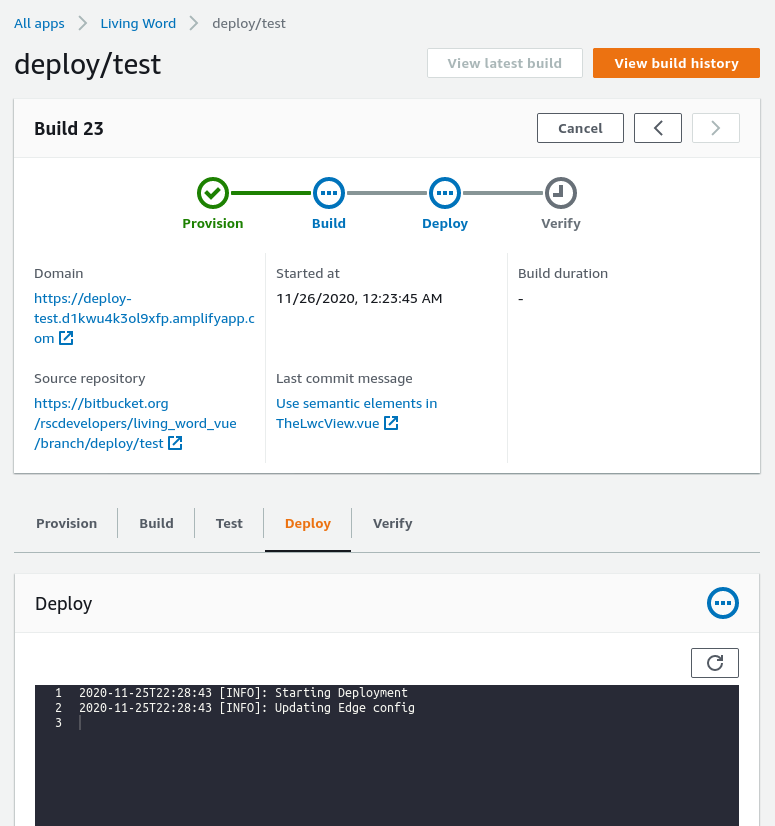
Somehow it's building and deploying simultaneously? On the build tab, it seems to have completed the build. It's not deploying.
 rudolfbyker
on 26 Nov 2020
rudolfbyker
on 26 Nov 2020
A similar problem is occurring to me also
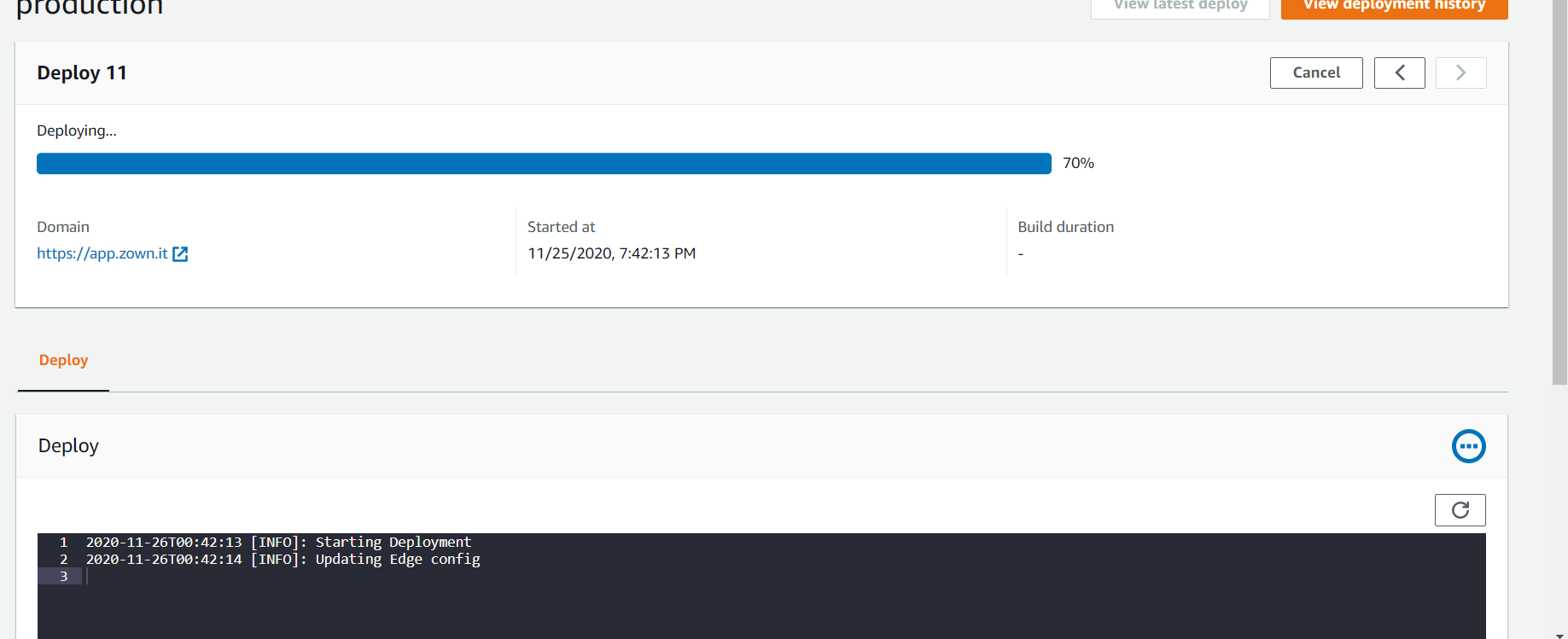
 ZownIt
on 26 Nov 2020
ZownIt
on 26 Nov 2020
After letting it run all night, it finished the deployment, but is still stuck on "verify". Weird.

rudolfbyker
on 26 Nov 2020
There was an unrelated AWS event yesterday in US-EAST-1 that was causing some issues. Please try a fresh build and let us know if you have any issues.
litwicki
on 26 Nov 2020
Yes, it was resolved now :-)
ZownIt
on 26 Nov 2020
Mine is now stuck on the provision step. How long is that usually supposed to take? Using the default image.
rudolfbyker
on 26 Nov 2020
@rudolfbyker if you have more than 5 concurrent builds going on in any one account any additional will get stuck in the provisioning step. This is a bug we are working on prioritizing as soon as we can.
litwicki
on 26 Nov 2020
Related issues
 nomiddlename
·
4Comments
nomiddlename
·
4Comments
 helloPiers
·
3Comments
helloPiers
·
3Comments
 nballenger
·
5Comments
nballenger
·
5Comments
 adamaltman
·
3Comments
adamaltman
·
3Comments
 zackthoutt
·
3Comments
zackthoutt
·
3Comments
Most helpful comment
any development about this issue?