Amplify-console: Amplify Console Build Failure - facebookAppId, amazonAppId, googleClientId, hostedUIProviderCreds] must have values
I added auth to my project with the Facebook, Google, and Amazon Logins. I got Cognito working well, so I decided to add an API using the AppPool for security.
I added the default graphQL API that adds todos with a simple one-to-many relationship, I ran amplify push and everything worked great. AppSync, Dynamo, and Cognito were all looking perfectly in each console.
I committed my code to git and pushed, which kicked off an Amplify Console build that failed with the following error message. Notice how it is complaining that it cannot find values for my facebookAppId, amazonAppId, googleClientId, hostedUIProviderCreds. That is confusing because Cognito is working perfectly with all 3 providers...
UPDATE_FAILED authdevilsswille50c45c5 AWS::CloudFormation::Stack Tue Oct 22 2019 14:04:31 GMT+0000 (Coordinated Universal Time) Parameters: [facebookAppId, amazonAppId, googleClientId, hostedUIProviderCreds] must have values
I expected the Amplify console to be able to build and deploy this project since amplify push worked fine from my machine.
If I remove the API, Cognito still works fine, I can commit and push at this point and the Amplify Console will build and deploy my project fine.
Any insight is always appreciated.
 KidSysco
All 125 comments
@KidSysco are you creating a new backend environment through the Amplify Console or are you reusing one created through the CLI?
 swaminator
on 29 Oct 2019
swaminator
on 29 Oct 2019
That is a really good question, I guess it is unclear what I am supposed to do here.
I use the CLI to push everything and test my code locally.
In the Amplify Console, I noticed there is a setting only available when setting up the app for the first time. It asks me if I want to deploy the backend, or only deploy the front end. I tried to change this setting after the app was created but I was unable to find a way. The only way to change that setting appears to be to delete the app from the Amplify Console and add it again.
Even when I deleted the app, added it again so I could try to only deploy the front end, I ran into permissions problems. I followed the directions to remove the aws-exports.js file from the GitIgnore file. But once I hit save, it complained about the role that is needed to deploy backend resources and gave me an error. However, it still added the app, but it would not deploy and just gives me a permissions error about the account needed to deploy the backend resources whenever it tries to build.
KidSysco
on 30 Oct 2019
@KidSysco The amplifyPush script has an issue with new stack creation when using social federation. As a workaround you could try:
- Create your own
amplifypush.shlikemyamplifypush.shin root folderamplify-auth-app/myamplifypush.sh - Add your authconfigs to the bash script
#!/usr/bin/env bash
set -e
IFS='|'
help_output () {
    echo "usage: amplify-push <--environment|-e <name>> <--simple|-s>"
    echo "  --environment  The name of the Amplify environment to use"
    echo "  --simple  Optional simple flag auto-includes stack info from env cache"
    exit 1
}

init_env () {
    ENV=$1
    AMPLIFY=$2
    PROVIDERS=$3
    CODEGEN=$4
    AWSCONFIG=$5
    CATEGORIES=$6
    echo "# Start initializing Amplify environment: ${ENV}"
    if [[ -z ${STACKINFO} ]];
    then
        echo "# Initializing new Amplify environment: ${ENV} (amplify init)"
        amplify init --amplify ${AMPLIFY} --providers ${PROVIDERS} --codegen ${CODEGEN} --categories ${CATEGORIES} --yes;
        echo "# Environment ${ENV} details:"
        amplify env get --name ${ENV}
    else
        echo "STACKINFO="${STACKINFO}
        echo "# Importing Amplify environment: ${ENV} (amplify env import)"
        amplify env import --name ${ENV} --config "${STACKINFO}" --awsInfo ${AWSCONFIG} --categories ${CATEGORIES} --yes;
        echo "# Initializing existing Amplify environment: ${ENV} (amplify init)"
        amplify init --amplify ${AMPLIFY} --providers ${PROVIDERS} --codegen ${CODEGEN} --yes;
        echo "# Environment ${ENV} details:"
        amplify env get --name ${ENV}
    fi
    echo "# Done initializing Amplify environment: ${ENV}"
}

ENV=""
IS_SIMPLE=false
POSITIONAL=()
while [[ $# -gt 0 ]]
do
    key="$1"
    case ${key} in
        -e|--environment)
            ENV=$2
            shift
            ;;
        -r|--region)
            REGION=$2
            shift
            ;;
        -s|--simple)
            IS_SIMPLE=true
            shift
            ;;
        *)
            POSITIONAL+=("$1")
            shift
            ;;
    esac
done

set -- "${POSITIONAL[@]}"

# if no provided environment name, use default env variable, then user override
if [[ ${ENV} = "" ]];
then
    ENV=${AWS_BRANCH}
fi
if [[ ${USER_BRANCH} != "" ]];
then
    ENV=${USER_BRANCH}
fi

# Check valid environment name
if [[ -z ${ENV} || "${ENV}" =~ [^a-zA-Z0-9\-]+ ]] ; then help_output ; fi

AWSCONFIG="{\
\"configLevel\":\"project\",\
\"useProfile\":true,\
\"profileName\":\"default\"\
}"

AMPLIFY="{\
\"envName\":\"${ENV}\"\
}"

PROVIDERS="{\
\"awscloudformation\":${AWSCONFIG}\
}"

CODEGEN="{\
\"generateCode\":false,\
\"generateDocs\":false\
}"

AUTHCONFIG="{\
\"facebookAppIdUserPool\":\"888888888888888\",\
\"facebookAppSecretUserPool\":\"88888888888888888\"\
}"

CATEGORIES="{\
\"auth\":$AUTHCONFIG\
}"

# Handle old or new config file based on simple flag
if [[ ${IS_SIMPLE} ]];
then
    echo "# Getting Amplify CLI Cloud-Formation stack info from environment cache"
    export STACKINFO="$(envCache --get stackInfo)"
    init_env ${ENV} ${AMPLIFY} ${PROVIDERS} ${CODEGEN} ${AWSCONFIG} ${CATEGORIES}
    echo "# Store Amplify CLI Cloud-Formation stack info in environment cache"
    STACKINFO="$(amplify env get --json --name ${ENV})"
    envCache --set stackInfo ${STACKINFO}
    echo "STACKINFO="${STACKINFO}
else
    # old config file, above steps performed outside of this script
    init_env ${ENV} ${AMPLIFY} ${PROVIDERS} ${CODEGEN} ${AWSCONFIG} ${CATEGORIES}
fi
- Edit
Build settingin amplify console
version: 0.1
backend:
  phases:
    build:
      commands:
        - '# Execute Amplify CLI with the helper script'
        - chmod u+x ./myamplifypush.sh
        - ./myamplifypush.sh
frontend:
  phases:
    preBuild:
      commands:
        - npm ci
    build:
      commands:
        - npm run build
  artifacts:
    baseDirectory: build
    files:
      - '**/*'
  cache:
    paths:
      - node_modules/**/*
- Redeploy the app
This worked on my app. If you could not reproduce it, please let me know.
 Joycehao19
on 11 Nov 2019
Joycehao19
on 11 Nov 2019
I'm having similar issues, or at least they appear to be closely related. I posted details here https://github.com/aws-amplify/amplify-cli/issues/2833
 kevin-mitchell
on 8 Dec 2019
kevin-mitchell
on 8 Dec 2019
Yep, looks exactly the same as my experience.
KidSysco
on 9 Dec 2019
@KidSysco what are you doing in the meantime? Are you just deploying via amplify push && amplify publish locally in the cli?
kevin-mitchell
on 10 Dec 2019
Pushing locally worked fine, and all functions worked fine locally. So I could develop locally but I just couldn't get it to production.
I decided to give amplify publish a try by setting up the publishing options in Amplify that would post the website to an S3 bucket, instead of using the Amplify Console.
However, amplify publish to S3 did not work for me either.
Same error.
I think what Joycehao19 said above is correct...
"The amplifyPush script has an issue with new stack creation when using social federation."
Official AWS Support just sent me to GitHub for Amplify support, but I was already here.
So I froze the idea there and moved on to write classic Restify services on an EC2 linux instance.
I think you could try to remove all social media functions and try it. I want to say I tried that and it did not work either, but based on what Joyce said above, it might work. I can't remember from a month ago. I also don't have any more time to sink into testing this for AWS. I already have a job, and a boss, and many deadlines of my own. lol
However, I am keeping on eye on Amplify and this issue. I will still comment and help out the community if I can.
I absolutely love the idea of Amplify, they need to keep pushing... But if you really need to go serverless, the best option right now is Azure. AWS is very new to writing dev tools, MS has been doing this since the dawn of time. The MS tools are very slick, from ORM (Entity Framework), to Web Server, source control, to multiple environments of Cloud resources. All one company. They are light years ahead in that game.
Fortunately for me, I do not NEED to go serverless right now, we are not huge fans of MS either. And we still get lots done on EC2, in record time.
Keep us posted if you make any break throughs!
KidSysco
on 10 Dec 2019
Thanks for all of the info, the insight / experiences you've had are super helpful as I think through this stuff.
RE: try without social, in my case social sign in is actually the ONLY option that I want to support. My "app" is for a limited set of "internal" users (hint: it's actually my family :)), but I want to build something robust / secure as a way to learn a new set of tools (e.g. Amplify) for evaluation in future professional projects. In my case, I know my family members all have gmail accounts so I want them to just sign in with Google credentials and save worry about / thinking about anything else.
RE: switching to something else, honestly Amplify is just sort of the entry point for a bunch of other things going on. Most important is AWS IoT, which I've spent a decent chunk of time implementing on physical hardware I'm making, so I'm pretty married to AWS at the moment.
I think for now I'll wait and watch this ticket and see what happens. I don't need to go to "production" at the moment, and truthfully I could live with only a single production environment if that solved my issue.
kevin-mitchell
on 10 Dec 2019
I understand completely.
As a Node.js programmer, the huge answer for social media SSO is passport.js.
However, I prefer Restify over Express, which has lead a pretty big divide in the Node community I'd say.
Passport.js is express based.
There are other services out there that are like Cognito, and we could use them too. I even have some training here from Udemy.com on getting AWS Developer certified. That class teaches new folks how to use Cognito directly using an older jQuery style of programming. It was not Vue, or React.
However, my instructor clearly indicated to his class that Amplify was not ready for production. I didn't believe him. I ended up here anyway because AWS makes amplify sound so awesome. I couldn't resist, even though I was warned by my instructor who was an Amplify Beta user.
I eventually decided that oAuth and social SSO logins are not really worth it on this platform yet.
Restify seems to have a real problem with JWT, and the AWS answer for something like that is just too much work to justify. There are easier ways to get social media SSO, but honestly, just writing my own login form seems to be much less work than all of this. Once I gave up on this, I started making huge gains in progress just writing it myself.
Now on Azure... OAuth was all super slick. This is why Amplify deserves a chance...
Years ago when I was on Azure, the default new project in Visual Studio for creating a new site, ships with oAuth stuff built in, all you need to do is fill in the keys and secrets into your code. No services needed, no passport.js, no express, OAuth just worked there. And that was back in 2015.
I know how it is supposed to work, because I have seen things like this elsewhere.
So it's just not worth fighting the platform. If it's not ready, then it's just not ready yet.
But DOn't get me wrong, I am still AWS 4 LYFE!!!! WOOT!!!!
So I agree, let's watch and see what happens next!
KidSysco
on 10 Dec 2019
Confirming @Joycehao19 's workaround. This worked also on my end. Just did a little adjustment on the AUTH_CONFIG for social feds authentication. Created config variables per environment on App settings > Environment variables tab and use it in my custom amplify push script myamplifypush.sh like below.
AUTHCONFIG="{\
\"googleAppIdUserPool\":\"${GOOGLE_CLIENT_ID}\",\
\"googleAppSecretUserPool\":\"${GOOGLE_CLIENT_SECRET}\",\
\"loginwithamazonAppIdUserPool\":\"${AMAZON_APP_ID}\",\
\"loginwithamazonAppSecretUserPool\":\"${AMAZON_APP_SECRET}\"\
}"
Then push and redeploy environment(s). I have 3 environments as of the moment master, local, staging with different auth config in each cognito per env respectively. Working fine now. Thanks!
 w3kp
on 22 Dec 2019
w3kp
on 22 Dec 2019
@Joycehao19 's workaround seemed to work for me for the "Backend" phase of the build process which now passes, but now it hangs on the "Frontend" phase (which was working fine before I ended up in this mess) because it seams the file aws-exports.js is no longer generated. Any suggestions?
 danieletieghi
on 2 Jan 2020
danieletieghi
on 2 Jan 2020
Facing Error: auth headless init is missing the following inputParams facebookAppIdUserPool, facebookAppSecretUserPool, googleAppIdUserPool, googleAppSecretUserPool as well.
Unfortunately, the workaround did not help us :(
 yuyokk
on 5 Jan 2020
yuyokk
on 5 Jan 2020
Based on the comment, I modified the script from here and it worked for me
#!/usr/bin/env bash
set -e
IFS='|'
help_output () {
    echo "usage: amplify-push <--environment|-e <name>> <--simple|-s>"
    echo "  --environment  The name of the Amplify environment to use"
    echo "  --simple  Optional simple flag auto-includes stack info from env cache"
    exit 1
}

init_env () {
    ENV=$1
    AMPLIFY=$2
    PROVIDERS=$3
    CODEGEN=$4
    AWSCONFIG=$5
    CATEGORIES=$6
    echo "# Start initializing Amplify environment: ${ENV}"
    if [[ -z ${STACKINFO} ]];
    then
        echo "# Initializing new Amplify environment: ${ENV} (amplify init)"
        amplify init --amplify ${AMPLIFY} --providers ${PROVIDERS} --codegen ${CODEGEN} --categories ${CATEGORIES} --yes;
        echo "# Environment ${ENV} details:"
        amplify env get --name ${ENV}
    else
        echo "STACKINFO="${STACKINFO}
        echo "# Importing Amplify environment: ${ENV} (amplify env import)"
        amplify env import --name ${ENV} --config "${STACKINFO}" --awsInfo ${AWSCONFIG} --categories ${CATEGORIES} --yes;
        echo "# Initializing existing Amplify environment: ${ENV} (amplify init)"
        amplify init --amplify ${AMPLIFY} --providers ${PROVIDERS} --codegen ${CODEGEN} --categories ${CATEGORIES} --yes;
        echo "# Environment ${ENV} details:"
        amplify env get --name ${ENV}
    fi
    echo "# Done initializing Amplify environment: ${ENV}"
}

ENV=""
IS_SIMPLE=false
POSITIONAL=()
while [[ $# -gt 0 ]]
do
    key="$1"
    case ${key} in
        -e|--environment)
            ENV=$2
            shift
            ;;
        -r|--region)
            REGION=$2
            shift
            ;;
        -s|--simple)
            IS_SIMPLE=true
            shift
            ;;
        *)
            POSITIONAL+=("$1")
            shift
            ;;
    esac
done

set -- "${POSITIONAL[@]}"

# if no provided environment name, use default env variable, then user override
if [[ ${ENV} = "" ]];
then
    ENV=${AWS_BRANCH}
fi
if [[ ${USER_BRANCH} != "" ]];
then
    ENV=${USER_BRANCH}
fi

# Check valid environment name
if [[ -z ${ENV} || "${ENV}" =~ [^a-zA-Z0-9\-]+ ]] ; then help_output ; fi

AWSCONFIG="{\
\"configLevel\":\"project\",\
\"useProfile\":true,\
\"profileName\":\"default\"\
}"

AMPLIFY="{\
\"envName\":\"${ENV}\"\
}"

PROVIDERS="{\
\"awscloudformation\":${AWSCONFIG}\
}"

CODEGEN="{\
\"generateCode\":false,\
\"generateDocs\":false\
}"

AUTHCONFIG="{\
\"facebookAppIdUserPool\":\"XXXXXXXXXXXXXX\",\
\"facebookAppSecretUserPool\":\"XXXXXXXXXXXXXX\"\
}"

CATEGORIES="{\
\"auth\":$AUTHCONFIG\
}"

# Handle old or new config file based on simple flag
if [[ ${IS_SIMPLE} ]];
then
    echo "# Getting Amplify CLI Cloud-Formation stack info from environment cache"
    export STACKINFO="$(envCache --get stackInfo)"
    init_env ${ENV} ${AMPLIFY} ${PROVIDERS} ${CODEGEN} ${AWSCONFIG} ${CATEGORIES}
    echo "# Store Amplify CLI Cloud-Formation stack info in environment cache"
    STACKINFO="$(amplify env get --json --name ${ENV})"
    envCache --set stackInfo ${STACKINFO}
    echo "STACKINFO="${STACKINFO}
else
    # old config file, above steps performed outside of this script
    init_env ${ENV} ${AMPLIFY} ${PROVIDERS} ${CODEGEN} ${AWSCONFIG} ${CATEGORIES}
fi
For some reason I am really struggling with the --categories parameter on amplify init. I cannot find any documentation on it and I cannot get the CATEGORIES with AUTHCONFIG to work. At this point I'm not even sure if I am in the right direction.
Every time I run the script, I am unable to add environment variables like @paulbartocillo to the script.
In the team-provider-info.json file I expect:
"categories": {
  "auth": {
    "cognito": {
      "myVar": "abc",
      "myOtherVar": "def"
    }
  },
  "function": {
    "functionName": {
      "RECAPTCHASECRET": "6Lfy_..."
    }
  }
}
Instead, I get all empties:
"categories": {
  "auth": {
    "cognito": {}
  },
  "function": {
    "functionName": {}
  }
}
Anyone who can point me in the right direction? I am using myscript.sh --environment test --simple . It works alright, but I really need those custom variables.
Many thanks!
 BabyDino
on 16 Jan 2020
BabyDino
on 16 Jan 2020
Any update on this issue that is not the workaround mentioned above?
 evertson90
on 30 Jan 2020
evertson90
on 30 Jan 2020
Facing
Error: auth headless init is missing the following inputParams facebookAppIdUserPool, facebookAppSecretUserPool, googleAppIdUserPool, googleAppSecretUserPoolas well.
Unfortunately, the workaround did not help us :(
Make sure you have the right amount of quotes and backslashes when adding your own "AUTH" variables.
It didn't work for me either because I had a "/" too much.
evertson90
on 30 Jan 2020
I face this problem and solve it.
1- Create amplfypush.sh file and add it to the root of project and put the following scripts in it:
#!/usr/bin/env bash
set -e
IFS='|'
help_output () {
    echo "usage: amplify-push <--environment|-e <name>> <--simple|-s>"
    echo "  --environment  The name of the Amplify environment to use"
    echo "  --simple  Optional simple flag auto-includes stack info from env cache"
    exit 1
}

init_env () {
    ENV=$1
    AMPLIFY=$2
    PROVIDERS=$3
    CODEGEN=$4
    AWSCONFIG=$5
    CATEGORIES=$6
    echo "# Start initializing Amplify environment: ${ENV}"
    if [[ -z ${STACKINFO} ]];
    then
        echo "# Initializing new Amplify environment: ${ENV} (amplify init)"
        amplify init --amplify ${AMPLIFY} --providers ${PROVIDERS} --codegen ${CODEGEN} --categories ${CATEGORIES} --yes;
        echo "# Environment ${ENV} details:"
        amplify env get --name ${ENV}
    else
        echo "STACKINFO="${STACKINFO}
        echo "# Importing Amplify environment: ${ENV} (amplify env import)"
        amplify env import --name ${ENV} --config "${STACKINFO}" --awsInfo ${AWSCONFIG} --categories ${CATEGORIES} --yes;
        echo "# Initializing existing Amplify environment: ${ENV} (amplify init)"
        amplify init --amplify ${AMPLIFY} --providers ${PROVIDERS} --codegen ${CODEGEN} --categories ${CATEGORIES} --yes;
        echo "# Environment ${ENV} details:"
        amplify env get --name ${ENV}
    fi
    echo "# Done initializing Amplify environment: ${ENV}"
}

ENV=""
IS_SIMPLE=false
POSITIONAL=()
while [[ $# -gt 0 ]]
do
    key="$1"
    case ${key} in
        -e|--environment)
            ENV=$2
            shift
            ;;
        -r|--region)
            REGION=$2
            shift
            ;;
        -s|--simple)
            IS_SIMPLE=true
            shift
            ;;
        *)
            POSITIONAL+=("$1")
            shift
            ;;
    esac
done

set -- "${POSITIONAL[@]}"

# if no provided environment name, use default env variable, then user override
if [[ ${ENV} = "" ]];
then
    ENV=${AWS_BRANCH}
fi
if [[ ${USER_BRANCH} != "" ]];
then
    ENV=${USER_BRANCH}
fi

# Check valid environment name
if [[ -z ${ENV} || "${ENV}" =~ [^a-zA-Z0-9\-]+ ]] ; then help_output ; fi

AWSCONFIG="{\
\"configLevel\":\"project\",\
\"useProfile\":true,\
\"profileName\":\"default\"\
}"

AMPLIFY="{\
\"envName\":\"${ENV}\"\
}"

PROVIDERS="{\
\"awscloudformation\":${AWSCONFIG}\
}"

CODEGEN="{\
\"generateCode\":false,\
\"generateDocs\":false\
}"

AUTHCONFIG="{\
\"facebookAppId\":\"${FACEBOOK_CLIENT_ID}\",\
\"facebookAppSecret\":\"${FACEBOOK_CLIENT_SECRET}\",\
\"googleAppId\":\"${GOOGLE_CLIENT_ID}\",\
\"googleAppSecret\":\"${GOOGLE_CLIENT_SECRET}\"\
}"

CATEGORIES="{\
\"auth\":$AUTHCONFIG\
}"

# Handle old or new config file based on simple flag
if [[ ${IS_SIMPLE} ]];
then
    echo "# Getting Amplify CLI Cloud-Formation stack info from environment cache"
    export STACKINFO="$(envCache --get stackInfo)"
    init_env ${ENV} ${AMPLIFY} ${PROVIDERS} ${CODEGEN} ${AWSCONFIG} ${CATEGORIES}
    echo "# Store Amplify CLI Cloud-Formation stack info in environment cache"
    STACKINFO="$(amplify env get --json --name ${ENV})"
    envCache --set stackInfo ${STACKINFO}
    echo "STACKINFO="${STACKINFO}
else
    # old config file, above steps performed outside of this script
    init_env ${ENV} ${AMPLIFY} ${PROVIDERS} ${CODEGEN} ${AWSCONFIG} ${CATEGORIES}
fi
2- In amplify console --> App Settings ----> Environment variables add FACEBOOK_CLIENT_ID, FACEBOOK_CLIENT_SECRET, GOOGLE_CLIENT_ID, GOOGLE_CLIENT_SECRET to the environment varibale and set values for each environment
3- Change console --> App Settings ---->Build Setting to
version: 0.1
backend:
  phases:
    build:
      commands:
        - '# Execute Amplify CLI with the helper script'
        - chmod u+x ./vertrun-amplifypush.sh
        - ./amplfypush.sh
frontend:
  phases:
    preBuild:
      commands:
        - yarn install
    build:
      commands:
        - yarn run build
  artifacts:
    baseDirectory: build
    files:
      - '**/*'
  cache:
    paths:
      - node_modules/**/*
 vajafari
on 9 Feb 2020
vajafari
on 9 Feb 2020
I'm getting the following message:
[hostedUIProviderCreds] must have values
I don't have a frontend setup in the amplify console, i don't use the hosted UI at all.
I'm using Auth, Api and Storage services. I just want to add some fields in my schema and i'm stuck with this error...
This is the only issue that i found related to my error message. can someone help?
 ohadts
on 14 Mar 2020
ohadts
on 14 Mar 2020
I'm getting the following message:
[hostedUIProviderCreds] must have valuesI don't have a frontend setup in the amplify console, i don't use the hosted UI at all.
I'm using Auth, Api and Storage services. I just want to add some fields in my schema and i'm stuck with this error...This is the only issue that i found related to my error message. can someone help?
I have the same issue @ohadts
 zahydo
on 20 Mar 2020
zahydo
on 20 Mar 2020
@zahydo Nobody is answering here 😒
Did you manage to found any workaround?
ohadts
on 24 Mar 2020
Hi, I don't know if this is acceptable for you, but I had the same problem, and after failing in applying the workaround I came up with a different one: simply I do not manage social single sign ons with amplify (chose no at don't know which question), and I simply added them manually in the cognito console (I have 2 environments, I did it twice off course). It works and neither amplify push nor a console build removes the configuration.
danieletieghi
on 24 Mar 2020
That was not acceptable to me, why use Amplify at all then? I can go to the console and add Cognito myself too.
The point behind Amplify is that we are finally getting Infrastructure as Code at AWS with serverless constructs.
Cognito and all of its configuration should be stored in source control, otherwise things will get missed when trying to replicate it later. This is what Infrastructure as Code does.
Right now, at my company, we cannot rebuild several of our old servers because no one knows how to. There are no docs, and the folks who put it together took years to get it done and none of them work here anymore.
This is what Amplify promises to resolve using all of the standard best practices that Amazon uses on their own websites.
I might even suggest it is more damaging to mislead future devs in your company by putting some of your apps infrastructure into code and source control, while certain other little things are not. It will lead people into believing that everything is done with infrastructure as Code when it actually is not.
I would rather have it one way or the other.
Not somewhere half way inbetween.
KidSysco
on 24 Mar 2020
@zahydo Nobody is answering here 😒
Did you manage to found any workaround?
@ohadts No, I had to recreate my API. It seems to Amplify that don't work well adding or removing fields related to the @key directive. Please contact me if you find another way to solve that problem. Thanks.
zahydo
on 24 Mar 2020
@zahydo @KidSysco we are working on a fix that will allow you to provide an environment variable with your Facebook/Google Client ID, and we will be able to create new environments without the build failure. We should have the fix out in the next few weeks.
swaminator
on 26 Mar 2020
We simply did a an amplify pull --appId XXXXXXXX --envName dev command on another computer . Modified some graphql schema.
On amplify push it gives the error : Parameters: [hostedUIProviderCreds] must have values
Please help. We are really struck because of this .
 slatemates
on 30 Mar 2020
slatemates
on 30 Mar 2020
@KidSysco Totaly agree.
@zahydo Did you lost all of your data? I'm not trying to add or modified fields related to the @key directive, just to add a plain primitive field...
@slatemates It happened to me on a machine that I did "amplify pull..." like you did, but then I went back to my original machine (the one that I started the amplify project on) and got the same results.
ohadts
on 30 Mar 2020
@ohadts On the original machine it still works fine. Since I had to work on the new machine, I made a tar ball of the original amplify folder , copy /pasted on the new machine. Its a lame workaround, but it works !
slatemates
on 31 Mar 2020
Hi! When you create a new back-end environment on Amplify Console, you could add your auth parameters in environment variables area now without creating your own amplifypush.sh.
The way to do it:
When you connect your branch, in Backend deployments, choose Create new environment, and enter your backend name.

In the key and value fields, enter your client id and client secret. Amplify Console supports configuring Facebook, Google and Amazon account.

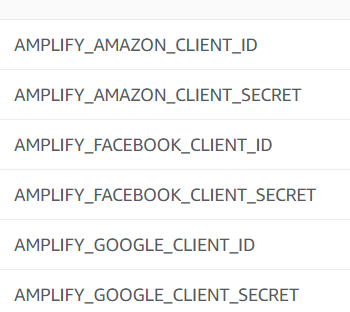
| Variable name | Description | Example |
| ------------- | ------------- | ------------- |
| AMPLIFY_AMAZON_CLIENT_ID | The Amazon client Id | 123456 |
| AMPLIFY_AMAZON_CLIENT_SECRET | The Amazon client secret | example123456 |
| AMPLIFY_FACEBOOK_CLIENT_ID | The Facebook client Id | 123456 |
| AMPLIFY_FACEBOOK_CLIENT_SECRET | The Facebook client secret | example123456 |
| AMPLIFY_GOOGLE_CLIENT_ID | The Google client Id | 123456 |
| AMPLIFY_GOOGLE_CLIENT_SECRET | The Google client secret | example123456 |
Joycehao19
on 1 Apr 2020
@Joycehao19 ~please advise how to migrate the custom amplifypush.sh solution (existing backend) to the proper solution.~
Thank you!
UPDATE
my bad :|
In the key and value fields, enter your client id and client secret. Amplify Console supports configuring Facebook, Google and Amazon account.
I think this item covers existing backends.
yuyokk
on 1 Apr 2020
Hi @yuyokk , If you created a back-end via cli and deployed on the console, it would not be affected. If it does, please let us know. Thanks!
Joycehao19
on 2 Apr 2020
@ohadts I lost my data. But, for the moment that is not a problem because I'm working in development. But the same error happens to me with I did push my amplify backend changes in the 'test' environment. I did add some features like lambdas and auth to the 'dev' environment without problems. But when I want to push the same features in the 'test' environment the Amplify Cli raises the same error:
Parameters: [hostedUIProviderCreds] must have values
zahydo
on 3 Apr 2020
@Joycehao19
I still receive the same error when using the script
Error: auth headless init is missing the following inputParams facebookAppIdUserPool, facebookAppSecretUserPool, googleAppIdUserPool, googleAppSecretUserPool
at updateConfigOnEnvInit (/root/.nvm/versions/node/v10.16.0/lib/node_modules/@aws-amplify/cli/node_modules/amplify-category-auth/provider-utils/awscloudformation/index.js:369:15)
at /root/.nvm/versions/node/v10.16.0/lib/node_modules/@aws-amplify/cli/node_modules/amplify-category-auth/index.js:234:28
at /root/.nvm/versions/node/v10.16.0/lib/node_modules/@aws-amplify/cli/node_modules/promise-sequential/index.js:16:18
at process._tickCallback (internal/process/next_tick.js:68:7)
Well, actually, it works the first build then fails for all subsequent one for reasons unknown.
Adding env var manually in the console (i.e. AMPLIFY_FACEBOOK_CLIENT_ID, AMPLIFY_FACEBOOK_CLIENT_SECRET, AMPLIFY_GOOGLE_CLIENT_ID, AMPLIFY_GOOGLE_CLIENT_SECRET) doesn't resolve the issue.
Amplify Console is supposed to save developer time from building and deploying app, but ironically ends up costing couple hours of developer's time to attempt to fix its error with no luck fixing it. This issue really deserves high priority and be addressed. I am ditching Amplify Console entirely and rather hosting my app via Cloudfront amplify hosting add and build & push up locally amplify publish. Works way better.
 xitanggg
on 5 Apr 2020
xitanggg
on 5 Apr 2020
@xitanggg I truly apologize for the inconvenience, and our team is actively working on fixes of build failures now. Thanks for being an Amplify Console user and giving the conductive feedback. In order to better assist you, and improve our ongoing feature offering, I hope you could kindly share your appId and region to us (App settings => General => App ARN => arn:aws:amplify:${Region}:xxxxxxx:apps/${appId}).
Thank you.
Joycehao19
on 7 Apr 2020
@Joycehao19 Thanks for getting back promptly.
Here is my App ARN
arn:aws:amplify:us-east-1:xxxxxxx:apps/d2tcc56dy4swxp
Build 4 is the only time it works when I introduce the myamplifypush.sh with
AUTHCONFIG="{\
\"facebookAppId\":\"xxxxx\",\
\"googleClientId\":\"xxxxxx.apps.googleusercontent.com\",\
\"facebookAppIdUserPool\":\"xxxxx\",\
\"facebookAppSecretUserPool\":\"xxxxx\",\
\"googleAppIdUserPool\":\"xxxxx.apps.googleusercontent.com\",\
\"googleAppSecretUserPool\":\"xxxxx\"\
}"
, then it starts failing at Build 5 (which I only changed my front end react code and updated a function) to Build 18 with no luck fixing it.
No rush on this, since I am not using amplify console.
xitanggg
on 7 Apr 2020
@xitanggg @yuyokk @KidSysco @kevin-mitchell @paulbartocillo We have a solution posted here.
To get it working, revert your backend build settings to use the amplifyPush --simple script, add the env variables, and any new environment created through the Console will work. Just to reiterate the workflow (assuming you're starting from scratch).
- Install the Amplify CLI. Setup env
dev. - Run
amplify add authand setup social sign-in. Runamplify push - Commit changes to master branch.
- Set environment variables mentioned here.
- Connect master branch in the Console and create a new backend env
prod.
Expected result: The Amplify Console will deploy a new backend env without the error you are facing in the build. In the Frontend Env tab you should see the master branch and in the backend env tab you should see two envs prod and dev.
@slatemates @ohadts @zahydo Some of you are reporting an issue with Parameters: [hostedUIProviderCreds] must have values when you are making a change to your schema. Please open an issue on the Amplify CLI repo for that.
swaminator
on 8 Apr 2020
Hi. I'm here, because I setup a project with Amplify CLI, using Auth, which includes federatedSignIn.
I did this with an an initial environment, dev.
In the past, when ready to deploy to production (or staging), I'd (in the Amplify Console) connect a repo, and create a new env, prod, from the master branch.
From what I see happening, the build is choking on the fact that there is no OAuth client ID or secret present. This is mostly likely because I have intentionally excluded amplify/team-provider-info.json from the repo, because the fact that it contains the secret keys.
This seems to be of a chicken and egg scenario, as I can't go in and add these keys in the console, because the backend for prod is failing.
At this point, I can't deploy.
I've tried adding the client ID and secret key as environment variables via the console, but that changes the build error to: missing the following inputParams googleAppIdUserPool, googleAppSecretUserPool
There is also an error in the console, which I believe to be a red herring:
There was an issue connecting to your repo provider, click "Re-authenticate app" in General Settings, and then try your build again.
 kimfucious
on 13 Apr 2020
kimfucious
on 13 Apr 2020
Yes, you are at the right place. We tend to see that issue a lot...
At this point, I can't deploy.
So I might suggest to AWS...
Come up with some way to manually deploy this stuff. Then when it breaks, we can at least follow some manual steps to deployment, like copying files to S3 or EC2 ourselves.
After seeing this error from so many people now, I think back and wonder if I would have stuck with Amplify for my project, if I could have just deployed.
Amplify doesn't need to work perfect, but where I work, we need to deploy. Anything less is absolutely unacceptable, under any circumstance. So we had to drop Amplify from the tech stack when that is not something we wanted to do at all.
After all, we just ended up running our own API, one of our own EC2 instances, with our own instance of RDS, it uses Vue.js and we deploy the front-end to S3 by manually copying files into the AWS console.
There is no infrastructure as code here, no fancy automation, but the bottom line is... It works.
Some folks in the thread above have found the AmplifyPush.sh script to help them get it deployed, that might help if you are willing to go through it. I just never felt comfortable doing that. Amplify was supposed to abstract all of that stuff away from me. So the only way I would be willing to move forward, was if I could manually deploy things as I do now. Which is something I know, and trust.
KidSysco
on 13 Apr 2020
@kimfucious did you check out this post? https://github.com/aws-amplify/amplify-console/issues/206#issuecomment-611036436
swaminator
on 13 Apr 2020
@KidSysco sorry to hear that. Would you be open to getting on a call so we can better understand what you went through? Absolutely agree that not being able to deploy is unacceptable.
swaminator
on 13 Apr 2020
@swaminator Sure I would be willing to have a chat with you. I have AWS Support through my company, and I already went through them. They just pointed me here, so I suppose talking to you is the next step. How do I go about doing that?
KidSysco
on 13 Apr 2020
Has this been resolved yet and documented, or is the current "fix" still
customizing the deployment script? I'm havinga slightly difficult time
keeping track with all of the discussion here. Thank you!
On Mon, Apr 13, 2020, 8:21 PM Ryan Segura notifications@github.com wrote:
@swaminator https://github.com/swaminator Sure I would be willing to
have a chat with you.I have AWS Support through my company, and I already
went through them. They just pointed me here, so I suppose talking to you
is the next step. How do I go about doing that?—
You are receiving this because you were mentioned.
Reply to this email directly, view it on GitHub
https://github.com/aws-amplify/amplify-console/issues/206#issuecomment-613052669,
or unsubscribe
https://github.com/notifications/unsubscribe-auth/AFCJCPDSAMBIE7N74EPEJWDRMNQ4NANCNFSM4JDRK43A
.
kevin-mitchell
on 13 Apr 2020
@kevin-mitchell we have a solution so please refer to this post: https://github.com/aws-amplify/amplify-console/issues/206#issuecomment-611036436
swaminator
on 13 Apr 2020
@KidSysco send me an email via [email protected] and I'll set up time with you.
swaminator
on 13 Apr 2020
@kimfucious did you check out this post? #206 (comment)
Thanks for the follow up, @swaminator
Here's where I'm at:
Started from a clean slate. Brand new app just to test this:
- Ran
amplify initon my local, creating env "dev" - Ran
amplify auth add
$ amplify auth add
Using service: Cognito, provided by: awscloudformation

 The current configured provider is Amazon Cognito.

 Do you want to use the default authentication and security configuration? Default configuration with Social Provider (Federation)
 Warning: you will not be able to edit these selections.
 How do you want users to be able to sign in? Username
 Do you want to configure advanced settings? Yes, I want to make some additional changes.
 Warning: you will not be able to edit these selections.
 What attributes are required for signing up? Email
 Do you want to enable any of the following capabilities?
 What domain name prefix you want us to create for you? authentify7adc49c2-7adc49c2
 Enter your redirect signin URI: https://localhost:3000/auth-callback/
? Do you want to add another redirect signin URI No
 Enter your redirect signout URI: https://localhost:3000/
? Do you want to add another redirect signout URI No
 Select the social providers you want to configure for your user pool: Google

 You've opted to allow users to authenticate via Google.  If you haven't already, you'll need to go to https://developers.google.com/identity and create an App ID.

 Enter your Google Web Client ID for your OAuth flow:  <id goes here>
 Enter your Google Web Client Secret for your OAuth flow:  <key goes here>
Successfully added resource authentify7adc49c2 locally
amplify push- git push to repo
- In Amplify console, new app appears with "dev" back-end configured,
- Click Connect a frontend web app
- Click Connect branch
- Enter repo and branch (master)
- Create new environment (prod)
- Choose existing service role (amplifyconsole-backend-role)
Something odd here. Maybe I'm going senile, but I remember there being an "advanced" accordion/collapse menu on the _Configure build settings page_. This is now gone. This is where I would put in the environment vars: AMPLIFY_GOOGLE_CLIENT_ID & AMPLIFY_GOOGLE_CLIENT_SECRET, before the build, but now that's not possible.

- Only option, click Next
- Click Save and deploy
This fails with (excerpt from build log):
2020-04-14T10:39:31.512Z [WARNING]: ✖ There was an error initializing your environment.
2020-04-14T10:39:31.512Z [INFO]: init failed
2020-04-14T10:39:31.513Z [INFO]: Error: auth headless init is missing the following inputParams googleAppIdUserPool, googleAppSecretUserPool
- Click Environment variables in left menu.
- Add aforementioned env vars
- Navigate to the failed build and click Redeploy this version.
This fails with the same error as above.
- Make a change in the app code and git push to the repo, kicking off a new build.
This give the following error in Amplify Console:

I believe this is a _red herring_ because a git on my local status says:
$ git status
On branch master
Your branch is up to date with 'origin/master'.

nothing to commit, working tree clean
So I just waited. After a while, I came back and refreshed the page, and see this error (same as before):
2020-04-14T10:54:35.721Z [WARNING]: - Initializing your environment: prod
2020-04-14T10:54:35.863Z [WARNING]: ✔ Initialized provider successfully.
2020-04-14T10:54:35.870Z [WARNING]: ✖ There was an error initializing your environment.
2020-04-14T10:54:35.871Z [INFO]: init failed
2020-04-14T10:54:35.871Z [INFO]: Error: auth headless init is missing the following inputParams googleAppIdUserPool, googleAppSecretUserPool
Just to be thorough, I went and reconnected the repository, clearing out the existing hook in my repo settings prior, kicking off another build.
The Cloning repository phase reports:
2020-04-14T11:04:41.195Z [INFO]: Note: checking out '3e9e8fb41abb0d6461672088879fe64966621f68'.
                                 You are in 'detached HEAD' state. You can look around, make experimental
                                 changes and commit them, and you can discard any commits you make in this
                                 state without impacting any branches by performing another checkout.
                                 If you want to create a new branch to retain commits you create, you may
                                 do so (now or later) by using -b with the checkout command again. Example:
                                 git checkout -b <new-branch-name>
                                 HEAD is now at 3e9e8fb docs: revert fake edit
Which I'm guessing is why the There was an issue connecting to your repo provider error is showing up, which it did again.
And 🥁 🥁 🥁 💣
The build fails again with the same headless init error as mentioned above.
I hope that's enough info for you. If not, let me know.
And just a reminder (I've mentioned this prior), I have excluded amplify/team-provider-info.json from the repo, because it contains secrets and my repo is public.
This process has worked flawlessly for me on numerous non-federatedSignIn projects prior. I'm really surprised that this is "new" issue.
kimfucious
on 14 Apr 2020
I got it working on my end. I guess it only happens upon pulling auth settings to new project
$ amplify pull --appId yourID --envName yourENV
Just copy the team-provider-info.json from your original setup and paste to other setup. And amplify push
here's my team-provider-info.json
{
  "prod": {
    "awscloudformation": {
      "AuthRoleName": "amplify-bulokTae-prod-69696969-authRole",
      "UnauthRoleArn": "arn:aws:iam::98237982374937:role/amplify-bulokTae-prod-69696969-unauthRole",
      "AuthRoleArn": "arn:aws:iam::98237982374937:role/amplify-bulokTae-prod-69696969-authRole",
      "Region": "ap-southeast-1",
      "DeploymentBucketName": "amplify-bulokTae-prod-69696969-deployment",
      "UnauthRoleName": "amplify-bulokTae-prod-69696969-unauthRole",
      "StackName": "amplify-bulokTae-prod-69696969",
      "StackId": "arn:aws:cloudformation:ap-southeast-1:98237982374937:stack/amplify-bulokTae-prod-69696969/be7691a0-7f0f-11ea-8531-0a58c7c408be",
      "AmplifyAppId": "d3ldsjafaasddd"
    },
    "categories": {
      "auth": {
        "bulokTae77df9dab": {
          "hostedUIProviderCreds": "[{\"ProviderName\":\"Facebook\",\"client_id\":\"6969696969696\",\"client_secret\":\"0169696969669696\"}]"
        }
      }
    }
  }
}
the only missing from new setup ($ amplify pull --appId yourID --envName yourENV ) is
"categories": {
      "auth": {
        "bulokTae77df9dab": {
          "hostedUIProviderCreds": "[{\"ProviderName\":\"Facebook\",\"client_id\":\"6969696969696\",\"client_secret\":\"0169696969669696\"}]"
        }
      }
    }
 mharrvic
on 16 Apr 2020
mharrvic
on 16 Apr 2020
@kimfucious thanks for the detailed post. We're investigating this now.
swaminator
on 17 Apr 2020
Thanks, @swaminator
It could very well that I'm doing something dumb, but I feel like I've tried everything you've recommended. Do let me know if I can try something else and/or provide more detail.
kimfucious
on 18 Apr 2020
We need the user pool environment variables as well. https://github.com/aws-amplify/amplify-console/issues/206#issuecomment-607499826
That will at least make new auth deployments usable for people on new amplify projects.
 akhockey21
on 18 Apr 2020
akhockey21
on 18 Apr 2020
@kimfucious thanks for taking the time to post those details, it saved me from trying to start over from scratch. I have one (mainly unrelated if i were honest!) followup if you have time: you mentioned excluding amplify/team-provider-info.json from your project - I'm wondering if this is normal to do or if you had to work around this somehow?
This is likely dumb (or at least lazy?) question, but I'm not entirely clear which files are actually important for me to keep under source control vs which files should be .gitignored. I would have imagined that anything that wasn't needed would be added to gitignore by amplify CLI on project init, but maybe not?
@swaminator FYI in my case I have an existing project with a team-provider-info.json file that looks like this (I scrubbed secrets):
{
    "master": {
        "awscloudformation": {
            "AuthRoleName": "amplify-myproject-master-123456-authRole",
            "UnauthRoleArn": "arn:aws:iam::99999999999:role/amplify-myproject-master-123456-unauthRole",
            "AuthRoleArn": "arn:aws:iam::99999999999:role/amplify-myproject-master-123456-authRole",
            "Region": "us-west-2",
            "DeploymentBucketName": "amplify-myproject-master-123456-deployment",
            "UnauthRoleName": "amplify-myproject-master-123456-unauthRole",
            "StackName": "amplify-myproject-master-123456",
            "StackId": "arn:aws:cloudformation:us-west-2:99999999999:stack/amplify-myproject-master-123456/777777777-4444444-7777-4444-999999999",
            "AmplifyAppId": "scrubbbbbbbb999999"
        },
        "categories": {
            "function": {
                "myproject4545454PreSignup": {
                    "DOMAINWHITELIST": "blah.com",
                    "VALIDEMAILS": "[email protected]"
                },
                "myproject4545454PostAuthentication": {},
                "myproject4545454PreAuthentication": {},
                "configurations": {}
            },
            "auth": {
                "myproject4545454": {
                    "googleClientId": "XXXXX.apps.googleusercontent.com",
                    "hostedUIProviderCreds": "[{\"ProviderName\":\"Google\",\"client_id\":\"XXXX.apps.googleusercontent.com\",\"client_secret\":\"YYYYYYYYY\"}]"
                }
            }
        }
    }
}
but I've also added the configuration keys mentioned above:

But still the build fails (as others are mentioning):
2020-04-19T14:22:49.073Z [WARNING]: - Initializing your environment: master
2020-04-19T14:22:49.443Z [WARNING]: ✔ Initialized provider successfully.
2020-04-19T14:22:49.477Z [WARNING]: ✖ There was an error initializing your environment.
2020-04-19T14:22:49.477Z [INFO]: init failed
2020-04-19T14:22:49.479Z [INFO]: Error: auth headless init is missing the following inputParams googleAppIdUserPool, googleAppSecretUserPool
                                 at updateConfigOnEnvInit (/root/.nvm/versions/node/v10.16.0/lib/node_modules/@aws-amplify/cli/node_modules/amplify-category-auth/provider-utils/awscloudformation/index.js:369:15)
Are there additional steps I need to take?
kevin-mitchell
on 19 Apr 2020
Hi @kevin-mitchell
The reason, for me at least, to exclude the team-provider-info.json file from my repo is because my repo is public and, since I'm using federated sign in, not excluding it would expose the secret keys for my external auth providers (e.g. Amazon, Facebook, Google).
I believe that the team-provider-info.json is there to make it super easy for teams to work on a project, but, IMHO, it should only be used in a private repo, unless you're dang sure that you're not sharing the family jewels with the world.
At present, this is the only file that I manually exclude, deferring to the modifications that Amplify makes to .gitignore for the rest.
I should mention here again that I've excluded this file on several past Amplify projects where I was not using federated sign in, and the the process has worked well. So my gut tells me this is something related to federated sign in, and the suggested workarounds thus far seem to indicate this as well.
That said, I don't yet have a working workaround yet, but I'm hopeful that the some fine person will come up with a solution if they get enough tacos 🌮 !
kimfucious
on 19 Apr 2020
Hi @swaminator
Adding some possibly (un)related detail here.
I have another project (separate than the one that I used to provide detail with above) that has federated identify providers configured in the User Pool of the "dev" environment. And it's been working. I have not yet attempted to push the code changes to the repo to see what happens in the console.
Regardless, now a few weeks later, after adding a new backend function in dev (amplify function add) on my local and trying to push that via the CLI, I get the following error:
UPDATE_FAILED      authmyapp01234eb6               AWS::CloudFormation::Stack Mon Apr 20 2020 12:51:25 GMT-0700 (Narnia Time) Parameters:
[hostedUIProviderCreds] must have values
Again , this is trying amplify-push from the dev env on my local (no repo or amplify console involved). And I'm fairly certain that I upgraded the Amplify CLI from to 4.18.0 between when the last push worked (with federated sign-in enabled) without errors. I don't know what version of the cli I upgraded from.
I realize that this is a CLI related, but I thought it might help with your investigations.
UPDATE: I resolved this CLI issue
Though probably unrelated, I'm posting how I fixed this.
In short, I just re-ran amplify init in the existing directory where the problem occurred, using the following selections:
$ amplify init
Note: It is recommended to run this command from the root of your app directory
? Do you want to use an existing environment? Yes
? Choose the environment you would like to use: dev
Using default provider  awscloudformation
√ Initialized provider successfully.

 You've opted to allow users to authenticate via Google.  If you haven't already, you'll need to go to https://developers.google.com/identity and create an App ID.

 Enter your Google Web Client ID for your OAuth flow:  <id goes here>
 Enter your Google Web Client Secret for your OAuth flow:  <key goes here>
Initialized your environment successfully.

Your project has been successfully initialized and connected to the cloud!
After the above, amplify push worked again; however, when attempting to create a front-end in the console with a new "staging" backend in the console, our old headless init error was still lurking about.
kimfucious
on 20 Apr 2020
Thanks for the response to my Q @kimfucious ! I had (wrongly it seems!) assumed it was required for the build pipeline on the Amplify side (for handling the automated backend deployments and such). I might purge it from my repo though, the fact that it contains secrets and is under source control is the reason I currently have my Amplify project private.
FWIW, in my situation I am only use Google sign in. So I believe it's correct to say that I AM using federated sign in (?).
kevin-mitchell
on 20 Apr 2020
Hi @kevin-mitchell I'm happy to help and trying to provide as much info here as possible toward a solution.
I had my reservations about adding team-provider-info.json some time back and got an official reply here, that states:
The purpose of this file is basically sharing it within your team-members on the same project and want to update/use the same AWS Infrastructure tied to an environment. If you're open-sourcing your project you can totally get rid of this file (or make it a part of .gitignore).
So I've been running with that advice.
Regarding whether or not you're using federated sign in, I'd say, "yes," though I could be mixing terminology. In short, when you setup auth with amplify add auth and choose Default configuration with Social Provider (Federation) or a manual equivalent, you're setting up the backend so that you can ultimately use Auth.federatedSignIn({ provider: "Google" }) on the front end.
kimfucious
on 20 Apr 2020
Hello, I had a preexisting environment with auth. I then added federated signin with the cli amplify auth update. It all worked fine when deploying locally. Then when I went onto the console I ran into the error Parameters: [hostedUIProviderCreds] must have values. I then followed the instructions in this comment. When trying to create a new test environment I got another error Error: auth headless init is missing the following inputParams facebookAppIdUserPool, facebookAppSecretUserPool, googleAppIdUserPool, googleAppSecretUserPool, loginwithamazonAppIdUserPool, loginwithamazonAppSecretUserPool so it looks as if the environment variables set aren't being mapped to these required inputs ? Any suggestion how to get this working.
UPDATE: I managed to get auth working with federated sign in. I had not updated my team-provider-info.json with the appId credentials as the environment was shared across apps. I have now been able to use amplify console to use an existing backend (one setup with CLI) to host the app with federated sign in however the issue above still persists when trying to create a new environment with amplify console.
 magjack
on 21 Apr 2020
magjack
on 21 Apr 2020
@kevin-mitchell @magjack Make sure you add the environment variables before connecting the new branch. If you add it after, it won't currently work.
Just to reiterate the workflow (assuming you're starting from scratch).
- Install the Amplify CLI. Setup env
dev. - Run
amplify add authand setup social sign-in. Runamplify push - Commit changes to
devbranch. - Connect
devbranch in the Console and connect existing backend envdev. - Set environment variables mentioned as shown below
| Variable name | Description | Example |
| ------------- | ------------- | ------------- |
| AMPLIFY_AMAZON_CLIENT_ID | The Amazon client Id | 123456 |
| AMPLIFY_AMAZON_CLIENT_SECRET | The Amazon client secret | example123456 |
| AMPLIFY_FACEBOOK_CLIENT_ID | The Facebook client Id | 123456 |
| AMPLIFY_FACEBOOK_CLIENT_SECRET | The Facebook client secret | example123456 |
| AMPLIFY_GOOGLE_CLIENT_ID | The Google client Id | 123456 |
| AMPLIFY_GOOGLE_CLIENT_SECRET | The Google client secret | example123456 |
- Connect
masterbranch and pick create new backend environment. Name itprod.
Expected result: The Amplify Console will deploy a new backend env without the error you are facing in the build. In the Frontend Env tab you should see the master and dev branch and in the backend env tab you should see two envs prod and dev.
swaminator
on 22 Apr 2020
Hi @swaminator, I know that the above was addressed to others, but it got me thinking, as I usually never actually create a front-end for "dev".
I know I'm probably over-communicating here, but I really would like to find a solution for this soon.
What I usually do is:
- create "dev" env on local
- run
amplify add auth - run
amplify push - exclude
team-provider-info.jsonin.gitignore - run
git push origin master(having already configured a repo with git) - run
git checkout -b develop - run
git push origin develop
Note: at this point, there is no way to add environment variables to the app in Amplify Console prior to actually adding a front-end
- In the Amplify console, add front end, not using existing "dev" backend, but creating a new "staging" and/or "prod" backend
This has worked in the past for me many times, with non-federated/social sign in.
Here's a full from scratch task list:
- run
npx create-react-app amplify-issue-206-test - run
amplify init
// yes, I'm using PowerShell on this one
PS D:\Users\Kim\Dev\Sites\workspace\amplify-issue-206-test> amplify init
Note: It is recommended to run this command from the root of your app directory
? Enter a name for the project amplifyissue206test
? Enter a name for the environment dev
? Choose your default editor: Visual Studio Code
? Choose the type of app that you're building javascript
Please tell us about your project
? What javascript framework are you using react
? Source Directory Path:  src
? Distribution Directory Path: build
? Build Command:  npm.cmd run-script build
? Start Command: npm.cmd run-script start
Using default provider  awscloudformation

For more information on AWS Profiles, see:
https://docs.aws.amazon.com/cli/latest/userguide/cli-multiple-profiles.html

? Do you want to use an AWS profile? Yes
? Please choose the profile you want to use default
Adding backend environment dev to AWS Amplify Console app: d3ubvyi61tdunc
| Initializing project in the cloud...

// lots of stuff happens without errors.

√ Successfully created initial AWS cloud resources for deployments.
√ Initialized provider successfully.
Initialized your environment successfully.

Your project has been successfully initialized and connected to the cloud!
- run
amplify auth add
PS D:\Users\Kim\Dev\Sites\workspace\amplify-issue-206-test> amplify auth add
Using service: Cognito, provided by: awscloudformation

 The current configured provider is Amazon Cognito.

 Do you want to use the default authentication and security configuration? Default configuration with Social Provider (Federation)
 Warning: you will not be able to edit these selections.
 How do you want users to be able to sign in? Username
 Do you want to configure advanced settings? Yes, I want to make some additional changes.
 Warning: you will not be able to edit these selections.
 What attributes are required for signing up? Email
 Do you want to enable any of the following capabilities?
 What domain name prefix you want us to create for you? amplifyissue206testd93055db-d93055db
 Enter your redirect signin URI: https://localhost:3000/auth-callback/
? Do you want to add another redirect signin URI No
 Enter your redirect signout URI: https://localhost:3000/
? Do you want to add another redirect signout URI No
 Select the social providers you want to configure for your user pool: Google

 You've opted to allow users to authenticate via Google.  If you haven't already, you'll need to go to https://developers.google.com/identity and create an App ID.

 Enter your Google Web Client ID for your OAuth flow:  <id goes here>
 Enter your Google Web Client Secret for your OAuth flow:  <key goes here>
Successfully added resource amplifyissue206testd93055db locally
- run
amplify push
PS D:\Users\Kim\Dev\Sites\workspace\amplify-issue-206-test> amplify push
√ Successfully pulled backend environment dev from the cloud.

Current Environment: dev

| Category | Resource name               | Operation | Provider plugin   |
| -------- | --------------------------- | --------- | ----------------- |
| Auth     | amplifyissue206testd93055db | Create    | awscloudformation |
? Are you sure you want to continue? Yes
/ Updating resources in the cloud. This may take a few minutes...
// lots of stuff happens without errors
√ All resources are updated in the cloud
- run
git push origin master - run
git checkout -b develop - run
git push origin develop - In the Amplify Console, click
Connect a frontend web app, selecting Github
Note: at this point, there is no way to add environment variables to the app in Amplify Console prior to actually adding a front-end
- Click
Connect branch - Select repo and branch "develop"
- Click Next
I swear there used to be a way to add add environment variables here, below build and test settings, but it's gone now
- In
App build and test settingsselect "dev" as the backend env (this is different from what I normally do) - Select an existing service role (amplifyconsole-backend-role)
- Click Next, then
Save and deploy
This fails with:
2020-04-23T07:33:09.826Z [INFO]: UPDATE_FAILED authamplifyissue206testd93055db AWS::CloudFormation::Stack Thu Apr 23 2020 07:33:09 GMT+0000 (Coordinated Universal Time) Parameters: [hostedUIProviderCreds] must have values
Now I can add environment variables! Add both AMPLIFY_GOOGLE_CLIENT_ID & AMPLIFY_GOOGLE_CLIENT_SECRET
Click General under App Settings
- Select "develop" branch
- Choose action "disable auto build" (if you don't do this, I don't think you can disconnect the branch)
- Select "develop" branch again.
- Chose action "disconnect branch"
- Click
Disconnect(confirmation message appears at top out of view and disappears after 3 secs) - Repeat from step 8 to 14 above (no changes), with environment variables now configured
This fails with:
2020-04-23T07:48:26.015Z [INFO]: UPDATE_FAILED authamplifyissue206testd93055db AWS::CloudFormation::Stack Thu Apr 23 2020 07:48:21 GMT+0000 (Coordinated Universal Time) Parameters: [hostedUIProviderCreds] must have values
- Start entire process again, except this time do not exclude
team-provider-info.jsonfrom the (private) repo. And it works (which we already know)!
Again, no way to add env variables near step 8, but there is no need to if you have team-provider-info.json in the repo. And, not to sound like a broken record but, you don't want to put team-provider-info.json in a public repo when it has the secret keys of your auth providers.
So it appears that the lack of team-provider-info.json is what breaks this, and that the current proposed solution of adding environment values in the Amplify Console when connecting to repos without that file doesn't quite work yet.
I could very well just work from private repos, but the irony is that I discovered this issue when creating a project, Authentify, to document Federated sign-in, using Amplify. It wouldn't be of much help to anyone in a private repo.
Hope this helps... 🌮 !
kimfucious
on 23 Apr 2020
@kimfucious thank you for the detailed post. I'll work on investigation, and keep updating here.
Joycehao19
on 24 Apr 2020
I tried the instructions decribed again with a new amplify console config but still see the same error. Will continue with using CLI to setup backend.
magjack
on 25 Apr 2020
Thanks @Joycehao19. While you're at it, here's more info for you.
- I've got an existing app on Amplify that has a dev and prod backend.
- It has a front end for prod (only), created by connecting the master branch of a public repo.
- This project, to date, has had auth configured w/o federated sign-in.
- I've added federated sign-in to the dev backend, and it works testing locally
- Ultimately I want to get this working in prod
- Until I'm comfortable with all this working swimmingly, I'm working in a staging branch, trying to get it successfully deployed by Amplify Console.
- Once successful there, I plan to merge the changes to master and have that update prod.
- To hopefully make things "easier," I've elected to make the repo private and add the
team-provider-info.jsonfile to the repo.
Here's my efforts with that:
- Make public repo on existing project private. This app already exists on Amplify
- Remove exclusion for
team-provider-info.jsonfrom .gitignore - Run git checkout -b staging
- Run git push origin staging
- Add env vars for auth providers for the app. This is possible, because this is an existing repo with an existing front end.
- In Amplify Console / Front End, click
Connect Branch - Select staging for branch / Create new environment
- Click next
- Click Save and deploy
The back-end gets created without errors.
The front-end fails (in the build log, the Amplify console shows the build still in progress) with cannot find ./aws-exports in ./src.
New bug? Amplify CLI auto excludes this in .gitignore. I've never included this file in a repo.
I let this hang for 10 minutes before cancelling the build.
- Remove exclusion for
aws-export.jsfromgitignore - Run git push origin staging
- This triggers a new build
Back end fails with error:
2020-04-25T16:23:12.048Z [INFO]: Error: auth headless init is missing the following inputParams googleAppIdUserPool, googleAppSecretUserPool
- Disconnect staging branch from Amplify Console
Delete the back-end:
a. Runamplify pull --appId xxxxxxxxxxxxx --envName stagingon localA lovely experience while doing this you get to watch almost everything in the amplify directory get deleted, because the staging back-end is in a failed/incomplete state. This can give a person heart palpitations.
b. Run
amplify env checkout dev
c. Runamplify env remove staging
d. Run amplify pull --appId xxxxxxxxxxxxx --envName dev
And this is scary too:
Pre-pull status:

Current Environment: dev

| Category | Resource name                | Operation | Provider plugin   |
| -------- | ---------------------------- | --------- | ----------------- |
| Auth     | xxxxxxxxxx12345678           | Delete    | awscloudformation |
| Storage  | xxxxxxxxxxxxxxxxxx           | Delete    | awscloudformation |
| Storage  | xxxxxxxxxxxxxxx              | Delete    | awscloudformation |
| Storage  | xxxxxxxxxxxxxxxxxxx          | Delete    | awscloudformation |
| Storage  | xxxxxxxx                     | Delete    | awscloudformation |
| Function | xxxxxxxxxxxxxxxxxx           | Delete    | awscloudformation |
| Function | xxxxxxx                      | Delete    | awscloudformation |
| Function | xxxxxxxxxxxxxxx              | Delete    | awscloudformation |
| Function | xxxxxx                       | Delete    | awscloudformation |
| Function | xxxxxxxxxxx                  | Delete    | awscloudformation |
| Function | xxxxxxxx                     | Delete    | awscloudformation |
| Function | xxxxxxxxxxxxxxxxxx           | Delete    | awscloudformation |
| Function | xxxxxxxxxxxxxxxxxxxxxxxxxxxx | Delete    | awscloudformation |
| Function | xxxxxxxxxxxxxxxxxxx          | Delete    | awscloudformation |
| Api      | xxxxxxxxxxxxx                | Delete    | awscloudformation |

Local changes detected.
Pulling changes from the cloud will override your local changes.
? Are you sure you would like to continue? (y/N)
Though it seems scary, when you say enter Y, your back-end is restored from dev.
At this point, back to square one. Except Amplify CLI has re-added aws-exports.js as an exclusion in .gitignore
There is also a new amplify folder in ./src, which I don't quite understand. I didn't run amplify anything while in ./src, so??? I'll ignore for now, leaving it in the repo.
- Remove exclusion for
aws-exports.jsform.gitignore - Commit all changes, including those made by amplify when performing the actions in step 15 above.
- In Amplify Console, refresh the browser and make sure that the staging back-end is gone.
- Start over at step 4 above (skipping step five, as it's done already)
The build works and the app gets deployed to CloudFront. It's broken because it's lambda functions are missing env vars and other stuff, which is sad but expected.
- Copy env vars from all dev lambdas to staging lambdas (not in the app, in lambda functions themselves)
Configure new user pool
a. Configure policies
b. Add Sign in with Apple manually, if you're using that
b. Adjust callback URLs in App Client Settings to match the URL for new staging front-end.
c. Add the correct URLs matching new User Pool domain name at each auth provider.
c. Add custom attributes, if you're using them
d. Add Attribute mapping for each provider, if you're using more than the default.
e. Select Triggers, if you're using them.Open staging at https://staging.xxxxxxxxxxxxxx.amplifyapp.com
- Sign up new user with password.
- A "User already exists" error is thrown by Cognito.
Step 15d has the staging front-end looking at the dev back end, doh!
- Run amplify pull --appId xxxxxxxxxxxxxx --envName staging
This updates the values in aws-export.js to match the staging backend, except for the redirect URLs related to the User Pool App client settings.
- Manually update
redirectSignInandredirectSignOutto preventredirect_mismatcherrors when doingfederatedSignIn(). - Remove
aws-exports.jsfrom.gitignore. I've got a feeling I'm doing something wrong here! Again, I've never includedaws-exports.js. Why is this different? - Commit all changes and push to staging branch in repo
- This kicks off a new build of staging in the Amplify Console
Back-end build fails with:
UPDATE_FAILED authmyapp02605eb4 AWS::CloudFormation::Stack Sat Apr 25 2020 17:58:53 GMT+0000 (Coordinated Universal Time) Parameters: [hostedUIProviderCreds] must have values
Hmm... 🤔
- Check repo for
team-provider-info.jsonfile
It's there, but it's missing everything but the dev block. My local copy has everything there. Check .gitignore. It's not excluded. Hmm...
- Make a minor change. Push it to repo. Kicks of another build.
It fails with:
UPDATE_FAILED authmyapp02605eb4 AWS::CloudFormation::Stack Sat Apr 25 2020 18:13:20 GMT+0000 (Coordinated Universal Time) Parameters: [hostedUIProviderCreds] must have values
That's it! I'm going back to COBOL...
kimfucious
on 25 Apr 2020
FYI @swaminator I believe i followed the steps you outlined here exactly but am seeing what seems to be inconsistent behavior. Following the steps you outlined, I have had both prod and dev environments build, but also both fail with
Parameters: [hostedUIProviderCreds] must have values
One thing I noticed (possibly related to @kimfucious 's comment) is that initially dev failed but prod succeeded. At this point I was .gitignoreing my team-provider-info.json file. I then added it back, and dev builds but not prod. This is very likely a red herring, and I can't 100% be sure of this, but it does seem to have SOME effect (maybe?).
One thing I'm fairly certain of those is that this ideally shouldn't be so easy to break, especially with a branch new / clean "from scratch" project. Some better debug / diagnostic details / logging could be useful perhaps to make it easier for people to give better error reports?
edit: I think the team-provider-info.json thing seems irrelevant. For "fun" I tried to remove it and i get the same behavior actually, doesn't seem to matter if it's there or not. For some reason, the first dev environment builds, the second prod does not.
Also, FWIW, I tried with only the single "all branches" environment variables, as well as adding specific overrides for each of the two branches (as in the screenshot below)
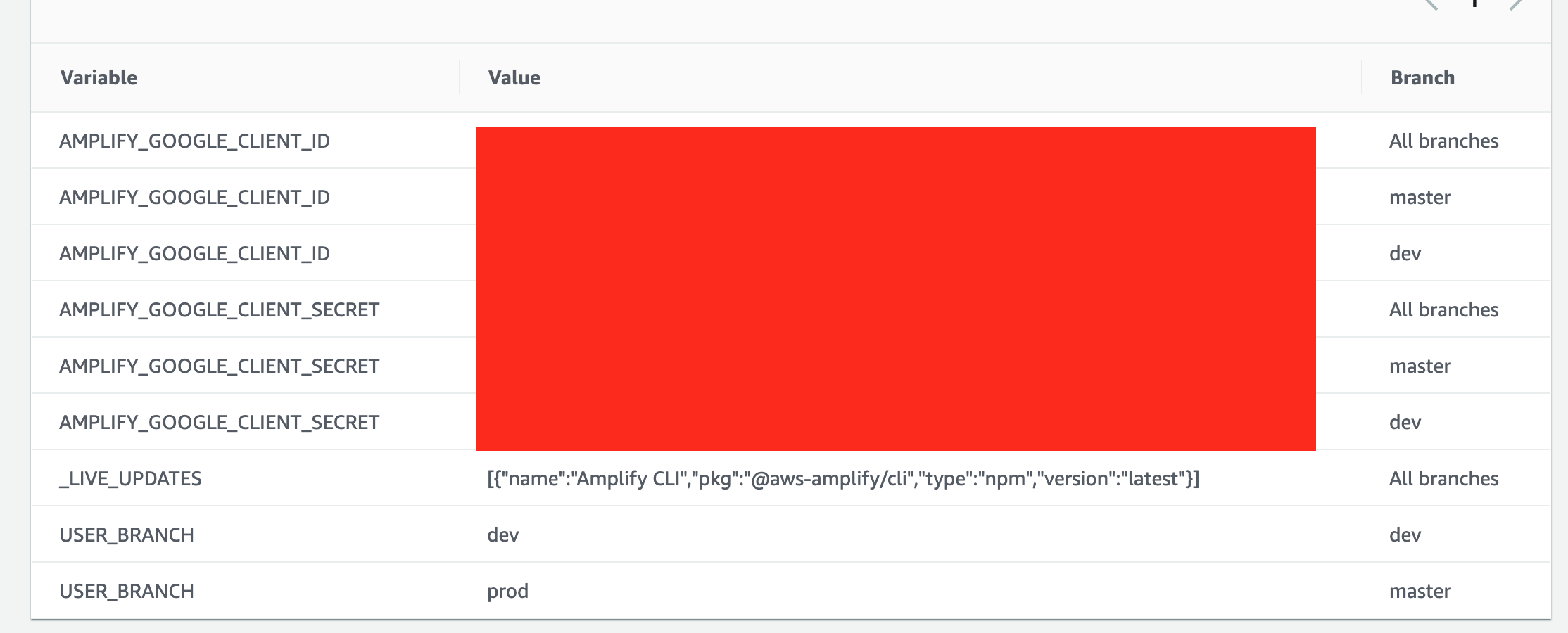
edit 2: One thing that does seem significant though, I USED TO get an error that referenced the Google specific parameters as missing... Now I'm just seeing hostedUIProviderCreds?
... missing the following inputParams, googleAppIdUserPool, googleAppSecretUserPool
edit: I am still seeing
Error: auth headless init is missing the following inputParams googleAppIdUserPool, googleAppSecretUserPool
in my "real" project I am still getting the same error, about the specific input parameters missing. I think I might try to take some time to actually step through and understand the deployment script, because it seems like this probably isn't that complicated but maybe I just need to take a bit more time to understand what's going on here 🤷♂️
kevin-mitchell
on 26 Apr 2020
Hi @Joycehao19 & @swaminator
Trying something new here, for the sake of simplicity, as I know my posts on this have been long and probably have some mistakes in them.
Use this article Feature branch deployments and team workflows from the _AWS Amplify Console User Guide_ as a starting point.
Follow the steps in the Feature branch workflow section
- Side note: I do not know why it suggests to push in steps 2 and 3, as nothing has changed, but I did it anyway.
- Do step 9, but change
amplify api addtoamplify auth addand go withDefault configuration with Social Provider (Federation)
- Another side note: after step 9, the steps start at 1 again. So, when I say step 9.3 below, I mean step 3 after step 9. I've submitted feedback on the docs page to let the docs folks know.
- Step 9.3 kicks off a build in the console and the build fails on the
testback-end, with our old friend:
2020-04-26T13:07:53.470Z [INFO]: Error: auth headless init is missing the following inputParams googleAppIdUserPool, googleAppSecretUserPool
Notes:
- All branches in the repo contain the
team-provider-info.jsonfile with clauses for dev, prod, and test, and these clauses contain thehostedUIProviderCredsproperty under categories/auth/... - I did not add env variables to any front ends in the Amplify Console.
- On the weird issue I mentioned after step 9 here, I do have the app configured to import
aws-exports.jsasawsconfigand use it withAmplify.confgure(awsconfig). It is excluded by default in.gitignore, but no error is thrown, so I must have something messed up in my other repo, where that (unrelated) error is occurring.
Hope this helps 🙏
kimfucious
on 26 Apr 2020
よー @kevin-mitchell,
I know I've written some long posts, and some things might not have been clear, despite my best intentions.
To clarify this from here:
One thing I noticed (possibly related to @kimfucious 's comment) is that initially dev failed but prod succeeded.
My mention of prod in this post is for a pre-existing Amplify app that was initially created with dev and prod using auth without federated sign-in. So both succeeded initially.
At present, I've got federated sign-in working on the dev back-end, because my front-end is my local dev machine.
However, because things are not working as expected, I've created a "staging" front-end (connected to a staging branch in the repo) and a "staging" back-end. Or at least I've been trying to.
This is to keep a separation from production, letting the failures happen in staging while working toward a solution. So this prod has never worked with federated sign-in.
Ultimately, and hopefully soon, there will be a fix/workaround that works, and staging will get merged to master, kicking of a prod build that does not fail, and the world will be a better place.
I hope that's clear. If not, please ask.
kimfucious
on 26 Apr 2020
@magjack Hi, sorry that you are still having this issue. Would you mind provide your appId, region and buildId? I can check from the logs to find out why it failed.
Joycehao19
on 27 Apr 2020
@kimfucious thank you for the detailed post. I'll work on investigation, and keep updating here.
Hi, @Joycehao19 @swaminator, got any thing for me yet? I'm still dead in the water.
kimfucious
on 28 Apr 2020
This just started happening for me. It was working fine and then I tried changing the callback and logout URLs and from then on it started failing. My team-provider-info.json hasn't changed so I don't think that is related.
 steinybot
on 6 May 2020
steinybot
on 6 May 2020
Ummmm ok so all of a sudden this morning it started working again and I didn't change anything (well I tried adding some debugging in amplify.yml but nothing meaningful).
steinybot
on 6 May 2020
@swaminator @Joycehao19 Any progress on this. @steinybot 's post gave me some hope, but it was fleeting, as I faced the same issue when creating a new backend via the console from a connected (private) repo branch (team-provider-info.js included, env vars added in the console) with this:
2020-05-07T14:53:20.109Z [INFO]: Error: auth headless init is missing the following inputParams googleAppIdUserPool, googleAppSecretUserPool
same thing giving errors whatever of the tricks i do mentioned here.
 kaipi
on 7 May 2020
kaipi
on 7 May 2020
Hi @swaminator @Joycehao19,
I had a thought about this after having looked at the stack trace of the error, which points to node_modules/@aws-amplify/cli/node_modules/amplify-category-auth/provider-utils/awscloudformation/index.js.
I could be completely off-base, but here it goes anyhow:
There's a line item (492 in v 4.18.1) in that file that looks for the inclusion of the text accounts.google.com.
It's looking for this in previousValues.authProviders.
Though I'm not sure if I'm tracing everything correctly, I believe that ultimately the values in authProviders is coming from team-provider-info.json, specifically hostedUIProviderCreds.
And what I see in my entry for that on my local is:
"hostedUIProviderCreds": "[{\"ProviderName\":\"Google\",\"client_id\":\"123456789098-xxxxxxx12x0xxx64x3xx1x2x7xxxx0xx.apps.googleusercontent.com\",\"client_secret\":\"xxxXXXX9x0xXxXXxxxXxxxxx\"}]"
Note that there is no accounts.google.com, only apps.googleusercontent.com
If my guess is indeed true, then this entry will not be pushed into the array, and perhaps this is the cause of the errors that I'm getting.
Like I said, I could be way off base, but I thought I'd point it out, as I think I've tried all options possible to get things working and have come up short.
kimfucious
on 8 May 2020
I am seeing this error again.
2020-05-10T17:15:37.026Z [INFO]:
2020-05-10T17:15:37.028Z [INFO]: For more information on AWS Profiles, see:
                                 https://docs.aws.amazon.com/cli/latest/userguide/cli-multiple-profiles.html
2020-05-10T17:15:37.380Z [INFO]: Amplify AppID found: d2avikkcqe0wq. Amplify App name is: roundin-customer
2020-05-10T17:15:37.440Z [INFO]: Backend environment devf found in Amplify Console app: roundin-customer
2020-05-10T17:15:37.986Z [INFO]:
2020-05-10T17:15:38.977Z [INFO]: Note: It is recommended to run this command from the root of your app directory
2020-05-10T17:15:43.185Z [WARNING]: - Initializing your environment: devf
2020-05-10T17:15:43.844Z [WARNING]: ✔ Initialized provider successfully.
2020-05-10T17:15:43.872Z [WARNING]: ✖ There was an error initializing your environment.
2020-05-10T17:15:43.873Z [INFO]: init failed
2020-05-10T17:15:43.876Z [INFO]: Error: auth headless init is missing the following inputParams facebookAppIdUserPool, facebookAppSecretUserPool, googleAppIdUserPool, googleAppSecretUserPool, loginwithamazonAppIdUserPool, loginwithamazonAppSecretUserPool
                                 at updateConfigOnEnvInit (/root/.nvm/versions/node/v10.16.0/lib/node_modules/@aws-amplify/cli/node_modules/amplify-category-auth/provider-utils/awscloudformation/index.js:369:15)
                                 at /root/.nvm/versions/node/v10.16.0/lib/node_modules/@aws-amplify/cli/node_modules/amplify-category-auth/index.js:234:28
                                 at /root/.nvm/versions/node/v10.16.0/lib/node_modules/@aws-amplify/cli/node_modules/promise-sequential/index.js:16:18
                                 at process._tickCallback (internal/process/next_tick.js:68:7)
2020-05-10T17:15:43.891Z [ERROR]: !!! Build failed
2020-05-10T17:15:43.892Z [ERROR]: !!! Non-Zero Exit Code detected
2020-05-10T17:15:43.892Z [INFO]: # Starting environment caching...
2020-05-10T17:15:43.892Z [INFO]: # Environment caching completed
This time with both existing environments and new environments. I am on eu-west-1
magjack
on 10 May 2020
Hi @magjack
For what it's worth, the only way that I've got this to semi-work again, is to follow @Joycehao19 's recommendation here.
In short, create custom push script and hard-code the AUTHCONFIG section with your ids and secrets. Then, manually edit the amplify.yml file under build settings as shown in @Joycehao19 's instructions.
So far it's inconsistent, as I believe changes to auth anything will cause it to break again. And multi-environments adds additional complexity, and I've yet to nail down a workflow combining amplify-cli and amplify console that works consistently.
Deleting the front-end and reconnecting a branch to build from sometimes works after that.
Again, for what it's worth 😉
kimfucious
on 10 May 2020
@kimfucious こんにちは :)
I feel like this shouldn't be that complicated to fix, and I keep downloading the amplify-cli source to try to figure it out, but so far I've lost motivation every time I start looking into this (it's for a "fun" project so nights and weekends).
One thing I recently did is switch my AWS account to an "organization" structure and created a brand new account specifically for hosting my project that I'm creating with Amplify. During that I had to redeploy everything from scratch and this has lead me to the understanding that (and I think I'm stating something obvious and well established, but it was a sanity check for myself) at least the first environment that is deployed with Amplify (the AWS service, not directly using the CLI) relies on the team-provider-info.json to get the google client id / secret. What I did is create try to deploy my backedn through the AWS Console -> Amplify BEFORE I pushed the google client id and secret in the team provider json and it failed with the familiar "missing..." console message. I then made a new commit with these values in the team provider info json and deployment happened without issue.
I also downloaded the source for amplify-cli and did a quick search for AMPLIFY_GOOGLE_CLIENT_ID but didn't find it... so my assumption was that this is probably a dynamic key, so I did find packages/amplify-category-auth/provider-utils/awscloudformation/index.js - the updateConfigOnEnvInit funciton seems like it might be worth looking into more to understand how this is actually working?
kevin-mitchell
on 10 May 2020
@kevin-mitchell Like you I also couldn't find AMPLIFY_GOOGLE_CLIENT_ID. I was looking in https://github.com/aws-amplify/amplify-console/blob/master/scripts/amplifyPush.sh but didn't see it there. What I did in the end was to add cat /usr/bin/amplifyPush.sh to the build and that version had it. From memory it was just the same AUTHCONFIG workaround as others posted here earlier.
steinybot
on 11 May 2020
Hi @kevin-mitchell,
I agree it shouldn't be complicated, but we're dealing with a bug-workaround, so it is what it is, until that bug is fixed.
The workaround suggested by @Joycehao19 here does work, but not consistently, as far as I can tell. It appears that any changes to auth will cause the error to occur again. For example, changing call back URLs, like @steinybot mentioned, will cause the error to re-appear, even after prior builds have succeeded. And the only fix (for me, at least) is to disconnect the front-end and re-connect it, which results in a successful build.
On team-provider-info.json, Amplify console (when running amplify init) needs the creds when auth is using federated/social logins. And that info is stored in team-provider-info.json. I've also seen that this info is stored in amplify/dev/.temp/#current-cloud-backend/amplify-meta.json (sometimes in temp dirs after deleting an env named "dev"), but it's my assumption/guess that team-provider-info.json is the source from which other entities try to pull the creds.
The bug involves not being able to get those creds. I've found that the only way to get the console to see those creds is by hard coding them into a custom push script, as described in @Joycehao19 's link mentioned above.
I've yet tried removing team-provider-info.json from the repo with the hard-coded values in place, but my guess is that the build will work without it, if the custom script is being used in the build settings in Amplify console. I believe you should also be able to reference these creds, if they are setup as env vars in the amplify console, as mentioned by @paulbartocillo here, so that you aren't putting secrets into the custom push script, that is getting checked into a repo.
I too have looked into the amplify-cli code, here, but that's pretty much a futile exercise, as I'm part idiot.
I should also mention that I really do want this to work because Amplify saves so much time doing things that I really don't enjoy doing, like writing cloud formation templates, and let's me focus on creating product. I'm hopeful that this is a bump in the road, that will get patched soon.
がんばって!
kimfucious
on 11 May 2020
@kimfucious I agree with all your observations in that these work arounds can get a successful build and but fail soon after any changes in auth.
I have now opted for a different workaround in that I removed the backend build command - amplifyPush --simple from amplify.yml so it now just acts as a front-end CI/CD pipeline and I will deploy the backends manually with the cli. This also involved removing aws-exports.js from the .gitingore file. I hope this issue get resolved soon as the benefits of the amplify console are significant, however, when it goes wrong it can be a pain to fix.
magjack
on 13 May 2020
I am also getting these errors now on an existing environment.
On the commits yesterday it was working fine. I've tried to redeploy yesterdays working build from build history, but this also fails.
Parameters: [hostedUIProviderCreds] must have values
Error: auth headless init is missing the following inputParams facebookAppIdUserPool, facebookAppSecretUserPool, googleAppIdUserPool, googleAppSecretUserPool
arn:aws:amplify:eu-central-1:526170664677:apps/d19opi8vv8vc20
eu-central-1
@Joycehao19 @swaminator are there any updates?
 pechisworks
on 13 May 2020
pechisworks
on 13 May 2020
Hi @Joycehao19 @swaminator,
I just did a build off a connected repo in Amplify Console that included auth changes, and it didn't fail!
Is this a fluke, or did something get fixed?
PS: I still have the custom myAmplifyPush.sh script in place.
kimfucious
on 21 May 2020
I was getting this error and then I noticed in my amplify/team-provider-info.json file somehow under the categories section my auth had been taken out, I would look at changes to this file and find one where auth->{your-auth-group}->hostedUIProviderCreds is present.
 DavidBrear
on 28 May 2020
DavidBrear
on 28 May 2020
I got distracted by a plague, some riots, and a few other projects, but now I'm back looking at this and it's been since April 28 that @Joycehao19 or @swaminator has commented here.
I wonder if this is considered working, being ignored, or what by the Amplify Console team?
kimfucious
on 7 Jun 2020
I have tried the stuff on this page and I am still getting the same error. If a workaround exists why is this not fixed in the Amplify CLI? I send the values from the parameters to the console. Here is what I have
Categories: {"auth":{"googleAppIdUserPool":"878889996620-xxxxxxxxxxxx.apps.googleusercontent.com","googleAppSecretUserPool":"xxxxxxxxx",}} Providers: {"awscloudformation":{"configLevel":"project","useProfile":true,"profileName":"default"}} Amplify: {"envName":"dev"}
This is the error I get
UPDATE_FAILED authtenjin844c8f14 AWS::CloudFormation::Stack Mon Jun 15 2020 19:18:51 GMT+0000 (Coordinated Universal Time) Parameters: [hostedUIProviderCreds] must have values
I am wondering why I have an extra comma after the value in the googleAppSecretUserPool? Is that the cause of the issue?
 sudeep-quantelai
on 15 Jun 2020
sudeep-quantelai
on 15 Jun 2020
I removed the comma but still the same issue. What am I missing? I am only using Google Federation for now. I have created the myamplifypush.sh, updated the build setting and also created environment variables as mentioned in @vajafari 's thread.
sudeep-quantelai
on 15 Jun 2020
Been using amplify heavily to build my startup since May 2019. I rely on auth, lambdas, storage, GraphQL. I also use the amplify console, and replaced my CI with it when it introduced tests. I have 15+ years of experience as a full stack dev.
Regarding the present issue, after an afternoon trying to fix it, I simply disabled backend build from the console. I can't just rebuild auth from scratch, as I would lose my hundreds of users from cognito. The only safe way to proceed for me is to use the console just for the frontend. So I went back to deploying backend environments manually.
That's how I "solved" most of amplify problems I've had for the past 14 months: disable the feature. Most fixes provided usually involve rebuilding auth from scratch, which is not suitable for production websites. After trying hard to play by the amplify rules, I stopped believing I could rely on it.
When I could interact with aws team members, like @swaminator, it's always been a good experience. I can see that they are skilled and professional, but the problem seem to be elsewhere. A lot of times, a team member will start work on an issue, make good progress, and then suddenly stop working on it. It is then left hanging for months or years like this one.
I'm grateful for amplify as it made it easier for me to start in the AWS ecosystem, which would have been too overwhelming otherwise. But now, I just can't wait to replace it with something that is actually production ready. Like serverless or something like that.
The sad thing is, I'm not just dabbling around, I'm running a business. And amplify is a liability. Too bad amazon is treating this as something for people to play with, instead of the critical business infrastructure that it is for me.
 thedgbrt
on 16 Jun 2020
thedgbrt
on 16 Jun 2020
I think these are great points. It's been really interesting to watch this issue, because I can't really tell if
- there is just a small set of people who are really using Amplify past doing short lived sample projects?
- The few of us active in this thread are just somehow doing something "wrong" (it doesn't seem that way)
I suspect that there may be larger customers who are using Amplify, but I wouldn't be surprised if they have more 1:1 support from AWS because of larger accounts for example, and I wouldn't be surprised if larger customers using Amplify have their own specific requirements around deployments that end up precluding the use of Amplify for deployments anyway.
Honestly I suspect there is a "goldilock zone" where smaller projects who don't have the resources for a full / part time infrastructure resource working on deployments that instead are using Amplify for this purpose. To be fair, from AWS account perspective these are probably really small and inconsequential accounts, so I can see why maybe this is perhaps not a huge priority. I've been using Amplify as a tool for a smaller hobby project, my "day job" we'd have a few people who would be working on this type of problem and we'd very quickly outgrow Amplify from a CI / deployment perspective I suspect.
What I think I'd like to see (maybe?) is the Amplify libraries (JS SDK, iOS, etc) documentation totally separated out from Amplify the deployment / CI / provisioning tooling. Perhaps offer a set of CDK templates as well as cloud formation templates to get started (or even have their generated an option via the Amplify CLI), but something really solid that isn't going to be dependent on an obviously not super actively supported build pipeline / AWS Amplify Console.
I feel like the Amplify "stack" is still really great, likely even for larger "production" projects as a way of helping to figure out auth and gate AWS resources. It just doesn't seem to scale super well if you are reliant on the SDK and build pipeline.
Anyway, <3 AWS and hopefully this is resolved or some sort of news comes out about why perhaps these types of tickets aren't super actively being addressed.
kevin-mitchell
on 16 Jun 2020
I'm grateful for amplify as it made it easier for me to start in the AWS ecosystem, which would have been too overwhelming otherwise. But now, I just can't wait to replace it with something that is actually production ready. Like serverless or something like that.
second this!
I'm genuinely afraid of doing anything with amplify cli as most of the time there are errors.
Been using serverless for different projects and my experience so far has been super smooth comparing to amplify :|
yuyokk
on 16 Jun 2020
@thedgbrt Thanks for that feedback. We are working on a product launch and amplify sounded great because we have limited resources and amplify promises to take care of most of the details. But having listened to the comments here and grappling with many such issues I am rethinking this :-(
sudeep-quantelai
on 16 Jun 2020
We are facing the same issue. Can we get a rough estimate of when this will be looked at?
 zetsnotdead
on 24 Jun 2020
zetsnotdead
on 24 Jun 2020
@zetsnotdead I went down @thedgbrt 's route and pulled the backend out of the build and building it manually for now. Was able to move forward that way. The sad part is that unless you keep track of this thread we will not know if the issue has been fixed when it is fixed.
@swaminator Is there a single place for me to check what bugs have been fixed in each release?
sudeep-quantelai
on 24 Jun 2020
@sudeep-quantelai @thedgbrt @zetsnotdead @xitanggg @yuyokk @KidSysco @kevin-mitchell @paulbartocillo @kimfucious @DavidBrear @kaipi apologies for the silence on this issue. While it was tough for us to read some of the comments in this thread, I completely understand and empathize with what you are going through. Just for the record, all developer feedback is important to us (not just the folks that pay for support). In fact that's why we took a unique approach (at least within AWS) to manage our issues on a public forum like GitHub vs the AWS Forums or relying only on paid support. Having said that, we completely dropped the ball on this issue - partly because we incorrectly thought we fixed it and then there were other competing priorities.
Resolving this issue is now our top priority along with #115. The current 'fix' provided here partly works but only for the first build. All subsequent builds fail with the hostedUI creds missing error. We are working on fixing this ASAP and will keep you posted.
W.r.t @kimfucious situation where he needs to remove the teamprovider from a public repo: We do not have an immediate fix for that but are working on a redesign where the teamprovider file is stored in the service instead of the repository. That will ensure there is no scenario where the repository and the service are out of sync. That might take a little longer for us to solve but we are working on it. We would like to track that completely separately from this issue so we aren't mixing numerous problems so I created a new issue here #790.
Our dev team, @litwicki, and I will ensure to track this issue to resolution.
swaminator
on 24 Jun 2020
Solid response, @swaminator!
I realize the whole excluding teamprovider is a bug-bear, so I understand the delay on the fix.
I'll track that issue in the new location and provide info that you might find relevant if/when I come across it.
As for the first build-only issue, I've been working around it by simply trashing the front-end on each subsequent build, but it will be great to not have to do that when you fine folks have worked this all out.
Thanks for your dedication and continued awesome work in making Amplify great.
kimfucious
on 25 Jun 2020
Thank you very much for the update. This is really nice to here, and much appreciated!
kevin-mitchell
on 25 Jun 2020
Thanks a lot for the update. It's great to hear it will be looked at. 👍
In general, any response about an issue from the amplify team is appreciated 🙏. Even if you let us know the issue will not be fixed soon it can give us a chance to react to it on our end by figuring out some workarounds.
zetsnotdead
on 25 Jun 2020
I tried all the suggestion, but none of them worked. I am using latest amplify cli.
Finally following changes worked for me.
Added following env variables in Amplify Console > Environment variables
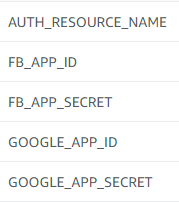
You can get the value of AUTH_RESOURCE_NAME from your project folder amplify > backend > auth > <Folder name>
Then use the custom amplifyPush script with slight modification
#!/usr/bin/env bash
set -e
IFS='|'
help_output () {
    echo "usage: amplify-push <--environment|-e <name>> <--simple|-s>"
    echo "  --environment  The name of the Amplify environment to use"
    echo "  --simple  Optional simple flag auto-includes stack info from env cache"
    exit 1
}

init_env () {
    ENV=$1
    AMPLIFY=$2
    PROVIDERS=$3
    CODEGEN=$4
    AWSCONFIG=$5
    CATEGORIES=$6
    echo "# Start initializing Amplify environment: ${ENV}"
    if [[ -z ${STACKINFO} ]];
    then
        echo "# Initializing new Amplify environment: ${ENV} (amplify init)"
        amplify init --amplify ${AMPLIFY} --providers ${PROVIDERS} --codegen ${CODEGEN} --categories ${CATEGORIES} --yes;
        echo "# Environment ${ENV} details:"
        amplify env get --name ${ENV}
    else
        echo "STACKINFO="${STACKINFO}
        echo "# Importing Amplify environment: ${ENV} (amplify env import)"
        amplify env import --name ${ENV} --config "${STACKINFO}" --awsInfo ${AWSCONFIG} --categories ${CATEGORIES} --yes;
        echo "# Initializing existing Amplify environment: ${ENV} (amplify init)"
        amplify init --amplify ${AMPLIFY} --providers ${PROVIDERS} --codegen ${CODEGEN} --yes;
        echo "# Environment ${ENV} details:"
        amplify env get --name ${ENV}
    fi
    echo "# Done initializing Amplify environment: ${ENV}"
}

ENV=""
IS_SIMPLE=false
POSITIONAL=()
while [[ $# -gt 0 ]]
do
    key="$1"
    case ${key} in
        -e|--environment)
            ENV=$2
            shift
            ;;
        -r|--region)
            REGION=$2
            shift
            ;;
        -s|--simple)
            IS_SIMPLE=true
            shift
            ;;
        *)
            POSITIONAL+=("$1")
            shift
            ;;
    esac
done

set -- "${POSITIONAL[@]}"

# if no provided environment name, use default env variable, then user override
if [[ ${ENV} = "" ]];
then
    ENV=${AWS_BRANCH}
fi
if [[ ${USER_BRANCH} != "" ]];
then
    ENV=${USER_BRANCH}
fi

# Check valid environment name
if [[ -z ${ENV} || "${ENV}" =~ [^a-zA-Z0-9\-]+ ]] ; then help_output ; fi

AWSCONFIG="{\
\"configLevel\":\"project\",\
\"useProfile\":true,\
\"profileName\":\"default\"\
}"

AMPLIFY="{\
\"envName\":\"${ENV}\"\
}"

PROVIDERS="{\
\"awscloudformation\":${AWSCONFIG}\
}"

CODEGEN="{\
\"generateCode\":false,\
\"generateDocs\":false\
}"

AUTHCONFIG="{\
\"${AUTH_RESOURCE_NAME}\":\"{\
\"googleAppIdUserPool\":\"${GOOGLE_APP_ID}\",\
\"googleAppSecretUserPool\":\"${GOOGLE_APP_SECRET}\",\
\"facebookAppIdUserPool\":\"${FB_APP_ID}\",\
\"facebookAppSecretUserPool\":\"${FB_APP_SECRET}\"\
}}"

CATEGORIES="{\
\"auth\":$AUTHCONFIG\
}"

# Handle old or new config file based on simple flag
if [[ ${IS_SIMPLE} ]];
then
    echo "# Getting Amplify CLI Cloud-Formation stack info from environment cache"
    export STACKINFO="$(envCache --get stackInfo)"
    init_env ${ENV} ${AMPLIFY} ${PROVIDERS} ${CODEGEN} ${AWSCONFIG} ${CATEGORIES}
    echo "# Store Amplify CLI Cloud-Formation stack info in environment cache"
    STACKINFO="$(amplify env get --json --name ${ENV})"
    envCache --set stackInfo ${STACKINFO}
    echo "STACKINFO="${STACKINFO}
else
    # old config file, above steps performed outside of this script
    init_env ${ENV} ${AMPLIFY} ${PROVIDERS} ${CODEGEN} ${AWSCONFIG} ${CATEGORIES}
fi
The modified part
AUTHCONFIG="{\
\"${AUTH_RESOURCE_NAME}\":\"{\
\"googleAppIdUserPool\":\"${GOOGLE_APP_ID}\",\
\"googleAppSecretUserPool\":\"${GOOGLE_APP_SECRET}\",\
\"facebookAppIdUserPool\":\"${FB_APP_ID}\",\
\"facebookAppSecretUserPool\":\"${FB_APP_SECRET}\"\
}}"
Then update your build settings, Amplify Console > Build Settings
version: 1
backend:
  phases:
    build:
      commands:
        - '# Execute Amplify CLI with the helper script'
        - chmod u+x ./amplifyPush
        - ./amplifyPush --simple
frontend:
  phases:
    build:
      commands:
        - yarn install
        - yarn run build
  artifacts:
    baseDirectory: build
    files:
      - '**/*'
  cache:
    paths:
      - node_modules/**/*
 arnabk
on 28 Jun 2020
arnabk
on 28 Jun 2020
So what is the latest on this issue? I literally got it from one build to the next with nothing on the Auth or backend changing at all. I am loathe to put in any partial hacks to try and work around it, so when can we expect an actual fix?
 jasonergle
on 10 Jul 2020
jasonergle
on 10 Jul 2020
I'm getting this out of nowhere too
 cespin
on 10 Jul 2020
cespin
on 10 Jul 2020
@jasonergle-powerschool @cespin @arnabk @kimfucious @zetsnotdead We have started releasing a fix this week that should be available to all regions before end of week. Both us-west-2 and us-east-* have been updated so please let me or the team know if you still experience any issues.
This fix includes the ability to add Environment Variables when connecting the front end to an existing backend the very first time. The builds which were previously failing from second time onward should succeed always when the social creds are passed/present in the environment variables. This applies only to backends configured with Social sign in credentials.
 litwicki
on 10 Jul 2020
litwicki
on 10 Jul 2020
@jasonergle-powerschool @cespin @arnabk @kimfucious @zetsnotdead We have started releasing a fix this week that should be available to all regions before end of week. Both us-west-2 and us-east-* have been updated so please let me or the team know if you still experience any issues.
This fix includes the ability to add Environment Variables when connecting the front end to an existing backend the very first time. The builds which were previously failing from second time onward should succeed always when the social creds are passed/present in the environment variables. This applies only to backends configured with Social sign in credentials.
Thanks for the response. I am in US-East-1 and still see the issue. Are you saying that I should define the social creds as environment variables now?
jasonergle
on 10 Jul 2020
Hi @jasonergle-powerschool,
Yes, that is correct. Once the social sign in creds are added as environment variables, they would default to be used in all branches, and the builds would pick it up. You can override them per branch if you have different social creds across branches.
 abhi7cr
on 10 Jul 2020
abhi7cr
on 10 Jul 2020
@litwicki is there a ticket or issue on github we can watch to see changes / make sure we are following along in the right place? I think it would be more useful to just follow along with the progress in that issue / PR / release directly rather than the "is it done yet?!" type questions we might ask here?
Also, thank you! :)
kevin-mitchell
on 10 Jul 2020
@kevin-mitchell We can use this issue to track progress/updates. As of this message we are rolled out to all regions with the fix. As @abhi7cr mentioned above if you add the social sign in creds as env variables you will be all good to go for all branches. If you notice anything abnormal please let us know here.
litwicki
on 10 Jul 2020
Just got here (started getting this issue today). Thank you @litwicki and @abhi7cr for fix and replies here, but it is not working for me—your instructions are a bit vague though, so I may not be doing the right thing. Can one of you please explain specifically how to fix the original issue stated in this bug? To clarify my confusion:
- Does the "fix" actually mitigate the underlying issue (of amplify console build failing) providing I add the right environment variables? If so, specifically what are the env variable names?
- Or does the fix just fix the env variables getting to amplify scripts, i.e. it fixes custom amplifyPush script workaround that's been bandied about here by various commenters?
Thanks in advance.
 benkrejci
on 11 Jul 2020
benkrejci
on 11 Jul 2020
Hi @benkrejci,
The fix would enable the following 2 things:
1) ability to add environment variables during the first time you connect a frontend to an existing backend.
This would enable the following workflow:
Once you create a backend in Amplify CLI, with auth configured via Social credentials (Facebook, google, Amazon), when you connect your frontend for the first time, you would have the option to add environment variables corresponding to the social credentials configured during the backend creation. The list of their names can be referred from https://github.com/aws-amplify/amplify-console/issues/206#issuecomment-607499826
- Once the env variables are configured, all the builds would use them for pulling/updating the backend, and run successfully.
Previously 1) was not possible and 2) failed from the second build onwards. You wouldn’t need to use the custom amplify push script anymore if you are just configuring the social credentials. Adding the social creds to Environment variables should suffice.
Also, if you are creating the backend from the Console itself (through a full stack app), it should behave the same way as above, where you would add environment variables during the set up, and the builds should pick them up in the first as well as all subsequent builds.
Let me know if you see any issues.
abhi7cr
on 11 Jul 2020
Adding only the env vars fixed it for me.
cespin
on 11 Jul 2020
@abhi7cr perfect explanation, thank you so much! I changed the environment variable names to the following and subsequent builds have succeeded:
AMPLIFY_AMAZON_CLIENT_ID
AMPLIFY_AMAZON_CLIENT_SECRET
AMPLIFY_FACEBOOK_CLIENT_ID
AMPLIFY_FACEBOOK_CLIENT_SECRET
AMPLIFY_GOOGLE_CLIENT_ID
AMPLIFY_GOOGLE_CLIENT_SECRET
benkrejci
on 12 Jul 2020
I'll add my experience here. This issue started occurring recently where it had been working fine before. Adding the environment variables mentioned by @benkrejci (although I just use google and facebook) made the amplify build work again. I made my test google and facebook app credentials the main env var version, and then did an override for the production specific credentials on my master branch. Not sure if there are any best practices regarding which branches to override, but I think this will work for me in my early stage development.
 jhuizingh
on 12 Jul 2020
jhuizingh
on 12 Jul 2020
@arnabk thank you. I resolved my issue related to this.
here is my codes below and PR log
amplfypush.sh
#!/usr/bin/env bash
set -e
IFS='|'
help_output () {
    echo "usage: amplify-push <--environment|-e <name>> <--simple|-s>"
    echo "  --environment  The name of the Amplify environment to use"
    echo "  --simple  Optional simple flag auto-includes stack info from env cache"
    exit 1
}

init_env () {
    ENV=$1
    AMPLIFY=$2
    PROVIDERS=$3
    CODEGEN=$4
    AWSCONFIG=$5
    CATEGORIES=$6
    echo "# Start initializing Amplify environment: ${ENV}"
    if [[ -z ${STACKINFO} ]];
    then
        echo "# Initializing new Amplify environment: ${ENV} (amplify init)"
        amplify init --amplify ${AMPLIFY} --providers ${PROVIDERS} --codegen ${CODEGEN} --categories ${CATEGORIES} --yes;
        echo "# Environment ${ENV} details:"
        amplify env get --name ${ENV}
    else
        echo "STACKINFO="${STACKINFO}
        echo "# Importing Amplify environment: ${ENV} (amplify env import)"
        amplify env import --name ${ENV} --config "${STACKINFO}" --awsInfo ${AWSCONFIG} --categories ${CATEGORIES} --yes;
        echo "# Initializing existing Amplify environment: ${ENV} (amplify init)"
        amplify init --amplify ${AMPLIFY} --providers ${PROVIDERS} --codegen ${CODEGEN} --categories ${CATEGORIES} --yes;
        echo "# Environment ${ENV} details:"
        amplify env get --name ${ENV}
    fi
    echo "# Done initializing Amplify environment: ${ENV}"
}

ENV=""
IS_SIMPLE=false
POSITIONAL=()
while [[ $# -gt 0 ]]
do
    key="$1"
    case ${key} in
        -e|--environment)
            ENV=$2
            shift
            ;;
        -r|--region)
            REGION=$2
            shift
            ;;
        -s|--simple)
            IS_SIMPLE=true
            shift
            ;;
        *)
            POSITIONAL+=("$1")
            shift
            ;;
    esac
done

set -- "${POSITIONAL[@]}"

# if no provided environment name, use default env variable, then user override
if [[ ${ENV} = "" ]];
then
    ENV=${AWS_BRANCH}
fi
if [[ ${USER_BRANCH} != "" ]];
then
    ENV=${USER_BRANCH}
fi

# Check valid environment name
if [[ -z ${ENV} || "${ENV}" =~ [^a-zA-Z0-9\-]+ ]] ; then help_output ; fi

AWSCONFIG="{\
\"configLevel\":\"project\",\
\"useProfile\":true,\
\"profileName\":\"default\"\
}"

AMPLIFY="{\
\"envName\":\"${ENV}\"\
}"

PROVIDERS="{\
\"awscloudformation\":${AWSCONFIG}\
}"

CODEGEN="{\
\"generateCode\":false,\
\"generateDocs\":false\
}"

AUTHCONFIG="{\
\"facebookAppIdUserPool\":\"${FACEBOOK_APP_ID}\",\
\"facebookAppSecretUserPool\":\"${FACEBOOK_APP_SECRET}\"\
\"googleAppIdUserPool\":\"${GOOGLE_CLIENT_ID}\",\
\"googleAppSecretUserPool\":\"${GOOGLE_CLIENT_SECRET}\"\
}"

CATEGORIES="{\
\"auth\":$AUTHCONFIG\
}"

# Handle old or new config file based on simple flag
if [[ ${IS_SIMPLE} ]];
then
    echo "# Getting Amplify CLI Cloud-Formation stack info from environment cache"
    export STACKINFO="$(envCache --get stackInfo)"
    init_env ${ENV} ${AMPLIFY} ${PROVIDERS} ${CODEGEN} ${AWSCONFIG} ${CATEGORIES}
    echo "# Store Amplify CLI Cloud-Formation stack info in environment cache"
    STACKINFO="$(amplify env get --json --name ${ENV})"
    envCache --set stackInfo ${STACKINFO}
    echo "STACKINFO="${STACKINFO}
else
    # old config file, above steps performed outside of this script
    init_env ${ENV} ${AMPLIFY} ${PROVIDERS} ${CODEGEN} ${AWSCONFIG} ${CATEGORIES}
fi
amplify.yml
version: 1
backend:
  phases:
    build:
      commands:
        - cd frontend/kendra-button-front
        - chmod +x amplfypush.sh
        - ./amplfypush.sh -e dev
frontend:
  phases:
    preBuild:
      commands:
        - yarn
    build:
      commands:
        - find . -name "aws-exports.js"
        - yarn build
  artifacts:
    baseDirectory: frontend/kendra-button-front/src/out
    files:
      - '**/*'
  cache:
    paths:
      - node_modules/**/*
I think this is a temporary solution, but I hope that a public solution will come out later.
 geoseong
on 13 Jul 2020
geoseong
on 13 Jul 2020
💯
One resolves this issue on a project updating team-provider-info.json with
{
   "prod": {
      "awscloudformation": {...},
      "categories": {
         "hosting": {...},
         "auth": {
            "xxx": {
                "hostedUIProviderCreds": "[{\"ProviderName\":\"xxx\",\"client_id\":\"xxx\",\"client_secret\":\"xxx\"}]"
            }
         }
      }
   }
},
💯
These lines were missing after amplify pull for us
I am surprised nobody tries this before but it worked for us 👍
 arelaxend
on 16 Jul 2020
arelaxend
on 16 Jul 2020
Hi, This AWS bug has caused us weeks of delay for redeploying (with a minor change) something that was already working before. AWS guys, could you pls send a detailed step by step procedure to fix this?. This is VERY URGENT and we are considering to moving to Azzure ASAP!
 serviolimareina
on 18 Jul 2020
serviolimareina
on 18 Jul 2020
@serviolimareina it sounds like this is now resolved I believe. By adding the credentials to the appropriate environment variables builds should now proceed.
kevin-mitchell
on 18 Jul 2020
Hello @serviolimareina, you can follow the below steps (A or B) depending upon your current state:
A. Connecting a front-end app in Amplify Console with an amplify backend configured using Social sign-in (OAuth):
Prerequisite: You must have an amplify backend environment setup using CLI, with auth category configured using social sign-on.
- Go to the backend app in Amplify Console using the
amplify consoleCLI command or by directly logging into your AWS Console - Click the Frontend environments tab
- Select a repository provider
- Add repository branch
- Configure build settings: Expand the Environment variables section to add the following environment variables (_You would need to add only the variables corresponding to the social platforms you have configured during the Auth CLI setup_):
AMPLIFY_FACEBOOK_CLIENT_ID
AMPLIFY_FACEBOOK_CLIENT_SECRET
AMPLIFY_GOOGLE_CLIENT_ID
AMPLIFY_GOOGLE_CLIENT_SECRET
AMPLIFY_AMAZON_CLIENT_ID
AMPLIFY_AMAZON_CLIENT_SECRET - Review. Make sure the environment variables are correct. Click Save and deploy
Note: If you have different values for your social credentials based on the branch, you can configure them individually in the Environment variables section found under App settings
B. If you have the frontend already connected with the backend, you can just update the Environment variables (found under App settings on the sidebar) using the names from step 5.
Let me know if you have further questions/clarifications.
PS: We are also in the process of updating our official docs, and will update here as soon as its done.
abhi7cr
on 18 Jul 2020
It's still not working for me, even worse, as using newest version 4.25.0 breaks workaround from this comment https://github.com/aws-amplify/amplify-console/issues/206#issuecomment-650689777.
I've tried both A and B approaches.
PS. I will ask the same question from different issues. Are you sure that Amplify is production ready?
There are so many regressions and weird bugs like with expiring API Key and unable to generate new one that in our team we are thinking that it is absolutely not.
 Redid
on 26 Jul 2020
Redid
on 26 Jul 2020
Hi,
If anyone is struggling with this issue still after trying all of the suggestions in this thread. I have come up with a pretty hacky but useful workaround. It was blocking me from developing in my staging environment so I needed to solve it quickly.
For context, I am deploying a next.js application on vercel. I have a build command which is 'build:vercel' in package.json which runs during deployment.
The command I initially ran was "build:vercel": "./vercel-build.sh && next build",. This called a build script that had the CATEGORIES flag and the AUTHCONFIG in it. This did not work for me, I tried so many variations.
I decided to run the script without the --yes flag at the end. When I went through the steps I noticed it would only ask for facebookAppId, amazonAppId, googleClientId when I select 'Yes' to Do you plan on modifying this backend?
I didnt have a requirement to modify the backend during my build, I only need 'aws-exports.js' generated so that I can use it in my react application. So I decided to remove the --y and modify the build command to enter no when the script becomes interactive. So my command became:
./vercel-build.sh <<< $'no\n' && next build
I just ran the build and it works great! I hope this helps someone with a similar use case, at least until there is a proper fix.
 hirenumradia
on 4 Aug 2020
hirenumradia
on 4 Aug 2020
Setting the environment variables like explained in https://github.com/aws-amplify/amplify-console/issues/206#issuecomment-660498668 worked for me. However, I don't think this should be a necessary step, since the values are already set in team-provider-info.json.
 ianmartorell
on 6 Aug 2020
ianmartorell
on 6 Aug 2020
I have added the environment variable as specified (double checked it), and my build is still failing. I have loved using AWS for the past 4 years, so I was excited to discover Amplify. However, its current state is not production ready when a simple Google Sign In needs all these hacky solution, especially when this problem has existed for over 6 months (honestly kind of ridiculous because this is a core functionality). Again, love AWS and would love to use Amplify when it's ready, but frankly, I can't recommend (if not discourage) people from using Amplify as of now.
 AlbertPun
on 14 Aug 2020
AlbertPun
on 14 Aug 2020
@AlbertPun in my personal experience the process of manually creating Cognito Pool and only use amplifyjs to connect to existing resource is so much smoother than using amplify cli and face different weird issues with cli/console integration.
yuyokk
on 14 Aug 2020
@yuyokk Thanks for the suggestion. I will try that going forward. I'm seeing a lot of problems with the cli, such as every time I'm deleting and then adding an auth or sometimes I make updates I get cloudformation reference errors.
AlbertPun
on 15 Aug 2020
Hi @litwicki
I'm coming back to this after a long time away.
Can we assume that there is no longer a need to have a custom amplifypush.sh script as mentioned here?
@jasonergle-powerschool @cespin @arnabk @kimfucious @zetsnotdead We have started releasing a fix this week that should be available to all regions before end of week. Both us-west-2 and us-east-* have been updated so please let me or the team know if you still experience any issues.
This fix includes the ability to add Environment Variables when connecting the front end to an existing backend the very first time. The builds which were previously failing from second time onward should succeed always when the social creds are passed/present in the environment variables. This applies only to backends configured with Social sign in credentials.
kimfucious
on 21 Aug 2020
@kimfucious that's correct; the standard social credentials login will not require a custom amplifyPush script
litwicki
on 21 Aug 2020
Thanks for that clarification, @litwicki
Things seem to be working now! No need to disconnect and re-attach the front-end, too!
Thanks to you, @swaminator, and the Amplify team for addressing this issue and getting it resolved.
kimfucious
on 22 Aug 2020
Finally closign this issue as it has been resolved. For those landing here now, check out this post
swaminator
on 24 Aug 2020
Shouldn't the amplify-cli add these variables automatically, or at the very least the documentation be updated? As a new Amplify user following the official docs, the first build will fail with a cryptic error and they'll have to Google the error to find this thread and then read the entire thing to find the correct answer, like I did. Not the best solution IMHO.
ianmartorell
on 24 Aug 2020
For those who still have problems verify if you don't have whitespaces in front or at the end. This was my stupid issue, because of copy-paste. +1 for not adding this variables by hand :smile:
Redid
on 29 Aug 2020
@ianmartorell good feedback.
Docs are updated: https://docs.amplify.aws/lib/auth/social/q/platform/js#deploying-to-amplify-console
swaminator
on 2 Sep 2020
@abhi7cr @swaminator as by 01/11/2020 this issue still appears when I turn on PR Previews that create a new backend environment for every PR.
I have done as suggested in your comment, the required env variables are set for all branches:

The dev branch works as expected but the backend build for the PR environments fails in the same way (Error: auth headless is missing the following inputParams googleClientId, facebookAppId).
Is this a known bug? Do I need a custom build script if I want to turn on PR previews?
 jackscotti
on 1 Nov 2020
jackscotti
on 1 Nov 2020
Same goes here @jackscotti thanks for posting!
 iuyt9003
on 17 Nov 2020
iuyt9003
on 17 Nov 2020
I followed the instructions for setting up the environment variables in the web console for my automatic github deploys and that worked well for me. Afterward I ran into issues where amplify push would fail after adding user pools to my auth. I was able to fix it by amplify pulling which prompted me for my identity provider keys, and the next push worked. For anyone that runs into the same issue.
 NikolaBo
on 9 Dec 2020
NikolaBo
on 9 Dec 2020
Related issues
 nomiddlename
·
4Comments
nomiddlename
·
4Comments
 kontrol-debug
·
4Comments
kontrol-debug
·
4Comments
 OzzieOrca
·
3Comments
OzzieOrca
·
3Comments
 nballenger
·
5Comments
nballenger
·
5Comments
 zackthoutt
·
3Comments
zackthoutt
·
3Comments
Most helpful comment
It's still not working for me, even worse, as using newest version 4.25.0 breaks workaround from this comment https://github.com/aws-amplify/amplify-console/issues/206#issuecomment-650689777.
I've tried both A and B approaches.
PS. I will ask the same question from different issues. Are you sure that Amplify is production ready?
There are so many regressions and weird bugs like with expiring API Key and unable to generate new one that in our team we are thinking that it is absolutely not.