Amplify-console: Cloudfront cache is deleted every 1 second
Describe the bug
All assets return x-cache: Miss from Cloudfront, even after multiple refreshes. It only returns a cached version when a request is made less than one second after the previous one.
Environment
Default Gatsby app. The amplify console sets the infrastructure to Infrastructure: Gatsby-Amplify
Proof
Request the same asset with 2000ms interval, we always get a MISS:
while true; do curl -X HEAD -i https://master.dsvk1bi06ng1b.amplifyapp.com/ -s | grep -Fi x-cache; sleep 2; done
x-cache: Miss from cloudfront
x-cache: Miss from cloudfront
x-cache: Miss from cloudfront
x-cache: Miss from cloudfront
x-cache: Miss from cloudfront
x-cache: Miss from cloudfront
x-cache: Miss from cloudfront
x-cache: Miss from cloudfront
x-cache: Miss from cloudfront
x-cache: Miss from cloudfront
x-cache: Miss from cloudfront
x-cache: Miss from cloudfront
x-cache: Miss from cloudfront
x-cache: Miss from cloudfront
x-cache: Miss from cloudfront
Request the same asset with 100ms interval, we only get a MISS every ~1second:
while true; do curl -X HEAD -i https://master.dsvk1bi06ng1b.amplifyapp.com/ -s | grep -Fi x-cache; sleep 0.1; done
x-cache: Miss from cloudfront
x-cache: Hit from cloudfront
x-cache: Hit from cloudfront
x-cache: Hit from cloudfront
x-cache: Hit from cloudfront
x-cache: Miss from cloudfront
x-cache: Hit from cloudfront
x-cache: Hit from cloudfront
x-cache: Hit from cloudfront
x-cache: Hit from cloudfront
x-cache: Hit from cloudfront
x-cache: Hit from cloudfront
x-cache: Hit from cloudfront
x-cache: Hit from cloudfront
x-cache: Miss from cloudfront
x-cache: Hit from cloudfront
x-cache: Hit from cloudfront
To Reproduce
use this command from the terminal:
while true; do curl -X HEAD -i https://master.dsvk1bi06ng1b.amplifyapp.com/ -s | grep -Fi x-cache; sleep 2; done
Alternatively, you can go to the deploy url and refresh the page with the network inspector open.
Expected behavior
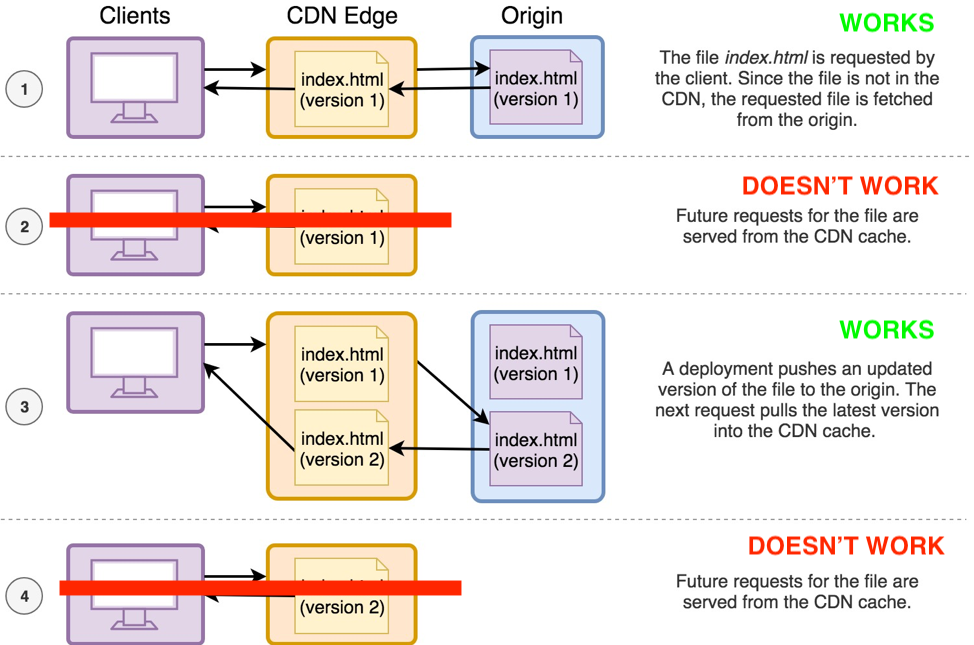
Cloudfront should only invalidate cache when a new deployment is made. For every request after the first one, it should return the cached version from the CDN, as mentioned here.
Sample code
I've created a demo repo to view the issue.
 thedgbrt
All 12 comments
I could also reproduce with a standard create-react-app.
thedgbrt
on 30 Aug 2019
@thedgbrt The content is indeed being cached, we just have an issue with reporting the information correctly in the header responses which has led to confusion from other customers before as well. The diagram in the blog post doesn't fully explain how our CDN works - we have dual layer CDN distributions so what happens is that you're seeing the miss from the CDN Edge vs the CDN Origin. We will prioritize a fix for this soon. Hope that helps - thanks for the detailed explanation.
 swaminator
on 30 Aug 2019
swaminator
on 30 Aug 2019
@swaminator thanks for the quick answer.
What I'm concerned about is response time. When I manage to hit the CloudFront cache, I get a response in 10-30ms, which is what I'm used to when using a CDN.
However when I don't hit it (that is, 99% of the time right now), it's in the 50-200ms range, and can go up to 500ms. For an SPA with code split between 10-20 files each page, this has a dramatic impact on user experience. I routinely have to wait 1-2 seconds for a simple page change that could be almost instant.
I don't know how much that has to do with proper cache headers being set, or with the way amplify console fundamentally manages CDN responses. Is the fix that is being prioritized going to lower response times to expected CloudFront levels?
thedgbrt
on 30 Aug 2019
Trying to provide a little more clarity until we've got a further solution. As @swaminator mentioned, your content is being cached and returned by our origin CDN, however you're seeing the response header from the closest edge CDN as a miss (which is by design), which is understandably confusing. The design is a bit more complex than alluded to, but in order to facilitate instant deployment changes (including invalidation of cached resources) and have as performant hosting as possible for all of our customers, we've implemented a dual layer CDN structure with an edge layer in-between. The response times you're seeing come from the brief edge layer invocation, before the content is then retrieved from the origin CDN (if it exists there, otherwise it is retrieved all the way from actual origin, which takes much longer). This round-trip time is several times faster than if we went straight to origin, and is still giving you the benefit of cached content (read; not re-serving from hosting origin if the file hasn't changed). We understand that certain customers (like in the example provided, with heavy code splitting) may want to optimize their edge CDN performance even further, and we are looking at a number of ways to provide this.
That said, your unmodified content _is_ being cached and served from our origin CDN, the edge CDN response header just makes this confusing.
 cslogan-red
on 23 Oct 2019
cslogan-red
on 23 Oct 2019
@cslogan-red what about being able to respond with 304 “not modified” for assets (for example my site.webmanifest file gets requested with a 200 status every time, despite the request header and response header etags matching) and also what if the instant deployment optimizations were bypassed if the cache headers are aggressive enough (e.g., "Cache-Control: public,max-age=31536000,immutable")?
 mrcoles
on 23 Oct 2019
mrcoles
on 23 Oct 2019
@mrcoles we're considering a number of solutions for both the confusing initial response header from the edge CDN as well as tuning the edge CDN's performance that just need prioritization, we'll respond to this thread once we've implemented an update!
cslogan-red
on 23 Oct 2019
Is it expected that Chrome or any browser can not cache to disk files provided by cloudfront such as JS or CSS files ? For example, https://app.fays.io/7ce58fce-d67e-47c5-8ad7-7163b45d2b87, after each tab refresh, Chrome downloads a 1.2 megabytes js file.
 arelaxend
on 7 Feb 2020
arelaxend
on 7 Feb 2020
have you tried something like this?
amplify.yml
version: 0.1
frontend:
  phases:
    preBuild:
      commands:
        - yarn
    build:
      commands:
        - yarn build
  customHeaders:
    - pattern: '/*.chunk.js'
      headers:
      - key: 'Cache-Control'
        value: 'public, max-age=31536000, immutable'
 isi-gach
on 7 Feb 2020
isi-gach
on 7 Feb 2020
have you tried something like this?
amplify.yml
It works. 🥇 I always forget this amplify.yml file ! I have used pattern: '**/*' instead for more generality.
arelaxend
on 7 Feb 2020
@arelaxend setting those Cache-Control headers can be super useful, but be careful you’re not caching content that you want to update at some later time. Doing pattern: '**/*' would set that Cache-Control header on your HTML files and other things that usually don’t want such extreme caching (usually you only want aggressive caching on just images, JS, CSS—especially if they have a content hash in their filename).
This doesn’t address the issue of how the CDN is not returning 304 not modified when request and response etag headers match (https://github.com/aws-amplify/amplify-console/issues/92#issuecomment-545609647)
 supersetapp
on 7 Feb 2020
supersetapp
on 7 Feb 2020
Any update on this?
This should be fixed ASAP as cloudfront is considered broken
 masterofkfit
on 1 Apr 2020
masterofkfit
on 1 Apr 2020
@masterofkfit @thedgbrt can you please let us know if you're still experiencing this as it should be resolved.
 litwicki
on 8 Dec 2020
litwicki
on 8 Dec 2020
Related issues
 OzzieOrca
·
3Comments
OzzieOrca
·
3Comments
 nballenger
·
5Comments
nballenger
·
5Comments
 ayotise
·
4Comments
thedgbrt
·
5Comments
ayotise
·
4Comments
thedgbrt
·
5Comments
 adamaltman
·
3Comments
adamaltman
·
3Comments
Most helpful comment
Any update on this?
This should be fixed ASAP as cloudfront is considered broken