Amplify-console: CloudFront with Web Application Firewall?
* Which Category is your question related to? *
Amplify Console Hosting
If I'm using the Amplify Console to host a Static Website, where is it stored? It doesn't look like there is an S3 bucket being used by the Amplify Console to host the website?
If we use the Amplify CLI add hosting, it will use an S3 bucket, does the Amplify Console do something similar, but we just can't access it?
 blazinaj
All 11 comments
The Amplify Console provides fully managed hosting so you get features such as instant cache invalidation, atomic deploys, branch-based deployments, easy custom domain setup and more.
There isn't any S3 bucket in your account which you can manage. See:https://aws.amazon.com/amplify/console/pricing/
 swaminator
on 22 Jul 2019
swaminator
on 22 Jul 2019
Do we have any control over the CloudFront distribution? Am I able to utilize AWS Web Application Firewall rules or anything like that?
I am just curious about the security details of the "Managed Hosting".
blazinaj
on 22 Jul 2019
@blazinaj Hi we have a workaround to enable WAF: Add a new CloudFront distribution from the AWS console and use your amplifyapp.com branch as the origin. Now Go to App settings > Environment variables and add a system variable for _DISABLE_L2_CACHE: true. This will allow you to enable features such as WAF for your domain.
 garyleefight
on 5 Aug 2019
garyleefight
on 5 Aug 2019
Thank you very much. That is what I needed. What does the _DISABLE_l2_CACHE: true do exactly?
blazinaj
on 6 Aug 2019
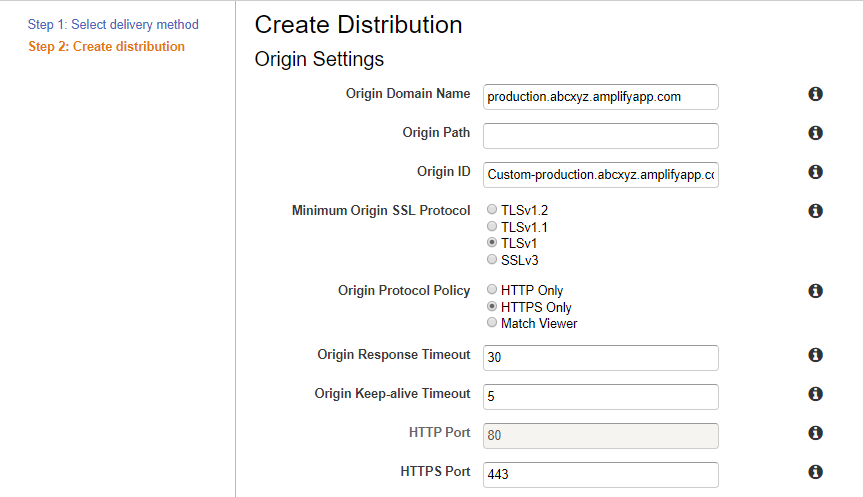
When I'm creating a CloudFront distribution, do I put the full amplify url as the Origin Domain Name?
blazinaj
on 6 Aug 2019
Thank you very much. That is what I needed. What does the
_DISABLE_l2_CACHE: truedo exactly?
Disable the L2 cache will disable one layer of CloudFront that AWS Amplify Console used for instant deployment. As CloudFront allows 2 maximum CloudFront chaining together, you have to disable it and add your customize distribution.
For the second question, your settings looks good to me
garyleefight
on 6 Aug 2019
Thank you!
I got it hooked up through my custom CloudFront distribution. How do I make it so that the production.abcxyz.amplifyapp.com URL doesn't just bypass my custom CloudFront/WAF?
blazinaj
on 6 Aug 2019
@blazinaj Hi, for the WAF feature the original URL is still public. The workaround can't disable the original domain. Right now, you can only use basic auth to ensure its security.
garyleefight
on 7 Aug 2019
Ah, thank you very much. That's what I needed to know. I'll submit a feature request for that.
blazinaj
on 7 Aug 2019
If we are also using a custom domain with our Console app, should this CloudFront/WAF workaround work? If so, what would I use for the Origin in the CloudFront Distribution - our custom domain name or the Console generated domain? I tried our custom domain and traffic did not seem to get routed properly through Cloudfront to get to the Console app. It seems to just go straight to the Console app.
 dave-moser
on 20 Nov 2019
dave-moser
on 20 Nov 2019
Hi,
I have the same situation of previous message (@dave-moser), custom domain, and I want to protect it with WAF and IpFiltering with IPSet. Could somebody answer if the @garyleefight workaround and the configuration indicated by @blazinaj should work with custom domains added in the Amplify Console?
thank you
 dpalmeira
on 3 Apr 2020
dpalmeira
on 3 Apr 2020
Related issues
 patleeman
·
5Comments
patleeman
·
5Comments
 asyschikov
·
5Comments
asyschikov
·
5Comments
 zackthoutt
·
3Comments
zackthoutt
·
3Comments
 JIoJIaJIu
·
5Comments
JIoJIaJIu
·
5Comments
 ckamps
·
3Comments
ckamps
·
3Comments
Most helpful comment
Do we have any control over the CloudFront distribution? Am I able to utilize AWS Web Application Firewall rules or anything like that?
I am just curious about the security details of the "Managed Hosting".