Amphtml: CLS of 1.0 caused by "async" for https://cdn.ampproject.org/v0.js
What's the issue?
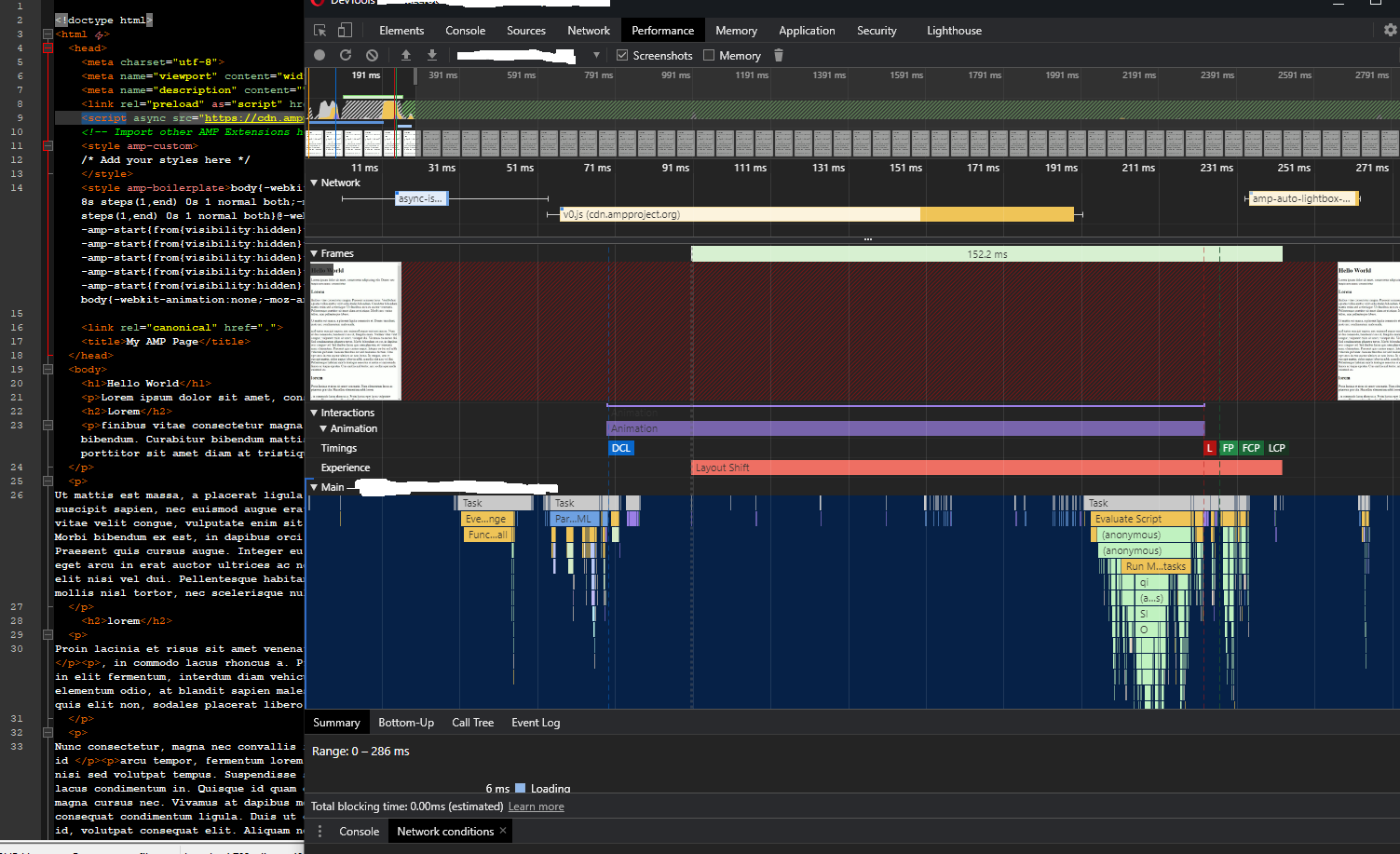
Async for https://cdn.ampproject.org/v0.js is causing 1 Cumulative Layout Shift that penalizes our amp-only site with a CLS of magnitude 1.0.
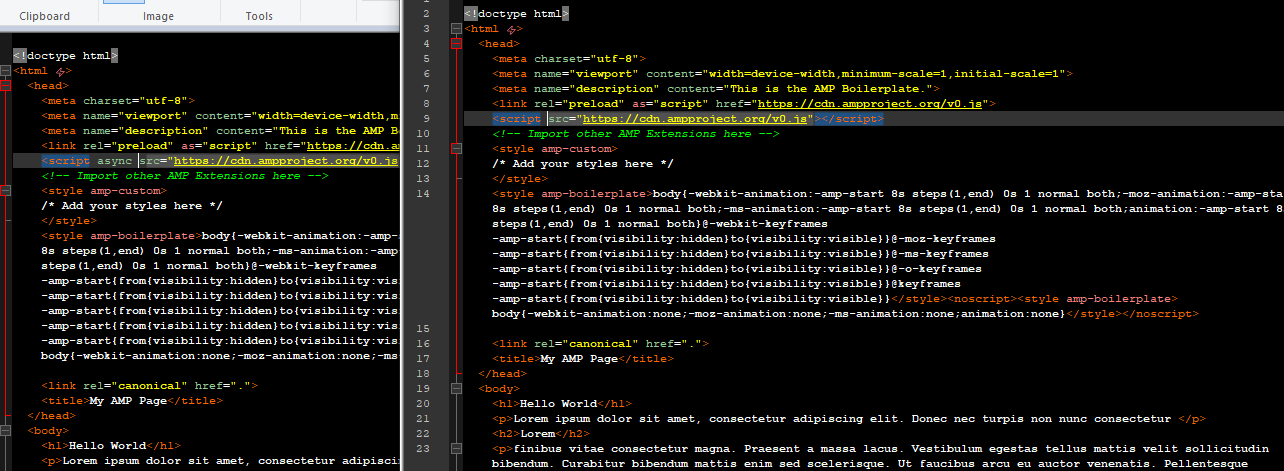
Removing async removes the CLS issue but the "async" for v0.js is mandatory for amp.
How do we reproduce the issue?
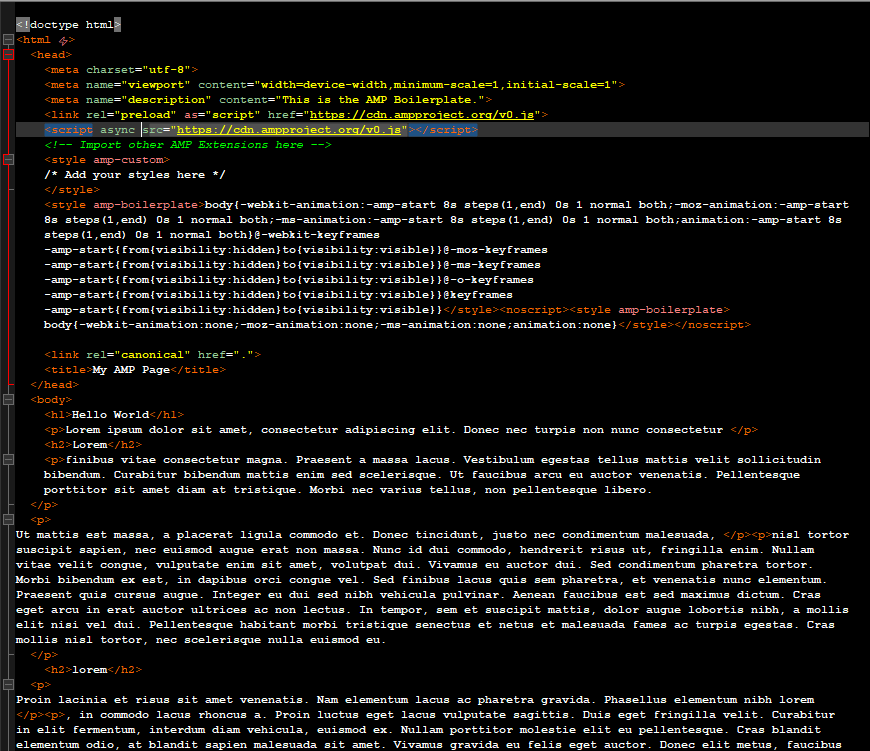
Step 0. Make a boilerplate amp-html: https://amp.dev/boilerplate/
Step 1. Add some "lorem ipsum".
Step 2. Inspect performance with chrome, opera etc. CLS issue appears.
Step 3. Remove async from ""
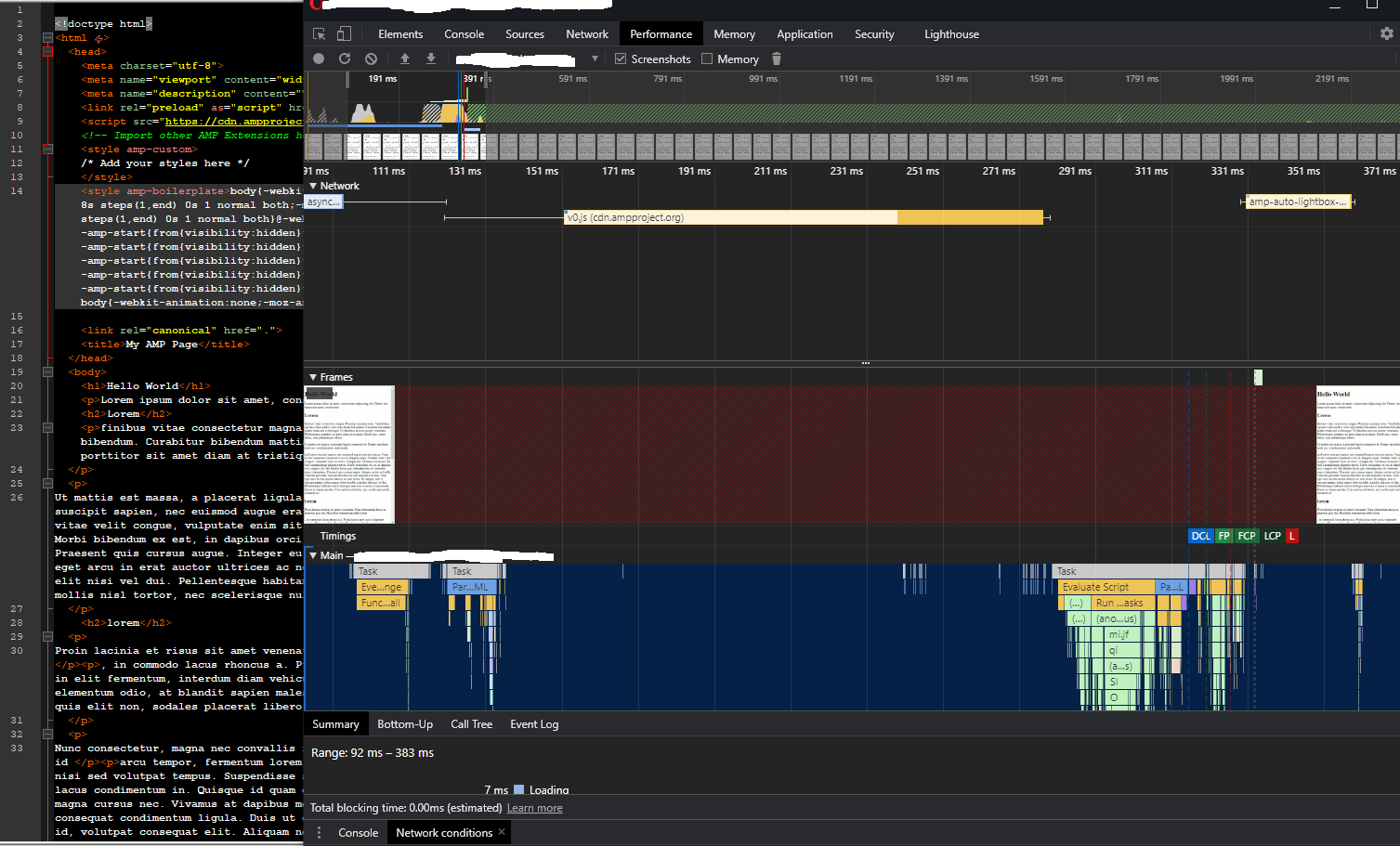
Step 4. Inspect performance again and CLS issue is not there.
Step 5. Add async back on to double-check and the CLS is back.
The result is: 1 single CLS but with a magnitude of 1.0.
I've taken screen-shots of these steps.
Browsers/Device?
Tested on chrome, opera, windows 10. On chrome I've inspected in both mobile- and desktop-mode.
Which AMP version is affected?
Version 2010132225003
I got my first CLS error flag in Core Web Vitals at 20-10-2020 (2 weeks ago).

 Zerototh
All 9 comments
I'm also experiencing this issue.
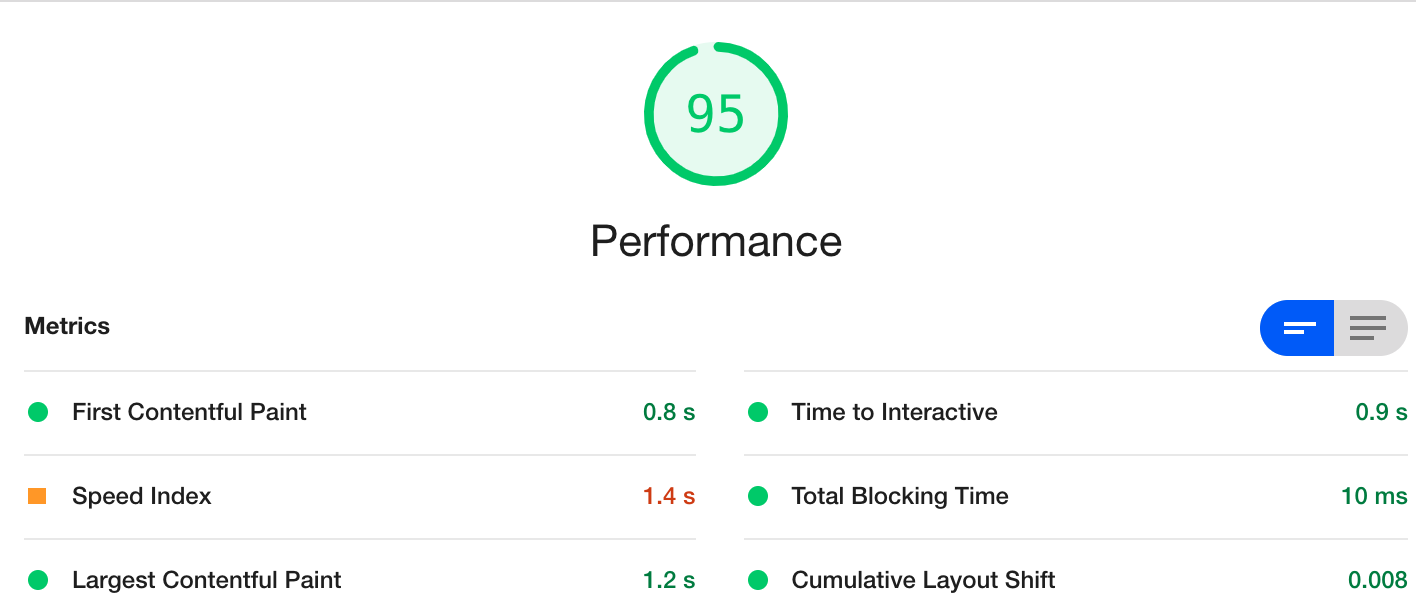
Performance with: <script acync src="https://cdn.ampproject.org/lts/v0.js"></script>
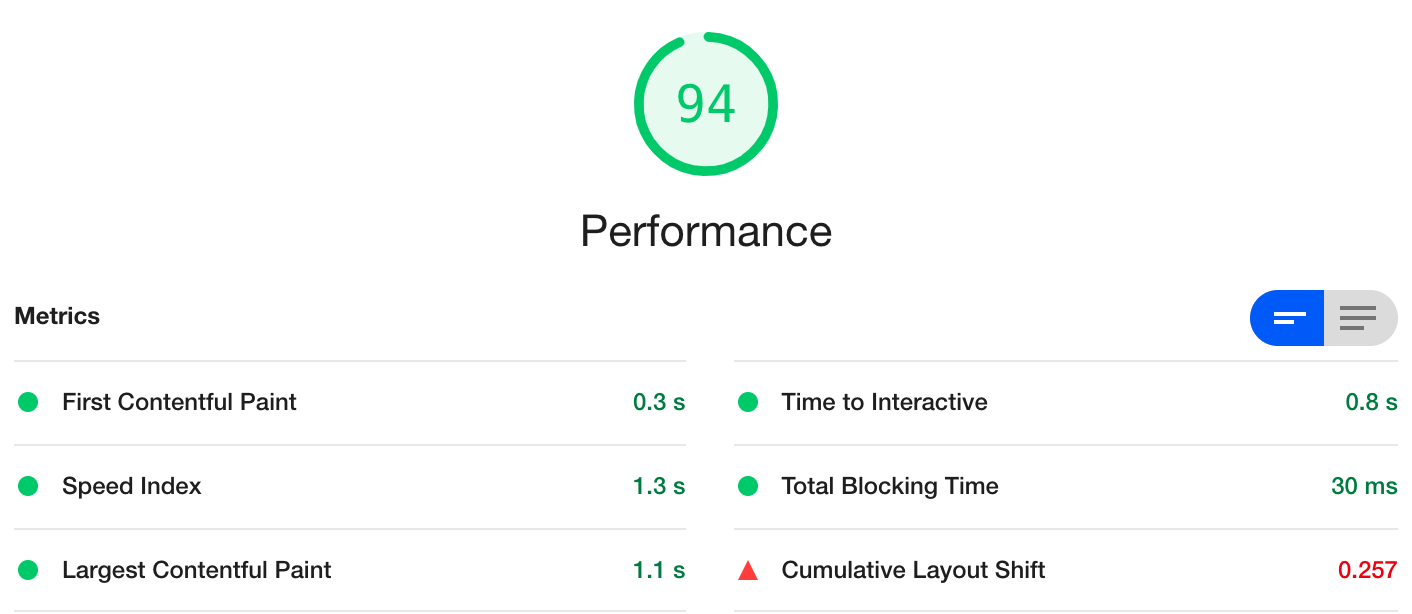
Performance with: <script src="https://cdn.ampproject.org/lts/v0.js"></script>
 Sebschock
on 9 Nov 2020
Sebschock
on 9 Nov 2020
Triaging to @kevinkimball.
I'll also take a look when starting work today.
Theoretically, this makes little sense but we will root cause it.
 kristoferbaxter
on 9 Nov 2020
kristoferbaxter
on 9 Nov 2020
Given the example, I created a sample here to illustrate: https://lavender-jumpsuit.glitch.me/
As you can see this uses the 'async' attribute on
v0.js.

There is a Layout Shift once JavaScript loads (as expected).
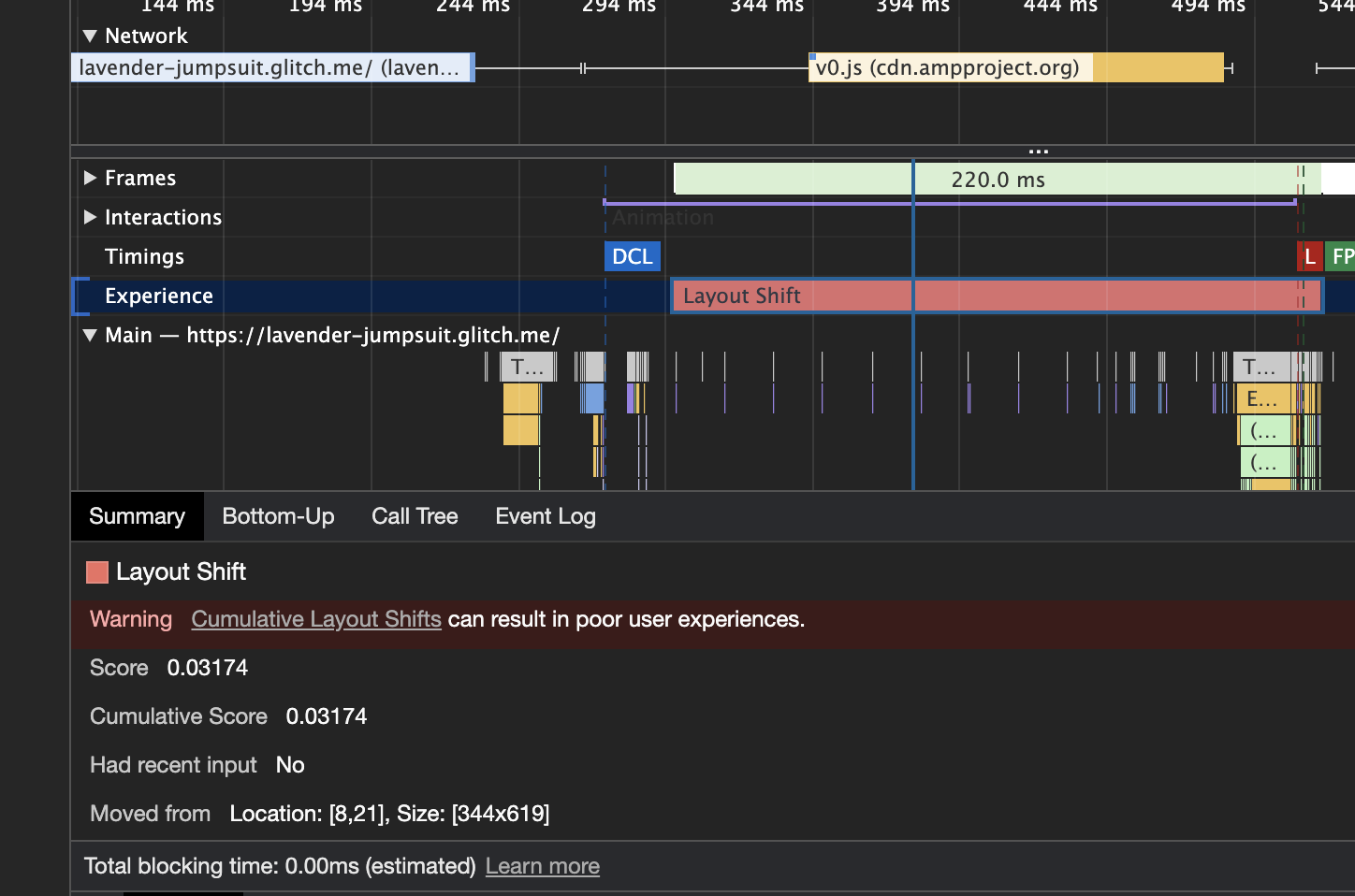
This layout shift is from the execution of JavaScript on the document, removing the boilerplate.
There are several solutions to remove the layout shift with varying tradeoffs.
- Use a sync script loading mechanism for
v0.js. This is what the ticket is mentioning, however this moves critical resources on the document into a sync loading process. - Preferred: Use an AMP Optimizer (demo) to eliminate the boilerplate, removing the need for JS execution to do so.
When this approach is used (using an Optimizer or loading from Google's AMP Cache), the result is 0 CLS. An example is available here: https://lavender-jumpsuit.glitch.me/optimized.html
So, in short...
We recommend using an AMP Optimizer on canonical origins to eliminate the boilerplate since this will fix the issue and provides other origin based performance benefits in the long run.
If you run this default document (https://lavender-jumpsuit.glitch.me/) thru the AMP Page Experience tool (https://amp.dev/page-experience), you'll notice the first recommendation is to use an AMP Optimizer. We recommend this to all AMP origins, as it improves performance significantly with the same approach AMP Caches do.
kristoferbaxter
on 9 Nov 2020
Marking this as closed, please comment if there are additional items to consider here and we can reopen the issue.
kristoferbaxter
on 10 Nov 2020
Our _only_ pages that Google Search Console complains about for failing the Core Web Vitals test are the AMP variants and their bad CLS metrics. So instead of improving performance, AMP is creating new performance issues for us. And now we are supposed to install an AMP Optimizer on our servers to restore performance to levels we already had? :disappointed:
 steffenweber
on 13 Nov 2020
steffenweber
on 13 Nov 2020
Thank you for sharing your experience.
Can you link to the documents that are failing Core Web Vitals? We'd be happy to take a look.
If you'd prefer not to install an AMP Optimizer on your servers there are a few options:
- Implement the functionality of an AMP Optimizer independently (the test suite is Open Source too).
- Leverage the Open Source Docker implementation.
- Contribute fixes to support other models like Cloudflare Worker support.
This specific issue (removing flashes of un-upgraded elements) is avoided by leveraging server side rendering (ie an AMP Optimizer) or by delaying content from appearing until it's settled (creates a CLS impact). This is why we recommend an Optimizer, which gives a better user experience.
kristoferbaxter
on 13 Nov 2020
I did as you suggested and installed AMP Optimizer. Our CLS is down to 0.008 which is way better than the 1.0 we had.
The best part is that we now have control over the cause of the CLS. We're now able to choose between real user experience and the metric CLS. Some things are worth their "CLS-weight". Something we didn't have control over before we installed the optimizer.
The performance was essentially the same as without it. With our site already using preload, srcsets, css minimization etc we didn't see much of a boost in performance.
Thank you for your help kristoferbaxter. Much appreciated.
Zerototh
on 13 Nov 2020
The issue affects all of our AMP pages. Example article from today:
AMP: https://www.computerbase.de/2020-11/amazon-echo-dot-mit-uhr-test/?amp=1 (CLS = 1.0)
Web: https://www.computerbase.de/2020-11/amazon-echo-dot-mit-uhr-test/ (CLS = 0.0)
Another article that Search Console specifically complains about:
AMP: https://www.computerbase.de/thema/grafikkarte/rangliste/?amp=1 (CLS = 1.0)
Web: https://www.computerbase.de/thema/grafikkarte/rangliste/ (CLS = 0.0)
Tested using the Web Vitals Chrome extension. I had to explicitly reload the page because otherwise the browser's cache makes the issue disappear.
I experimented with the AMP Optimizer for PHP today. Out of the box it is prohibitively slow (it seems to be doing remote network requests on each invocation… :astonished:). Running only the "ServerSideRendering" transformation (which is enough to solve the CLS issue) makes it way faster but it'd still add 10–20 ms of PHP execution time to each page request. This would effectively double the PHP exectime for us.
steffenweber
on 13 Nov 2020
Unfortunately to remove the CLS concern on the origin AMP page, the documents need to be output with the SSR transforms applied. Otherwise the documents are either invalid, or will display rendering issues as the Custom Elements on the page are hydrated.
If the AMP Optimizer for PHP has a performance concern for your PHP environments, it might be prudent to work with the Open Source team to increase its efficiency.
Here's a link to the Pixi recommendations for a URL provided: https://amp.dev/page-experience/?url=https://www.computerbase.de/2020-11/amazon-echo-dot-mit-uhr-test/?amp=1
Also, I'd recommend:
- Marking hero images on this document (https://pics.computerbase.de/9/5/6/1/9-9744a71efabb0709/article-1260x709.d388817b.jpg is a good candidate) which will improve LCP.
- Modifying image compression (previous image is 23% smaller with MozJPEG, 30% smaller with WebP, and 59% smaller with AVIF).
_Edit_: Added recommendations.
kristoferbaxter
on 14 Nov 2020
Related issues
 aghassemi
·
3Comments
aghassemi
·
3Comments
 gmajoulet
·
3Comments
aghassemi
·
3Comments
gmajoulet
·
3Comments
aghassemi
·
3Comments
 jpettitt
·
3Comments
jpettitt
·
3Comments
 mrjoro
·
3Comments
mrjoro
·
3Comments