Amphtml: [amp-list] dynamic src emulation doesn't work
What's the issue?
Template is not updating after the form submit a new request
How do we reproduce the issue?
I'm using a slightly modified version of this tutorial: https://playground.amp.dev/?url=https%3A%2F%2Fpreview.amp.dev%2Fdocumentation%2Fexamples%2Finteractivity-dynamic-content%2Fadvanced_server_request&format=email&_gl=11o0m9e9_ga*MzU1NzgzMDgzLjE1NTM2MjE0NzI
What browsers are affected?
Chrome Version 75.0.3770.142 , Firefox 68
Which AMP version is affected?
Version 1907152257550
 taytus
All 9 comments
Hi @taytus,
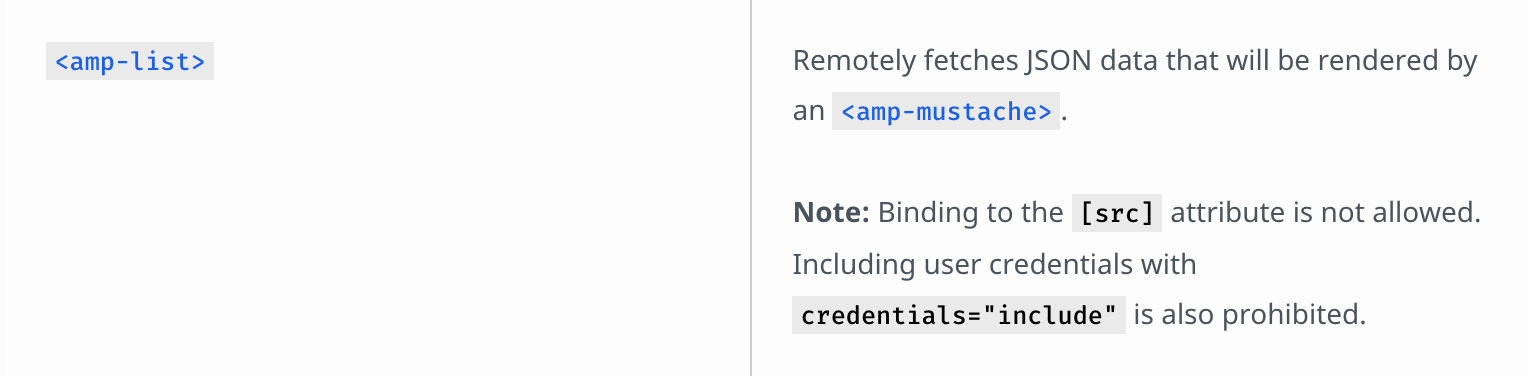
Unfortunately binding src in <amp-list> is not supported in AMP4EMAIL right now. Please see:
 cathyxz
on 22 Jul 2019
cathyxz
on 22 Jul 2019
Hello @cathyxz,
Thank you for taking the time in replying. Yes, I know that [src] is not available right now. However, that is not what I was asking.
I apologize for the confusion but what I was asking about was a way to retrieve a grid/array (instead of just one element like in the linked example) and using the same template to do so.
The template is modified by the form-success, not via amp-list [src].
Thank you.
taytus
on 22 Jul 2019
I see. Sorry about that. I misread this as a question about <amp-list> due to your issue title. Turns out this is actually about the usage of <amp-form>'s submit-success not working in a neat example that shares a <template> with <amp-list>.
I think you're getting this error because your template in <amp-form> and your template in <amp-list> is expecting a different data format. <amp-list> by default expects the JSON payload to contain an items attribute which contains an array of data for it to iterate over. <amp-form> sees that your data is in the shape of {items: []} (i.e. an object), and therefore treats it as a single object and tries to find image, description, etc. but is not successful.
For example, if you template looked like this, it would probably not work with the amp-list, but work with the amp-form.
<template id="animal-template" type="amp-mustache">
{{#items}}
<a href="https://google.com" class="commerce-listing-product text-decoration-none inline-block col-6 md-col-4 lg-col-3 px1 mb2 md-mb4 relative">
<div class="flex flex-column justify-between">
<div>
<amp-img class="commerce-listing-product-image mb2" src="{{image}}" width="340" height="340" layout="responsive" alt="{{ name }}" noloading="">
<div placeholder="" class="commerce-loader"></div></amp-img>
<h2 class="commerce-listing-product-name h6">{{ name }}</h2>
{{ description }}
</div>
<div class="h6 mt1">£{{ price }}</div>
</div>
</a>
{{/#items}}
</template>
Basically the <amp-form> doesn't make the same assumptions about the data that <amp-list> does. A few ways to fix this:
Without changing the shape of your API, use the
{{#items}} ... {{/#items}}in your template and tell<amp-list>assume that your JSON payload is an object by using thesingle-itemattribute and setitemsto".". This will work because it forces<amp-list>to read the items the same way as<amp-form>(as an object) and they will both try to iterate overitems, which is assumed to be an array.Instead of returning
{ items: []}, just return[], and setitemsto".". This way,<amp-list>will iterate over your data and assume it is an array (sincesingle-itemis NOT set).<amp-form>also gets this data verbatim, sees that it is an array, and will iterate over it as an array.
Some references that may be useful.
https://amp.dev/documentation/components/amp-list/#items-(optional)
https://amp.dev/documentation/components/amp-list/#single-item-(optional)
Description of the section tag under: https://amp.dev/documentation/components/amp-mustache/#syntax
/cc @cvializ to keep me honest since half of this is mostly just my 5 minute interpretation of the relevant pieces of <amp-form> source code.
cathyxz
on 22 Jul 2019
I think your interpretation is correct @cathyxz 👍
 cvializ
on 23 Jul 2019
cvializ
on 23 Jul 2019
@cathyxz Thank you for the explanation, that helped me a lot to better understand amp-form and amp-list differences.
Unfortunately, neither of the suggestions worked for me.
The form calls the same JSON endpoint, I just wanted to make it work
This is my template:
<template id="animal-template" type="amp-mustache">
    {{#items}}
    <a href="https://google.com" class="commerce-listing-product text-decoration-none inline-block col-6 md-col-4 lg-col-3 px1 mb2 md-mb4 relative">
        <div class="flex flex-column justify-between">
            <div>
                <amp-img class="commerce-listing-product-image mb2" src="{{image}}" width="340" height="340" layout="responsive" alt="{{ name }}" noloading="">
                    <div placeholder="" class="commerce-loader"></div></amp-img>
                <h2 class="commerce-listing-product-name h6">{{ name }}</h2>
                {{ description }}
            </div>
            <div class="h6 mt1">@{{ price }}</div>
        </div>
    </a>
    {{/#items}}
</template>
This is the amp-list
<amp-list id="animal-list" template="animal-template" src="https://amp4email2.roboamp.com/amp4email/asr/a/b" height=1000 width=300 layout="responsive"></amp-list>
And my form:
<form id="animal-form" method="get" action-xhr="https://amp4email2.roboamp.com/amp4email/asr_post/">

        <div>
            <p>Select an animal to update the server response.</p>
            <select name="animal" on="change:animal-form.submit,animal-list.hide">
                <option value="dog">Dog</option>
                <option value="cat">Cat</option>
                <option value="parrot">Parrot</option>
            </select>
        </div>
        <div submit-error>Failed to load data.</div>
        <div submit-success template="animal-template">


        </div>


    </form>
On Gmail, the list loads correctly. As soon as I submit the form, the form receives the data correctly and NO ERRORS are showing on the console: https://www.dropbox.com/s/28bhqd54qbze51q/Screenshot%202019-07-23%2013.03.06.png?dl=0
I'm lost 😅
taytus
on 23 Jul 2019
The template you wrote starts with {{#items}} which iterates an array called items.
However, amp-list by default will iterate items inside the returned JSON. In other words, the way things are now, your amp-list expects an object that looks like this: { items: [ { items: [ ... ] } ] }.
What you want to do is make sure your amp-list consumes a flat object, the same one as amp-form. Like @cathyxz said, you can do this by combining the single-item and items="." attributes: <amp-list single-item items="." template="animal-template" src="..." ...></amp-list> (the example you mentioned has the same approach).
 fstanis
on 23 Jul 2019
fstanis
on 23 Jul 2019
I truly appreciate your time helping me here.
The problem I'm having is not with the list thou. Is with the form, the list loads perfectly fine, I think that is what is confusing me.
Ninja edit: @fstanis do think there is any chance to edit that example to show how to load an array instead of just one object? I believe it would help other people understand this better :)
taytus
on 23 Jul 2019
In addition to using {{#items}} ... {{/#items}} in your template above, try to add the following attributes to your <amp-list>: single-item, items=".". Your code should look like this:
<template id="animal-template" type="amp-mustache">
    {{#items}}
    <a href="https://google.com" class="commerce-listing-product text-decoration-none inline-block col-6 md-col-4 lg-col-3 px1 mb2 md-mb4 relative">
        <div class="flex flex-column justify-between">
            <div>
                <amp-img class="commerce-listing-product-image mb2" src="{{image}}" width="340" height="340" layout="responsive" alt="{{ name }}" noloading="">
                    <div placeholder="" class="commerce-loader"></div></amp-img>
                <h2 class="commerce-listing-product-name h6">{{ name }}</h2>
                {{ description }}
            </div>
            <div class="h6 mt1">@{{ price }}</div>
        </div>
    </a>
    {{/#items}}
</template>

<amp-list id="animal-list"
  template="animal-template"
  src="https://amp4email2.roboamp.com/amp4email/asr/a/b"
  height=1000
  width=300
  single-item
  items="."
  layout="responsive"></amp-list>

<form id="animal-form" method="get" action-xhr="https://amp4email2.roboamp.com/amp4email/asr_post/">
        <div>
            <p>Select an animal to update the server response.</p>
            <select name="animal" on="change:animal-form.submit,animal-list.hide">
                <option value="dog">Dog</option>
                <option value="cat">Cat</option>
                <option value="parrot">Parrot</option>
            </select>
        </div>
        <div submit-error>Failed to load data.</div>
        <div submit-success template="animal-template">
        </div>
    </form>
@cathyxz @fstanis it's working!! 🎉🥳🎉
The issue was...drumroll please....
On the Template declaration, the closing tag for items is </items> not </#items>
That was it.
Can't thank you enough both of you 🙏🏼
taytus
on 23 Jul 2019
Related issues
 radiovisual
·
3Comments
radiovisual
·
3Comments
 devanes
·
3Comments
devanes
·
3Comments
 edhollinghurst
·
3Comments
edhollinghurst
·
3Comments
 akshaylive
·
3Comments
akshaylive
·
3Comments
 choumx
·
3Comments
choumx
·
3Comments
Most helpful comment
@cathyxz @fstanis it's working!! 🎉🥳🎉
The issue was...drumroll please....
On the Template declaration, the closing tag for items is
</items>not</#items>That was it.
Can't thank you enough both of you 🙏🏼