Amphtml: Safari blocks <amp-analytics type="googleanalytics"> pageview requests
What's the issue?
Affects: Safari iOS
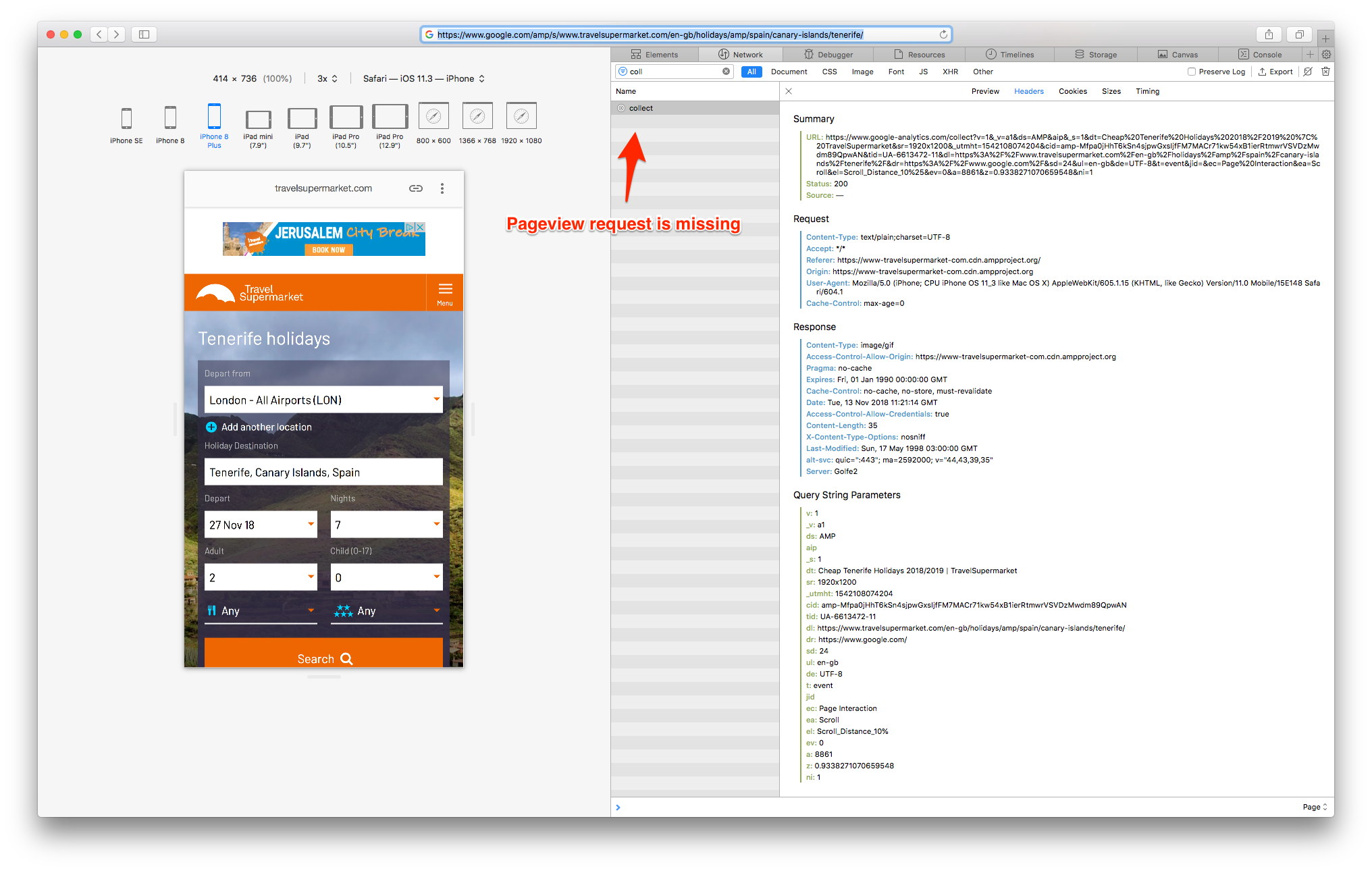
- Enable the Develop menu in Safari Preferences, then click on the menu: 'Develop > Enter Responsive Design Mode'. Then select a mobile device such as 'iPhone 8',
- On the url bar go to: https://www.google.com/amp/s/www.travelsupermarket.com/en-gb/holidays/amp/spain/canary-islands/tenerife/
- Open the developer tools and go to the network tab, then filter by 'collect'
- When the page loads, the 'pageview' request will not be sent. Other requests such as the scroll pings work fine.
Incidentally, if you repeat these steps on Google Chrome, everything works as expected.
 RonnieWinter
All 10 comments
/to @zhouyx @jeffjose
 aghassemi
on 13 Nov 2018
aghassemi
on 13 Nov 2018
I'll take a look.
 zhouyx
on 13 Nov 2018
zhouyx
on 13 Nov 2018
After a couple hours of investigation, Here's what I found
- I am able to reproduce the issue with Safari
- It happens both with https://www.google.com/amp/s/www.travelsupermarket.com/en-gb/holidays/amp/spain/canary-islands/tenerife/ with viewer and https://www.travelsupermarket.com/en-gb/holidays/amp/spain/canary-islands/tenerife/ w/o viewer
- I can't reproduce with a simple local page with
<amp-analytics type='googleanalytics'> - I am still able to reproduce the issue when running the site with proxying and using local build script
- I am able to confirm that
navigator.sendBeacon(pageviewUrl)is called when tracing the issue. Which means the pageview event is handled correctly. - Though
navigator.sendBeacon(pageviewUrl)hasn't been sent, no pageview request can be found under the Safari Network tab - To verify that the request has been sent out, I changed the pageviewUrl and have it sent to my local server instead. Local server has received the request.
- I also tried calling
naviator.sendBeacon(pageviewUrl)manually, where I copied the resolved pageviewUrl. I am not able to see the request in Safari Network tab. However to verify it's not some special character that breaks the request, I replaced the pageviewUrl domain with the localhost domain. I was able to receive the request, AND I was also able to locate the request in Safari Network tab then. cc @avimehta Do you have any idea on why this is the case?
@RonnieWinter Did you see a decrease of pageview in Safari server side? I have a feeling that this is only an issue with Safari Network tab.
Thanks @torch2424 for the help today
zhouyx
on 14 Nov 2018
@zhouyx Thanks for your reply. Yes we have seen a drop in pageview requests on our server side, and this is what lead us to investigate and find this issue.
Regards
RonnieWinter
on 14 Nov 2018
Thank you @RonnieWinter. Could I get a bit more information on the data to help me investigate.
- When did the drop first happen?
- How much percentage is the drop?
- Does the drop happen across all Safari version? Mobile and Desktop?
Thank you!
zhouyx
on 14 Nov 2018
Not sure why.
@zhouyx If I understand your investigation so far correctly, sendBeacon pings are not getting sent from the browser to GA. If you change the URL to point to a local server, the pings do go through and they also show up in Network tab. Is that correct?
@RonnieWinter Is this happening throughout your site or on one particular section? A date when this started happening will help debug the issue more (to check if there were some releases around that time). Also, in the reports, is the drop only on Safari or does it happen for other browsers as well?
 avimehta
on 14 Nov 2018
avimehta
on 14 Nov 2018
@avimehta Based on my experiment. I can see #sendBeacon() being called. But I am not sure if the pings are sent to GA. One thing worth mention is that I am able to locate other scroll event pings in the Network tab.
If you change the URL to point to a local server, the pings do go through and they also show up in Network tab. Is that correct?
That's correct.
zhouyx
on 14 Nov 2018
@avimehta
Hi, yes it seems like the pageview doesn't appear on the network tab for Safari, but it is actually being sent.
I have just had confirmation from the data team that they can see that there are iOS safari users that do register 'pageviews'. The real problem is that they do not convert once they click the search button (which takes them to the results page). This would therefore imply that their ClientIDs are changing once they leave the AMP cached page, to go to the results page (going cross-domain). Which means this bug is actually a manifestation of the issue described in #19172
RonnieWinter
on 15 Nov 2018
Thank you @RonnieWinter for the investigation! I've also verified with the ampproject.org data, and no signs of pageview drop has been identified.
Lessons learned about Safari network tab : )
zhouyx
on 15 Nov 2018
fyi, I am looking into the cross-domain issue and will report back here or on the other bug once I get some time to look into it.
avimehta
on 15 Nov 2018
Related issues
 sryze
·
3Comments
aghassemi
·
3Comments
sryze
·
3Comments
aghassemi
·
3Comments
 devanes
·
3Comments
devanes
·
3Comments
 radiovisual
·
3Comments
aghassemi
·
3Comments
radiovisual
·
3Comments
aghassemi
·
3Comments
Most helpful comment
After a couple hours of investigation, Here's what I found
<amp-analytics type='googleanalytics'>navigator.sendBeacon(pageviewUrl)is called when tracing the issue. Which means the pageview event is handled correctly.navigator.sendBeacon(pageviewUrl)hasn't been sent, no pageview request can be found under the Safari Network tabnaviator.sendBeacon(pageviewUrl)manually, where I copied the resolved pageviewUrl. I am not able to see the request in Safari Network tab. However to verify it's not some special character that breaks the request, I replaced the pageviewUrl domain with the localhost domain. I was able to receive the request, AND I was also able to locate the request in Safari Network tab then. cc @avimehta Do you have any idea on why this is the case?@RonnieWinter Did you see a decrease of pageview in Safari server side? I have a feeling that this is only an issue with Safari Network tab.
Thanks @torch2424 for the help today