Amphtml: IE11 does not support layout intrinsic for amp-img
What's the issue?
AMP-IMG components do not expand to content size if layout intrinsic is used due to a javascript error.
Die Eigenschaft "setAttribute" eines undefinierten oder Nullverweises kann nicht abgerufen werden. [object HTMLUnknownElement]

SCRIPT438: Das Objekt unterstützt die Eigenschaft oder Methode "trimLeft" nicht
validator.js (31,802)
Sorry for the german error massages.
How do we reproduce the issue?
- open: https://p2er.github.io/amp-articleslider/image-intrinsic.html#development=1
- JS error pops up in console showing an unsupported attribute (null or undefined) "setAttribute" was called on [object HTMLUnknownElement]
3.JS error states that object does not support "trimLeft"
What browsers are affected?
Tested on IE 11.228.17134.0
Which AMP version is affected?
Powered by AMP HTML – Version 1534872626733
 p2er
p2er
All 11 comments
Apparently this is a known issues with IE SVG support (https://gist.github.com/larrybotha/7881691)
I don't have an IE11 machine to hand right now. Please try adding this to your CSS and let me know if it fixes it.
/* 2 */
@media screen and (-ms-high-contrast: active), (-ms-high-contrast: none) {
  img[src*="svg+xml"] {
    width: 100%;
  }
}
The validator issue is separate - as far as I'm aware the validator doesn't support IE @Gregable can you confirm?
Edit:
To elaborate a little on what's going on with layout=intrinsic: AMP does not rely on the normal browser image resizing because it can cause screen jumps when the browser loads the image. All AMP images need a specified size. layout=responsive almost works like a regular image in that it will resize, and will do so without screen jank because we know the aspect ratio. However the resizing is done with a div which has a subtle difference compared to a real img tag. The div doesn't have an intrinsic size, this means that when it's in a floated parent element it collapses to 0x0 instead of inflating to a natural size like an img.
This difference make layout=responsive annoying to use, often requiring extra CSS glue to get the desired outcome. We layout=intrinsic to fix this. layout=intrinsic uses an SVG in a data url of a real img element to hold the space. Because it's a real img it expands to its intrinsic size as you'd expect. The problem is IE 9, 10, and 11 SVG support is buggy. Note: IE is not a supported browser for AMP but we try not to break it where possible,
 jpettitt
on 22 Aug 2018
jpettitt
on 22 Aug 2018
I've added the hack to my demo page but it does not seem to solve the problem.
I've found the problem while checking out the amp & gutenberg implementation for wordpress, where I noticed that layout intrinsic is used by the amp plugin for wordpress to convert all regular images to amp-img components with layout intrinsic. They plan to merge gutenberg editor and the amp plugin into core, as far as I remember their talk from amp conf. That would remove ie support for a lot of themes and all plain wp installations.
p2er
on 22 Aug 2018
OK I'll dig up an IE11 machine and take a look.
jpettitt
on 22 Aug 2018
Update: It looks like the issue is related to how IE creates elements, It's failing here and this look to be becasue the code that create the element for sizer is not running synchonously.
@jridgewell the template helper in htmlFor() is something you added. Can you take a look and confirm?
jpettitt
on 22 Aug 2018
Well, this is new behavior to me. The issue is IE11's innerHTML is broken.
Everything is fine, until we try freeing memory from static-helper's container. Once we do that, we hit IE's borked innerHTML, which destroys the el element's tree. Instead, I can just container.removeChild(el) and get the proper behavior and memory freeing.
 jridgewell
on 22 Aug 2018
jridgewell
on 22 Aug 2018
That makes total sense. Just generated PR to fix it per your recommendation.
jpettitt
on 22 Aug 2018
Hi @jpettitt
I'm trying to find the solution to this problem with the simageens in IE11. Sorry for the trouble they came to find a solution?
Thanks
 ronaldlauweb
on 14 Feb 2019
ronaldlauweb
on 14 Feb 2019
I'm in a same boat.
layout=intrinsic is not working on IE11, img are very small. (i-amphtml-sizer calculated small size in IE11). layout=responsive is working.
In my case, this solution does not work for me..
https://github.com/ampproject/amphtml/issues/17652#issuecomment-415044600
 bissy
on 25 Apr 2019
bissy
on 25 Apr 2019
@bissy Can you open a new issue with a URL the demonstrates your issue (preferably one that includes @jpettitt's solution, even if it doesn't work)?
jridgewell
on 25 Apr 2019
@jridgewell Thank you! I will do that.
bissy
on 26 Apr 2019
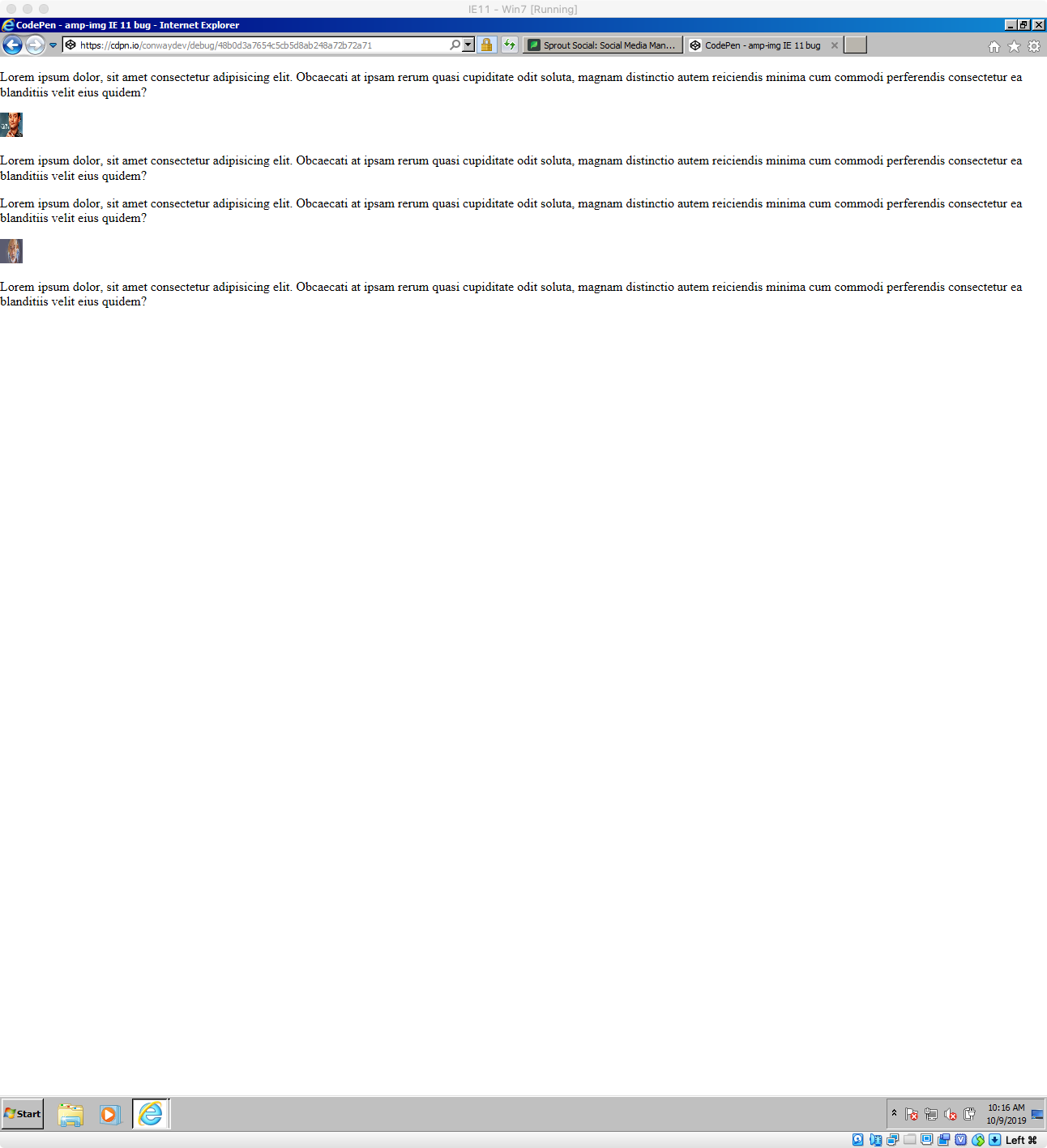
@jridgewell running up against this and we recently started caring about IE 11 again :|, but I have an example at https://cdpn.io/conwaydev/debug/48b0d3a7654c5cb5d8ab248a72b72a71 which includes the above code sample.
Screenshot of it in IE 11 VM (https://developer.microsoft.com/en-us/microsoft-edge/tools/vms/):
 conwaydev
on 9 Oct 2019
conwaydev
on 9 Oct 2019
Related issues
 mkhatib
·
3Comments
mkhatib
·
3Comments
 torch2424
·
3Comments
torch2424
·
3Comments
 devanes
·
3Comments
devanes
·
3Comments
 aghassemi
·
3Comments
aghassemi
·
3Comments
 sryze
·
3Comments
sryze
·
3Comments