Amp-wp: Scaffolding for AMP Setup Wizard
Feature description
An admin page will be created containing an empty div to serve as the onboarding application root. On that page, the minimum required core packages will be loaded, and a piece of test text will be rendered into the application root via React.
_Do not alter or remove anything below. The following sections will be managed by moderators only._
Acceptance criteria
/wp-admin/admin.php?page=amp-setuploads in all WP versions back to 4.9.- Page contains test text loaded into the app root via React
Implementation brief
- PHP: Onboarding code will consist of a single entry point wrapped in a check for a constant,
AMP_NEW_ONBOARDING. When this constant is set totrue, the onboarding PHP classes will be loaded. Outside this entry point, existing PHP code will not need to be modified. (The constant will be removed at the completion of UX Phase 1.) We'll also allow the screen to be loaded if a specific URL flag exists. - JS: The JavaScript for the onboarding page will also be self-contained. A new
setupdirectory will be created in the JS source files.
~- Polyfilling: A target WP version (currently 5.4) will be set in the main onboarding PHP class. Existing Webpack config will be used to build required core packages from the most up-to-date versions available from NPM and compatible with the target WP version. Where the WP version is lower than the target version, the plugin-provided versions of the packages will load in place of those provided by core.~
Note: as discussed in Slack, WP 4.9 will not be supported.
QA testing instructions
- If you don't have a local dev environment, follow the steps in the “Getting Started” and “Local Environment” sections here: https://github.com/ampproject/amp-wp/wiki/Engineering-Guidelines You'll need to run
composer install && npm install && npm run buildat the end of those steps to get the plugin working. - Navigate to http://localhost:8890/wp-admin/admin.php?page=amp-setup&-new-onboarding=1 and confirm the test text loads on the screen.
- Navigate to http://localhost:8890/wp-admin/admin.php?page=amp-options&-new-onboarding=1 and confirm you see "Setup Wizard" in the AMP submenu. Note that this menu item will only show if
amp-new-onboarding=1is in the URL.
Demo
Changelog entry
 jwold
jwold
All 15 comments
Discussed in our backlog grooming today and John will add details as he has opportunity.
jwold
on 14 May 2020
@jwold @westonruter @kmyram I've updated the description on this issue. Let me know if you have any questions or feedback. Expecting to have a PR ready in the first half of this week.
 johnwatkins0
on 18 May 2020
johnwatkins0
on 18 May 2020
@johnwatkins0 The description is good. Could you update the title of the issue to be more descriptive as well?
 amedina
on 18 May 2020
amedina
on 18 May 2020
Updated the issue description after an email discussion with Felix and Adam on the development of Site Kit. Based on their experience with that plugin it sounds like attempting to use JS packages from core is more trouble than it's worth. I crossed out that section of the description.
johnwatkins0
on 21 May 2020
@jwold Assigning this to you to take a crack at QA. Let me know if you run into difficulties with step 1. You won't need to change branches to test this, because it's been merged.
Don't spend too much time getting set up if you hit any roadblocks, because we can always look into setting up a QA server somewhere if your machine does not like doing these things, but do reach out for help if you get temporarily stuck.
Let me know how it goes.
johnwatkins0
on 21 May 2020
John walked me through getting Docker setup on my computer and I was able to verify that this is working in QA (screenshot)
jwold
on 22 May 2020
John walked me through getting Docker setup on my computer and I was able to verify that this is working in QA (screenshot)
Aside: @johnwatkins0 Could you outline the steps you went through to do this? We may want to add this to the plugin wiki for others to get set up as well.
 westonruter
on 22 May 2020
westonruter
on 22 May 2020
@westonruter The steps in https://github.com/ampproject/amp-wp/wiki/Engineering-Guidelines worked more or less as outlined. The main issue was Joshua did not have Composer installed, and the auto-install in ./bin/local-env/start.sh failed silently:
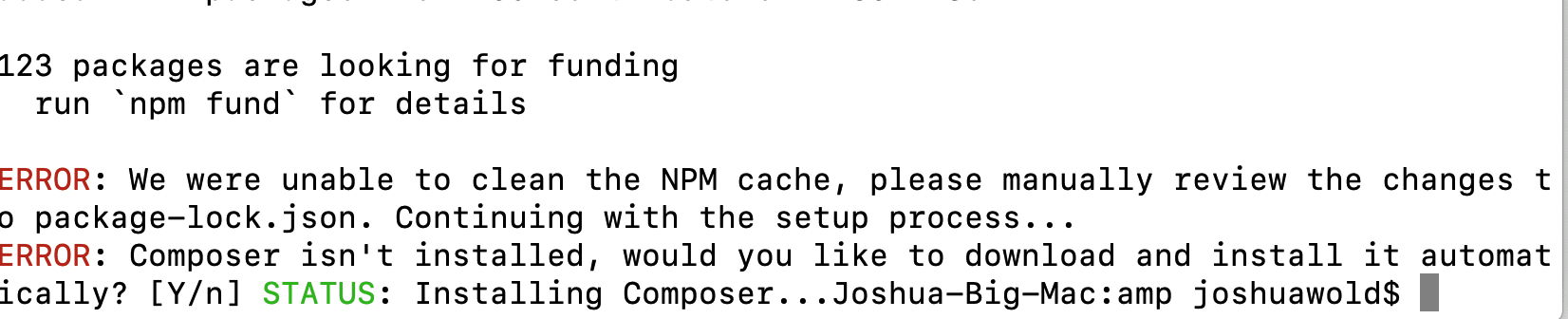
So I walked him through installing Composer via the command line, which is not an intuitive process in any circumstance. After that, he just needed to download and install Docker for desktop, and everything worked.
One note is that the composer install && npm install && npm run build step might be useful in the Engineering Guidelines file. Some people might assume that happens in ./bin/local-env/start.sh.
johnwatkins0
on 22 May 2020
These are the Composer steps we took:
php -r "copy('https://getcomposer.org/installer', 'composer-setup.php');"
php -r "if (hash_file('sha384', 'composer-setup.php') === 'e0012edf3e80b6978849f5eff0d4b4e4c79ff1609dd1e613307e16318854d24ae64f26d17af3ef0bf7cfb710ca74755a') { echo 'Installer verified'; } else { echo 'Installer corrupt'; unlink('composer-setup.php'); } echo PHP_EOL;"
php composer-setup.php
php -r "unlink('composer-setup.php');"
Then this:
mv composer.phar /usr/local/bin/composer
And which composer to confirm.
johnwatkins0
on 22 May 2020
Composer and NPM should be part of the Docker container(s) to make this easier, no?
westonruter
on 22 May 2020
Anyone working with the code locally will need NPM and Composer on their system anyway to build the plugin to run in the Docker container. Joshua is an edge case because he never had a reason to install Composer until I asked him to QA this.
But I like the idea of alternative "QA mode" steps for local setup, where it's assumed there won't be any code edits. In that mode maybe a non-coding contributor could just start the container and perform actions such as branch checkout through the WordPress admin. It seems like I heard something similar to this being discussed recently in the context of another plugin.
johnwatkins0
on 22 May 2020
Unless all developer actions could be performed inside the docker container 🤔
johnwatkins0
on 22 May 2020
@pierlon is currently looking at automating ZIP builds per PR and letting the plugin switch to arbitrary release channels.
Once that is in, Joshua will be able to switch to a given branch from within the admin dashboard instead, and never deal with the console or any build tools.
 schlessera
on 22 May 2020
schlessera
on 22 May 2020
Yes, that is an amazing idea.
johnwatkins0
on 22 May 2020
Unless all developer actions could be performed inside the docker container 🤔
Exactly. This actually is what I'm doing via Lando in the wordpressdev environment. Lando is based on Docker. The main thing that is not ideal is the slower performance of running things in the container. But it's worth it for the benefits of containerization for me. But I was curious if you the Docker setup had that in an alternative way.
westonruter
on 22 May 2020
Related issues
 nickcernis
·
4Comments
nickcernis
·
4Comments
 swissspidy
·
5Comments
swissspidy
·
5Comments
 miina
·
5Comments
miina
·
5Comments
 GitaStreet
·
4Comments
westonruter
·
3Comments
GitaStreet
·
4Comments
westonruter
·
3Comments
Most helpful comment
@pierlon is currently looking at automating ZIP builds per PR and letting the plugin switch to arbitrary release channels.
Once that is in, Joshua will be able to switch to a given branch from within the admin dashboard instead, and never deal with the console or any build tools.