Amp-wp: Simple way to remove AMP story pages
Feature description
As a user I want there to be an easier way to remove pages from within the editor.
_Do not alter or remove anything below. The following sections will be managed by moderators only._
Acceptance criteria
- AC1: It is currently possible to remove AMP story pages by pressing delete or using the remove block button on the in the top bar. However, there should be a simple way to remove pages within the UI.
- AC2: Add "Remove page" to the right-click context menu, upon selection, page will be removed.
- AC3: Include a "remove" link in the page panel, when a page is selected. Selecting the "remove" link will remove the page (see visual in comment below).
Implementation brief
Implementation for this issue is broken into two piece of work.
- Add another a Remove page back on the
InspectorControlsfor the edit method the page block.
Mock up of which looks like this.

- Add new options to the context menu that appears when a user right clicks in the stories editor.
Currently the context menu is limiting to only appearing in one of two cases. First if a block other the the page block is selected, it shows options. Case two, if a page block is selected and there a block in the clipboard, show a 'Paste block' option.
To implement this feature, some of the limitations and checks for if page is selected. These will have to be removed. The following limitations will need to be respected.
- When a page block is selected, a user will not be able to copy or cut or page a page.
- However, they is no limitation on duplication, so if simple, this should also be implemented.
- Elements in popover menu, should say, remove page instead of remove block.
- If only one page is in the story, remove page should not be displayed.
A mockup of what this will look like.

QA testing instructions
Test 1
- Create new story post.
- Create a second page.
- Select second page.
- Click page to show right context menu (background settings).
- Click remove page.
- Confirm page is removed.
Test 2
- Create new story post.
- Create a second page.
- Select second page.
- Right Click page to show context menu
- Click remove page.
- Confirm page is removed.
Demo
Changelog entry
- Added a new button to the sidebar to easily remove pages.
 spacedmonkey
All 30 comments
I'd first have some UX feedback here, so I don't think this is an XS task.
 swissspidy
on 18 Sep 2019
swissspidy
on 18 Sep 2019
What about using the new right click menu for this?
Related: #2532.
swissspidy
on 27 Sep 2019
Also related is https://github.com/ampproject/amp-wp/issues/3280 & https://github.com/ampproject/amp-wp/issues/3221.
This issue shows that pages are sometimes mistakenly removed them the delete key is pressed. It we clear to users how to remove blocks and pages, they should be multiple ways of doing it and it should be clear what is going to removed when that button / key is pressed. Remove block to remove a page is super unclear, as users will likely be unaware that the page is even a block, not at least as they understand it.
spacedmonkey
on 27 Sep 2019
Remove block to remove a page is super unclear, as users will likely be unaware that the page is even a block, not at least as they understand it.
Hmm we should avoid using the term "block" whenever possible. For pages we should use "Duplicate page" and "Remove page", and otherwise we should use "Duplicate element" and "Remove element"
swissspidy
on 27 Sep 2019
Currently the only way (that I have found) to remove a page, is using the option in the toolbar dropdown. The wording on this button, say 'Remove Block'. This is unclear to users that this will in fact remove the page.
See screenshot.

spacedmonkey
on 27 Sep 2019
We suggest the following:
- The context menu should by default allow you ro remove a page when you right click within that page.
- When a user clicks on a page (or background element within that page). The tool bak at the top... the block navigation should not say "Remove Block", it should say "Remove page".
- Add the "Remove" link in the Page panel when the page is selected. This present a non-hidden visual indicator as well. See mock up:

This should satisfy the acceptance criteria.
 cathibosco
on 8 Oct 2019
cathibosco
on 8 Oct 2019
Another couple of ideas.
Add a clear button in the top toolbar. When a page is selected, just add 'Remove page' button.

When a page is selected, as a red cross in the top right hand corner.

spacedmonkey
on 9 Oct 2019
- Add the "Remove" link in the Page panel when the page is selected. This present a non-hidden visual indicator as well. See mock up:
Is this even doable in Gutenberg? I guess this is a core panel, that we have little control over. Can we insert such a link, @spacedmonkey?
 barklund
on 9 Oct 2019
barklund
on 9 Oct 2019
Is this even doable in Gutenberg? I guess this is a core panel, that we have little control over. Can we insert such a link, @spacedmonkey?
Completely possible. The background color is inserted by our code. We can hook in and add whatever we want to that sidebar.
spacedmonkey
on 9 Oct 2019
Is this even doable in Gutenberg? I guess this is a core panel, that we have little control over. Can we insert such a link, @spacedmonkey?
Completely possible. The background color is inserted by our code. We can hook in and add whatever we want to that sidebar.
I'm talking about the very top link though. I haven't seen any of our components changing that panel except for the text inside.

But if it's doable, then this is pretty quick to write up in Implementation Brief.
barklund
on 9 Oct 2019
I _think_ it's doable by just adding a link directly within InspectorControls.
Add the "Remove" link in the Page panel when the page is selected. This present a non-hidden visual indicator as well. See mock up:
@cathibosco Should we do this for _all_ blocks? Seems a bit inconsistent otherwise.
swissspidy
on 9 Oct 2019
@cathibosco Should we do this for _all_ blocks? Seems a bit inconsistent otherwise.
100% Agree with this :arrow_up:
I will await an answer before I write up an implementation.
spacedmonkey
on 10 Oct 2019
Since this ticket is for the removal of a page, and since we are going through a larger design principal evaluation and refactor. My recommendation is to to the following:
- The context menu should by default allow you to remove a page when you right click within that page.
- When a user clicks on a page (or background element within that page). The tool bar at the top... the block navigation should NOT say "Remove Block", it should say "Remove Page".
- Add the red "Remove" link in the Page panel when the page is selected. This presents a non-hidden visual indicator as well. See mock up: in the entry above.
Then in the next sprint we can decide if a red link is needed for other block removals. At this time we should consider improving the specific frustrating task of remove page and work to eliminate that frustration. (since it appears that is possible)
cathibosco
on 14 Oct 2019
- The context menu should by default allow you to remove a page when you right click within that page.
This is pretty straightforward.
It even allows us to remove the logic sometimes displaying the default browser context menu on right click as we always have at least the single option of deleting the page.
This is true even if it's the only page – just like you can delete the only page now by using any of the other methods (which de facto clears the page).
- When a user clicks on a page (or background element within that page). The tool bar at the top... the block navigation should NOT say "Remove Block", it should say "Remove Page".
I actually don't think this is possible. It wasn't back in March at least, but of course a lot has happened since then.
I guess we might want to re-implement this top bar however (as we've done with many other things) I we generally want the text to say "Remove element" for non-page blocks. Also, the "Insert Before" and "Insert After" are a little weird. For page blocks, they kind of make sense, but for all other blocks, they simple add an empty block of the same type to the page - and they both work completely similarly except for layer ordering (relative position on page is identical). However, I don't think this belongs in this issue actually. Customizing (by either copy-pasting or adding upstream filter in Gutenberg to customize menu) the top menu bar is a new issue if needed IMHO.
I suggest we remove it from this ticket.
- Add the red "Remove" link in the Page panel when the page is selected. This presents a non-hidden visual indicator as well. See mock up: in the entry above.
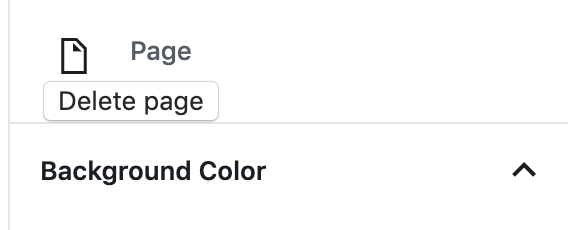
This is possible - simple by inserting it as the first child of <InspectorControls />:
<InspectorControls>
    <button>Delete page</button>
    <BackgroundColorSettings ...>
    ...
</InspectorControls>
Results in:
barklund
on 15 Oct 2019
The context menu should by default allow you to remove a page when you right click within that page.
The remove page button in the context menu is a great idea. I would not show the remove page if there is only one page. I would also add a 'Duplicate page' button. This should mean we could give issue of default context menu showing, as they would always be at least one option.
When a user clicks on a page (or background element within that page). The tool bar at the top... the block navigation should NOT say "Remove Block", it should say "Remove Page".
As @barklund said, I don't believe this is easy. That built in toolbar context menu (or want of a better word), should be removed and replaced with our context menu (right click). Currently I am worried that users will not find the right click functionality as will expect the system context menu to appear. Putting our context menu in the toolbar, allows another place for users to find it.
Add the red "Remove" link in the Page panel when the page is selected. This presents a non-hidden visual indicator as well. See mock up: in the entry above.
I believe the button should say, 'Remove Page'. So it clear what the button does. I also think the button should remain when other elements are selected but say, 'Remove element'.
spacedmonkey
on 15 Oct 2019
Looks like the plan to have Remove Page & Duplicate Page are possible in the context menu - awesome and super useful!
and
Adding the Remove Page to the Page Panel is also possible! .... thinking through the suggestion of adding Remove Element to the page panel goes beyond this ticket I think and leads to a larger UX/UI consideration.
Do we have enough to solve this issue now? (plus a little extra with the Duplicate page?)
cathibosco
on 15 Oct 2019
I think we have got this. I am going to write up the implementation brief.
spacedmonkey
on 15 Oct 2019
Looks fine to me. Let's get cracking!
I hadn't found that PluginBlockSettingsMenuItem, nice catch!
barklund
on 15 Oct 2019
I have marked this as a small as work as already been done as part of discovery.
This branch is for the top toolbar.
This branch is for the right click.
I also have local branch for sidebar button. I will continue the work.
spacedmonkey
on 15 Oct 2019
I have broken this into three PR, for easier reviewing #3535, #3537 and #3538
spacedmonkey
on 15 Oct 2019
AC3: When a page, or background of a page is selected, within the vertical ellipsis menu in the tool bar the "remove block" text will update to display "remove page".
It was correctly stated that this is not easily doable in the editor (Gutenberg limitation).
@cathibosco @jauyong Since that is not possible, what is the expected UI when opening the menu when a page is selected?
With #3538 it currently looks like this:

Where both remove links perform the same action. IMO that is very confusing and it should only display the "Remove Block" label, even though the label is not ideal.
swissspidy
on 16 Oct 2019
Where both remove links perform the same action. IMO that is very confusing and it should only display the "Remove Block" label, even though the label is not ideal.
It doesn't perform the same action always. If a text block is selected then that will be removed.
I didn't love the behavior, but we are limited by what we can control in GB. This behavior was detailed in the IB, which was approved and reviewed.
spacedmonkey
on 16 Oct 2019
It doesn't perform the same action always. If a text block is selected then that will be removed.
In my comment I explicitly mentioned the "when a page is selected" use case :)
I didn't love the behavior, but we are limited by what we can control in GB. This behavior was detailed in the IB, which was approved and reviewed.
It doesn't match the AC though, which is why I am raising this question.
swissspidy
on 16 Oct 2019
I didn't love the behavior, but we are limited by what we can control in GB. This behavior was detailed in the IB, which was approved and reviewed.
It's always easier to understand what's better once something actually has a visual presentation and can be tested out. The goal is to create the best UX for the user and it's OK to make changes if it comes out later that some detail in the IB could be improved. WDYT?
If only one page is in the story, remove page should not be displayed.
The existing behavior of the More Options allows Removing a page when it's the first and only page as well. This is very useful when quickly wanting to "clear" the first Page since a new clean Page is always added if no Pages exist in the Story. It makes more sense than creating a new Story as suggested here or cleaning the page block by block since:
- Creating a new Story leaves an unused Draft
- Creating a new story also requires adding a Title and Featured Image again
- Creating a new story takes more time
- Removing a block is supported from
More Toolsso it would be consistent to have it in the Sidebar as well - It's not obvious why it doesn't appear on the first page -- confusing for the user, especially since it always appears in the "More Options" Menu
- Removing blocks from the page block by block would take a long time if I'd have to do it one by one.
I honestly don't see _any reason at all_ why it shouldn't be allowed. What's the downside?
Thoughts?
 miina
on 16 Oct 2019
miina
on 16 Oct 2019
Where both remove links perform the same action. IMO that is very confusing and it should only display the "Remove Block" label, even though the label is not ideal.
Agreed that it's confusing and makes sense to only display "Remove Block".
miina
on 16 Oct 2019
The IB review as fallen down here. I included screenshots and details on behaviours in the IB. Why is this being flagged now? The point of the IB was to stop changes in functionality when it gets to code review like this.
Personally I don't think we should merge #3538 as it doesn't add value and is a little confusing. I think we should focus on https://github.com/ampproject/amp-wp/issues/3466 . However in my research,I couldn't find a way to change the text on the remove block to remove page, which is what I originally wanted to do.
spacedmonkey
on 16 Oct 2019
The IB review as fallen down here. I included screenshots and details on behaviours in the IB. Why is this being flagged now? The point of the IB was to stop changes in functionality when it gets to code review like this.
This is a new process for everyone, we're all learning how to do things better, looks like it's not so easy to think through _all the details_ based on IB only. Visually being able to test the feature out is always easier. This has been a good experience for future reviews though and a reminder to try thinking through the edge cases even more, too. Unfortunate that this happened with a PR that you already started working on.
In any case, the ultimate goal is always to offer the best experience for the user.
miina
on 16 Oct 2019
AC3 and IB3 are being taken out of this ticket. Please see this slack conversation for more information.
The AC and IB have been put in https://github.com/ampproject/amp-wp/issues/3552
Removed:
- AC3: When a page, or background of a page is selected, within the vertical ellipsis menu in the tool bar the "remove block" text will update to display "remove page".
- Add a remove page menu item to more options dropdown.
Using thePluginBlockSettingsMenuItemapi, menu items can be added the more options dropdown, but not remove.
When the remove page menu item is clicked, the current page should be remove.
Mockup.

Test 3
- Create new story post.
- Create a second page.
- Select second page.
- Click on the more option button in top toolbar.
- Click remove page.
- Confirm page is removed.
 jauyong
on 17 Oct 2019
jauyong
on 17 Oct 2019
Assigned to @csossi for him to do his thing.
To confirm, the Remove page button, should not appear if there is only one page :+1:
spacedmonkey
on 17 Oct 2019
Verified in QA
When only 1 page:

When more than 1 page:

 csossi
on 17 Oct 2019
csossi
on 17 Oct 2019
Related issues
 luizeof
·
4Comments
luizeof
·
4Comments
 KhalidAlmallahi
·
4Comments
KhalidAlmallahi
·
4Comments
 GitaStreet
·
4Comments
miina
·
5Comments
miina
·
3Comments
GitaStreet
·
4Comments
miina
·
5Comments
miina
·
3Comments
Most helpful comment
I have broken this into three PR, for easier reviewing #3535, #3537 and #3538