Amp-wp: Export AMP Story as Zip File
As a user, when exporting an AMP Story, I want the exported story to be in the format of a zip file.
AC1: Selecting the "export" (or like) button within the editor the initiate a request to the server to create a zip file of the AMP Story
AC2: The zip file will include all assets referenced within the story
AC3: Once the zip file is ready the user will be prompted to download the zipped story
AC4: The zip file will contain index.html as well as all assets (images, videos, etc.)
AC5: The zip file will be named the same as the title of the AMP Story
AC6: The style of the exported AMP Story matches the source AMP Story
 MackenzieHartung
All 18 comments
Architectural Summary
Add the
enable_amp_stories_exportandamp_stories_baseurloptions toAMP_Options_Menu::render_amp_stories()andAMP_Options_Manager::validate_options()so we can verify that export is supported withAMP_Options_Manager::get_option( 'enable_amp_stories_export' ), as well as, perform the find and replace on the exported assets withAMP_Options_Manager::get_option( 'amp_stories_baseurl' ). Image from #2464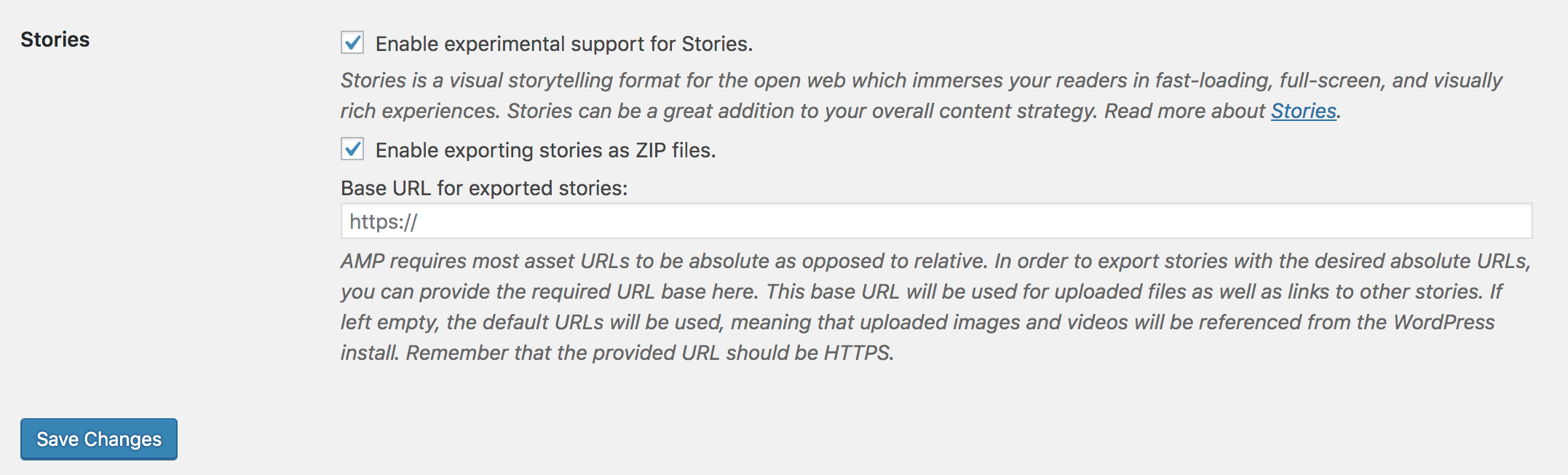
Add a hook inside
AMP_Story_Post_Type::register()to handle the Ajax request.- Create one or more helper methods to check that we can actual export the code. For example, check that the
ZipArchiveclass is available and thecurrent_user_can( 'edit_files' ). This will make it easier to test and load hooks etc. - Enqueue
amp-stories-export.jsinsideAMP_Story_Post_Type::enqueue_block_editor_scripts()with a localizedampStoriesExportscript to contain the nonce/action and other variables. Create an
amp-stories-export.jsfile that useswp.plugins.registerPlugin,wp.element.createElement, andwp.editPost.PluginMoreMenuItemto create a new menu item inside the existing tools & options sidebar that makes an Ajax request toAMP_Story_Post_Type::handle_export().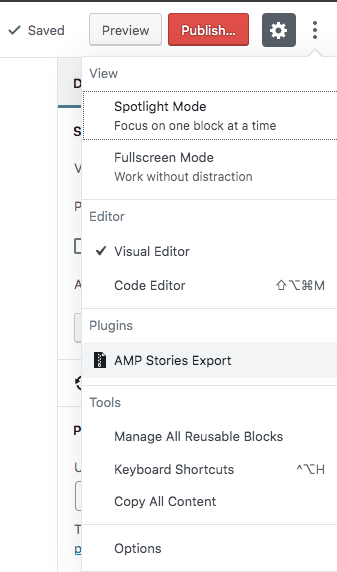
Create an
AMP_Story_Post_Type::handle_export()method that returns a JSON response.- On
error.
- Display the error message.
TBD
- Display the error message.
- On
success.
- The method generates a Zip archive (probably as an actual WP attachment ) and sends the location back with the JSON response. We can then do
window.location = xhr.response.data.location;, which will initiate a download and NOT redirect the page.
- The method generates a Zip archive (probably as an actual WP attachment ) and sends the location back with the JSON response. We can then do
- Further Thoughts
- If the archive can be created as an attachment then we don't have to worry about garbage collection and can let the user delete the archive files through the media manager or download them again at a later time.
- We need to decide on the name conventions of the archive file. So whether it will be just the story slug or if we attach the date or perhaps use something like
hash_fileto ensure we don't generate a duplicate archive. Also, we need to decide on what to do if there isn't a slug, we will only have access to the story ID.
- On
- Add unit and integration tests.
 valendesigns
on 4 Jun 2019
valendesigns
on 4 Jun 2019
Enqueue
amp-stories-export.jsinside [...]
Create anamp-stories-export.jsfile that useswp.plugins.registerPlugin,wp.element.createElement, andwp.editPost.PluginMoreMenuItem
I don't think we need a new file for that single feature. Adding that new plugin would be as easy as creating a file ./assets/src/stories-editor/plugins/export.js with content like this:
/**
 * WordPress dependencies
 */
import { PluginMoreMenuItem } from '@wordpress/edit-post';

export const name = 'amp-story-export';

export const render = ( ) => (
    <PluginMoreMenuItem
        icon="smiley"
        onClick={ () => { alert( 'Button Clicked' ) } }
    >
        More Menu Item
    </PluginMoreMenuItem>
);
Create an
AMP_Story_Post_Type::handle_export()method that returns a JSON response.
Instead of creating files on the server or even attachments, can we just return the actual ZIP file? That would greatly simplify this IMHO.
Also, how would the exporter work under the hood, just fetch the actual story using wp_remote_get() (like \AMP_Validation_Manager::validate_url) and then replacing the URLs somehow?
Curious to hear Weston's thoughts on this first though :-)
 swissspidy
on 4 Jun 2019
swissspidy
on 4 Jun 2019
Instead of creating files on the server or even attachments, can we just return the actual ZIP file? That would greatly simplify this IMHO
+1 for returning the Zip file directly.
 amedina
on 4 Jun 2019
amedina
on 4 Jun 2019
- Add a hook inside
AMP_Story_Post_Type::register()to handle the Ajax request.
Note that this could be a REST API endpoint, perhaps even an endpoint dangling off of a singular story. For example: https://example.com/wp-json/wp/v2/amp_story/2071/zip/. Though I realize that the REST API is not usually sending back non-JSON data.
- The method generates a Zip archive (probably as an actual WP attachment ) and sends the location back with the JSON response. We can then do
window.location = xhr.response.data.location;, which will initiate a download and NOT redirect the page.
I have little experience with doing this, but what about using something like download.js to ensure cross-platform compatibility?
- If the archive can be created as an attachment then we don't have to worry about garbage collection and can let the user delete the archive files through the media manager or download them again at a later time.
As @swissspidy noted, do we even need to have the file saved to disk? For example, if doing a fetch() then the server could respond with the ZIP as the response and the client could pass that blob to that download() JS lib. No need to save a file to disk, and no need to create an attachment, and no worry about the archive going stale.
- We need to decide on the name conventions of the archive file. So whether it will be just the story slug…
Yes, the user should be prompted to download a file with the story slug as the basename of the ZIP.
Also, how would the exporter work under the hood, just fetch the actual story using
wp_remote_get()(like\AMP_Validation_Manager::validate_url) and then replacing the URLs somehow?
One approach I think that could work well here is to conditionally register a custom sanitizer during such export requests. This is already being done similarly for the story sanitizer:
So consider an AMP_Story_Export_Sanitizer which takes a sanitizer arg for the base URL for the export. This sanitizer would have access to the DOM of the story which it could then use rewrite the src, srcset, and href attributes as required, as well as gather up a list of the files that should be grabbed from the filesystem for inclusion in the ZIP.
For example:
add_filter(
    'amp_content_sanitizers',
    function( $sanitizers ) {
        if ( is_singular( self::POST_TYPE_SLUG ) && isset( $_GET['story_export'] ) ) {
            $sanitizers['AMP_Story_Export_Sanitizer'] = array(
                'base_url' => get_option( '...' ),
            );
        }
        return $sanitizers;
    },
    100 // Run sanitizer after the others (but before style sanitizer and validating sanitizer).
);
So yes, when initiating the fetch request to download the story ZIP, the PHP handler would have to initiate a wp_remote_get() request to the story permalink with the ?story_export query param added. But how would the extracted asset URLs be passed to PHP? I suppose the AMP_Story_Export_Sanitizer could do that by sending back a response header with the asset URLs encountered. So then the response for wp_remote_get() would have the HTML of the story, as well as a response header that contains the URLs for the assets in the story. It could then take these, and package them into a ZIP for sending back in its response to the editor fetch() request.
 westonruter
on 4 Jun 2019
westonruter
on 4 Jun 2019
Add the enable_amp_stories_export and amp_stories_baseurl options to AMP_Options_Menu::render_amp_stories() and AMP_Options_Manager::validate_options() so we can verify that export is supported with AMP_Options_Manager::get_option( 'enable_amp_stories_export' ), as well as, perform the find and replace on the exported assets with AMP_Options_Manager::get_option( 'amp_stories_baseurl' ).
Curious to know why these options are needed. In which case would a user want to disable the export functionality via the UI settings page? Regrading the domain, if we have the files structure below, why would we need to prefix assets with a domain (an image src in the index.html could just be ../assets/image-1.png for example)?
.
+-- assets
| +-- image-1.png
| +-- image-2.png
+-- index.html
 ThierryA
on 4 Jun 2019
ThierryA
on 4 Jun 2019
Curious to know why these options are needed. In which case would a user want to disable the export functionality via the UI settings page? Regrading the domain, if we have the files structure below, why would we need to prefix assets with a domain (an image src in the index.html could just be
../assets/image-1.pngfor example)?
The reason is that relative URLs are largely not allowed in AMP (or highly discouraged). They are allowed for amp-img, but only for the time being. Look at the validator definitions for allow_relative for:
When allow_relative: true is present, a comment appears next to it: # Will be set to false at a future date.
westonruter
on 4 Jun 2019
Regrading the domain, if we have the files structure below, why would we need to prefix assets with a domain (an image src in the index.html could just be ../assets/image-1.png for example)?
NM, I guess that wouldn't work for videos amp-videos "source" "must start with "https://" or "//"
ThierryA
on 4 Jun 2019
Good point about the options. I don‘t see a need to add an option on the settings page to enable/disable such a feature.
swissspidy
on 5 Jun 2019
I don‘t see a need to add an option on the settings page to enable/disable such a feature.
Where would the user provide the base URL for the exported story's URLs to be rewritten to?
westonruter
on 5 Jun 2019
@westonruter
Note that this could be a REST API endpoint, perhaps even an endpoint dangling off of a singular story. For example: https://example.com/wp-json/wp/v2/amp_story/2071/zip/. Though I realize that the REST API is not usually sending back non-JSON data.
I have a POC that works with the Ajax request. Adding an endpoint seems like overkill for the timeline. Not to mention it's a bit odd to return a Zip from a JSON endpoint.
I have little experience with doing this, but what about using something like download.js to ensure cross-platform compatibility?
It doesn't appear to support Zip...
20XX :: ???? Considering Zip, Tar, and other multi-file outputs, Blob.prototype.download option, and more, stay tuned folks.
As well, the redirect method is cross browser since window.location is supported by all of them.
As @swissspidy noted, do we even need to have the file saved to disk? For example, if doing a fetch() then the server could respond with the ZIP as the response and the client could pass that blob to that download() JS lib. No need to save a file to disk, and no need to create an attachment, and no worry about the archive going stale.
The issue I see is that you need to generate an archive for the user to actually download and I don't know of a way to do that 100% in memory with PHP or JS that doesn't require an untested vendor dependency. You have to at least create a zip on the server to add the files to, which needs to exist until they download it and this is where the issue comes into play with garbage collection.
We can't unlink the archive before it's downloaded and by responding with the attachment URL to the file and doing a redirect we get a simple cross browser solution and the archive is stored in the media library so they can do what they want with it later (pros and cons but better than stale data they can't delete in the tmp directory).
I would much rather stream the data to JS in memory but this could be done later when there is more time to test a bunch of vendor libraries.
Yes, the user should be prompted to download a file with the story slug as the basename of the ZIP.
What if they don't add a title and it only has an ID?
As for the export sanitizer... YES to all of the things you mentioned above. We can sanitize the output and use wp_remote_get() to get a copy of the HTML then either we already know what assets to include from the header, else use regex and download_url() to move them into the archive while replacing their URLs in the HTML on the fly.
I'd rather have a list of assets but it would still need to be generated somehow, perhaps get_children( array( 'post_parent' => {parent_ID}, 'post_type' => 'attachment' ) ) then build a list of media URLs that need to be replaced. We probably don't need to pass this list within the headers since we can pass the ID to the Ajax handler and get those attachments during the Zip creation step.
valendesigns
on 5 Jun 2019
@swissspidy
You make a great point. However, I built the JS file this way in the POC I'm working on. Once the code is moved into the AMP project and is not a plugin all to itself writing the code more like what you've shared makes sense. I didn't want to install dependencies in the POC and get too much into the weeds when coming up with a solution due to time constraints.
const { registerPlugin } = wp.plugins;
const { PluginMoreMenuItem } = wp.editPost;
const { createElement } = wp.element;

registerPlugin(
    ampStoriesExport.action,
    {
        render: () => {
            return createElement(
                PluginMoreMenuItem,
                {
                    icon: ampStoriesExport.icon,
                    onClick: () => {
                        const data = new window.FormData();
                        const xhr = new window.XMLHttpRequest();

                        data.append( 'action', ampStoriesExport.action );
                        data.append( '_wpnonce', ampStoriesExport.nonce );
                        data.append( 'post_ID', $( '#post_ID' ).val() );

                        xhr.onreadystatechange = () => {
                            if ( 4 === xhr.readyState && 200 === xhr.status ) {
                                if ( true === xhr.response.success ) {
                                    window.location = xhr.response.data.location;
                                } else {
                                    alert(xhr.response.data.errorMessage);
                                }
                            }
                        };

                        xhr.responseType = 'json';
                        xhr.open( 'POST', ampStoriesExport.ajaxUrl, true );
                        xhr.send( data );
                    }
                },
                ampStoriesExport.label
            )
        }
    }
);
Note This is not complete code, just a WIP to test the Ajax response.
valendesigns
on 5 Jun 2019
Where would the user provide the base URL for the exported story's URLs to be rewritten to?
@westonruter there are two setting fields on the screenshot shared by @valendesigns, one to enable/disable export and the other to enter the domain.
I question the need of the enable/disable export checkbox, we could simply have the domain field and default to localhost if no domain is entered. On that note, see how all images are relative on amp.dev templates exports and videos use http://localhost:8000/ by default (look at the video ad sample specifically since it includes an image and a video).
ThierryA
on 5 Jun 2019
@valendesigns could you share the files structure of the export that you have in mind? Is it something like:
.
+-- assets
| +-- image-1.png
| +-- image-2.png
| +-- video.mp4
+-- index.html
+-- README.txt
👆 note the README.txt which I think we should have with some instructions and a link to the documentation (linking to documention allows us to update it frequently rather than updating the README)
ThierryA
on 5 Jun 2019
I don‘t see a need to add an option on the settings page to enable/disable such a feature.
Where would the user provide the base URL for the exported story's URLs to be rewritten to?
@westonruter I was referring to having a toggle to disable the export feature entirely. That is unneeded IMO. Of course the field to provide the base URL should be kept.
swissspidy
on 5 Jun 2019
It doesn't appear to support Zip...
I don't think there is any limitation of the file type? It seems you can supply any Content-Type you want, no?
We can't unlink the archive before it's downloaded and by responding with the attachment URL to the file and doing a redirect we get a simple cross browser solution and the archive is stored in the media library so they can do what they want with it later (pros and cons but better than stale data they can't delete in the
tmpdirectory).
If you absolutely have to create a file, you could still do so but then immediately send it directly to the client fpassthru() and then unlink() it. If there is no file hanging around on the filesystem, then no need to direct the user to the file's location via window.location.
I'd rather have a list of assets but it would still need to be generated somehow, perhaps
get_children( array( 'post_parent' => {parent_ID}, 'post_type' => 'attachment' ) )then build a list of media URLs that need to be replaced. We probably don't need to pass this list within the headers since we can pass the ID to the Ajax handler and get those attachments during the Zip creation step.
The assets are not guaranteed to be attachments of the story, so I think you'll have to extract the URLs from the AMP markup via the sanitizer. For any URL that references the wp-content/uploads directory on the server, then those should be rewritten and included in the list of assets to include in the ZIP.
westonruter
on 5 Jun 2019
Testing instructions
Without changing any settings:
- Create a new Story with a few pages and with different assets and using different features, e.g. a Video, some Images, animations, rotations, etc.
- Verify that you can see "Export Story" action in the "More tools & options" menu (the three dots in the upper right corner above the right sidebar).
- Verify that a message appears after clicking the button indicating the Export starting.
- Verify that a .zip file was created in the format of "story_title.zip".
- Verify that all the assets used in the Story are also present in the created archive (in the
assetsfolder). - Verify that also a
readme.txtfile (almost empty) andindex.htmlfile are present. - Verify that when you open the
index.htmlfile inside the archive (it should open in your browsers), the story is displayed identically to how it displays on the site where it was created. - Verify that the created asset URL point to the original URL where the Story was exported from.
- Verify that an unsaved Story can't be exported -- a warning message will be shown.
Role differences:
- Verify that the export works as an Author as well.
- Verify that as Contributor the "Export Story" action does not show up in the menu
(ask someone, like me for example, to change the role for you if necessary)
Changing the Base URL settings.
- Go to the AMP Settings Page (
.../wp-admin/admin.php?page=amp-options) - Change the "Base URL for exported stories" to something else, e.g. a local URL or just something else for testing purposes.
- Save the settings and export the Story again.
- Verify that now, in the
index.htmlthe assets are pointing to the configured URL (if that's not a valid URL then the assets will not show on the Story) and it should be in the following format: CONFIGURED_BASE_URL/STORY_TITLE/assets/asset-name.png
You can see that by opening theindex.htmlin a text editor or inspecting the source of the AMP Story when it's opened in the browser (if the URL was valid and the assets do show up).
 miina
on 16 Jul 2019
miina
on 16 Jul 2019
Verified in QA
 csossi
on 16 Jul 2019
csossi
on 16 Jul 2019
 cathibosco
on 16 Sep 2019
cathibosco
on 16 Sep 2019
Related issues
 postphotos
·
30Comments
swissspidy
·
33Comments
postphotos
·
30Comments
swissspidy
·
33Comments
 Airell
·
22Comments
Airell
·
22Comments
 chvillanuevap
·
26Comments
chvillanuevap
·
26Comments
 YosuCadilla
·
27Comments
YosuCadilla
·
27Comments