Amber: [CLI] Amber CLI - Configurable
Description
Hi @amberframework/contributors I think we should support extensions/plugins for amber cli, so we can so something like:
development_dependency:
  amber_assets:
    github: foobar/amber_assets
  amber_rollup:
    github: barbaz/amber_rollup
  amber_admin:
    github: bazfoo/amber_admin
  amber_graphql:
    github: foobaz/amber_graphql
And then:
> amber plugin assets
> amber plugin rollup
> amber plugin admin MyAdmin
> amber plugin graphql User
Finally, we can implement amberframework/amber#476 to make amber watch configurable
Steps to Reproduce
- Install crystal and amber
- Figure out how to create an amber cli plugin/extension (generator)
Expected behavior: Be able to extent amber cli
Actual behavior: I can't do that
Reproduces how often: always
Versions
➜  ~ crystal --version
Crystal 0.24.1 (2017-12-20)

LLVM: 5.0.0
Default target: x86_64-unknown-linux-gnu
➜  ~ shards --version
Shards 0.7.2 (2017-11-23)
➜  ~ amber --version
Amber CLI (amberframework.org) - v0.6.4
Additional Information
Some related to #476
 faustinoaq
All 20 comments
The problem with this issue is that amber is compiled, so we can't extend it dynamically.
I was thinking we can archive this compiling plugins inside bin directory and execute them with amber cli, so a plugin must have amber as dependency to be able to extent current generators.
In practice it will looks like:
- Add amber plugin to
shard.yml
development_dependencies:
  amber_graphql:
    github: foobarbaz/amber_graphql
- Execute shards install (generate executable)
> shards install
Installing ...
make amber_graphql
> ls bin/plugins
graphql
- Execute
amber plugin graphql(it runsbin/plugins/graphql)
> amber plugin graphql
02:22:00 Generate   | (INFO) Rendering GraphQL template
02:22:00 Generate   | (INFO) new       src/graphql/graphql.cr
02:22:00 Generate   | (INFO) new       src/models/graphql.cr
02:22:00 Generate   | (INFO) new       src/controllers/graphql_controller.cr
02:22:00 Generate   | (INFO) new       spec/plugins/graphql_spec.cr
02:22:00 Generate   | (INFO) new       spec/plugins/spec_helper.cr
This will bring to amber a new world of possibilities 🤔
faustinoaq
on 23 Jan 2018
Also I think we can add some flags like: amber plugin --delete graphql and amber plugin --uninstall graphql, working like:
> amber plugin --delete graphql
02:22:00 Delete   | (INFO) Deleting GraphQL template
02:22:00 Delete   | (INFO) remove       src/graphql/graphql.cr
02:22:00 Delete   | (INFO) remove       src/models/graphql.cr
02:22:00 Delete   | (INFO) remove       src/controllers/graphql_controller.cr
02:22:00 Delete   | (INFO) remove       spec/plugins/graphql_spec.cr
02:22:00 Delete   | (INFO) remove       spec/plugins/spec_helper.cr
> amber plugin --uninstall graphql
02:22:00 Delete   | (INFO) Deleting GraphQL plugin
02:22:00 Delete   | (INFO) remove       bin/graphql
WDYT?
faustinoaq
on 23 Jan 2018
Also we can add some kind of api plugin so:
➜ cat shard.yml
...
development_dependencies:
  api:
    github: foobar/amber_api
➜ shards install
Fetching https://...
Installing https://...
Making amber_api bin...
➜ tree bin
bin
├── myapp
└── plugins
    └── api

1 directory, 2 files
➜ amber plugin api  # executes bin/plugins/api
04:42:35 Generate   | (INFO) Rendering api template...
04:42:35 Generate   | (INFO) new       db/migrations/20180123164235353_create_api.sql
04:42:35 Generate   | (INFO) new       src/models/api.cr
04:42:35 Generate   | (INFO) new       spec/models/api_spec.cr
04:42:35 Generate   | (INFO) new       spec/models/spec_helper.cr
04:42:35 Generate   | (INFO) new       src/controllers/api_controller.cr
04:42:35 Generate   | (INFO) new       spec/controllers/api_controller_spec.cr
04:42:35 Generate   | (INFO) new       spec/controllers/spec_helper.cr
04:42:35 Generate   | (INFO) new       src/views/api/show.slang
04:42:35 Generate   | (INFO) new       src/views/api/new.slang
04:42:35 Generate   | (INFO) new       src/views/api/index.slang
04:42:35 Generate   | (INFO) new       src/views/api/edit.slang
04:42:35 Generate   | (INFO) new       src/views/api/_form.slang
04:42:35 Generate   | (INFO) rewritten src/views/layouts/_nav.slang
I think this a great idea but it is a priority at the moment since the CLI is work just fine. Also this is bringing a lot of configuration files to maintain and this hangs will probably require to move the CLl tonite own shard IMO
 eliasjpr
on 25 Jan 2018
eliasjpr
on 25 Jan 2018
Also this is bringing a lot of configuration files to maintain and this hangs will probably require to move the CLl tonite own shard
@eliasjpr Not at all, the idea is to create command-line tools based on amber/amber-cli (plugins), then using postinstall shards/plugins get compiled into bin/plugins and finally amber plugin foo command search binary foo and executes it passing extra arguments.
No configuration, no need to move CLI, just a new command amber plugin and a new folder bin/plugins. Also a new guide to create amber_plugins 😉
faustinoaq
on 25 Jan 2018
Currently a fair amount of the Amber workflow is launched from the system-wide installed amber command, which makes it difficult to have more than one Amber binary installed on a given system.
As an Amber implementer, this makes it difficult to maintain more than one Amber site.
As Amber maintainers, it means we have a bigger overhead for releasing. Each release must be accompanied by a release to any of N package managers Amber decides to publish to.
Shards is fundamentally different from RubyGems in that it installs dependencies project-local instead of system wide. The Amber workflow as it stands does not support project-local specification of an Amber version, which breaks the paradigm that Shards is presenting.
I'd like to propose a solution to these problems: generate a project with a bin/ folder which has scripts for finding and calling the correct Amber binary, and set a precedent to execute all repository commands from that bin folder: bin/amber migrate up or even simpler: bin/migrate up.
Consider this simple bash script, which will find and compile the appropriate version of amber in the lib directory, and use that binary to run migrations:
# file: u+x bin/amber

# Check to make sure the lib amber is compiled
# This should only have to run once per project per update of Amber
if [[ ! -x ../lib/amber/bin/amber ]]; then
  # build the amber binary once
  pushd ../lib/amber/bin/amber
  shards build amber
  popd
fi

# execute whatever command against that binary
../lib/amber/bin/amber "$@"
Now, from a project directory, it's easy to run migrations using the locally specified Amber version: bin/amber migrate up.
About the Amber CLI
Currently Amber ships a compiled version of the entire binary to brew and aur, and it must re-ship that binary every time Amber releases a new version. But if generate command for a new project changed a little, that would almost never need to happen. Consider replacing the amber new command with this workflow:
amber new fancy_blogcommand is run by usersystem binary: query github or amberframework.org for current release version of Ambersystem binary: create a directory, add basic shard.yml and runshards installsystem binary: compile local amber:cd fancy_blog/lib/amber && shards build ambersystem binary: pass off app generation to versioned amber:./fancy_blog/lib/amber/bin/amber --generate-applocally compiled amber binary: populate the rest of a generated app with the latest and greatest Amber upgrades.
Because the Amber CLI is simply a shortcut for bootstrapping an Amber project, it doesn't need to be updated frequently. Releases are easier No more brew issues targeting the wrong sha, etc etc.
Re: CLI Plugins
Now, to @faustinoaq's point above, it is hopefully true that the ecosystem that builds around Amber will want to provide plugins to an Amber project. Amber CLI could re-invent the wheel as Rack, Mix, and many others have done, or simply set a precedent that plugins can launch from the bin/ folder.
Benefits
- Amber developers and implementers can easily have more than one version of Amber installed, and each Amber project will use the right version of Amber. This is difficult for my personal workflow, and was brought up in Gitter this morning. Hat tip to @zapnap and @damianham.
- Amber CLI commands can be shorter:
bin/migrate up,bin/watchetc. - CLI plugins are basically free. If you build a plugin to generate a blog, it can be triggered by simply:
bin/fancy_blog generate. Installing the scirpt intobin/might be accomplished with a shardpost_installcommand. No maintenance overhead for a CLI plugin api. - Amber project maintainers can easily override and extend these commands when needed without deviating from the canonical interface. For example, instructing an haproxy load balancer to put up a splash page while migrations are run.
Drawbacks
- Not able to run Amber commands from anywhere within an Amber project. I don't think this is much of an issue, but Rails has this convenience and it is developer friendly.
- I'm sure there are others.
As always, comments welcome 🍐
 robacarp
on 25 Jan 2018
robacarp
on 25 Jan 2018
@robacarp I think this ticket is trying to address two different issues and we should break it up. Do you mind opening a different issue related to the local version of amber per project?
I think we can shards build amber on post install of the shard in the bin directory. That way they can have the global amber from the brew install and then a local version bin/amber which should match the shards version.
 drujensen
on 25 Jan 2018
drujensen
on 25 Jan 2018
@drujensen good suggestion. I didn't mean to muddy the waters. Opened, ^
robacarp
on 26 Jan 2018
Re: CLI Plugins
Now, to @faustinoaq's point above, it is hopefully true that the ecosystem that builds around Amber will want to provide plugins to an Amber project. Amber CLI could re-invent the wheel as Rack, Mix, and many others have done, or simply set a precedent that plugins can launch from the bin/ folder.
@robacarp I think we can have something like:
development_dependencies:
  admin:
    github: foobarbaz/amber-admin
    # admin is a independent shard example (a.k.a. plugin) based on amber cli
    # This uses postinstall to get compiled to bin/plugins/admin
We can provide a bin/plugin script that runs executable plugins:
#/usr/bin/env bash

PLUGIN=$1
OPTIONS=${@:2}

if [[ -f bin/plugins/$PLUGIN ]]; then
  ./bin/plugins/$PLUGIN $OPTIONS
else
  echo "Plugin $PLUGIN not found. Try this:"
  echo "- check dependencies in your shard.yml"
  echo "- execute shards install"
  exit 1
fi
Then:
> bin/plugin adminn
Plugin adminn not found. Try this:
- check dependencies in your shard.yml
- execute shards install
> bin/plugin admin
04:42:35 Generate   | (INFO) Rendering admin template...
04:42:35 Generate   | (INFO) new       db/migrations/20180123164235353_create_admin.sql
04:42:35 Generate   | (INFO) new       src/models/admin.cr
04:42:35 Generate   | (INFO) new       spec/models/admin_spec.cr
04:42:35 Generate   | (INFO) new       spec/models/spec_helper.cr
04:42:35 Generate   | (INFO) new       src/controllers/admin_controller.cr
04:42:35 Generate   | (INFO) new       spec/controllers/admin_controller_spec.cr
04:42:35 Generate   | (INFO) new       spec/controllers/spec_helper.cr
04:42:35 Generate   | (INFO) new       src/views/admin/show.slang
04:42:35 Generate   | (INFO) new       src/views/admin/new.slang
04:42:35 Generate   | (INFO) new       src/views/admin/index.slang
04:42:35 Generate   | (INFO) new       src/views/admin/edit.slang
04:42:35 Generate   | (INFO) new       src/views/admin/_form.slang
04:42:35 Generate   | (INFO) rewritten src/views/layouts/_nav.slang
@robacarp Even better (based on your script https://github.com/amberframework/amber/issues/582#issuecomment-360640957 )
#/usr/bin/env bash

PLUGIN=$1
OPTIONS=${@:2}

set -euo pipefail
IFS=$'\n\t'

SHARD="./lib/$PLUGIN"
BIN="$SHARD/bin/$PLUGIN"

fail() {
  echo
  echo "Building local copy of $PLUGIN failed!, try this:"
  echo
  echo "1. Check your shard.yml"
  echo "2. Execute shards install"
  echo
  exit 1
}

# Check to make sure the shard installed by shards is compiled.
# This should only have to run once per project per update of the plugin.
if [[ ! -x "$BIN" ]]; then
  echo "Compiling $PLUGIN. This should only happen once..."
  pushd "$SHARD" &> /dev/null || fail
  shards build $PLUGIN
  if [[ $? -ne 0 ]]; then
    fail
  fi
  popd &> /dev/null
fi

# execute whatever command against that binary
"$BIN" "$OPTIONS"
Working like:
➜  forum ./bin/plugin admin
Compiling admin. This should only happen once...
Fetching https://github.com/amberframework/amber.git
Fetching https://github.com/luislavena/radix.git
Fetching https://github.com/jeromegn/kilt.git
Fetching https://github.com/jeromegn/slang.git
Fetching https://github.com/stefanwille/crystal-redis.git
Fetching https://github.com/amberframework/cli.git
Fetching https://github.com/mosop/optarg.git
Fetching https://github.com/mosop/callback.git
Fetching https://github.com/mosop/string_inflection.git
Fetching https://github.com/amberframework/teeplate.git
Fetching https://github.com/juanedi/micrate.git
Fetching https://github.com/crystal-lang/crystal-db.git
Fetching https://github.com/jwaldrip/shell-table.cr.git
Fetching https://github.com/askn/spinner.git
Fetching https://github.com/will/crystal-pg.git
Fetching https://github.com/crystal-lang/crystal-mysql.git
Fetching https://github.com/crystal-lang/crystal-sqlite3.git
Fetching https://github.com/fobarbaz/amber_admin.git
Installing amber (0.6.4)
Installing radix (0.3.8)
Installing kilt (0.4.0)
Installing slang (1.7.1 at master)
Installing redis (1.9.0)
Installing cli (0.7.0)
Installing optarg (0.5.8)
Installing callback (0.6.3)
Installing string_inflection (0.2.1)
Installing teeplate (0.5.0)
Installing micrate (0.3.0)
Installing db (0.5.0)
Installing shell-table (0.9.2)
Installing spinner (0.1.1)
Installing pg (0.14.1)
Installing mysql (0.4.0)
Installing sqlite3 (0.9.0)
Installing admin (0.1.0)
Building: admin
04:42:35 Generate   | (INFO) Rendering admin template...
04:42:35 Generate   | (INFO) new       db/migrations/20180123164235353_create_admin.sql
04:42:35 Generate   | (INFO) new       src/models/admin.cr
04:42:35 Generate   | (INFO) new       spec/models/admin_spec.cr
04:42:35 Generate   | (INFO) new       spec/models/spec_helper.cr
04:42:35 Generate   | (INFO) new       src/controllers/admin_controller.cr
04:42:35 Generate   | (INFO) new       spec/controllers/admin_controller_spec.cr
04:42:35 Generate   | (INFO) new       spec/controllers/spec_helper.cr
04:42:35 Generate   | (INFO) new       src/views/admin/show.slang
04:42:35 Generate   | (INFO) new       src/views/admin/new.slang
04:42:35 Generate   | (INFO) new       src/views/admin/index.slang
04:42:35 Generate   | (INFO) new       src/views/admin/edit.slang
04:42:35 Generate   | (INFO) new       src/views/admin/_form.slang
04:42:35 Generate   | (INFO) rewritten src/views/layouts/_nav.slang
➜  forum ./bin/plugin admin -v
Beautiful Admin Template for Amber Framework (v0.1.0)
➜  forum ./bin/amber watch
...
@robacarp I think you are on the right lines but I would like to suggest a slightly different alternative. React has a create-react-app npm module that has a single responsibility - to scaffold a new React app. I think we should go the same way with an npm module called something like amber-create that we run with npx to scaffold out a new Amber app, e.g;
npx amber-create fancy_blog -d pg -t slang --deps command is run by user which;
- determine version of crystal
- git clone or download and expand a zip template of amber according to the crystal version, db and template engine into fancy_blog folder
- replace variable config items e.g. application name, author, database url etc.
- cd fancy_blog && shards install
- cd lib/amber && shards build amber
- anything else that needs to be done to bootstrap the new amber web application
I suggest using npx for a number of reasons. Javascript and Node are ubiquitous and I don't see anything wrong with using another development ecosystem to bootstrap a crystal language application. @faustinoaq pointed out recently that a new amber project has more JavaScript code than Crystal code. Amber and Javascript are inextricably linked so we might as well leverage the best tools in each ecosystem to achieve our aims. Using npx we also get the added benefit of not even installing the amber-create executable anywhere to pollute the user's global installs.
In the case where I have upgraded Crystal and want to upgrade my amber app to a later version of amber I would like to see an upgrade command in amber-create to either auto upgrade my amber app if possible or otherwise tell me what the differences are. Application templates stored on github should make that process simple.
One more suggestion would be an application template option e.g. npx amber-create -s template_URL to specify an application template from another source so that people can share their templates that add various features to a stock amber app such as OAuth, React etc.
 damianham
on 26 Jan 2018
damianham
on 26 Jan 2018
Some of the comments might relate to this issue https://github.com/amberframework/amber/issues/489
eliasjpr
on 26 Jan 2018
@robacarp I think you are on the right lines but I would like to suggest a slightly different alternative. React has a create-react-app npm module that has a single responsibility - to scaffold a new React app. I think we should go the same way with an npm module called something like amber-create that we run with npx to scaffold out a new Amber app, e.g;
@damianham I like your idea, this issue aims to implement a way (script or subcomand) with a single responsibility: _executing amber plugins based on amber cli_. So bin/plugin create-amber-app would be possible too, and create-amber-app has a single responsibility.
npx amber-create fancy_blog -d pg -t slang --deps
We already can do this amber new fancy_blog -d pg -t slang --deps, we can even tweak some things and bypass amber installation, see: https://github.com/amberframework/amber/issues/582#issuecomment-360672932
This issue is more about a way to allow people creating amber plugins for generating things like admin templates, api templates, new database models, new tech-support (graphql, progressive apps, etc), even webpack could be an amber plugin something like an amber_webpack generator
I suggest using npx for a number of reasons. Javascript and Node are ubiquitous and I don't see anything wrong with using another development ecosystem to bootstrap a crystal language application.
I think we are trying to not depend on NPM, NPX, YARN, etc but just crystal and shards commands (I think git and amber could be optional https://github.com/amberframework/amber/issues/582#issuecomment-360683842). When #476 is achieved we would be able to use other tools different from NPM, Also developers could use vanillajs and vanillacss if they want to. Right now if I want to use vanillajs and vanillacss with amber without NPM I have to remove all webpack settings, remove this line and edit files under public folder.
faustinoaq
on 26 Jan 2018
Hi community I have been trying some experiments, and I concluded we don't need a new script/subcommand to support amber plugins.
I built amber-saludo, this is a tiny project example to try a proof of concept:
So you just need to add the plugin dependency and the target build:
targets:
  saludo:
    main: lib/amber_saludo/src/amber_saludo.cr

dependencies:
  amber_saludo:
    github: faustinoaq/amber-saludo
Then execute shards build saludo and run the compiled plugin:
➜ bin/saludo generate
Rendering SaludoController...
new       src/controllers/saludo_controller.cr
Finally recompile your project and go to /saludo path in your server host:
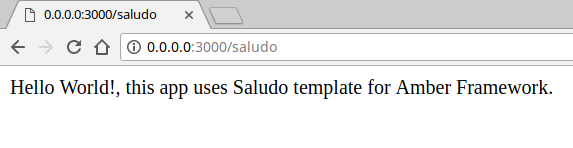
This approach solve this issue in a similar way that #582 is being solved
faustinoaq
on 1 Feb 2018
We can use this ☝️ same approach to create admin templates, auth templates, dashboards and so on.
faustinoaq
on 1 Feb 2018
@faustinoaq I like that idea. Also the generated code could require the shard incase any code needs added or modified from amber core.
 elorest
on 1 Feb 2018
elorest
on 1 Feb 2018
Yes! That's a nice pattern to set. Easy to understand, easy for users to discover what's available in their project, etc.
robacarp
on 1 Feb 2018
Yeah, we just need to add a guide about _"Creating Amber extensions"_ 👍
faustinoaq
on 1 Feb 2018
I this addressed by the recipes PR https://github.com/amberframework/amber/pull/728?
eliasjpr
on 6 Apr 2018
@eliasjpr Yeah, it is :+1:
@damianham Thank you so much! :tada:
I think we should close this after #728 is merged
faustinoaq
on 7 Apr 2018
Related issues
faustinoaq
·
5Comments
 aarongodin
·
7Comments
aarongodin
·
7Comments
 yorci
·
6Comments
yorci
·
6Comments
 conradwt
·
3Comments
conradwt
·
3Comments
 blankoworld
·
7Comments
blankoworld
·
7Comments
Most helpful comment
@robacarp I think this ticket is trying to address two different issues and we should break it up. Do you mind opening a different issue related to the local version of amber per project?
I think we can
shards build amberon post install of the shard in thebindirectory. That way they can have the global amber from the brew install and then a local versionbin/amberwhich should match the shards version.