Altair: Chart doesn't display graph - Rendering issue
Hi,
I have looked at the other similar issues but the solutions there don't appear to work.
I am running Jupyter Lab, it should be running 2.7.3 and I have the setups in the screenshot below.
Are there any ideas what could be causing this?
I did have this working a while ago, but through installing new environments and other changes, I'm not sure what has happened.
I have commented out the render line because i am using jupyter lab and not notebooks.
Please let me know if there is any other details that would help.
Thank you for the help...
Screenshot with details:

 DarricauVert
All 7 comments
Same issue here..
 alteborg
on 9 May 2019
alteborg
on 9 May 2019
If running Altair 3 on JupyterLab, you need JupyterLab version 1.0 or newer. See https://altair-viz.github.io/user_guide/troubleshooting.html for details.
 jakevdp
on 9 May 2019
jakevdp
on 9 May 2019
If running Altair 3 on JupyterLab, you need JupyterLab version 1.0 or newer. See https://altair-viz.github.io/user_guide/troubleshooting.html for details.
I saw that and created a new environment through Conda earlier, but it still faces the same issue.
This is what I am getting, please let me know if this still looks incorrect to you...
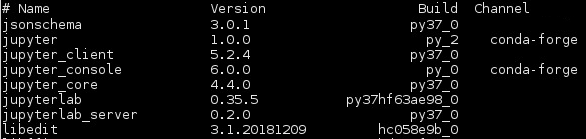
and:

DarricauVert
on 9 May 2019
It seems as though pip install -U jupyterlab still grabs the 0.35.6 release, not 1.0. I had to manually install the latest tagged release from github using pip3 install git+https://github.com/jupyterlab/[email protected].
 welchr
on 9 May 2019
welchr
on 9 May 2019
It seems as though
pip install -U jupyterlabstill grabs the 0.35.6 release, not 1.0. I had to manually install the latest tagged release from github usingpip3 install git+https://github.com/jupyterlab/[email protected].
Hi Welchr,
this worked perfectly! Thank you very much for the help. I really appreciate it.
DarricauVert
on 9 May 2019
Sorry about that... I should update the docs.
You're correct that since JupyterLab 1.0 is still a pre-release, you need a special pip invocation. I'd recommend the following:
python -m pip install -U --pre jupyterlab
Updating docs in #1492; it will be live on the website with the next release.
jakevdp
on 9 May 2019
Related issues
 bmcfee
·
3Comments
bmcfee
·
3Comments
 breadbaron
·
4Comments
breadbaron
·
4Comments
 galloramiro
·
3Comments
galloramiro
·
3Comments
 LukeMathWalker
·
3Comments
LukeMathWalker
·
3Comments
 maxgerma
·
3Comments
maxgerma
·
3Comments
Most helpful comment
Sorry about that... I should update the docs.
You're correct that since JupyterLab 1.0 is still a pre-release, you need a special pip invocation. I'd recommend the following: