Altair: How to keep bars in original order
I am creating a bar chart:
incidents = alt.Chart(off_by_bias).mark_bar().encode(
    x='Bias motivation',
    y='incidents + offenses',
    color='Type'
)
And when I do this, it's sorting x alphabetically. However, I want the bars to retain their original order from the data. Is this possible?
question
 caseyahlan
👍2
All 2 comments
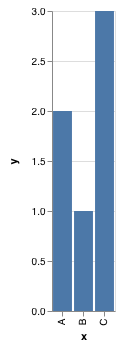
Axes are sorted (either numerically or alphabetically) by default. If you would like them to be ordered differently, you can specify the sort keyword. For example:
import altair as alt
import pandas as pd
data = pd.DataFrame({
'x': ['B', 'A', 'C'],
'y': [1, 2, 3]
})
alt.Chart(data).mark_bar().encode(
x=alt.X('x', sort=['A', 'B', 'C']),
y='y'
)
 jakevdp
on 3 Dec 2018
jakevdp
on 3 Dec 2018
👍4
I believe you can also pass sort=None to use the original (insertion) order (Vega-Lite docs). Here's an example:
data = alt.InlineData([
    {'letter': 'b', 'index': 2},
    {'letter': 'a', 'index': 1},
    {'letter': 'c', 'index': 3},
])

alt.Chart(data).mark_bar().encode(x=alt.X('letter', type='nominal', sort=None), y='index:Q')
 iaindillingham
on 20 Jan 2019
iaindillingham
on 20 Jan 2019
👍4
Was this page helpful?
0 / 5 - 0 ratings
Related issues
 bmcfee
·
3Comments
bmcfee
·
3Comments
 floringogianu
·
3Comments
floringogianu
·
3Comments
 nielsmde
·
4Comments
nielsmde
·
4Comments
 LukeMathWalker
·
3Comments
LukeMathWalker
·
3Comments
 Juan-132
·
3Comments
Juan-132
·
3Comments
Most helpful comment
I believe you can also pass
sort=Noneto use the original (insertion) order (Vega-Lite docs). Here's an example: