Is your feature request related to a problem? Please describe.
For authenticated graphql queries, it's frustrating to have to periodically get a new authorization token from the server (cookie-less) to make those authenticated requests.
Describe the solution you'd like
Something like postman's prerequest scripts would be awesome. This is a general JS code block that runs before each request. It can then, optionally, set variables programmatically. This is handy for "logging" a user in and setting the Authorization header before making the graphql request.
Describe alternatives you've considered
None considered, really, but open to suggestions!
Additional context
If this is a feature you'd be amenable to, I'd be happy to take a stab and see how far I can get. Thanks!
 mike-engel
All 23 comments
@mike-engel Sure. It sounds like it has a viable use case. I'm not really keen on having script blocks that would be entered by the users and executed (poses a major security issue, plus the CSP we use wouldn't even allow it) but we could have the functionality that you would normally written in the pre script to be included in altair. Let me know what you think.
 imolorhe
on 8 Jun 2018
imolorhe
on 8 Jun 2018
@imolorhe Thanks for the quick response! Unfortunately I don't see a way to implement this without a custom script. If I understood your question wrong, please let me know. Postman gets around this a little bit by providing a custom API, but that won't cover all cases. Authorization is implemented in so many ways it'd be hard to abstract it enough to be useful I think.
As an example, here's what our pre-request script looks like for authenticated queries in our postman collection:
pm.sendRequest({
url: pm.environment.get("PROTOCOL") + "://" + pm.environment.get("HOST") + "/auth",
method: "GET",
header: {
"authorization": pm.environment.get("BASIC_ADMIN_AUTH")
}
}, function (err, res) {
if (err) console.error(err);
pm.environment.set("TOKEN", res.json().token);
});
I'm super open to suggestions and ideas though!
mike-engel
on 8 Jun 2018
I thought that could be the case too. I think this would still need some thought though. For one, I'm not very comfortable with having user-defined scripts. Secondly, I doubt the CSP altair uses would allow executing code using eval(), and the CSP is enforced by Mozilla and the likes for a justifiable reason.
I'm also open to suggestions and possible workarounds for this scenarios too! 😊
imolorhe
on 11 Jun 2018
@imolorhe Would you be able to point me to the CSP for altair? There doesn't seem to be on on the web app version, but I may be missing something.
As for the other issue, a couple thoughts. We could provide an isolated API somehow that restricts what the user can do (make a request, grab a property off the return, set that to a variable, etc.). Another option would be to see how sites like codepen work since they allow any type of arbitrary user-generated scripts to be run.
mike-engel
on 12 Jun 2018
@mike-engel The CSP is used by the extension. https://github.com/imolorhe/altair/blob/5356ff5860a44bed7cd9d32c3167be3ad3ad4b6f/chrome-ext-files/manifest.json#L20
Side question: You prefer the web app to the extension? Why?
imolorhe
on 12 Jun 2018
@imolorhe Ah ok. It looks like that might only be used by the extension, and not the other versions.
As for the other thing, I've never been a fan of extensions for tools like this (basically web apps). I much prefer to the the web app if available, or download the client for my OS. In my team's specific case, we have to download the client because of mixed protocol issues during development (can't mix http and https).
I think it would be worth seeing how postman/runkit/ramda repl allow users to run arbitrary code and potentially emulating that.
mike-engel
on 13 Jun 2018
@mike-engel They wouldn't use CSPs, and if they do, it wouldn't be strict.
imolorhe
on 13 Jun 2018
@mike-engel Any other ideas/suggestions on this?
imolorhe
on 22 Jun 2018
@imolorhe Only thing I can think of at this point is to allow arbitrary scripts on all platforms that aren't the extension. From what I've seen, they don't have any CSP rules, so there wouldn't be any limitation. For extentions, the ability to write pre-request scripts would have to be disabled
mike-engel
on 22 Jun 2018
This issue has been automatically marked as stale because it has not had recent activity. It will be closed if no further activity occurs. Thank you for your contributions.
![stale[bot] picture](https://avatars3.githubusercontent.com/in/1724?v=4&s=40) stale[bot]
on 21 Aug 2018
stale[bot]
on 21 Aug 2018
Would like to explore possible CSP-compliant alternatives to enabling this feature. Initial set of functions would be:
altair.helpers.getEnvironment(key)
altair.helpers.setEnvironment(key, val)
altair.helpers.getCookie(key)
imolorhe
on 6 Jun 2019
@imolorhe I would like to write a pre-request script which authenticates with a /auth endpoint first and passing that to the GraphQL request as a header later. Sadly there is basically no documentation about this pre-request script functionality, so I couldn't figure out how to do it or if it is even possible at all.
 levrik
on 7 Aug 2019
levrik
on 7 Aug 2019
Hey @levrik
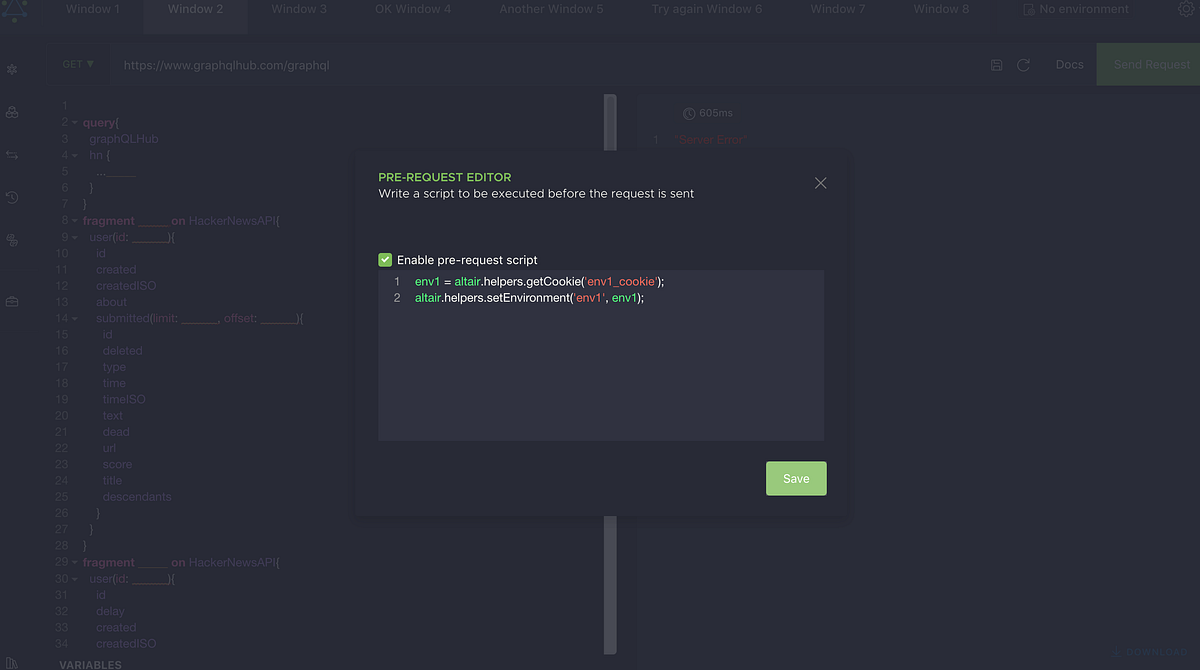
Sorry for not providing enough documentation for the feature at the moment. Currently there's just this article with an explanation of what is available: https://sirmuel.design/pre-requests-now-available-in-altair-graphql-client-c3b28892059c
For your use case, there is currently no functionality for making API requests (there wasn't enough motivation to go past the initial set of functionality until now), which was meant to be an implementation for the next phase of the pre request script implementation.
Medium
As part of the latest update of Altair (v2.2.0) comes a powerful new feature, the pre request functionality.
 imolorhe
on 7 Aug 2019
imolorhe
on 7 Aug 2019
I've reopened this issue again for a short time to discuss any other potential functions required in the pre request script.
Next release would contain altair.helpers.request() for making HTTP requests. What other functions would be beneficial in pre request scripts?
Note: altair.helpers.getEnvironment(key), altair.helpers.setEnvironment(key, val) and altair.helpers.getCookie(key) were already available for a while.
imolorhe
on 8 Aug 2019
Postman also has a Sandbox of JS Libraries, that we can use in Pre Request scripts (Or Tests), for example: CryptoJS.
This is very useful to include common libraries that allow basic functionality, for example, we need to apply some encryption to our token, before setting an Authentication Header.
 hfmm99
on 26 Aug 2019
hfmm99
on 26 Aug 2019
@hfmm99 I'd consider adding that in the electron version of the app. I wouldn't want to add those extra libraries in the chrome extensions (at least not yet).
imolorhe
on 1 Sep 2019
@imolorhe, I've tried using this feature today, doing a basic authorize before request script. All was awesome until I realized the script does not get triggered on refreshing the docs. Is it possible to also have the doc refresh feature to use prerequest script feature?
 qonn
on 12 Sep 2019
qonn
on 12 Sep 2019
Thanks for the feedback! Sounds reasonable enough to include this in docs requests as well. 👍🏾
imolorhe
on 12 Sep 2019
I am trying to use the pre-requests script feature to get an open-id connect access token via a POST request prior to doing the actual graphql request.
Seems I am stuck (probably due to not enought javascript know how) because I need to send a certain set of HTTP headers with the POST request and for that I should create a https://angular.io/api/common/http/HttpHeaders object that I then can pass into the request call....
I am getting the error message: "HttpHeaders is not defined" in the pre-req script while trying to do that - probably because it is not being imported? Is there a workaround or a potential fix for that?
Thx!
Angular is a platform for building mobile and desktop web applications. Join the community of millions of developers who build compelling user interfaces with Angular.
 nanosek
on 7 Nov 2019
nanosek
on 7 Nov 2019
@nanosek If you look at the angular docs (Overload 2), you can pass the header also as a key-value object, not only as a HttpHeader object
request(method: string, url: string, options: { body?: any; headers?: HttpHeaders | { [header: string]: string | string[]; }; observe?: "body"; params?: HttpParams | { [param: string]: string | string[]; }; reportProgress?: boolean; responseType: "arraybuffer"; withCredentials?: boolean; })
So you could have something like:
request('POST', 'https://www.google.com', {
headers: {
'header-key': 'header-value',
}
});
@imolorhe thank you! It took me some time to come back to that - but now it works like a charm:
Maybe it helps others that use this together with an open-id-connect server like keycloak to get their access tokens (this can for sure be fine-tuned to store the token for some time and only refresh it if necessary, but for now it does the job):
const client_id = 'your_open_id_connect_client_id'
const user_name = 'username_inside_keycloak'
const user_password = 'your secret password for username'

bodyString = 'grant_type=password&client_id='+client_id+'&username='+user_name+'&password='+user_password

const res2 = await altair.helpers.request('POST', 'https://[your keycloak tenants url]/protocol/openid-connect/token',{
  'body': bodyString,
  headers: {
    'Content-Type': 'application/x-www-form-urlencoded'
  }
});

const access_token=res2['access_token']
altair.helpers.setEnvironment('access_token', access_token);
That's awesome! If you can refine it better perhaps you can add it to the docs as an example usage with open ID?
imolorhe
on 15 Nov 2019
This issue has been automatically marked as stale because it has not had recent activity. It will be closed if no further activity occurs. Thank you for your contributions.
stale[bot]
on 14 Jan 2020
Related issues
 benhutton
·
10Comments
imolorhe
·
3Comments
benhutton
·
10Comments
imolorhe
·
3Comments
 Vinlock
·
8Comments
Vinlock
·
8Comments
 rshea0
·
11Comments
rshea0
·
11Comments
 sneko
·
10Comments
sneko
·
10Comments
Most helpful comment
@imolorhe thank you! It took me some time to come back to that - but now it works like a charm:
Maybe it helps others that use this together with an open-id-connect server like keycloak to get their access tokens (this can for sure be fine-tuned to store the token for some time and only refresh it if necessary, but for now it does the job):