Altair: Autocomplete popup displays incorrectly
Describe the bug
The autocomplete popup appears to be squished weirdly.
To Reproduce
Steps to reproduce the behavior:
- Press ctrl+space to open the autocomplete popup
Expected behavior
The autocomplete popup should display properly.
Screenshots
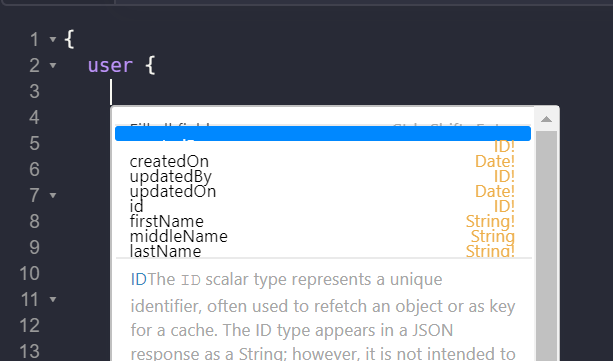
Desktop (please complete the following information):
- OS: Windows 10
Additional context
I'm using a high DPI display at 150% scaling, which I assume is causing the issue. The web version of the app displays fine.
 rshea0
All 11 comments
👋🏾Thanks for opening your first issue here! Be sure to follow the issue template! ✌🏾
![welcome[bot] picture](https://avatars0.githubusercontent.com/in/4141?v=4&s=40) welcome[bot]
on 23 May 2019
welcome[bot]
on 23 May 2019
Hey @PachowStudios, I'm not even sure I know the steps to reproduce this issue 😄 Would you know of an equivalent way of reproducing this issue on the web for example, assuming that could be universal (I use a Macbook).
 imolorhe
on 23 May 2019
imolorhe
on 23 May 2019
@imolorhe I'm only able to reproduce it using the desktop version on Windows. I don't have a Mac so I'm not sure if it happens there too. I assume it has to do with how Electron handles DPI scaling.
rshea0
on 24 May 2019
I am able to reproduce it in Mac where there is a fresh installation of the client. There is no trivial steps to see what @PachowStudios has shown.
 tangentlin
on 24 May 2019
tangentlin
on 24 May 2019
@tangentlin What settings do you have that could make it reproducible?
imolorhe
on 24 May 2019
{
  "theme": "light",
  "language": "en-US",
  "addQueryDepthLimit": 3,
  "tabSize": 4,
  "theme.fontsize": 24
}
My environment:
- Macbook Pro with Retina Display
tangentlin
on 24 May 2019
I think I can find an easy way to reproduce this by using UI against Github's GraphQL API
- Go to your Github setting and generate an access token with all privilege, copy the token
- Go to Altairi, start a new tab, add a new header with name
Authorization, and value asbearer <paste_token_here> - Set the URL as https://api.github.com/graphql
- Refresh Docs, explore the docs to ensure it is working
- Type in the GraphQL as below
{
  user(login: "anyname") {
    # Try auto complete here, because there are so many fields, you can see the UI squished the menu items
  }
}
Possible cause, perhaps by adding min-height to each menu item the problem would go away.
tangentlin
on 24 May 2019
I still can't reproduce it. What happens when you move through the autocomplete options? I need to get a sense of how to possibly fix it.
imolorhe
on 26 May 2019
I tried 2.1.5 on my other computer, which is a Macbook Pro with Retina Display, it was displaying fine, but as soon as I have updated to 2.1.8 the symptoms come back. The problem seems to happen with GraphQL object that has a lot of fields.
tangentlin
on 26 May 2019
Issue fix is in pull request #785
tangentlin
on 27 May 2019
Looks like that fix did the trick! Working fine on v2.2.0. Thanks guys!
rshea0
on 18 Jun 2019
Related issues
imolorhe
·
4Comments
 balthild
·
5Comments
balthild
·
5Comments
 benhutton
·
10Comments
benhutton
·
10Comments
 mike-sosa-sofarocean
·
8Comments
mike-sosa-sofarocean
·
8Comments
 someden
·
9Comments
someden
·
9Comments
Most helpful comment
Issue fix is in pull request #785