Alt-tab-macos: Incorrect window order for Google Chrome
Describe the bug
Command+Tab quick combination order is wrong when when I have Google Chrome. It won't change order when I select Chrome in the list.
Screenshots / video
Steps to reproduce the bug
- Open Google Chrome
- Open any other app.
- Try to switch with Command+Tab
Versions
- MacOS 10.15.7
- Alt-Tab 6.7.3
- Chrome 86.0.4240.75 (Latest stable)
 SamadiPour
All 10 comments
Hi @SamadiPour! Thank you for sharing this issue, with a nice video to showcase it!
I can't reproduce it on my machine. Chrome is ordered correctly like any other app.
Did you launch AltTab before or after Chrome? If you restart AltTab, does this still happen? What if you restart Chrome? What if you log out and back in your session? I'm wondering if this was a fluke or if it's a consistent issue you're experiencing.
 lwouis
on 12 Oct 2020
lwouis
on 12 Oct 2020
I think I found out how to reproduce it.
I tried restarting AltTab but no difference, then I Quit Google Chrome and opened it again and problem fixed.
I believe it happens with Google Chrome startup. I removed it from auto startup and everything was fine after that. Then I put it back to startup and bug happened again.
SamadiPour
on 12 Oct 2020
@SamadiPour so you are saying that the issue happens only when the app (Chrome here) is listed in System Preferences > Users & Groups > Login Items?
We have a similar ticket: #390
I remember when working on this other ticket, observing that at login, apps behave in a very buggy way. macOS sends buggy events like it will send multiple duplicate window for a given app, or it will say that a window is in an incorrect state so AltTab ignores it.
As you can imagine, it's a real pain to investigate these kind of issues as I have to logout and log back in my session dozens of time and hope that I witness some issues, and put logs in the app to try and guess what the hell macOS is doing. No way to debug the app with a debugger for instance since it happens at login before I can launch a debugger.
Can you confirm that this is indeed the scenario that's creating the issue for you?
lwouis
on 13 Oct 2020
So I did some more testing. here are the results:
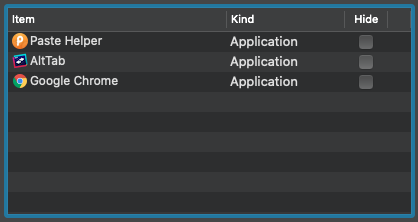
- If the hide option is checked, then this bug happens every time. The fix for me is to quit Google Chrome.
- If I uncheck hide option, There is no problem.
- If I remove it from Login Items, There is no problem.
SamadiPour
on 13 Oct 2020
I observed the same thing last time I worked on #390: checking the Hide checkbox creates all sorts of problem.
I'll investigate further and see what can be done to workaround this (macOS bug?).
Thank you very much for taking the time to test and narrow it down to this root cause!
lwouis
on 14 Oct 2020
Login items are actually started concurrently. I thought the order mattered since the API lets you chose where to insert in the list, but apparently it doesn't.
This means that sometimes AltTab will be running before other apps, sometimes it will be started after. In the second case, AltTab may have issues since it can only work in "best effort" for things started before it was itself started.
I also tried to logout+login with the "Restore windows when you log back in" macOS option. I then get Chrome with existing windows from the get go. Yet focusing them with AltTab properly updates their order in the list.
lwouis
on 14 Oct 2020
Hey @SamadiPour! I spent some time investigating the issue, and recorded a video response. Could you please have a look at it?
I'm especially curious about the steps before your gif. That is, from the very beginning after your login, up to the point where you have Chrome with 1 window, as I show in the video
lwouis
on 14 Oct 2020
Just chiming in here to recommend Delay Start. This might be a helpful workaround for folks if the Mac startup login items is causing issues.
https://apps.apple.com/us/app/delay-start/id591620786?mt=12
For me, I have apps that depend on my network storage being mounted (via another app), and thus I use this to delay it. I might consider moving more of my startup items into their (not AltTab however), judging by the inconsistency with the official OS X implementation.
 nathang21
on 14 Oct 2020
nathang21
on 14 Oct 2020
@lwouis wow that was a nice video and good explanation. Here are my versions:
- MacOS 10.15.7
- Alt-Tab 6.7.3
- Chrome 86.0.4240.75 (Latest stable)
The only thing different is that I tested it on my Hackintosh, but I don't think that's the problem. I'm not sure tho.
Let me do some more testing and I will get back to you. (probably with a nice video like yours😁)
SamadiPour
on 14 Oct 2020
Thanks for sharing the workaround @nathang21! Unfortunately, this is power user thinking. I would like the AltTab experience to be smooth for everyone of all skill level. Most people have a few Login Items, and would be sad that they experience issues such as this ticket or #390. I fixed parts of it already, see these 2 "fun" workarounds I implemented for example, after working on some other tickets: 1 and 2. It may be possible to workaround the last remaining login item issues, and get a good UX for everyone. Hopefully.
lwouis
on 14 Oct 2020
Related issues
 gingerbeardman
·
5Comments
gingerbeardman
·
5Comments
 max-sixty
·
4Comments
max-sixty
·
4Comments
 DaVince
·
3Comments
DaVince
·
3Comments
 gingerr
·
6Comments
gingerr
·
6Comments
 rway7
·
5Comments
rway7
·
5Comments