_This issue was opened by a bot after a user submitted feedback through the in-app form._
__From:__ [email protected]
__Message:__
Hello,
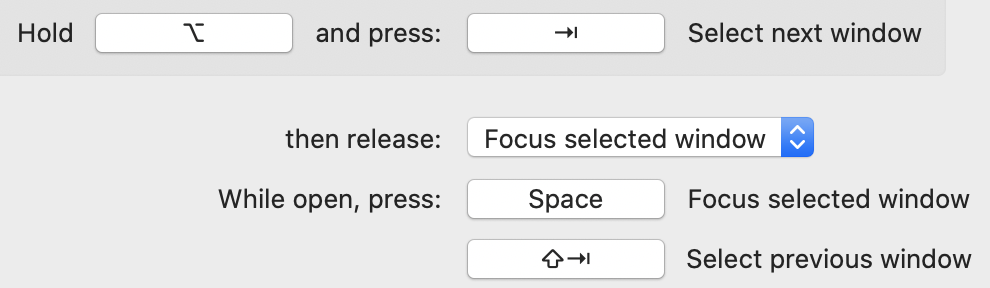
I really like this app - however could you make it an option to not have Shift automatically move one window backwards before you activate Tab again ?
Debug profile
* App version: 6.0.0 * App preferences: * MSAppCenter310AppCenterUserDefaultsMigratedKey: 1 * MSAppCenter310CrashesUserDefaultsMigratedKey: 1 * MSAppCenterInstallId: 1559ABC7-1592-44E4-86A7-9498529AA801 * MSAppCenterPastDevices: {length = 1127, bytes = 0x62706c69 73743030 d4010203 04050607 ... 00000000 00000375 } * MSAppCenterSessionIdHistory: {length = 452, bytes = 0x62706c69 73743030 d4010203 04050607 ... 00000000 0000014e } * MSAppCenterUserIdHistory: {length = 447, bytes = 0x62706c69 73743030 d4010203 04050607 ... 00000000 00000149 } * SUAutomaticallyUpdate: 1 * SUEnableAutomaticChecks: 1 * SUHasLaunchedBefore: 1 * SULastCheckTime: 2020-08-30 20:02:43 +0000 * crashPolicy: 2 * fadeOutAnimation: false * holdShortcut: ⌘ * iconSize: 26 * menubarIcon: 0 * preferencesVersion: 6.0.0 * showFullscreenWindows: false * showHiddenWindows: false * showMinimizedWindows: false * theme: 0 * updatePolicy: 2 * windowDisplayDelay: 101 * Applications: 66 * Windows: 3 * {isFullscreen: false, isMinimized: false, isHidden: false, isTabbed: false, isOnAllSpaces: false, spaceId: 1, spaceIndex: 1} * {isFullscreen: false, isMinimized: false, isHidden: false, isTabbed: false, isOnAllSpaces: false, spaceId: 1, spaceIndex: 1} * {isFullscreen: false, isMinimized: false, isHidden: false, isTabbed: false, isOnAllSpaces: false, spaceId: 1, spaceIndex: 1} * OS version: Version 10.15.6 (Build 19G2021) * OS architecture: x86_64 * Locale: en_DK (current) * Spaces: 1 * Dark mode: Dark * "Displays have separate Spaces": checked * Hardware model: MacBookPro16,1 * Screens: 1 * {x: 0.0, y: 0.0, width: 1792.0, height: 1120.0} * CPU model: Intel(R) Core(TM) i7-9750H CPU @ 2.60GHz * Memory size: 34,36 GB * Active CPU count: 12 * Current CPU frequency: 2.6 Ghz * Resource utilization: * CPU: 0.2% * Memory: 89M * Threads count: 9
 alt-tab-macos-bot
All 2 comments
Hi! Thanks for sharing this feedback!
I'm not sure I understood what you wrote clearly. I think you're saying that you would like to go backwards by pressing alt+shift+tab, but today as soon as you press shift (while still holding tab), it cycles backwards already. Assuming I understood you correctly, it's easy to fix. Simply customize your shortcut as such:
 lwouis
on 2 Sep 2020
lwouis
on 2 Sep 2020
Amazing ! exactly what I needed - It wasn't that obvious to me, thanks for the thorough explanation :)
 stefanskotte
on 2 Sep 2020
stefanskotte
on 2 Sep 2020
Related issues
 gingerr
·
4Comments
gingerr
·
4Comments
 DaVince
·
5Comments
gingerr
·
6Comments
DaVince
·
5Comments
gingerr
·
6Comments
 valentinocossar
·
3Comments
valentinocossar
·
3Comments
 buttercrab
·
4Comments
buttercrab
·
4Comments
Most helpful comment
Amazing ! exactly what I needed - It wasn't that obvious to me, thanks for the thorough explanation :)