Alt-tab-macos: List window-less apps
Is your feature suggestion related to a problem? Please describe.
Sometimes i open sublime text, or preview, and use CMD+W to close the image or tab, but then I forget to shut it down. That means that I'm wasting ram or processing power on something that i'm not even using.
Describe the solution you'd like
Copy Mac-OS' approach to just putting every app there, regardless of whether there is a window open.
Describe alternatives you've considered
I've tried switching back to regular Mac-OS CMD+Tab, but it just isn't as convenient as alt-tab. I'd love for this feature to be implemented.
 SoPat712
All 91 comments
Hi @SoPat712! Thanks for sharing this idea!
It would be a new preference
This is an interesting idea. It reminds me a bit of #354. It would have to be a preference for sure, as some users will want to keep some apps open, but don't want them to pollute the window list with an "app window". For example users of heavy apps like Photoshop, AfterEffects, AutoCAD, may keep the app open to avoid the long load time when they need to load something in the app.
UI/UX concerns
How the UI would look like? Maybe a small rectangle, with the app icon maximized, in place of the thumbnail; and the title would be the app name instead of the window title?
Another concern is the UX. Focusing this "app rectangle" and releasing the shortcut would put the focus on the app, or do nothing? The built-in app switcher just focuses the app, but interestingly, if you instead click on the Dock icon of a window-less app, it usually focuses it and opens a new window for it. Which one should we do here?
What about window-specific shortcuts such as alt+w to close or alt+m to minimize. They would silently do nothing?
I'm worried the user could get confused by the UI, and not necessarily understand that this rectangle represent a window-less app. They may think there is a problem with AltTab since it shows a window without a thumbnail, and focusing it doesn't show the window.
 lwouis
on 7 Jul 2020
lwouis
on 7 Jul 2020
Hi @lwouis , you are correct about the fact that it would need to be a preference. I think the smartest way to display it would be to have one box with the app icons. I'll draw something up tomorrow.
SoPat712
on 7 Jul 2020

this is something i just drew up. It should stay out of our way, but should remind us that they’re still there. Menubar apps, or other already out of the way apps shouldn’t be shown there though.
SoPat712
on 7 Jul 2020
Another concern is the UX. Focusing this "app rectangle" and releasing the shortcut would put the focus on the app, or do nothing? The built-in app switcher just focuses the app, but interestingly, if you instead click on the Dock icon of a window-less app, it usually focuses it _and_ opens a new window for it. Which one should we do here?
What about window-specific shortcuts such as
alt+wto close oralt+mto minimize. They would silently do nothing?
You mentioned the actions taken when the app is selected. There would in a perfect world be a preference setting in which the user could choose to never focus these apps. These apps should only either be left open, or be quit with alt+q. I feel like that is the most intuitive in this scenario, as having smaller icons clearly differentiates the app from the others
SoPat712
on 7 Jul 2020
I consider this to be a deal-breaker for Alt-Tab unfortunately, especially in the case of Finder. Finder is always running, but I have often closed all of its windows. Since it's missing from Alt-Tab, I can't even activate it and then press Command-N. Apple's failure to restore minimized windows is tedious, but with Alt-Tab I can't even access some applications with the keyboard.
To address this, Alt-Tab needs to offer the display of windowless apps and the option to issue a Command-N ("new window") to them when selected. That would be another big functional bonus, which is almost as important as restoring minimized apps.
As far as the UI of the application list is concerned, why not just show the application's icon?
 Stokestack
on 20 Jul 2020
Stokestack
on 20 Jul 2020
Yeah the way it works though is that once the app is switched, all of the
apps commands automatically work. The window less apps part I agree with,
but the cmd plus n is no work on their part.
On Sun, Jul 19, 2020, 9:46 PM G notifications@github.com wrote:
I consider this to be a deal-breaker for Alt-Tab unfortunately, especially
in the case of Finder. Finder is always running, but I have often closed
all of its windows. Since it's missing from Alt-Tab, I can't even activate
it and then press Command-N.To address this, Alt-Tab needs to offer the display of windowless apps AND
the option to issue a Command-N to them when selected.—
You are receiving this because you were mentioned.
Reply to this email directly, view it on GitHub
https://github.com/lwouis/alt-tab-macos/issues/397#issuecomment-660753538,
or unsubscribe
https://github.com/notifications/unsubscribe-auth/AHHRZKTWQVWJHVA7AF6MUO3R4OOWTANCNFSM4OSCJ4PA
.
SoPat712
on 20 Jul 2020
Hi SoPat,
Not sure I understand your remark. Do you mean that once the application is selected, Alt-Tab has no way to communicate with it and issue a "new window" command?
Stokestack
on 20 Jul 2020
Alt tab won't need to. Once the app is switched, then you can just
communicate with it via keyboard shortcuts of the app e.g it will show up
on your menu bar to fully control.
On Sun, Jul 19, 2020, 10:27 PM G notifications@github.com wrote:
Hi SoPat,
Not sure I understand your remark. Do you mean that once the application
is selected, Alt-Tab has no way to communicate with it and issue a "new
window" command?—
You are receiving this because you were mentioned.
Reply to this email directly, view it on GitHub
https://github.com/lwouis/alt-tab-macos/issues/397#issuecomment-660764693,
or unsubscribe
https://github.com/notifications/unsubscribe-auth/AHHRZKRJFTC7D5OE5DIMVPLR4OTP7ANCNFSM4OSCJ4PA
.
SoPat712
on 20 Jul 2020
I understand that, but it would be nice to have Alt-Tab eliminate the extra step of creating a window, the same way it automatically restores minimized apps.
Stokestack
on 20 Jul 2020
This ticket is overlapping with #354. To recap what I understand from both discussions:
Some users would like to have AltTab open new windows on apps that are currently running, but have no window. Finder is a special case as it is always running and shouldn't be quit, but the case could be made for any app which has no windows open.
UI would be to show the app icon instead of the window thumbnail, in a rectangle similar to the windows rectangle. If the user select that rectangle, they can't do window-specific shortcuts (minimize window, close window, etc). However, they can do app-specific shortcuts (quit app, hide app, etc).
Moreover, if the user focuses the rectangle, it would either focus the app, then the user would hit cmd+n or use the mouse to open a new window. That's what the built-in app switcher does. Alternatively, focusing the rectangle could directly focus the app and open a new window. I'm not sure that second behavior can work universally. It may not be technically possible to do that for some apps. Maybe some apps don't have "New window" shortcut. Also there is no API to open a new window because that's specific to the business each app is doing. The only thing that AltTab could do maybe, is send the cmd+n shortcut to the the app after focusing it. In some apps it may not open a new window, if they have set another action to that shortcut.
Another issue with this idea is that "running app without an open window" is a non-trivial designation. That clearly should include apps visible in the Dock, but should it also include apps that only have a menubar presence? What about apps that don't show anywhere, like AltTab itself if you check the box in the preferences?
To give you an idea, on the average system, AltTab is following around 50 apps, in case they generate windows. This covers very visible apps like Skype in the Dock, but also menubar apps, and even system daemons like imagine when you get a phone call on your mac. Some Apple daemon is routing that call to your computer, and popping up a window. Should we display that app as an app without open windows? Do you see the problem with there being around 50 of those? We could only show Dock-visible apps in the listing, but that may be strange if you rely on a menubar-visible app, and don't see it in the list.
lwouis
on 20 Jul 2020
@lwouis I understand the issue with AltTab following so many apps, but menu-bar apps are strictly designed to not create extra windows. I think the solution that both of us would like is to be able to pin apps to the 4 areas depicted below.

I for example would probably pin pathfinder, clipto, and some other usually windowless but always running apps, as I use them all very often.
The point isn't to supplement functionality not given by you, this enhancement is just extra features that reduces our reliance on the dock provided by Mac, and allows us to keep our hands on our keyboard.
I think an easy way to fix this would just be to let users pin their own applications to the quadrants above. I also do understand it's a lot of work, so please do inform me if this is an unrealistic goal.
@StokeStack
I understand that, but it would be nice to have Alt-Tab eliminate the extra step of creating a window, the same way it automatically restores minimized apps.
This functionality is already in alt-tab. If i'm not mistaken, it just takes certain commands, and forwards them over to the app as soon as the app switch is triggered.
SoPat712
on 20 Jul 2020
Thanks for that thorough summary, lwouis.
Actually, I don't really want to pin anything anywhere; so I'll leave that up to you guys (although I prefer not to be forced to use pinning). To solve the problem of "too many apps" or daemons, I think we should use whatever criteria Apple uses for its Command-Tab display. I realize that Alt-Tab provides the additional display of separate windows; but the filtering of applications themselves should match Apple's, which seems to work fine.
My entire motivation for installing Alt-Tab was Apple's refusal to restore minimized windows with Command-Tab; I see the option of creating a new window for a currently-windowless app as a very similar function: Make the app usable right away if you Alt-Tab to it.
Stokestack
on 20 Jul 2020
Apple has millions of dollars in developing budget. This is an individual project made on someones spare time. The easiest method(pinning apps) is not the most convenient, I agree, but Apple has significantly higher budget, and more reason to make their software the best as they possibly can. Personally, I have no problem with pinning, and it seems like the best solution for most people.
SoPat712
on 20 Jul 2020
Am I missing something? I'm using Alt-Tab right now and don't see any "pinning," so I'm fine with that. I'm not asking for additional UI work in that regard. If there's pinning available right now, and I'm not forced to use it, all good. Maybe I'll try it and like it later.
Stokestack
on 20 Jul 2020
I understand the issue with AltTab following so many apps, but menu-bar apps are strictly designed to not create extra windows.
This is incorrect. AltTab itself is an example of a menubar app that can spawn windows: the preference window, the feedback window, the permissions window. These properly show in AltTab UI. More information here (scratches the surface, but gives an idea).
pinning
Pinning goes into the territory of launchers. You already have a billion apps doing this, including macOS own Launchpad (which is the one i use because of its speed), and Spotlight.
I don't think I want to go into launcher territory. It's just a huge space with already great offer. However, focusing already running apps could be argued to be a different thing, as if Finder is already running for example, a launcher won't help focus it. This highlights a gap in AltTab, which I find interesting to fill.
I will investigate showing Dock-visible apps in the launcher as another window, but with the app icon instead of the window screenshot.
lwouis
on 20 Jul 2020
@lwouis thanks for Alt-Tab! I started using it today and find it very useful.
It would be very nice to be able to switch to apps without windows. I think the best starting point would be to emulate the native Cmd-Tab: i.e. include only Dock-visible apps in the switcher. This is the only thing I miss from my normal workflow.
 zzamboni
on 21 Jul 2020
zzamboni
on 21 Jul 2020
Hey everyone! I've been working on this ticket, and made good progress. Now I'm looking for opinions about some behaviors and UI considerations.
Here is a showcase of the current state of the feature in action.
Please share your thoughts 🙏
lwouis
on 27 Aug 2020
Firstly, I love the feature where it creates a new window. There are plenty of times where I'm utilizing an iTerm window and close the window, but don't quit the app. The feature where it creates a new window when I select that in Alt-Tab is honestly genius, and I can't believe that Apple hasn't already implemented that feature.
I have some questions though. Will this only work for certain predefined apps that you would have to set? I saw you do it in /Applications/Utilities/Terminal.app, but I use /Applications/iTerm.app, which is another terminal application, as you probably know. Basically, my question is, would this feature also work for external terminals, or would it just be preset apps. Would this also happen in Firefox, for example I close the window, but don't want to quit Firefox, and thus leave it open. If I select Firefox, would it know to create a new window?
Secondly, Could you possibly expand the app icon in the final version to fit the whole box. The transparent background looks awkward and out of place, and the UI design is something that I think needs to change before releasing the version.
Lets discuss the subject of where the window should be placed. Personally, I'm a firm believer that all new windows should be placed directly in the center of the main monitor. I use BetterSnapTool to resize Windows, and while it doesn't matter all that much for me, I still feel that it would be more convenient to just center the app window, instead of creating them in the place of the last terminal window I closed. While closing terminal windows, I don't close them in a specific order, and that would just be unnecessary in my opinion to place them in the essentially randomly selected final window closed location.
The quitting feature you got right. You should be able to quit all apps, and you should only be able to close, hide, and minimize open apps.
The kill finder feature was done through activity monitor, and it was never a "kill" option. I think that finder essentially always runs in the background, just like the dock process on MacOS, because those apps both manage more than their name suggests.
For closed apps, but not quit apps, like terminal and finder at 8:20 in the video, I think the apps should just be ordered from oldest closed to latest closed, so exactly the way you have it now. I just don't think the semi-transparent background looks very good, and I'm not sure how to make it look better. The circle with the cross through it is already the symbol used for hidden apps, and symbol like this might look a bit better

These are just suggestions, and I don't know how it would really look in the correct position, but in the end, it is really up to you how you choose to navigate these issues.
However, I really did enjoy this design I drew up about a month and a half ago.
I thought that it pretty well showed how the apps were just going to be launched, and not just focused, and the upside is that there is no icon needed to fill up blank space
SoPat712
on 27 Aug 2020
Thanks for taking the time to make that video, @lwouis !
I like everything you've proposed, and I think using the big application icon for apps that currently lack a window is a good idea. In fact, I prefer just having a giant icon (like Apple's normal Command-Tab display) instead of the application thumbnail for all running apps, but I realize that this doesn't let you distinguish between multiple windows of the same app.
An X or a slash to me means "forbidden" or "disabled," and thus I think it would be perplexing to the user if you used it for windowless apps.
I also agree with putting windowless applications at the end. Usually if I've closed an application's window, I'm not expecting to bounce back and forth between it and the app I was using before it. In fact, it would be pretty annoying to accidentally create a new window and have to close it simply because I thought I was going to toggle between the next two running apps.
Stokestack
on 27 Aug 2020
Will this only work for certain predefined apps
No it's universal. Any app, visible in the Dock, running, without open windows, will show in AltTab. Terminal and Finders were just examples.
it would be pretty annoying to accidentally create a new window and have to close it simply because I thought I was going to toggle between the next two running apps.
This is a great argument! I realize now that it will be the mindset for most users.
Regarding the UI, keep in mind that whatever solution is picked needs to scale up and down. People can customize AltTab to have huge thumbnails, if they have 4k monitors for example.
Thus using the app icon has limitations. Some apps will not have big icons that look good scaled-up. It may also be a bit unclear what focusing the icon does.
I'm trying to use SF Symbols as much as possible, as it's free vector assets. macOS doesn't support SVG, but it support fonts, so font-icons are a great way to have infinitely scalable visuals in a macOS app. I found this icon that I think could be a good visual:

lwouis
on 27 Aug 2020
Yeah, that one seems totally appropriate.
Stokestack
on 28 Aug 2020
I agree, the icon looks pretty appropriate for the task at hand.
SoPat712
on 28 Aug 2020
I may be going against the grain here, but I actually liked the look of what you had in the video with no thumbnail and just the empty space. To me at least, that combined with placing windowless apps consistently at the end of the list tells me everything I need to know - I feel that putting an icon in the space might look incongruous set against the other window thumbnails.
Definitely like the idea of creating a new window when selecting a windowless app, although I'm not sure I'd want it to be placed anywhere specific - other than on the same space as it was previously. Beyond that, this starts getting into window management territory and I already use Yabai for that. Introducing that extra bit of functionality may end up creating unforeseen conflicts.
Other than that, agree that this should just be aimed at apps with a dock icon, and the quit shortcut is all that's needed. As to having the other shortcuts fail silently, this doesn't seem an issue as closing a non-existent window or hiding a windowless app doesn't make any difference to usability really - although it does raise an interesting related request. Would it be possible to place hidden apps at the end of the list (but before the windowless apps) instead of retaining their current chronological position? This ties in with what @Stokestack says about switching back and forth with windowless apps. I know it's not emulating the MacOS default behaviour, but it'd be tons more useful as logically if I'm hiding an app I'd expect it to not then be the thing I immediately want to switch to next.
 frypf
on 31 Aug 2020
frypf
on 31 Aug 2020
Would it be possible to place hidden apps at the end of the list (but before the windowless apps)
Seems logical to me.
As far as the icon goes, I already find that the efficiency of Alt-Tab is reduced by having to peer carefully at the tiny icons; but I understand the need to show screen thumbnails for apps with multiple windows. But if there's no window to show, I think we can reduce the mental processing required by having a nice big icon.
Stokestack
on 31 Aug 2020
I was talking more in reference to the suggested generic "add window" icon that @lwouis referenced at the end of his last post. For me, if there's no window to show and there's no window in the switcher then that's as I'd expect, though I can definitely see the usefulness of having the specific app icon as per the original MacOS app switcher - particularly when working with a large number of windows and apps.
However I'm still not sure how this would work with the potential doubling up on the app icon for those who already have the top left corner icon set quite large. I definitely tend to prefer a minimalist approach to the amount of "stuff" I can see onscreen, hence my over-reliance on separate spaces for apps and things like window management apps, despite Apple seemingly decreasing their interest and investiture in these concepts over successive MacOS versions. UI is certainly a minefield of conflicting requirements 🤷♂️
As to the scaling issue could there be a max size equal to the 1024px that most Mac apps use these days? It shouldn't be this app's duty to make other people's poor design look shiny and new, although I appreciate that end-users may wrongly associate the problem with AltTab, rather than with the app they're switching to having a bad icon to start with. Everything else about this app is so nice and polished, and I can fully understand @lwouis wanting to maintain that going forward. On the other hand, surely those with large enough displays would already experience and be aware of this problem and the reasons behind it?
frypf
on 31 Aug 2020
Oh yeah, I forgot about the "add window" icon. I strongly prefer that over an empty space, because it tells the user exactly what's going to happen.
Stokestack
on 31 Aug 2020
I've finished working on this ticket. There were other interactions with this features that I discovered:
- Almost all preferences in that list interact with the feature:

- Blacklists
- Spaces icon should display the asterisk for these windowless apps since apps exist in all spaces
Here is a local build. Could you please help me test it before I release it? 🙇♂️
lwouis
on 1 Sep 2020
Just tried, it apparently loaded ok but unfortunately wouldn't show either the switcher or prefs without crashing/exiting.
Clarification: clicking "Preferences" in the menu bar did nothing, clicking "Show" crashed/exited. The keyboard shortcut just brought up the default MacOS switcher. Think I sent a crash report (possibly worth adding some sort of confirmation for that via notification centre or a modal?). It's entirely possible I'm being a noob in some way.
frypf
on 1 Sep 2020
I also sent a crash report. The local build did not work for me either. I just downdated the app back to 6.1.0 and it's working again. Not sure what happened there haha.
SoPat712
on 1 Sep 2020
Here is the stacktrace of your crash:
MAIN THREAD CRASHED

AltTab
AltTab.App.hideUi() -> () App.swift:116
AltTab
AltTab.App.showUiOrCycleSelection(Swift.Int) -> () App.swift:223
AltTab
partial apply forwarder for closure #1 () -> () in AltTab.App.showUi() -> () App.swift:166
I don't understand at all. This path through App.swift is the exact same as in 6.1.0. I have not touched App.swift in the local build. This path is:
- Click "Show" in the menubar
- User either has 0 window open (I see it's not the case in the debug profile), or Expose is open
- UI hides
So at step 2, how come it's hiding the UI. You had windows, so it's the only explanation is that you were activating Expose / MissionControl.
Even doing that I can't reproduce. That's frustrating. I don't get what's happening on your machines, and I don't know how to dig deeper.
Note: I received 2 crash reports, but both from the same user (a mac mini 2018 user).
lwouis
on 1 Sep 2020
Still no luck. I tried killing Yabai, restarting the Dock and even the whole machine but each time the same scenario as before. I noticed the modification date of the new build's app file states 02:59 tomorrow, so I even tried changing my system date to match on the off chance, but nope.
I definitely wasn't using Expose/Mission Control at the time - I was cautious after the restart not to even activate it before trying the new build.
frypf
on 1 Sep 2020
Similar results here. The prefs pane won't appear, and the app doesn't appear to be working; I get the standard Apple Command-Tab UI. After the preferences wouldn't appear, I selected "Show" from the Alt-Tab menu and it immediately crashed. Maybe that's a help; I sent the report.
Stokestack
on 2 Sep 2020
I'm really confused as to why this is happening. Another hypothesis I have is that the PreferencesWindow is not even instantiated, thus the crash on App.swift#116. But how would that be possible. The init happens early during the launch, and is guaranteed by the language.
I still only see crash reports from the macmini 2018 in AppCenter. Other people who had it crash, could you tell me on which macOS version you are? Also could you click in the menubar the "Send feedback" option, and share what happens if you do that?
lwouis
on 2 Sep 2020
I see the same behavior as reported by @Stokestack with the test build. I am on macOS 10.15.6.
When I select "Send feedback" from the menu, nothing happens - no window but also no crash. I do get the crash consistently if I select "Show" from the menu. I have sent the crash report every time.
zzamboni
on 2 Sep 2020
Ok then it seems that there is an issue where no window is initialized. The Feedback window and preference windows have a check to avoid crashing if they are nil, but the main window is supposed to never be nil, so asking to show it crashes.
I don't see how these windows can be nil. Could you please let me know if this build acts differently? It contains #384 implementation on top of this ticket. Perhaps the issue is magically gone?
If it still crashes, could you please share with me the results of defaults read com.lwouis.alt-tab-macos, as well as grab the Crash Report in Console.app (go in the sidebar > Crash Reports > Search "AltTab" > right click on each row > "Reveal in finder" > attach to your comment here)
lwouis
on 2 Sep 2020
Latest test build cannot be opened, even via right-click option.
 foss-
on 2 Sep 2020
foss-
on 2 Sep 2020
Sorry @foss-, I think I shared a Debug build. Here is a Release build
lwouis
on 2 Sep 2020
@lwouis first of all, thanks for all your work working on this! AltTab is already excellent as it is, so your work on further improving it is much appreciated.
The latest build behaves the same as before: I get the built-in macOS launcher, selecting "Show" from the menubar causes a crash. I've sent a couple of crash reports from it.
zzamboni
on 2 Sep 2020
AltTab starts and shows in activity monitor, but I can't tab through open apps. It does not show its UI on macOS 10.15.6, supplement update. I do not see a crash though or no indication for a crash / hang in activity monitor.
foss-
on 2 Sep 2020
@zzamboni thanks for the encouraging words! As I've said, I only received crash reports from a mac mini user. They are on 10.14.6 as well, and you said you're on 10.15.6, thus I conclude that your crash reports never reached AppCenter.
@zzamboni @foss- Could you please follow the steps I listed above? @foss- try clicking the menubar icon then "Show". It will probably crash as it does for everyone else (except me). Then you can share the crash report and preferences
lwouis
on 2 Sep 2020
My problem is: I had played with alttab and opted to not show the menubar icon. Was trying to understand how to invoke alttab preferences. But maybe that not working is related? So this is a bit of a catch 22 I guess.
foss-
on 2 Sep 2020
@foss- yes, you would have to launch the public release (e.g. 6.1.0), re-enable the menubar icon. Then you can quit it, and launch the local build I shared
lwouis
on 2 Sep 2020
Requested terminal output:
https://bin.disroot.org/?080251cdfdc792a9#GCQqZgYQC2yLcrXGcve3z2dtQj8fpDxQGoxyap6qgiQk
Although I am not seeing a crash I cannot open AltTab preferences.
foss-
on 2 Sep 2020
@foss- did you try selecting "Show" from the menubar? That's what's causing the crash for others (see what other people wrote above)
lwouis
on 2 Sep 2020
Ah sorry didn't read the entire thread. Can confirm the crash. Crash log:
https://bin.disroot.org/?7f03e22e8b036165#Bfw5t1NFgwWNWjUmiadFaqvLRMxQLgEhUZdidjtYXsEo
And requested terminal output:
https://bin.disroot.org/?086b16b67cb256fd#4bAnUfaWAz3TvVhErfwW85xMUzWBqsFYxyYnwAYYv3tw
foss-
on 2 Sep 2020
Same again for me with the new version. I'm pretty sure the crash reports you've been successfully getting are mine, although I'm wondering if it makes a difference if they're sent when I try reopening the test build versus reopening the original 6.1.0. The dialog asking to send the report shows up for both. In any case, here's the other data as well:
frypf
on 2 Sep 2020
All these crashes happen at the same spot. I have no clue how this is happening and why it doesn't on my local machine
lwouis
on 2 Sep 2020
@foss- was kind enough to let me debug on his computer remotely. We found the root cause of these crashes: there is an issue with the new character from the SF Symbols font, used to represent an app without window. I'll work on a fix now, no need for further logs and crash reports 👍
lwouis
on 2 Sep 2020
Here is a build that should work now. Please let me know about the feature in this ticket, and also #384 if you're interested.
Please share feedback before I release the next version 👍
lwouis
on 2 Sep 2020
The latest build works great for me:

zzamboni
on 2 Sep 2020
Working here also, although for some reason my windowless icon is different:

Had a quick look at the Contexts-comparable functionality from #384 and that also seems to work fine. I definitely prefer the visual association with the screenshots (having originally arrived at AltTab after a trial of Contexts), but more options are no bad thing. Especially when there's minimal impact on the prefs window as it seems.
frypf
on 2 Sep 2020
I just noticed that after I quit Emacs, its window continues to show up in the chooser. If I select it, nothing happens.
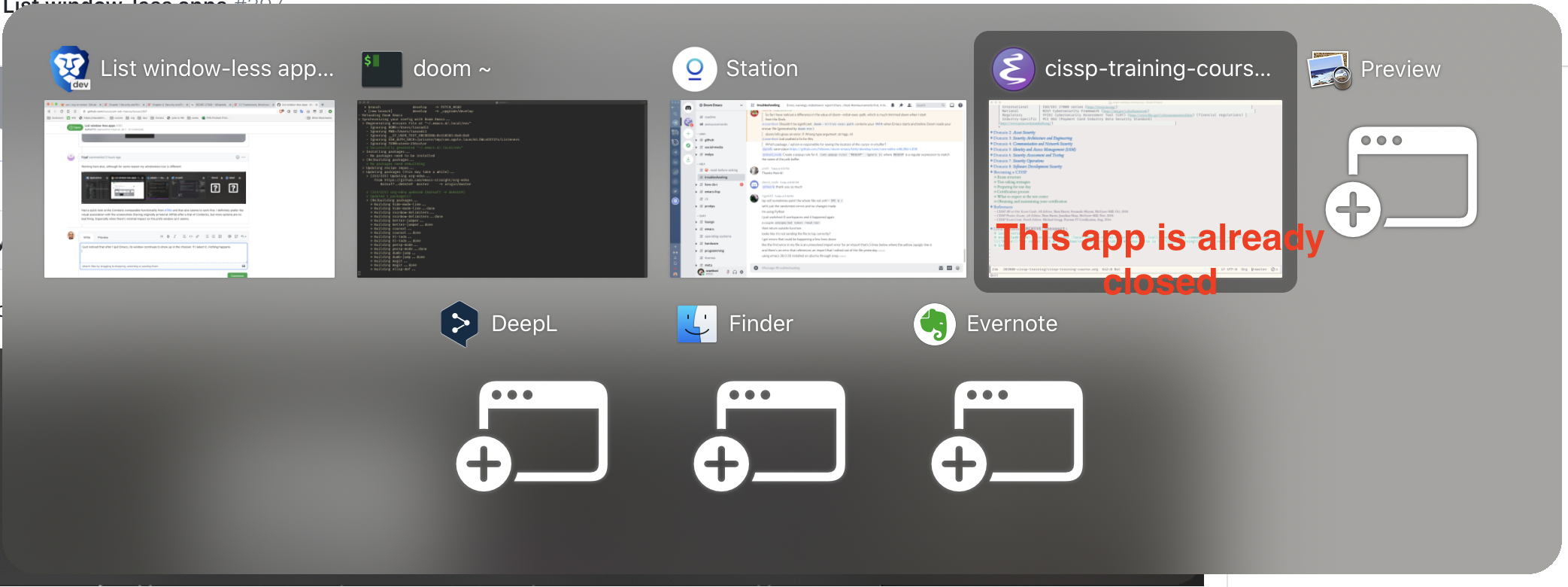
(Emacs seems to be the only app with which this happens)
zzamboni
on 2 Sep 2020
@frypf damn that's bad news. I checked on 3 VMs, and they all failed to show the symbol (10.12, 10.13, 10.14).


After pulling my hair for a few hours, I think this is what's happening: the new symbol I added uses some advanced new feature of the OpenType spec. Maybe it's the multicolor thing, maybe it's the localized thing. These symbols do a huge number of things these days, and are far from being simple letters as fonts used to be 10 years ago.
I tried to use the .ttf version, and it even crashes on older macOS. The .otf at least displays a question mark box, as shown above, on every macOS version before 10.15.
I don't know how to move forward with this. I spent a lot of time getting this symbol to be where I want in terms of layout (may sound easy, but it was by far the hardest part of this ticket). macOS doesn't support SVG. Using bitmap images means it won't scale to big screens, and will increase size of the app.
Any advice on how I could fix the symbol from the font, or switch to some other solution?
lwouis
on 2 Sep 2020
One more update: after I run Emacs again, I get two thumbnails in the chooser. I had to restart AltTab to get rid of the old spurious thumbnail (note: this had never happened).
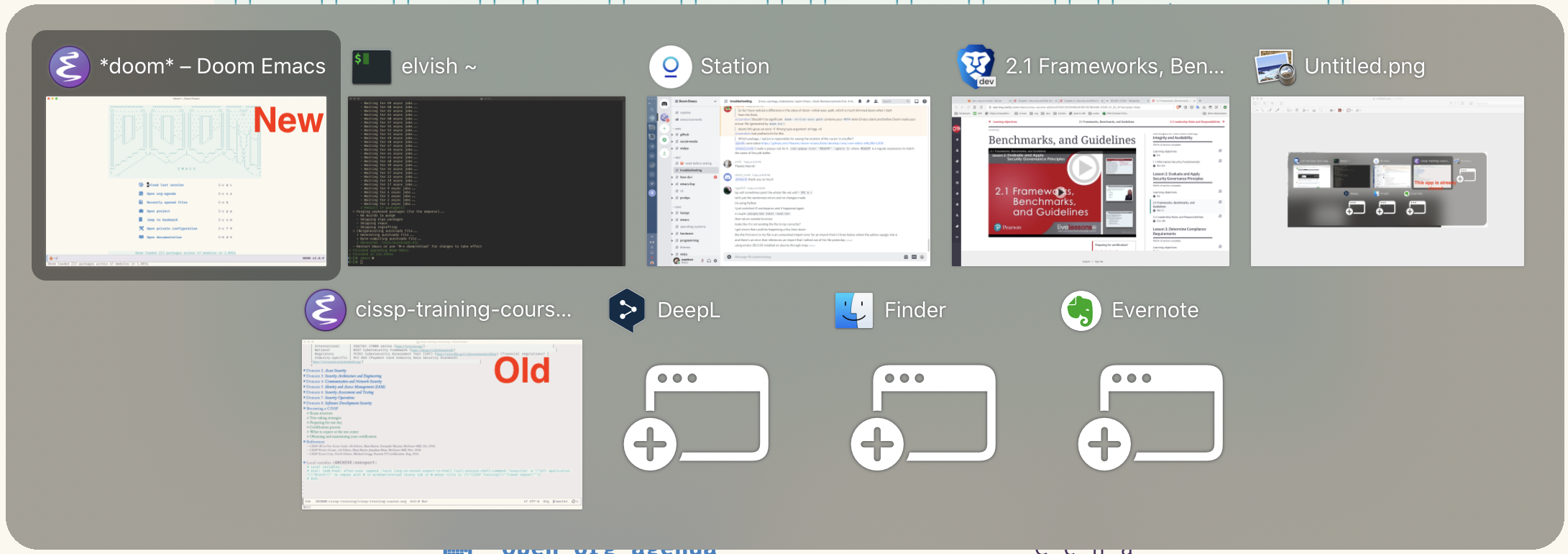
zzamboni
on 2 Sep 2020
@zzamboni you said this has never happened. You mean with public releases of AltTab, right?
Can you reproduce it every time with this beta build? Could you write exact steps for me to download Emacs and reproduce on my machine?
lwouis
on 2 Sep 2020
The new build is a bit buggy. To elaborate, the overlay only shows up for like 1 second between the release of the shortcut, and the refocusing of the other app. It doesn't show up immediately as soon as I initiate the shortcut. Not sure why this is happening. Is anyone else having a similar issue?
SoPat712
on 2 Sep 2020
@SoPat712 I'm sorry I can't understand the symptoms from your description. A video would be really helpful here! You may be experiencing #563 but again I'm not sure what you are experiencing based on the textual description you made.
lwouis
on 2 Sep 2020
Sorry, I was in a rush when I wrote that and didn't write very clearly. I am experiencing #563, except it only shows up after I choose(or don't choose, because I can see which window I hovered over) an app. I see it for a half second after I let go, but I can't see it when I need to see it, which is when I'm actually selecting an app to switch to. I'll look for a way to send a video, but I'd also need to send you a video of my keyboard during that time. I'll look for a recording app that can record keystrokes if you still don't understand.
SoPat712
on 2 Sep 2020
I'm on a late-2014 5K iMac, OS 10.15.6.
Stokestack
on 2 Sep 2020
@Stokestack did you try the latest build I shared? Is it working for you?
@SoPat712 I recommend Loom. You can be up-and-running in 5min, and it hosts the video for you. To show keyboard inputs, there are plenty of app but the built-in keyboard viewer can do the trick also, and it's ready to go immediately.
lwouis
on 2 Sep 2020
@lwouis Just tried the latest and it's working nicely for me. The +window icon shows up for windowless apps and looks great.
Stokestack
on 2 Sep 2020
Ok, I've had a longer test and am noticing issues around switching to windowless apps from a fullscreen app, ie. the app switches fine but is then missing from the list:
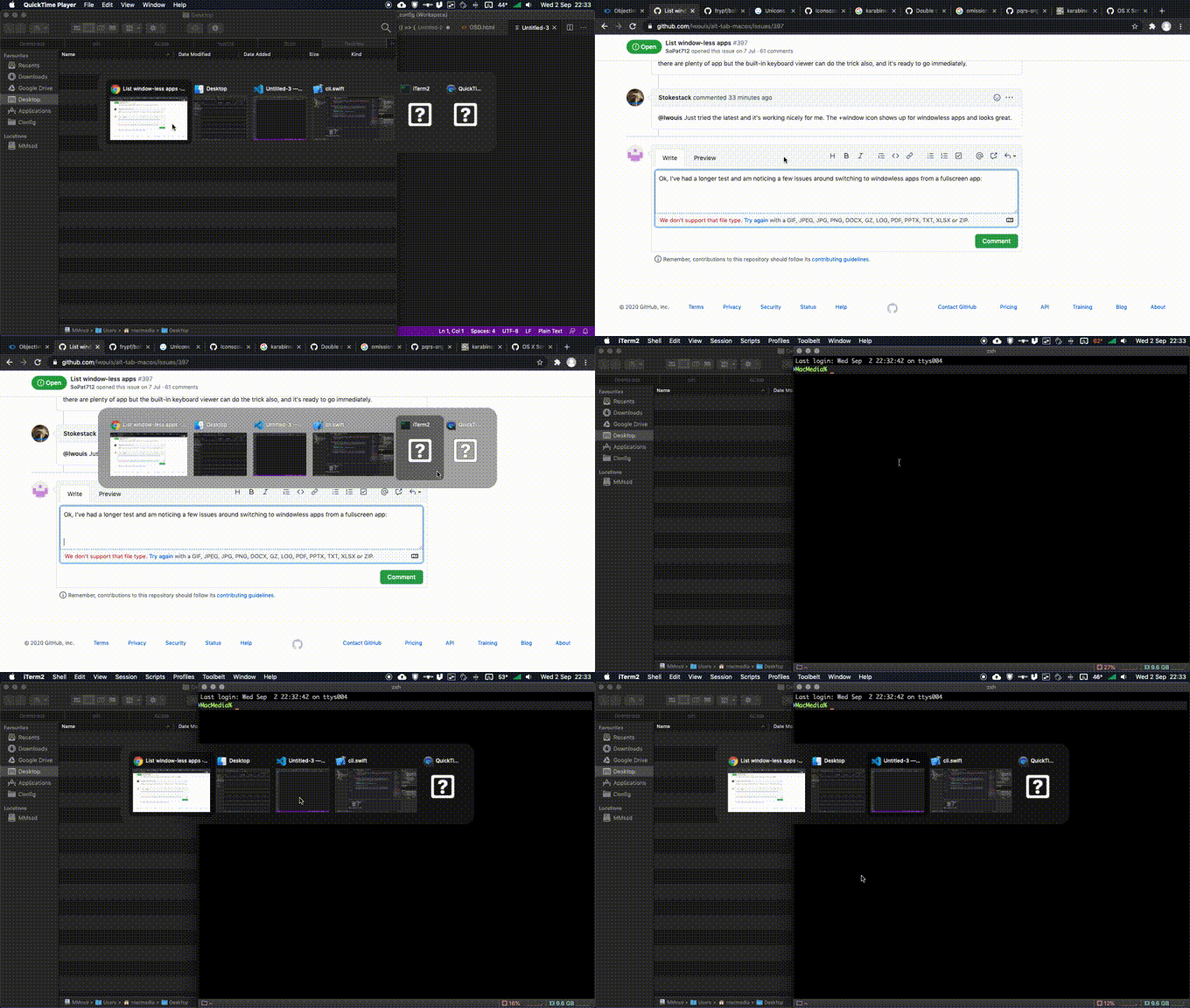
This is reproducible for me, although closing the iTerm window again does put the windowless iTerm back at the end of the list. I've tried with and without Yabai enabled and same results each time. Switching from a non-fullscreen app behaves correctly.
While testing the quit shortcut (still with iTerm) I've also had a similar issue to @zzamboni where the app continued to show in the switcher but was definitely quit and absent from the Dock. However in my case selecting it actually reopened it. It was then listed multiple times upon reopening - once as a regular windowed app, and again at the end as windowless. Only restarting AltTab solved this. I've yet to figure out steps to make this one happen again 🤔
frypf
on 3 Sep 2020
I had a similar issue with iTerm and also with pathfinder, both of which I use frequently. Also, Discord is completely terrible at interacting with the local build you gave us. Closing the window of discord means that the app goes in windowless mode, but the problem with Discord is that there is no new window feature like literally every other app(I dunno maybe it's cuz of electron, I'm no Mac app developer). This means that I'm stuck with a discord window that is now windowless, which it never should be for me personally. I try opening it with Alt-Tab and it only gives focus to discord, and I'm stuck with having to open it some other way, because the discord app is just weird apparently.
SoPat712
on 3 Sep 2020
Fullscreen to windowless-app doesn't show the newly opened window
@frypf thank you for sharing this bug! I was able to reproduce, find the root cause, and fix the issue. It was the tab detection flagging the new Terminal window as a tabbed window (thus not showing it) since the detection happened before the Space transition. We can't detect tabs in another space for various technical reasons. Anyway I found a workaround on this workaround, and I think I managed to keep tab detection working, while fixing this scenario.
iTerm2 and Emacs not removed properly after quitting
@zzamboni @frypf I was able to reproduce, though it happens rarely. I think I found the issue. It is a regression I introduced by refactoring some code. I switched from comparing apps to comparing their pid. However when an app quit, sometimes it still has a pid, but in some rare cases, it's already nil, thus we would fail to remove it.
Discord has strange behavior
@SoPat712 regarding Discord, I tested and it's the app. When you click the close window button, they override the behavior to actually hide the app. However, in AltTab, if you press alt+w, we don't simulate clicking the close button; we send the close window command directly. Thus you are able to actually close the window, whereas the UI merely hides the app. This scenario was never thought about by Discord developer I imagine. Could you please open a support ticket for Discord and ask them to look into fixing their non-standard behavior? In the meantime, just hide it I guess instead of closing the window, like they do internally, or quit the app.
@everyone here is a new build that fixes the issues above. Could you please switch to testing on this build?
lwouis
on 3 Sep 2020
@lwouis I recorded a video highlighting my previous issue I mentioned on the dev build. I've attached it here. Please take a look and tell me if this is a problem with my preferences, or something else. I would like to note that relaunching the app does fix the problem, but the problem just happens again 5 minutes later. Thanks for all the help so far.
SoPat712
on 3 Sep 2020
@SoPat712 wow that behavior is wild. This is like nothing we have discussed so far in this thread. See my previous post where I separated 3 distinct issues I addressed. Here is seems like the app is completely failing.
I notice you spam the tab key. What happens if you just slowly press the tab once? Also could you try to switch from cmd+tab to alt+tab in case there is an interaction here with something else?
lwouis
on 3 Sep 2020
@lwouis the behavior is exactly the same when I press the tab key once. Also, I just tried switching the key from cmd to alt, and it's still broken. I actually just removed all preferences of the app using AppCleaner, and it worked for 5 minutes well, and now it stopped again. I now know that with the fade out animation off, I can't see the alt-tab overlay at all, but with it on, I can at least see it for like a quarter of a second as seen in the video. The window that alt-tab creates when I function it must be not getting activated until the fade out animation. Are there any logs I can send you? A debug mode in Alt-tab perhaps?
SoPat712
on 3 Sep 2020
The last build seems a lot more stable for me and I've not noticed any of the previous issues again so far. No signs yet of the probs @SoPat712 seems to be experiencing but I'll keep you posted.
frypf
on 3 Sep 2020
@SoPat712
- Could you clarify when this crazy behavior started happening for you? Which version started showing this behavior? v5, v6, one of the builds I share on this thread (which one)?
- Which macOS version are you running?
- Could you try out this latest build?
lwouis
on 3 Sep 2020
Hi. Sorry for the late response, I was busy. This problem started in the builds that you sent on this thread. The problem is wholly fixed on 6.1.0, and I can try the latest build when I get up in the morning in like 9 hours. I am currently running Catalina, v15.(6?) to be more specific.
SoPat712
on 4 Sep 2020
I'm trying the latest build right now, I'll get back to you when things start going wrong @lwouis .
Also, how do I find the bundleID for apps, I've forgotten. I'm trying to hide finder, because I don't use it.
SoPat712
on 4 Sep 2020
Also, just a recommendation for an enhancement feature, it would be cool if you could select an open app window, and have alt-tab find the bundle id and automatically place it into the blacklist. That would make it much easier to block some sub windows that interact poorly with alt-tab. I think alt-tab does a much better job at finding the bundle id for those apps than we would have at finding them.
SoPat712
on 4 Sep 2020
I've been using
lsappinfo info -only bundleid 'APPNAME'
in Terminal. eg:
lsappinfo info -only bundleid Finder returns "CFBundleIdentifier"="com.apple.finder".
frypf
on 4 Sep 2020
Oh thanks @frypf !
SoPat712
on 4 Sep 2020
@lwouis The latest build apparently seems to be working for me? I don't know what changes you made, but they work like a charm. Now, the glitch I was talking about only happened once, and after that one time, it never happened again! Thanks for the great work on that bug! That reminds me that I need to start learning Swift haha.
Quick question: Do you use AppCode or XCode for development? Any reason why one is better than the other?
SoPat712
on 4 Sep 2020
Also, just a recommendation for an enhancement feature, it would be cool if you could select an open app window, and have alt-tab find the bundle id and automatically place it into the blacklist
There is already a ticket for this: #539
Quick question: Do you use AppCode or XCode for development? Any reason why one is better than the other?
I use AppCode before I love IntelliJ and have been using it for years. I can reuse all my knowledge of the idea in there. XCode in contrast is its own universe. It crashes a lot in my experience like investigating the view hierarchy during debug straight up crashes every single time I use it after I unfold a few nodes in the tree. Auto-complete, source-control management, navigation, search - all of these I find superior on AppCode. However AppCode is dependent on XCode to function, and some things I use XCode to check/learn/set regularly. It's a bad IDE overall. Also there is this whole joke about 1 range of macOS versions is tied to 1 range of XCode versions which are tied to 1 range of target iOS/macOS versions. Not user-friendly, not portable, hard to deal with for CI, etc, etc. You can read more on the dumpsterfire that is Apple developer ecosystem on the contributing page.
lwouis
on 4 Sep 2020
Omg I found that the font issue was not some complex OpenType support or anything. I forgot a simple line. Oh well, I can't get back the hours of research, but at least we are moving forwards 👍
lwouis
on 4 Sep 2020
Omg I found that the font issue was not some complex OpenType support or anything. I forgot a simple line. Oh well, I can't get back the hours of research, but at least we are moving forwards 👍
Glad you found it, I was racking my own brains and limited knowledge - didn't mean to leave you hanging, but was holding off while you ironed out the issue for @SoPat712. The only alternative I could find was to load an SVG within a WKWebView, which works but is probably not ideal.
frypf
on 4 Sep 2020
@SoPat712 I feel more confident in releasing now. The only outstanding issue is what you showed here: https://github.com/lwouis/alt-tab-macos/issues/397#issuecomment-686510287
Could you please test this build? If it's working for you then i'll release.
lwouis
on 4 Sep 2020
load an SVG on a transparent webpage within a WKWebView
With all the hate on electron these days because of its high resource consumption and poor performance, I found it quite humorous that you mention using a webview! As a fun anecdote, before I went on to use Swift, I tried to code AltTab using Electron, as they have an API to stream open window contents as video streams. I didn't know at the time the insane depths of macOS window management, so I gave up when electron couldn't show me the screenshots of minimized windows, or focusing windows on other Spaces. I didn't know yet that I would need to learn about macOS retro-engineered private APIs in order to do such basic functionality.
Anyway just so you realize what this solution would entail:
- We want to display the icon in a box. We know the size of the box
- We have to resize the webview to that size
- We have to resize the right DOM elements within that webview to also fit that size
- We have to disable javascript, drag and drop, resizing, scrolling, etc (list is insanely long) to avoid the icon becoming an interactive element
- We have to make the HTML page transparent, as well as the webview background itself
- We now have to find a way to find the font size value to fit the box. This is not an easy problem at all btw. For AltTab I used an heuristic, but at very big or very small size it breaks. Most answers on StackOverflow show people doing loops and basically increasing the font until it doesn't fit, then taking the previous font size value
- We now have achieve showing an icon by invoking 20x times the necessary technology. This will increase latency when showing the main window, and potentially could even show big performance issues if there are many of these webviews like 20 of them and it starts lagging
I wrote this just for the fun of showing the reality of these kind of funky solutions. Maybe it wouldn't even be that bad. I've learned to anticipate the worse in the Apple ecosystem though lol
lwouis
on 4 Sep 2020
Yep, I've only done some very limited playing around with it myself and found the same issues leading to a very obvious delay while it loads. I was pretty sure you'd have already dismissed it, but you'd asked me a specific question and I don't like just offering nothing. Spot the noob 😂
frypf
on 4 Sep 2020
I've been testing the local build you've given me, and all seems to working well. I think it's time to release it after a lot of work on your end @lwouis ! Again, I think all of us would like to thank you for the amount of time you've put into creating this extraordinarily useful app! I think I can say once and for all, that Apple is now behind you in terms of Cmd+Tab!
SoPat712
on 4 Sep 2020
There is one thing, though. I seem to have somehow opened a Finder window, even though it's in my blocklist. I'm not sure how, but it's also not showing up, which means it's working, just that the app is checking the blocklist after it get all the windows and apps that exist.
SoPat712
on 4 Sep 2020
Oops I hit the wrong button, there really needs to be a confirmation for closing issues!
SoPat712
on 4 Sep 2020
There is one thing, though. I seem to have somehow opened a Finder window, even though it's in my blocklist. I'm not sure how, but it's also not showing up, which means it's working, just that the app is checking the blocklist after it get all the windows and apps that exist.
@SoPat712 I'm sorry I don't understand the situation you're describing. I tried to add com.apple.finder to the first blacklist, and it stopped showing me the Finder windows, including the Finder app-window (if I close all Finder windows).
Could you please share a video of the issue to clarify the behavior you're seeing?
lwouis
on 4 Sep 2020
It's unreproducable. I Cmd+tabbed really quickly, and somehow managed to open a finder window even though it's in my blocklist. This isn't something you should be worried about, because I think it was 100% a 1 time thing. I think the problem is that the blocklist is checked after the apps that are open are found. Therefore by me Cmd+tabbing very quickly, I was able to focus finder before it got removed from the array of apps or whatever. Either way, it's not a problem.
One question: What version are you planning to make this release? This is a massive update, so it should probably be a major version switch!
SoPat712
on 4 Sep 2020
I was able to reproduce the issue by blacklisting Notes, then running this in the Terminal: sleep 1 && osascript -e 'open app "Notes"' then quickly hitting alt+tab. I found the root cause and fixed it. Shouldn't be possible to have that interaction happen now.
What version are you planning to make this release?
I use semantic-release so versioning is decided automatically. I merge a PR and it runs CI > CD, and done. No manual step is involved to release 👍
lwouis
on 4 Sep 2020
Thanks for all the work on this, @lwouis ! It's a major enhancement.
Stokestack
on 4 Sep 2020
Just found that Zoom does not show up in Alt-Tab. Odd.
Stokestack
on 5 Sep 2020
@Stokestack could you please open a new ticket for this Zoom issue?
lwouis
on 6 Sep 2020
Sure. I just launched Zoom and found that it does show up when you're simply on the log-in screen (not in an active session). I have a meeting tomorrow, so I'll verify this again.
Stokestack
on 6 Sep 2020
Related issues
 DaVince
·
5Comments
DaVince
·
5Comments
 gingerbeardman
·
5Comments
lwouis
·
3Comments
gingerbeardman
·
5Comments
lwouis
·
3Comments
 net
·
3Comments
net
·
3Comments
 max-sixty
·
4Comments
max-sixty
·
4Comments
Most helpful comment
@lwouis thanks for Alt-Tab! I started using it today and find it very useful.
It would be very nice to be able to switch to apps without windows. I think the best starting point would be to emulate the native Cmd-Tab: i.e. include only Dock-visible apps in the switcher. This is the only thing I miss from my normal workflow.