Alt-tab-macos: Android emulator not showing in AltTab
_This issue was opened by a bot after a user submitted feedback through the in-app form._
__From:__ [email protected] aka github.com/paulproteus
__Message:__
I notice that a window from the Android Emulator (based on qemu) isn't showing up in the list of available windows in this version of Alt-Tab.
By the way, this app is a complete lifesaver, and I am grateful for it, and continue to use it daily.
Debug profile
* App version: 4.1.2 * App preferences: * NSWindow Frame com.sindresorhus.Preferences.FrameAutosaveName: 685 403 549 524 0 0 1920 1057 * SUHasLaunchedBefore: 1 * SULastCheckTime: 2020-06-13 04:23:54 +0000 * holdShortcut: ⌘ * preferencesVersion: 4.1.2 * showMinimizedWindows: false * startAtLogin: true * theme: 1 * Applications: 33 * Windows: 12 * {isFullscreen: false, isMinimized: false, isHidden: false, isTabbed: false, isOnAllSpaces: false, spaceId: 1, spaceIndex: 1} * {isFullscreen: false, isMinimized: false, isHidden: false, isTabbed: false, isOnAllSpaces: false, spaceId: 1, spaceIndex: 1} * {isFullscreen: false, isMinimized: false, isHidden: false, isTabbed: false, isOnAllSpaces: false, spaceId: 1, spaceIndex: 1} * {isFullscreen: false, isMinimized: false, isHidden: false, isTabbed: false, isOnAllSpaces: false, spaceId: 1, spaceIndex: 1} * {isFullscreen: false, isMinimized: false, isHidden: false, isTabbed: true, isOnAllSpaces: false, spaceId: 1, spaceIndex: 1} * {isFullscreen: false, isMinimized: true, isHidden: false, isTabbed: false, isOnAllSpaces: false, spaceId: 1, spaceIndex: 1} * {isFullscreen: false, isMinimized: true, isHidden: false, isTabbed: false, isOnAllSpaces: false, spaceId: 1, spaceIndex: 1} * {isFullscreen: false, isMinimized: true, isHidden: false, isTabbed: false, isOnAllSpaces: false, spaceId: 1, spaceIndex: 1} * {isFullscreen: false, isMinimized: true, isHidden: false, isTabbed: false, isOnAllSpaces: false, spaceId: 1, spaceIndex: 1} * {isFullscreen: false, isMinimized: false, isHidden: false, isTabbed: true, isOnAllSpaces: false, spaceId: 1, spaceIndex: 1} * {isFullscreen: false, isMinimized: true, isHidden: false, isTabbed: false, isOnAllSpaces: false, spaceId: 1, spaceIndex: 1} * {isFullscreen: false, isMinimized: false, isHidden: false, isTabbed: true, isOnAllSpaces: false, spaceId: 1, spaceIndex: 1} * OS version: Version 10.15.5 (Build 19F101) * OS architecture: x86_64 * Locale: en_US (current) * Spaces: 1 * Dark mode: Light * "Displays have separate Spaces": checked * Hardware model: Macmini6,2 * Screens: 1 * {x: 0.0, y: 0.0, width: 1920.0, height: 1080.0} * CPU model: Intel(R) Core(TM) i7-3615QM CPU @ 2.30GHz * Memory size: 17.18 GB * Active CPU count: 8 * Current CPU frequency: 2.3 Ghz * Resource utilization: * CPU: 2.9% * Memory: 69M+ * Threads count: 10
 alt-tab-macos-bot
All 11 comments
Here's a screenshot of the emulator being the top window:

Here's a screenshot of it missing in AltTab.
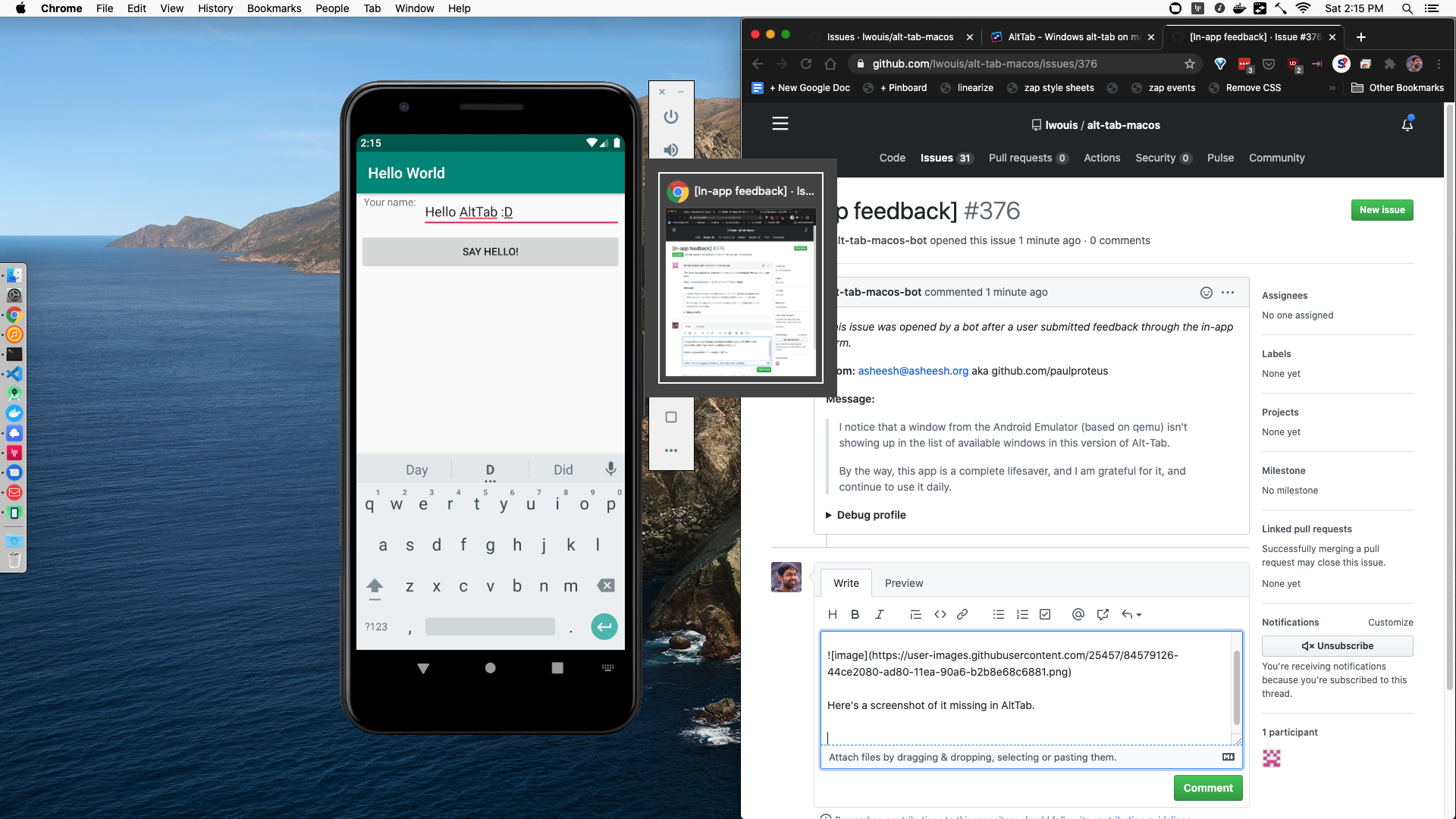
I have AltTab set to ignore minimized windows, but in my testing, the issue occurs even when I un-check that checkbox.
Thanks for this app. I'm happy with it as-is even if this issue stays unsolved forever.
 paulproteus
on 13 Jun 2020
paulproteus
on 13 Jun 2020
Hi @paulproteus! Thanks for sharing this issue!
Based on the screenshot, my hypothesis would be that the Android emulator is not a macOS window. Can you minimize it for instance?
I'll install it and experiment a bit more soon. My guess for now is that I will have to hardcode the bundleID to make an exception, as it doesn't appear to be a real window (i.e. NSWindow), and thus is not listed in AltTab.
 lwouis
on 14 Jun 2020
lwouis
on 14 Jun 2020
Ok I installed an Android emulator on my machine, and investigated the issue. Turns out the emulator is an extremely weird app. It is just an executable, not a normal .app. On my system, for example, launching it by going through Android Studio > ADB manager, then doing ps -ef reveals that it is the result of this command:
/Library/Android/sdk/emulator/qemu/darwin-x86_64/qemu-system-x86_64 -netdelay none -netspeed full -avd Pixel_2_API_30
Going into the parent folder /Library/Android/sdk/emulator/qemu/darwin-x86_64/ shows that only executable exist there:
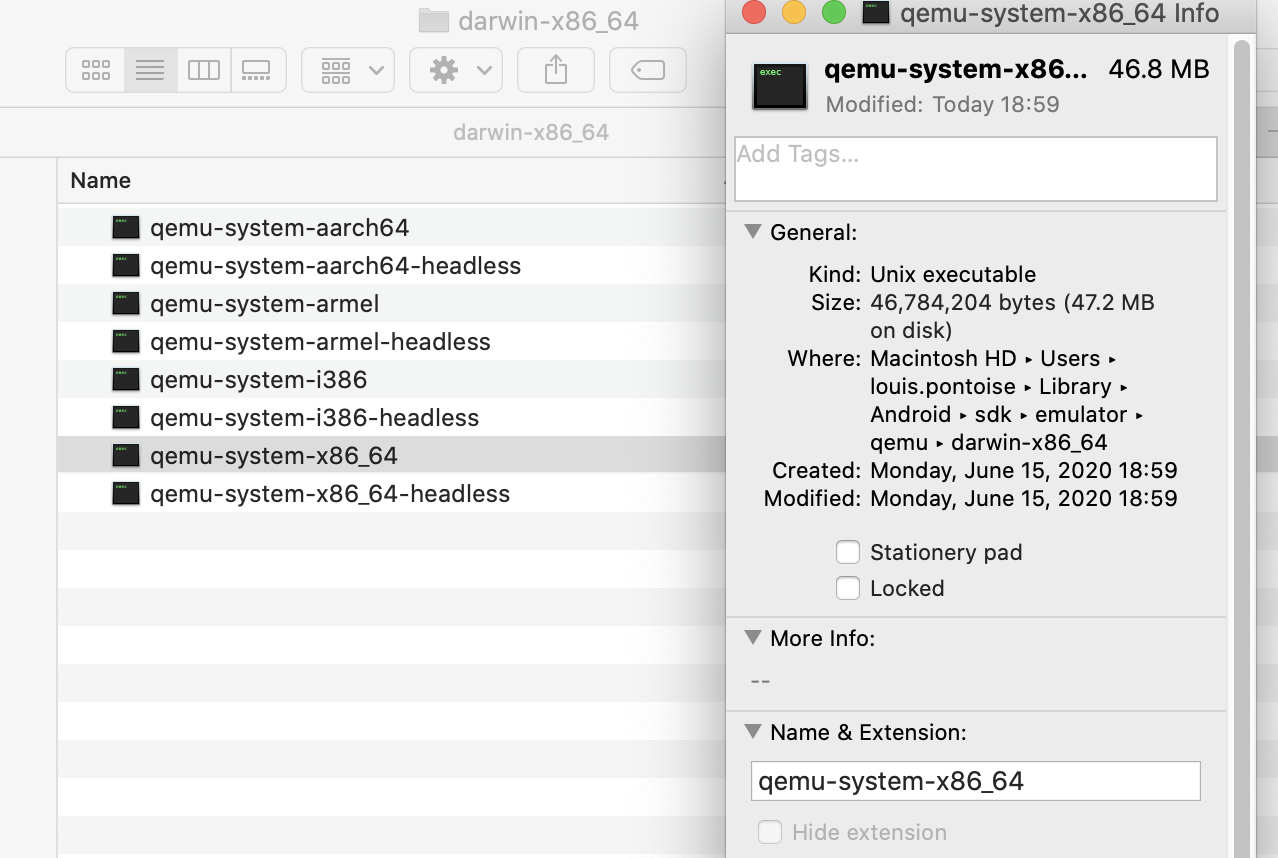
I didn't even know it was possible to make a macOS app that has an icon in the Dock, without bundling it in a .app, with an Info.plist file inside. I guess the Dock icon and code signature were embedded into the executable. That's very weird and not documented anywhere officially to my knowledge.
When using XCode > Accessibility Inspector, it bugs out, and gives info from the previously selected app, here Terminal:
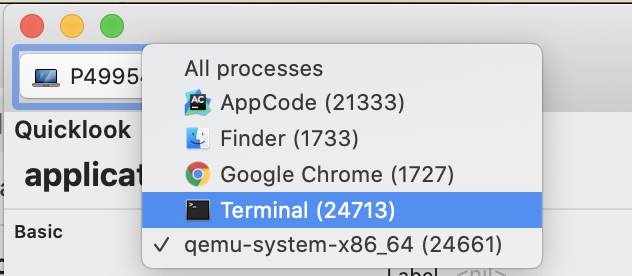

When getting the app from the accessibility API, within AltTab, the app doesn't have: bundleIdentifier, bundleURL, executableURL. The only thing that could help me identify it would be the icon. That's crazy. It has, however activationPolicy set to .regular which means we could monitor it as a valid app.
The second layer of issues here being that it's main window, where the phone is emulated has subrole set to AXUnknown instead of AXStandardWindow. We purposefully ignore any window which has subrole != AXStandardWindow, as these are usually junk windows. See this comment in AltTab's code:
// Some non-windows have subrole: nil (e.g. some OS elements), "AXUnknown" (e.g. Bartender), "AXSystemDialog" (e.g. Intellij tooltips)
Usually for apps with improper behavior like this, I would hardcode something like I did for Steam or Firefox:
// All Steam windows have subrole == AXUnknown
// some dropdown menus are not desirable; they have title == "", or sometimes role == nil when switching between menus quickly
(bundleIdentifier == "com.valvesoftware.steam" && title != "" && role != nil) ||
// Firefox fullscreen video have subrole == AXUnknown if fullscreen'ed when the base window is not fullscreen
(bundleIdentifier == "org.mozilla.firefox" && role == "AXWindow")
However here, the emulator has no bundleIdentifier or any unique identifier that I could use to hardcode an exception. I tried to run otool -P ~/Library/Android/sdk/emulator/qemu/darwin-x86_64/qemu-system-x86_64 but it returns nothing, so there is no embedded Info.plist.
Not sure how to proceed here. This stuff is clearly hacky. I think they are using the qt SDK, and made some really non-standard app with non-standard windows. Not sure how we could workaround these quirks and get it listed.
The only options I can imagine now to identify and whitelist the emulator would be:
- make a hash of the icon. Downsides: bad perf, icon can change
- use sysctl to get the full launch commands with args, and match with some kind of regexp. Not sure what is safe to parse here though:
~/Library/Android/sdk/emulator/qemu/darwin-x86_64/qemu-system-x86_64. Probablyqemu-system*at the end? Downside: bad perf (using sysctl), regexp on launch command seems fragile
lwouis
on 15 Jun 2020
@koekeishiya have you ever seen such an app, without a .app; straight binary that launches, yet has a Dock icon?
lwouis
on 15 Jun 2020
Wow @lwouis ! That's a really fun read. :) I agree it sounds pretty dire.
One other option is a pref (off by default) called, like
✅ When app ID is unknown, show all app windows
Then if that pref is currently true, the app can add the empty string bundleIdentifier to the whitelist of bundles whose AXUnknown windows get displayed.
Perhaps that could link to a page in AltTab's GitHub wiki explaining how AltTab works and how it selects which windows to show.
Then I could check that, and everyone else could leave it unchecked. :P :)
As for where to put that pref...
Perhaps at the bottom of "General", in another section, labeled "App Workarounds":
✅ For unidentifiable apps, include windows of unknown type
Not sure. I'm in no big rush, as I said. Thanks for the amazing read this morning.
paulproteus
on 15 Jun 2020
Yep, I’ve made a few myself. They can use something like TransformProcessType(&window->psn, kProcessTransformToForegroundApplication); to register as a proper GUI application. It will trigger a notification to the activationPolicyChanged key-value-observer.
On 15 Jun 2020, at 17:01, lwouis notifications@github.com wrote:
@koekeishiya https://github.com/koekeishiya have you ever seen such an app, without a .app; straight binary that launches, yet has a Dock icon?
—
You are receiving this because you were mentioned.
Reply to this email directly, view it on GitHub https://github.com/lwouis/alt-tab-macos/issues/376#issuecomment-644188971, or unsubscribe https://github.com/notifications/unsubscribe-auth/ABPDZV6J6KHX4T3RIGTKQSDRWYZVTANCNFSM4N5EW52Q.
 koekeishiya
on 15 Jun 2020
koekeishiya
on 15 Jun 2020
@paulproteus
Then if that pref is currently true, the app can add the empty string bundleIdentifier to the whitelist of bundles whose AXUnknown windows get displayed.
Like i said, the reason these are not shown is that some apps use windows (i.e. NSWindow) for things a user wouldn't consider a window (e.g. a tooltip, a popover, an overlay). That checkbox you describe would indeed have the emulator listed, but it would also list lots of random junk windows. To illustrate more, the emulator itself has 2 windows: the fake phone, and the vertical menu. The latter wouldn't be considered as a window by most users i think.
I think i'll have to go with hardcoding an exception for this qemu magic app.
What's the path/command of your emulator when it's running? You can get it with something like:
ps -ef | grep qemu
Hi @lwouis !
For me it's:
$ ps -ef | grep qemu
  501 22165     1   0 Sat02PM ??        60:34.62 /Users/paulproteus/.briefcase/tools/android_sdk/emulator/qemu/darwin-x86_64/qemu-system-x86_64 @beePhone -dns-server 8.8.8.8
This is because I'm using https://beeware.org/project/projects/tools/briefcase/ to manage the Android emulator. (Happy to say more if that's useful.)
FWIW, when I wrote this:
Then if that pref is currently true, the app can add the empty string bundleIdentifier to the whitelist of bundles whose AXUnknown windows get displayed.
I meant that AltTab would have this pseudocode:
if (bundleIdentifier == "" && role == "AXUnknown") {
    if (weirdAsheeshPref) {
        show = true;
    } else {
        show = false;
    }
}
I believe that would address the issue that you mentioned of other apps using NSWindow for popups/tooltips/etc, since they would have a non-empty bundleIdentifier.
paulproteus
on 15 Jun 2020
/Users/paulproteus/.briefcase/tools/android_sdk/emulator/qemu/darwin-x86_64/qemu-system-x86_64
Cool, the path seems consistent. Now to find a way to get that path using the C APIs... is going to require some research
Regarding the preference, some other apps have no bundleIdentifier thus may display junk windows. You don't want junk windows, do you? ;p
Also i'm trying to reduce the number of preferences as there are already a lot. This is discussed more in #351. More preferences means worst UX, especially for casual and first-time users. It also means we need to localize a new string. We support something like 13 languages already. Every new string is a considerable effort. It also means more diverse scenarios to investigate on bug reports, etc.
I think hardcoding some values to whitelist this buggy app is more efficient and works for all users out of the box. As it does for Firefox fake fullscreen video, and Steam being a messy ported app from Windows, for example.
lwouis
on 15 Jun 2020
I implemented the workaround here. I'll be merging the PR after the CI passes. That will trigger CD and release a new version of AltTab within the next 30min. It will also close this ticket automatically.
@paulproteus could you please test the new release, and tell me if the emulator is showing properly for you? 👍
lwouis
on 16 Jun 2020
@lwouis I confirm it works. Amazing. Thanks a million.
paulproteus
on 16 Jun 2020
Related issues
 tlex
·
6Comments
tlex
·
6Comments
 valentinocossar
·
3Comments
valentinocossar
·
3Comments
 mfn
·
4Comments
mfn
·
4Comments
 DaVince
·
5Comments
DaVince
·
5Comments
 boldandbusted
·
3Comments
boldandbusted
·
3Comments