Al: Reference to enum field does not exist in TableRelationship
Two tables (table A and B). One new enum type field in table A. In table B I have a field with a table relationship to table A. The table relationship has a filter on the enum field. In the table relationship, the new field is listed by Intellisense, but when I select it, the filter value gets the red squigly line, and the problems window says the reference field does not exist.
To Reproduce
The enum:
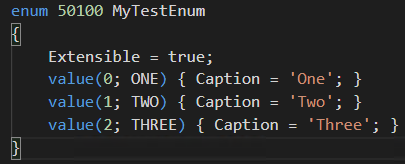
Table A:
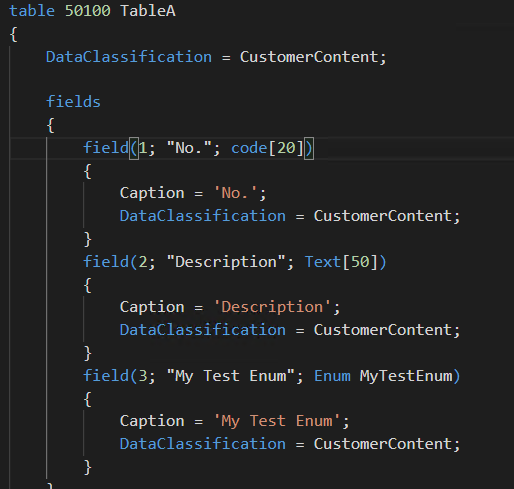
Table B with error:

Note that I selected the field using Intellisense, so AL is aware of the field.
- AL Langauge: 2.1.79379
- Business Central: GB Dynamics NAV 13.2 (26556)
Related to #4313
 TheDenSter
All 11 comments
Hi @TheDenSter , Use filter with index value instead of using const name. For reference see below:
TableRelation = TableA."No." where("My Test Enum" = filter(0));
 nareshbandariD365
on 5 Feb 2019
nareshbandariD365
on 5 Feb 2019
Using the filter option does result in showing only the proper values from TableA, but now I get weird validation results. Obviously I have different tables in my actual development project but this is what I am getting (we added an enum field to the Dimension Value table and filtering the tablerelationship on a particular value that I have not been able to make work):
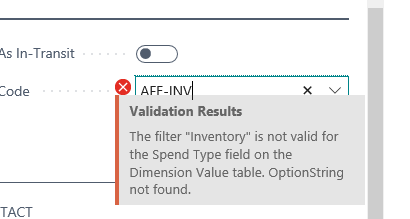
Note that the value 'Inventory' is the caption of the enum at index 0, which has the value 'INV', so it does seem to be aware of those values.
So even though the field is implemented as an enum field, the validation seems to either try to find an option string, or the error message is mixed up. IMO using the index of the enum as a filter is dead wrong anyway, it should be possible to use the value itself, and in this case I would prefer to use the const with the enum value anyway. Also there is definitely something not right with the enum implementation if the validation is still trying to find an optionstring.
TheDenSter
on 5 Feb 2019
Hi @TheDenSter ,
I created a simple project "Enum" in that I created one Enum object and two tables to test Enum as shown below:
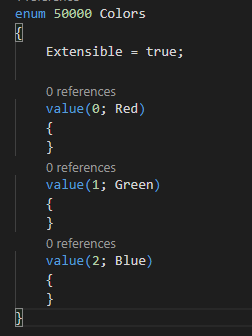
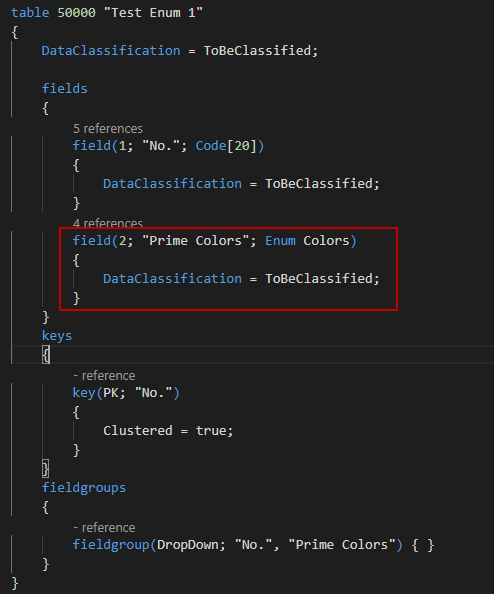
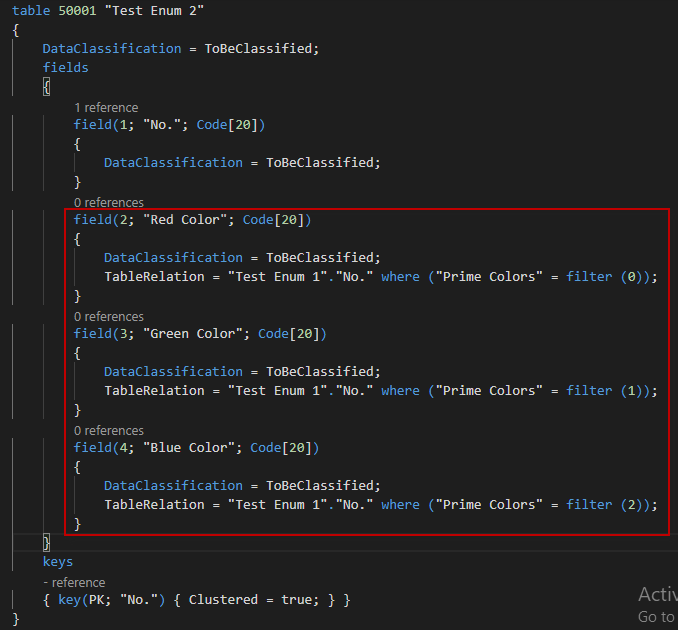
Test Results:
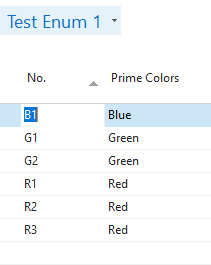
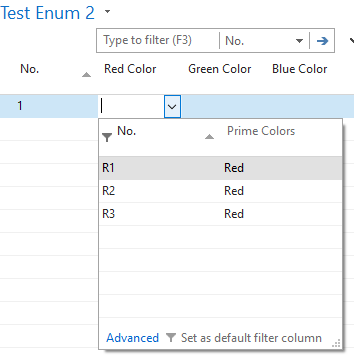
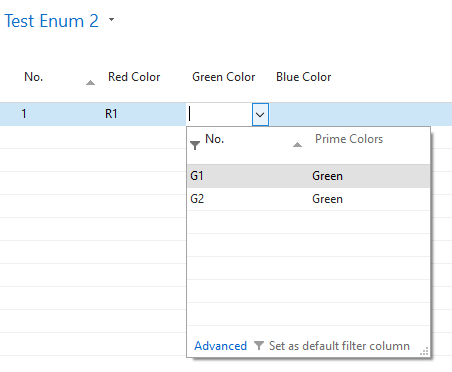
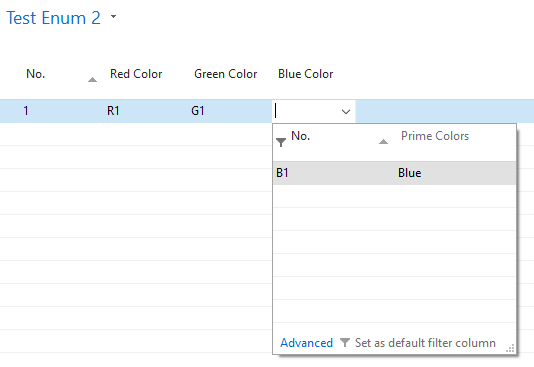
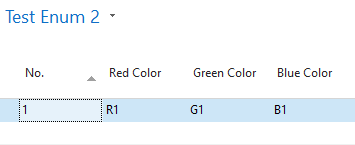
@TheDenSter ,It seems good, I didn't face any difficulty with Enum here, try it in this way if it will not resolve your issue, post us your code to reproduce the issue.
Versions:
AL Language: 2.1.79379
Business Central: 13.0.27183
nareshbandariD365
on 6 Feb 2019
@TheDenSter I have tried something very similar on the latest bcinsider without any issues. We that the 13 have had some issues around using extended enum fields in TableRelations, but they should have been fixed in the latest CU.
I'm unsure about the validation error. Can you supply a repro? We would definitely like to have this fixed.
 esbenk
on 6 Feb 2019
esbenk
on 6 Feb 2019
I have done some digging. The fix for using extended values is not backported to the current CU only in the upcoming master for the Spring release.
We will backport the fix an make available in the next CU as well.
esbenk
on 6 Feb 2019
Well slap me with a trout.... straight out of the Twilight Zone... I have two containers, both created from the same sandbox:gb Docker image. One is for my full on development project (which I obviously can't share the details about in here) and another is to repro this issue. I copied the enum (changed the values a little bit though) and the other objects. In my full dev container I am getting the weird error message, and in the repro AL workspace everything works as expected. A zipped up copy of that workspace is attached here:
EnumTableRelation.zip
The only thing that is different in my full development container is that there is a ton of additional stuff in there. This field and enum is identical. By the way, with the tablerelationship working, I would just remove the validation code, but since that is not working in my environment, I have to make sure the user picks the right value.
TheDenSter
on 6 Feb 2019
Hi @TheDenSter are you still facing this issue? We believe it should have been fixed by now.
 qutreson
on 17 Apr 2019
qutreson
on 17 Apr 2019
This is still causing the same error. I still can't reproduce it in a standard BCsandbox, but it is definitely not working right in this development database. We've worked around it with the validation code, but this should really work through the table relationship alone.
The tablerelationship seems to work using the literal value and the FILTER (so where "Enum Field" = FILTER(1)). The dropdown properly filters, but when I select one of the values I get this error:
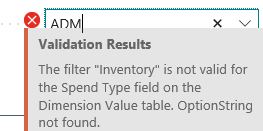
Note that the 'Spend Type' field is the enum field, and the index value '1' represents the value 'Inventory'
TheDenSter
on 18 Apr 2019
Hi,
this seems to still happen in Spring Release.
The tablerelation can be defined with const(value) or with filter(number), that's working ok, but I've come to the same problem as @TheDenSter in a Spring Release sandbox container. Creating the same example as @nareshbandariD365 posted, BUT adding captions to the enum, the thing is that when the caption doesn't exactly match the enum value, you get the validation error:
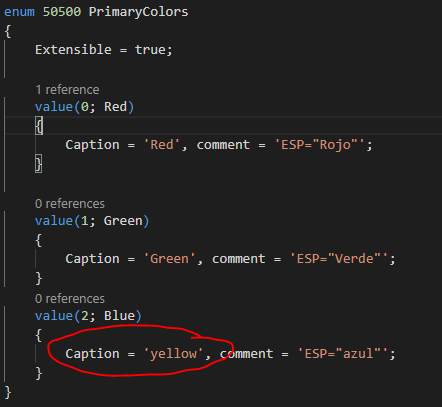
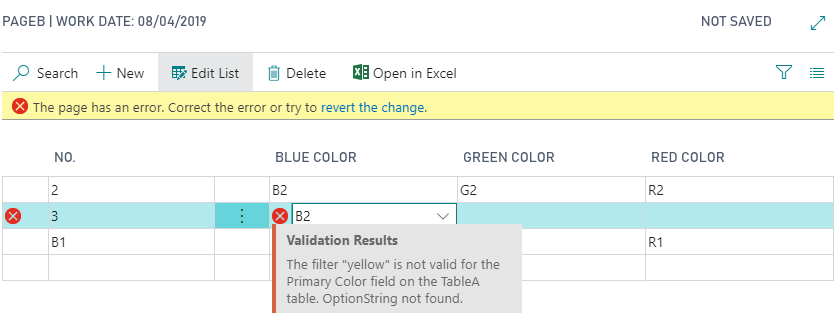
That's why it also happens in @TheDenSter code, because he said that the option value is INV, but the caption is Inventory.
That is absolutely intolerable, given that it ALWAYS happens if you are not working in English, as the caption never matches the enum value.
Any suggestions on how we can solve/workaround this?
 mariafores
on 20 Jun 2019
mariafores
on 20 Jun 2019
This fixed and will be available in a upcoming CU.
esbenk
on 21 Jun 2019
Shouldn't be closed until it is actually shipped - this was fixed in CU09 of 13.x.x.x releases
 rtwcolumbus
on 23 Aug 2019
rtwcolumbus
on 23 Aug 2019
Related issues
 RonKoppelaar
·
3Comments
RonKoppelaar
·
3Comments
 worldofthenavcraft
·
3Comments
worldofthenavcraft
·
3Comments
 FSharpCSharp
·
3Comments
FSharpCSharp
·
3Comments
 kine
·
3Comments
kine
·
3Comments
 TinaMenezes
·
3Comments
TinaMenezes
·
3Comments