Describe the bug
None of the functions that publish the extension complete. They do the compile and stop.
The created extension can be successfully published using the powershell scripts.
To Reproduce
Press F5 on a project that was working fine with the previous (v3.x.x) AL extension
AL Code to reproduce the issue
All projects when publishing with 4.0.182565 AL extension
Expected behavior
Previous working behaviour.
Screenshots
If applicable, add screenshots to help explain your problem.
5. Versions:
- AL Language: Name: AL Language
Id: ms-dynamics-smb.al
Description: AL development tools for Dynamics 365 Business Central
Version: 4.0.182565
Publisher: Microsoft
VS Marketplace Link: https://marketplace.visualstudio.com/items?itemName=ms-dynamics-smb.al
- Business Central: Version 15 latest docker image (15.0.36117)
 rdebath
All 19 comments
@rdebath we have multiple users successfully using this release. Can you add a GIF of how this fails? Are you using the keyboard shortcut or the command from the command drop down?
 atoader
on 2 Oct 2019
atoader
on 2 Oct 2019
I've attached the requested image below. As I said it doesn't matter how I start it. All the F5 combinations, the F6 one and the "palette list" none of them get past the build stage. Ctrl-Shift-F5 doesn't have a build so it just clears the output window. I guess you mean that somebody at your end has tried to make a dumber error message but failed missing out the "it's broken" message completely.
I have also tried it with none of the extensions installed (except AL) on another machine.
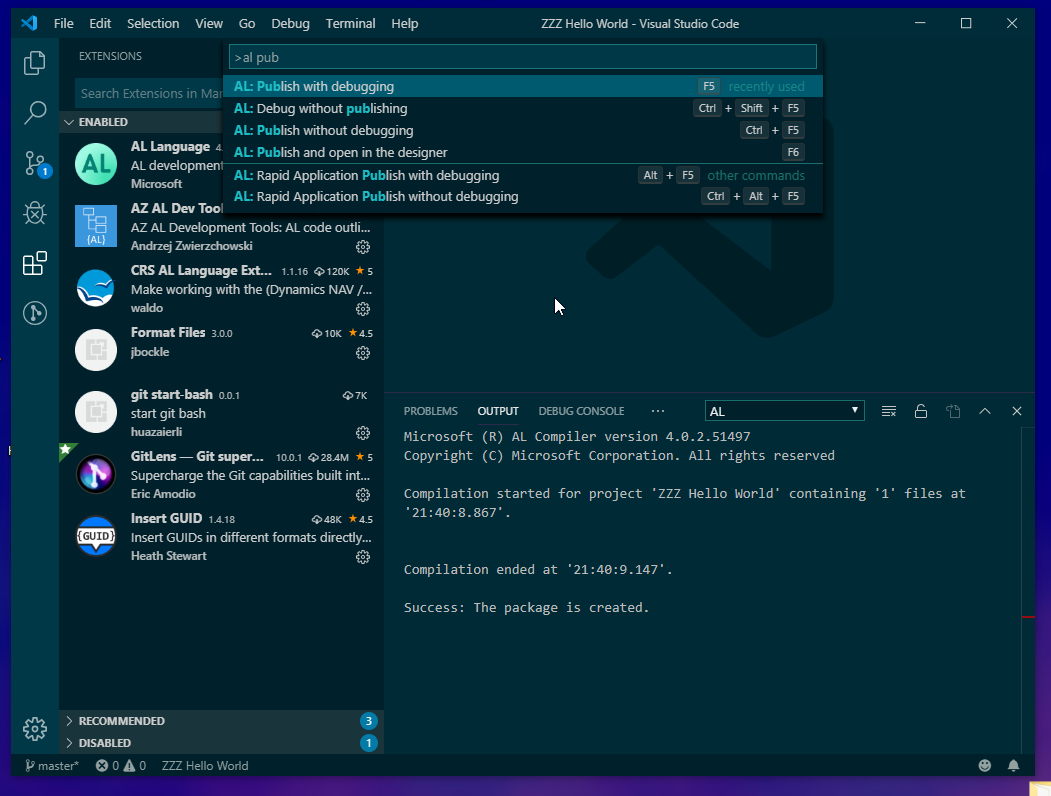
rdebath
on 2 Oct 2019
Can you set the:

to Verbose, restart your editor, attempt to publish, and then check the EditorServices.log file in C:UsersYourUser.vscodeextensionsmicrosoft.al-*bin ?
Does it contain any hints as to what is happening?
Does the event log contain any information as to what is happening?
I agree that we should not fail silently, but we need to figure out together why it is failing in this scenario and then improve the UX.
atoader
on 3 Oct 2019
Don't forget to set the Editor Services Log Level back to Normal after you are done.
atoader
on 3 Oct 2019
I see no errors. This is three publish attempts.
10/03/2019 07:43:48 [/1] Editor Services Host v4.0.2.51497 starting (pid 2356)...
10/03/2019 07:43:49 [/1] Editor Services Host started!
10/03/2019 07:43:49 [/5] Process:

 initialize
10/03/2019 07:43:49 [/6] Process:

 workspace/didChangeConfiguration
10/03/2019 07:43:50 [/6] Process:

 al/setActiveWorkspace
10/03/2019 07:43:50 [/8] Parsing Codeunit 94404 "TVTZZ Hello World".
10/03/2019 07:43:55 [107/8] Binding the members for Codeunit "TVTZZ Hello World".
10/03/2019 07:43:55 [107/8] Binding Attribute: '[EventSubscriber(ObjectType::Codeunit, Codeunit::"Role Center Notification Mgt.", 'OnBeforeShowNotifications', '', true, true)]' defined on 'OnBeforeShowRoleCentreNotifications'.
10/03/2019 07:43:55 [109/8] Binding Statement: HelloNotification.Message(HelloWorldTxt);.
10/03/2019 07:43:56 [109/8] Binding Statement: HelloNotification.Id := '2aba6df2-c194-41e3-a03c-89bf541261aa';.
10/03/2019 07:43:56 [109/8] Binding Statement: HelloNotification.Scope := NOTIFICATIONSCOPE::LocalScope;.
10/03/2019 07:43:56 [109/8] Binding Statement: HelloNotification.Send();.
10/03/2019 07:43:56 [109/8] Binding Statement: SendNotification();.
10/03/2019 07:43:56 [114/8] Binding the members for Codeunit "TVTZZ Hello World".
10/03/2019 07:43:56 [114/8] Binding Attribute: '[EventSubscriber(ObjectType::Codeunit, Codeunit::"Role Center Notification Mgt.", 'OnBeforeShowNotifications', '', true, true)]' defined on 'OnBeforeShowRoleCentreNotifications'.
10/03/2019 07:43:56 [116/8] Binding Statement: HelloNotification.Message(HelloWorldTxt);.
10/03/2019 07:43:56 [116/8] Binding Statement: HelloNotification.Id := '2aba6df2-c194-41e3-a03c-89bf541261aa';.
10/03/2019 07:43:56 [116/8] Binding Statement: HelloNotification.Scope := NOTIFICATIONSCOPE::LocalScope;.
10/03/2019 07:43:56 [116/8] Binding Statement: HelloNotification.Send();.
10/03/2019 07:43:56 [116/8] Binding Statement: SendNotification();.
10/03/2019 07:43:56 [279/11] Binding Statement: HelloNotification.Message(HelloWorldTxt);.
10/03/2019 07:43:56 [279/11] Binding Statement: HelloNotification.Id := '2aba6df2-c194-41e3-a03c-89bf541261aa';.
10/03/2019 07:43:56 [279/11] Binding Statement: HelloNotification.Scope := NOTIFICATIONSCOPE::LocalScope;.
10/03/2019 07:43:56 [279/11] Binding Statement: HelloNotification.Send();.
10/03/2019 07:43:56 [279/11] Binding Statement: SendNotification();.
10/03/2019 07:44:16 [/6] Process:

 al/checkSymbols
10/03/2019 07:44:16 [/6] Process:

 al/createPackage
10/03/2019 07:44:17 [367/6] Parsing Codeunit 94404 "TVTZZ Hello World".
10/03/2019 07:44:17 [511/6] Binding the members for Codeunit "TVTZZ Hello World".
10/03/2019 07:44:17 [511/6] Binding Attribute: '[EventSubscriber(ObjectType::Codeunit, Codeunit::"Role Center Notification Mgt.", 'OnBeforeShowNotifications', '', true, true)]' defined on 'OnBeforeShowRoleCentreNotifications'.
10/03/2019 07:44:17 [533/3] Binding Statement: HelloNotification.Message(HelloWorldTxt);.
10/03/2019 07:44:17 [533/3] Binding Statement: HelloNotification.Id := '2aba6df2-c194-41e3-a03c-89bf541261aa';.
10/03/2019 07:44:17 [533/3] Binding Statement: HelloNotification.Scope := NOTIFICATIONSCOPE::LocalScope;.
10/03/2019 07:44:17 [533/3] Binding Statement: HelloNotification.Send();.
10/03/2019 07:44:17 [533/3] Binding Statement: SendNotification();.
10/03/2019 07:44:17 [/6] Collecting all the labels and generating the translation template file.
10/03/2019 07:44:17 [539/6] Binding Statement: HelloNotification.Message(HelloWorldTxt);.
10/03/2019 07:44:17 [539/6] Binding Statement: HelloNotification.Id := '2aba6df2-c194-41e3-a03c-89bf541261aa';.
10/03/2019 07:44:17 [539/6] Binding Statement: HelloNotification.Scope := NOTIFICATIONSCOPE::LocalScope;.
10/03/2019 07:44:17 [539/6] Binding Statement: HelloNotification.Send();.
10/03/2019 07:44:17 [539/6] Binding Statement: SendNotification();.
10/03/2019 07:44:17 [/6] Starting process to add various files. (Report Layouts, Permission Sets, etc.).
10/03/2019 07:44:17 [/6] Process:

 workspace/didChangeWatchedFiles
10/03/2019 07:44:17 [/12] Process:

 workspace/didChangeWatchedFiles
10/03/2019 07:44:18 [/6] Process:

 textDocument/didOpen
10/03/2019 07:44:36 [/6] Process:

 al/checkSymbols
10/03/2019 07:44:36 [/3] Process:

 al/createPackage
10/03/2019 07:44:36 [672/3] Parsing Codeunit 94404 "TVTZZ Hello World".
10/03/2019 07:44:36 [844/3] Binding the members for Codeunit "TVTZZ Hello World".
10/03/2019 07:44:36 [844/3] Binding Attribute: '[EventSubscriber(ObjectType::Codeunit, Codeunit::"Role Center Notification Mgt.", 'OnBeforeShowNotifications', '', true, true)]' defined on 'OnBeforeShowRoleCentreNotifications'.
10/03/2019 07:44:36 [/3] Collecting all the labels and generating the translation template file.
10/03/2019 07:44:36 [866/19] Binding Statement: HelloNotification.Message(HelloWorldTxt);.
10/03/2019 07:44:36 [866/19] Binding Statement: HelloNotification.Id := '2aba6df2-c194-41e3-a03c-89bf541261aa';.
10/03/2019 07:44:36 [866/19] Binding Statement: HelloNotification.Scope := NOTIFICATIONSCOPE::LocalScope;.
10/03/2019 07:44:36 [866/19] Binding Statement: HelloNotification.Send();.
10/03/2019 07:44:36 [866/19] Binding Statement: SendNotification();.
10/03/2019 07:44:36 [870/3] Binding Statement: HelloNotification.Message(HelloWorldTxt);.
10/03/2019 07:44:36 [870/3] Binding Statement: HelloNotification.Id := '2aba6df2-c194-41e3-a03c-89bf541261aa';.
10/03/2019 07:44:36 [870/3] Binding Statement: HelloNotification.Scope := NOTIFICATIONSCOPE::LocalScope;.
10/03/2019 07:44:36 [870/3] Binding Statement: HelloNotification.Send();.
10/03/2019 07:44:36 [870/3] Binding Statement: SendNotification();.
10/03/2019 07:44:36 [/3] Starting process to add various files. (Report Layouts, Permission Sets, etc.).
10/03/2019 07:44:36 [/19] Process:

 workspace/didChangeWatchedFiles
10/03/2019 07:44:45 [/12] Process:

 al/checkSymbols
10/03/2019 07:44:45 [/12] Process:

 al/createPackage
10/03/2019 07:44:45 [985/12] Parsing Codeunit 94404 "TVTZZ Hello World".
10/03/2019 07:44:45 [1159/12] Binding the members for Codeunit "TVTZZ Hello World".
10/03/2019 07:44:45 [1159/12] Binding Attribute: '[EventSubscriber(ObjectType::Codeunit, Codeunit::"Role Center Notification Mgt.", 'OnBeforeShowNotifications', '', true, true)]' defined on 'OnBeforeShowRoleCentreNotifications'.
10/03/2019 07:44:45 [/12] Collecting all the labels and generating the translation template file.
10/03/2019 07:44:45 [1183/18] Binding Statement: HelloNotification.Message(HelloWorldTxt);.
10/03/2019 07:44:45 [1183/18] Binding Statement: HelloNotification.Id := '2aba6df2-c194-41e3-a03c-89bf541261aa';.
10/03/2019 07:44:45 [1183/18] Binding Statement: HelloNotification.Scope := NOTIFICATIONSCOPE::LocalScope;.
10/03/2019 07:44:45 [1183/18] Binding Statement: HelloNotification.Send();.
10/03/2019 07:44:45 [1183/18] Binding Statement: SendNotification();.
10/03/2019 07:44:45 [1185/12] Binding Statement: HelloNotification.Message(HelloWorldTxt);.
10/03/2019 07:44:45 [1185/12] Binding Statement: HelloNotification.Id := '2aba6df2-c194-41e3-a03c-89bf541261aa';.
10/03/2019 07:44:45 [1185/12] Binding Statement: HelloNotification.Scope := NOTIFICATIONSCOPE::LocalScope;.
10/03/2019 07:44:45 [1185/12] Binding Statement: HelloNotification.Send();.
10/03/2019 07:44:45 [1185/12] Binding Statement: SendNotification();.
10/03/2019 07:44:45 [/12] Starting process to add various files. (Report Layouts, Permission Sets, etc.).
10/03/2019 07:44:46 [/12] Process:

 workspace/didChangeWatchedFiles
10/03/2019 07:44:50 [/12] Process:

 shutdown
10/03/2019 07:44:50 [/11] Process:

 exit
10/03/2019 07:44:50 [/1] Editor Services Host exited normally.
Well, will you look at that. A project with just these two files in it exhibits the same behaviour.
As Douglas Crockford says for applications where comments are necessary desirable (like configuration files) you pipe it through a "JSmin" first.
{
  "id": "1fdb0e4e-82b1-4605-b4ff-86be4fe05b9c",
  "name": "ZZZ Hello World",
  "publisher": "TVision (Temp)",
  // "brief": "",
  // "description": "Just shows a notification, use to see if a trivial extension can be installed or removed.",
  "version": "2.0.0.0",
  // "privacyStatement": "https://www.tvisiontech.co.uk/privacy-policy/",
  // "EULA": "https://www.tvisiontech.co.uk/license-agreement/",
  // "help": "",
  // "url": "",
  // "logo": ".\\Extension\\TVision logo square.png",
  // "features": [
  //   "TranslationFile"
  // ],
  "platform": "15.0.0.0",
  "dependencies":  [
    // {
    //     "appId":  "437dbf0e-84ff-417a-965d-ed2bb9650972",
    //     "publisher":  "Microsoft",
    //     "name":  "Base Application",
    //     "version":  "15.0.0.0"
    // },
    // {
    //   "appId":  "63ca2fa4-4f03-4f2b-a480-172fef340d3f",
    //   "publisher":  "Microsoft",
    //   "name":  "System Application",
    //   "version":  "15.0.0.0"
    // }
  ],

  // "idRanges": [{ "from": 50200, "to": 99900}],
  //"showMyCode": true,
  "runtime": "4.0"
}
{
    "version": "0.2.0",
    // The below command allows you to update this file without committing your changes
    // git update-index --skip-worktree .vscode/launch.json

    "configurations": [
        {
            "type": "al",
            "name": "BC on Navdev",
            // "authentication": "Windows",
            // "server": "http://navdev.tvt.local",
            // "serverInstance": "BC",
            // "port": 7049,
            "request": "launch",
            // "startupObjectType": "Page",
            // "startupObjectId": 2500,
            // "schemaUpdateMode": "ForceSync"
        }
    ]
}
That helped :) ! The publishing is not triggered at all. Thank you for the repro! It seems that the app.json is to blame. Have you tried starting with a new project?
atoader
on 3 Oct 2019
Try formatting the app.json within VSCode (Ctrl Shift P, format document) and then publish again.
 kalberes
on 3 Oct 2019
kalberes
on 3 Oct 2019
@kalberes Just in case I tried that; it didn't work.
Sorry, to both of you, I though it was obvious from those files and my commentary.
The problem is that the the AL package routine is loading the app.json using a "fascist" JSON loader like you're supposed to use when loading completely untrusted JSON from a hostile client. This routine bombs out if it finds any comment the error is then lost.
If you remove all the comments from the app.json file it works properly.
This is obviously a serious problem because most people react as you have.
rdebath
on 3 Oct 2019
@rdebath until you published the app.json, the issue was not apparent. Thank you for taking the time to reproduce the issue. As you can imagine, there is a very large number of issues that can prevent you from publishing, and we need input to narrow the search space down by asking for input until we get to a probable cause.
atoader
on 3 Oct 2019
In principle JSON files should not have comments, but comments added as data. There is no fascist JSON parser here, but one that obeys the JSON standards. That said there are parsers that support comments.
kalberes
on 4 Oct 2019
@kalberes Yup, that's exactly the rationalisation that people use.
Firstly, You of course realise that you are recommending that source code has no comments in it, and yes a configuration file is source code because if you don't have it you can't compile.
Pretending that the comments are data is both inefficient and an evil hack. One major problem with this hack (for example) is that it becomes impossible to say if a particular property is misspelt, after all it could just be "commented out".
As for the the 404 standard please read the title, it is "The JSON Data Interchange Syntax" this is a semi-readable format for interchange between systems. This is again reiterated in the first line of the introduction and the first line of the scope! It is NOT intended as a configuration file format and Douglas Crockford the primary author of this has said as much, explicitly. His recommendation is that your configuration file (or any file for which comments are "desirable") is passed through his "JSMin" program before being given to the reference JSON processor. Other people recommend a simple comment stripper, which would be much lighter. This can even be a single (70 character!) regular expression if that's your fancy.
This is just a few of the reasons "fascist" 404 JSON is a really bad choice for a configuration file.
rdebath
on 4 Oct 2019
@rdebath
It was accepted as a bug that means that you are right and we will see what we can do. It was also accepted as in-progress that means that someone is working on it. Is there anything else to debate?
Side note:
We use standard API-s for json parsing, including the API VSCode uses for the language client. We cannot just use anything we wish or want.
kalberes
on 5 Oct 2019
@kalberes
Heh, sorry, I have a little issue with people who seem to attach to perceived authority even when that authority claims to have nothing to say in that instance or worse this authority actively defers to someone else.
The primary example of this (for me) is the "undefined behaviour" people in respect to the C and C++ languages; the original authors have stated that it doesn't mean your C compiler (for example) can do "anything" but that the system will do something reasonable for the environment (normally the physical machine). This is a completely different interpretation from the "rationalisation" that 'those people' try to employ.
You tripped over that by appealing to the ECMA standard inappropriately and, worse, citing the workaround that normal programmers (including your colleagues) use to work around the misapplication of that authority.
So ... sorry.
Side note: There is obviously more than one "API", as nothing has a problem with comments in launch.json, settings.json ... Nope ... no ... no... must resist
rdebath
on 5 Oct 2019
What I wanted to say that we are in certain ways bound by our integration into an existing environment.
If you open any package.json project file for example for any language server project in VSCode adding comments is not accepted.
You will get a compilation error. The reason:"message": "Comments are not permitted in JSON.",
On the other hand adding comments to the debug configuration file, or settings file is already accepted. So there is no clear borderline here. An app.json acts in semantics as a project file for us. Possibly we have just used the wrong API here.
But again your issue makes sense and we will try to refactor where we can do that.
kalberes
on 5 Oct 2019
4702
 qutreson
on 7 Oct 2019
qutreson
on 7 Oct 2019
Thanks for looking into this everybody.✔
I have just spent five hours faffing around with a perfectly legal (and non-commented ) app.json
Ending up manually typing eight dependencies (Test-projects have many dependencies).
Testing that VS code could download the needed Symbols for each Dependency AND NOT hang using F5.
Still, I dont know what the problem was.
I can live with having compile and dependency errors disappear by restarting VS Code.
But I am NOT touching my app.json files any time soon again, this was too weird 😂
-
I have made a GIF with a simple AL:GO example making F5 hang (first part of the gif)

 NzureAdmin
on 18 Oct 2019
NzureAdmin
on 18 Oct 2019
I do not see your error message on the server. But if a compilation passes locally that does not necessarily mean that it will pass on the server too.
If you have a repro please open a new request with proper template.
This issue is for comments in the JSON files. Let's not mix things. Don't add any other comments here.
kalberes
on 21 Oct 2019
I've just noticed that it's over a year since I raised this; and the "in-progress" label highlighted by @kalberes has been removed by @atoader .
So, does anyone have a reason why this is still using a different JSON parser to that used for all the other json config files?
And why it hasn't be "flipped" to use the "other one"?
BTW: I didn't flag this at the time (but it may now be necessary) :
You will get a compilation error. The reason:"message": "Comments are not permitted in JSON.",
Is NOT an indication of a problem from the AL compiler. It is caused by the issue that both "json without comments" and "json with comments" have the same file extension .json. This means that without additional help in the setting.json file (or outside it as with the settings.json file itself) VScode has to assume (by default) that all .json files are the most restrictive sort. This is frequently fixed in the user settings.
rdebath
on 22 Oct 2020
Related issues
 ThomasBrodkorb
·
3Comments
ThomasBrodkorb
·
3Comments
 SteveKrisjanovsD365
·
3Comments
SteveKrisjanovsD365
·
3Comments
 lvanvugt
·
3Comments
lvanvugt
·
3Comments
 ghost
·
3Comments
ghost
·
3Comments
 bvbeek
·
3Comments
bvbeek
·
3Comments
Most helpful comment
@kalberes Just in case I tried that; it didn't work.
Sorry, to both of you, I though it was obvious from those files and my commentary.
The problem is that the the AL package routine is loading the
app.jsonusing a "fascist" JSON loader like you're supposed to use when loading completely untrusted JSON from a hostile client. This routine bombs out if it finds any comment the error is then lost.If you remove all the comments from the
app.jsonfile it works properly.This is obviously a serious problem because most people react as you have.