Al: Translation to Spanish dont works in our customizations (Business Central OnPremise)
Describe the bug
es-ES translations (only for my customizations) are not working on my OnPremise Business Central server.
To Reproduce
I have added a new field to an standard Table and her Page (Customer Price Group in my case).
I have created a new Table and her new Page too.
In both cases, all names are with a custom prefix because I have "mandatoryPrefix" activated, and I use the Caption property to set the friendly visual name for all them...
Because I have "features": ["TranslationFile"] in my app.json, after every compilation, VSCode generates the translation file \Translations\MyExtensionName.g.xlf with "source-language" as en-US despite my version of Business Central is an es-ES localization (but I can't specify this in my project anywhere)...
I've copied this file with the name MyExtensionName.es-ES.xlf and I've edited to set "target-language" to es-ES and added with Spanish translations all
When I deploy to my OnPremise server, I see al this Captions in English despite my active Language is Spanish (Spain) so my translations are not working...
Expected behavior
My users with Spanish (Spain) language active should see all my es-ES translations for my customizations
Screenshots

Versions:
AL Language: 2.0.48254
Business Central: ES Dynamics NAV 13.0 (24630) OnPremise
 JavierFuentes
All 17 comments
Have you tried adding a
"supportedLocales": [
"es-ES"
]
to your app.json?
 kalberes
on 20 Nov 2018
kalberes
on 20 Nov 2018
Hi @kalberes ,
yes I have this configuration in app.json
"supportedLocales": ["en-US", "es-ES", "de-DE"],
JavierFuentes
on 20 Nov 2018
Hi @JavierFuentes,
It is hard to follow your problem without a small sample project that reproduces the problem, but it sounds like you haven't set the target-language in the .xlf file.
Have a look at Working with Translation Files to learn more.
 thpeder
on 20 Nov 2018
thpeder
on 20 Nov 2018
When deploying your extension do you see a message from the compiler that acknowledged your translation file being recognized as valid translation file?
You seem to be doing all the right steps so I wonder if the issue is just with the content of your translation file. For example are all characters properly escaped.
 StanislawStempin
on 20 Nov 2018
StanislawStempin
on 20 Nov 2018
Hi @StanislawStempin and @thpeder,
I attach here a tiny Hello-World issue example with a Label translated to Spanish... when I deploy this on my OnPremise Server the message is showed in English language and not in Spanish (the language by default when I log in).
Within the ZIP I have included all the source code, the libraries of symbols that VSCode has downloaded from my server and even the extension downloaded in ZIP format

I appreciate all the help you can give me to solve this issue.
JavierFuentes
on 24 Nov 2018
Hi @JavierFuentes,
I don't have spanish installed at the moment so I tried with danish, and when I set the region and the language to, in my case, Danish then I see the message otherwise it doesn't show up, because then the culture I'm using is something like da-US and not da-DK.
Can you try again with settings like this:

thpeder
on 28 Nov 2018
Hi Javier.
If you expand the language list you'll see there are two "Spanish (Spain)" languages. Try using the another one.
Greetings.
 jaloag
on 29 Nov 2018
jaloag
on 29 Nov 2018
Closing based on provided solution.
StanislawStempin
on 3 Dec 2018
Hi @StanislawStempin,
I am sorry for not having answered before but it has been impossible for me to test after the last comments that have been added to this Ticket.
@jaloag, thanks... I have verified that indeed the Español (España) language appears twice in the list with the exact same description (which is totally confusing) and does so for the Language as well as for the Regions.
I have added to the original message the calls to the functions that return the numeric code of the active language:
             Message (HelloMsg + '\\' +
                     'GlobalLanguage:' + Format (System.GlobalLanguage ()) + '\' +
                     'WindowsLanguage:' + Format (System.WindowsLanguage ()));
I'm sorry to say that the result remains be wrong with all possible combinations of Region and Language.
As you can see in this images, the message is showing in English and not in Spanish:

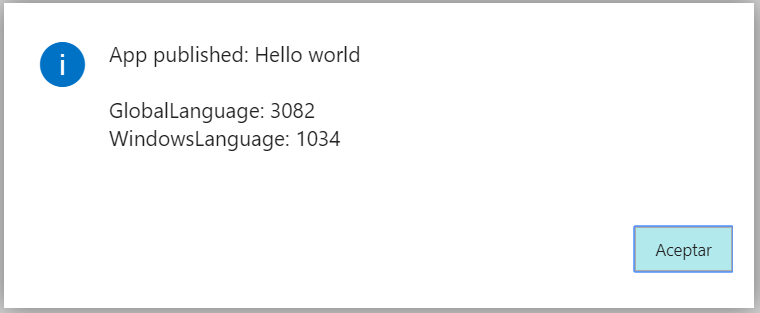
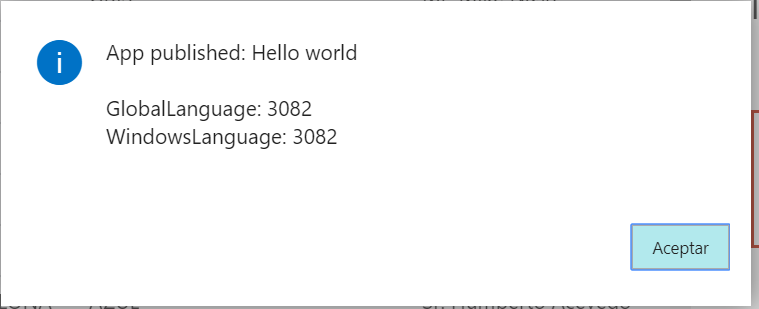
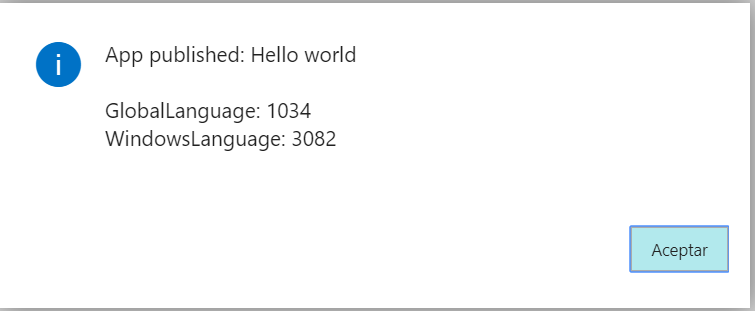
NOTE.- In this link, I can see that 3082 Language ID is for es-ES Code.
With all these combinations, the standard labels for fields and tables are showing in Spanish all the time... even establishing the Español (Mexico) language
@thpeder , I have tried to set target-language="es-US", target-language="es-ES", target-language="es-es" and target-language="es" but it doesn't worked for me...
Because Español (España) is the only one language apears twice, I think this could be a Bug of this version with Spanish custom translations...
Could you investigate it please?
Thanks for your help!
JavierFuentes
on 6 Dec 2018
Hi @JavierFuentes,
If there are no combination of Region and language that let's you see the translated texts then we have a bug.
thpeder
on 10 Dec 2018
Hello again,
I have some more information that I can give you about this issue ...
I have managed to make translations into Spanish work with several types of data,... but they still fail with Label type.
The keys for the translations to work with the rest of the data types I've tested have been 2:
- _target-language_ must be equals to _"es"_... "es-ES" doen't work!
- keep the tags _< source >_ exactly with the same string it has in the _.g.xlf_ file before the _< target >_ tags in _.es.xlf_ file
Note tha 2. condition is very fragile, because if you change any English string in your .al files and don't remember to match exactly in ALL your translations files, translation will not work in execution time... I think the rest of matching data that .xlf file has for every translated variable, should be enough to work OK.
I've updated my example and attach here again:
TranslationIssue2.zip
These are the modifications I've made:
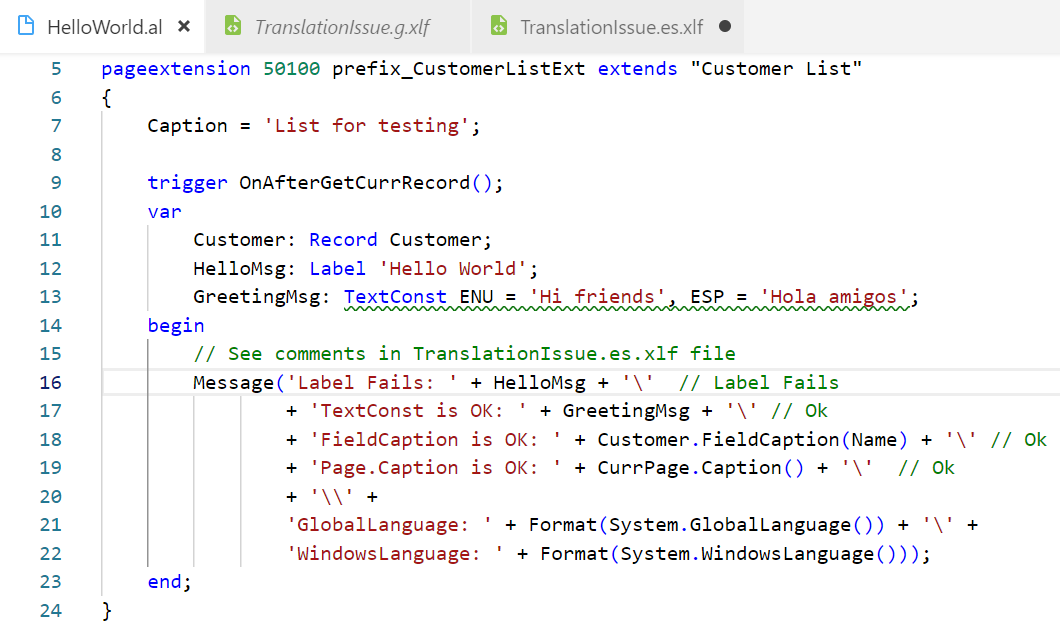

An these are the results:

I hope these can help you to fix these issue with Label translations to Spanish.
JavierFuentes
on 15 Dec 2018
Hi @JavierFuentes,
The issue is because there exists mutliple spanish cultures, given from your GlobalLanguage with ID 1034 and your textConst with culture name ESP, the culture name you are looking for is es-ES_tradnl in your translation file, which the compiler incorrectly will report as invalid at the moment so I'm fixing that.
| Culture | ID | ThreeLetterWindowsName | EnglishName |
| --- | --- | --- | --- |
| es | 10 | ESP | Spanish |
| es-ES | 3082 | SPA | Spanish (Spain, International Sort) |
| es-ES_tradnl | 1034 | ESP | Spanish (Spain, Traditional Sort) |
thpeder
on 17 Dec 2018
Hi @thpeder,
I am glad to know that finally there is a bug and that it is not something that I am doing incorrectly or that it is badly installed on my OnPremise server.
Yes,
I suppose that all we spanish-speakers are special people who need all those different encodings :-(
Culture Codes are relative to the format of decimals, currencies and dates, but here we talk about translations of text strings ...
I understand that the Culture code "es", when there were no more specific translations loaded in BC, should overwrite and work correctly with any other combination of Language and Region "es- *" that the user could have configured on their devices.
PD.- Thank you all for your efforts to solve this problem with the mother tongue of more than 442 million people in the world.
JavierFuentes
on 23 Dec 2018
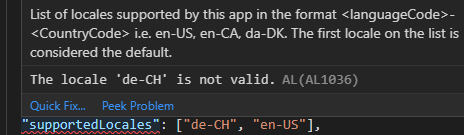
Currently the compiler (2.1.79379) tells mit that de-CH (2055) is not supported locale. Is this a related issue? Will this be fixed with the spring release?
It works when using de-DE.
 marknitek
on 12 Feb 2019
marknitek
on 12 Feb 2019
@thpeder
Spring release is here and the issue is still happening... We need to specify de-CH languages.
When will this be possible?
marknitek
on 11 Apr 2019
Las week I started a thread relating this problem in Yammer (I didn't know about this ticket).
https://www.yammer.com/dynamicsnavdev/#/threads/show?threadId=102064519135232
A new version of BC has been released, we still have two "Spanish (Spain)" options in the Language Selector, and our translations only apply correctly if you choose the correct one (the one after Australian English, as @josecarlosherrero found out).
If this is really related to Spanish "Traditional sort" and Spanish "International/sort", please, kill the "Traditional sort" with fire. Almost no-one knows what that means, it only applies to table collations when storing data, and it breaks search in BC if you choose it (but only in subtle ways that make it hard to notice; lots of fun).
 salgiza
on 15 Apr 2019
salgiza
on 15 Apr 2019
I finally managed to fixed the issue for me!
It turned out it was caused by a custom locale that we create for de-CH. This caused the compiler to not recognize the stirng de-CH in the app.json.
I forgot about that locale since it was installed years ago...
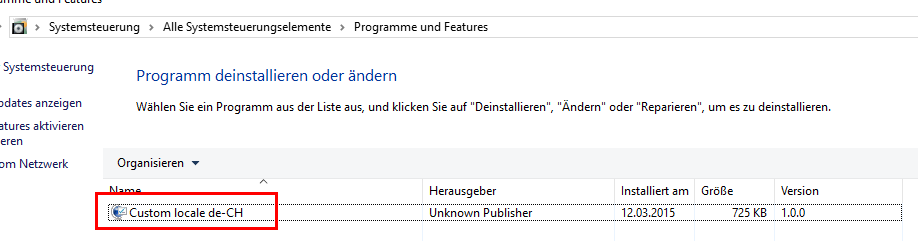
Here you can see the hint that a "custom" locale was used (notice the *)
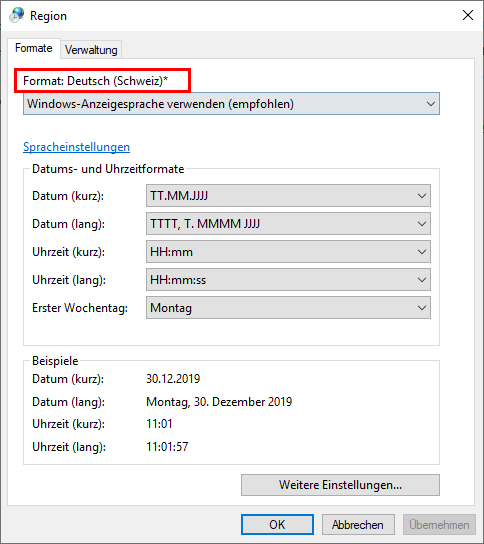
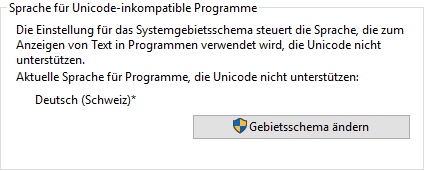
After uninstallation everything the * is gone

And the Compiler is happy

marknitek
on 30 Dec 2019
Related issues
 gregoral
·
3Comments
gregoral
·
3Comments
 kine
·
3Comments
JavierFuentes
·
3Comments
kine
·
3Comments
JavierFuentes
·
3Comments
 lvanvugt
·
3Comments
lvanvugt
·
3Comments
 AndersMad
·
3Comments
AndersMad
·
3Comments