Hello,
What i have to do if we want only "en-us" language support,
should i create xlf with source and destination both with value "en-us", or i can directly define caption on all occurrence?
Please suggest.
Thanks in advance
 ndpatel0074u
All 5 comments
Hi @ndpatel0074u,
When you enable the feature TranslationFile then it will generate a translation file for en-us, so you don't need to do anything beside writing the captions, labels and etc. in the AL code.
 thpeder
on 17 Jul 2018
thpeder
on 17 Jul 2018
thanks for replying @thpeder
is it mandatory to generate Translation file ? even i dont want multilanguage support.
I just want en-us language support.
ndpatel0074u
on 17 Jul 2018
Yes for AppSource, but if you don't want to see the folder in VSCode then you can hide it with the configuration setting: "files.exclude" : {"Translations/": true}
thpeder
on 17 Jul 2018
Hello @thpeder
We got the response from microsoft app validation team, they suggested below things:
*The reason why the generated translation file doesn’t specify target is because you cannot translate in this file since it’s overwritten on each run.
A simple thing to do (if someone doesn’t want to do proofreading or something else is to simply copy the file and just do a regex repace (below). Just use these expressions in vscode.
*
(<source>([^<]*)</source>)
$1\n\t\t\t\t\t<target>$2</target>
so, i have added Target values in whole xlf file with same as source value using above regEx expression
using find and replace.
Now i have the xlf file with source language: en-US and Target language en-US with same source and target values of captions, tooltips etc.
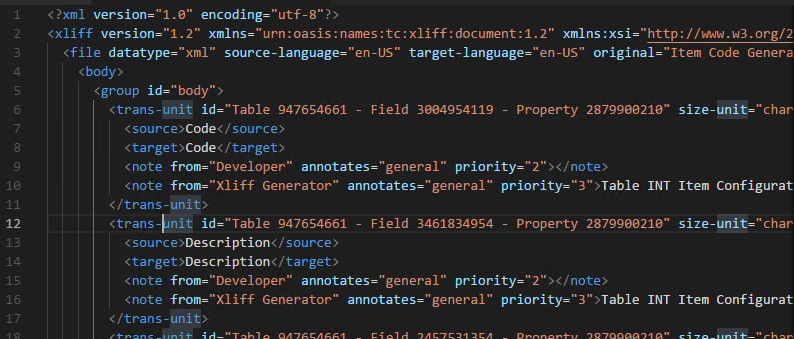
i just need your feedback, is that right or not?
Thanks,
Nishit Patel
ndpatel0074u
on 18 Jul 2018
@ndpatel0074u yes, that looks fine.
thpeder
on 18 Jul 2018
Related issues
 RedFoxUA
·
3Comments
RedFoxUA
·
3Comments
 dkatson
·
3Comments
dkatson
·
3Comments
 ThomasBrodkorb
·
3Comments
ThomasBrodkorb
·
3Comments
 ghost
·
3Comments
ghost
·
3Comments
 bvbeek
·
3Comments
bvbeek
·
3Comments
Most helpful comment
Yes for AppSource, but if you don't want to see the folder in VSCode then you can hide it with the configuration setting:
"files.exclude" : {"Translations/": true}